
Walfront HT106B
Walfront HT106B Socket Tester User Manual
Model: HT106B
1. Introduction
The Walfront HT106B Socket Tester is a compact and reliable device designed to quickly and accurately check the electrical connection status of sockets. It is an indispensable tool for ensuring electrical safety in various environments, including homes, offices, laboratories, and factories. This manual provides detailed instructions on how to use the HT106B to identify common wiring faults such as open ground, open neutral, open live, and reversed polarity connections, as well as perform RCD/GFCI tests.
Its user-friendly design, featuring clear LED indicators and an LCD display, makes it easy to interpret test results, even for users with limited electrical knowledge. The built-in light further enhances usability in dimly lit areas.
2. Important Safety Information
Please read and understand all safety warnings and operating instructions before using this product. Failure to follow these instructions may result in electric shock, fire, or serious injury.
- Always assume that any electrical circuit is live until proven otherwise.
- Do not use the tester if it appears damaged or is not functioning properly.
- Do not use the tester in wet conditions or in areas with explosive gases or vapors.
- This device is designed for AC 48-250V circuits. Do not use it outside this voltage range.
- The RCD/GFCI test function should only be performed on circuits protected by an RCD/GFCI device. This test will trip the RCD/GFCI, interrupting power to the circuit.
- Always disconnect power before attempting any repairs based on test results. Consult a qualified electrician for any wiring issues.
- Keep out of reach of children.
3. Package Contents
Verify that all items are present and in good condition:
- 1 × Walfront HT106B Socket Tester (US Plug)
4. Product Overview
The Walfront HT106B Socket Tester is a compact and robust device featuring a clear interface for easy fault detection. It incorporates multiple LED indicators and an LCD screen to display voltage and wiring status.

Figure 4.1: Front view of the Walfront HT106B Socket Tester, showing the LED indicator panel, LCD display, and RCD/GFCI test button.
Key Features:
- 7 LED Light Modes: Provides clear visual indications for various wiring conditions.
- LCD Display: Shows real-time voltage measurements (48-250V AC) and frequency (45-65Hz).
- RCD/GFCI Test Function: Allows for testing of Residual Current Devices/Ground Fault Circuit Interrupters.
- Compact and Portable: Easy to carry and store.
- Built-in Light: Facilitates use in dark environments.
5. Setup
The Walfront HT106B Socket Tester requires no complex setup. It is ready for use directly out of the package.
- Ensure the socket tester is clean and free from any visible damage.
- Confirm the voltage of the circuit you intend to test is within the tester's operating range (AC 48-250V).
6. Operating Instructions
6.1. Basic Socket Wiring Test
To test the wiring of a standard US electrical outlet:
- Plug the HT106B Socket Tester directly into the wall socket you wish to test.
- Observe the LED indicators on the front panel. The pattern of illuminated red lights will indicate the wiring status.
- Read the voltage displayed on the LCD screen.
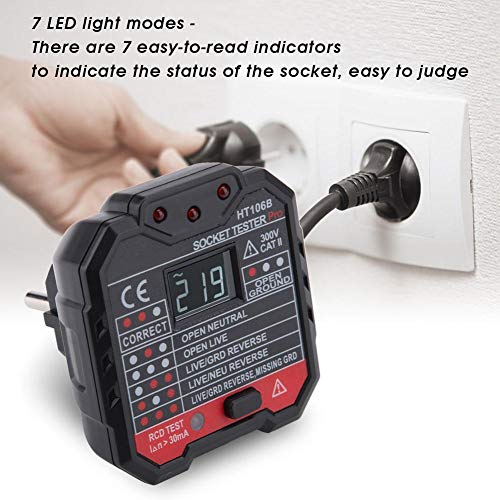
Figure 6.1: The HT106B Socket Tester plugged into a standard wall outlet, ready for testing.
6.2. Interpreting LED Indicators
The HT106B features a clear legend on its front panel to help interpret the LED patterns. Refer to the table below for detailed explanations of each indication:
| Indication | LED Pattern (Red/White) | Description |
|---|---|---|
| CORRECT | ● ● (Correct) | The wiring of the socket is correct: Live, Neutral, and Ground are properly connected. |
| OPEN GROUND | ● (Open Ground) | The ground wire is not connected or is open. This is a serious safety hazard. |
| OPEN NEUTRAL | ● (Open Neutral) | The neutral wire is not connected or is open. This can cause appliances to not function or create an unsafe condition. |
| OPEN LIVE | ● (Open Live) | The live (hot) wire is not connected or is open. The socket will have no power. |
| LIVE/GRD REVERSE | ● ● (Live/Grd Reverse) | The live wire and ground wire are reversed. This is a dangerous wiring error. |
| LIVE/NEU REVERSE | ● ● (Live/Neu Reverse) | The live wire and neutral wire are reversed. This can be a shock hazard. |
| LIVE/GRD REVERSE, MISSING GRD | ● ● ● (Live/Grd Reverse, Missing Grd) | The live wire and ground wire are reversed, and the ground wire is also missing. This is a critical safety issue. |
6.3. RCD/GFCI Test
The RCD/GFCI test function verifies the proper operation of Residual Current Devices or Ground Fault Circuit Interrupters. This test simulates a ground fault and should trip the RCD/GFCI, cutting power to the circuit.
- Ensure the socket is correctly wired (indicated by 'CORRECT' on the tester) before performing an RCD/GFCI test.
- Plug the HT106B into the RCD/GFCI-protected socket.
- Press the 'RCD TEST' button located on the front of the tester.
- If the RCD/GFCI is functioning correctly, it should trip, and the power to the socket will be cut off. The tester's lights and LCD will turn off.
- If the RCD/GFCI does not trip, it indicates a malfunction, and the device or circuit should be inspected by a qualified electrician.
- Reset the RCD/GFCI after the test.
Note: The RCD/GFCI test requires a trip current of >5mA for GFCI and >30mA for RCD.
6.4. Voltage Measurement
When plugged into a live socket, the HT106B's LCD screen will automatically display the measured AC voltage and frequency.
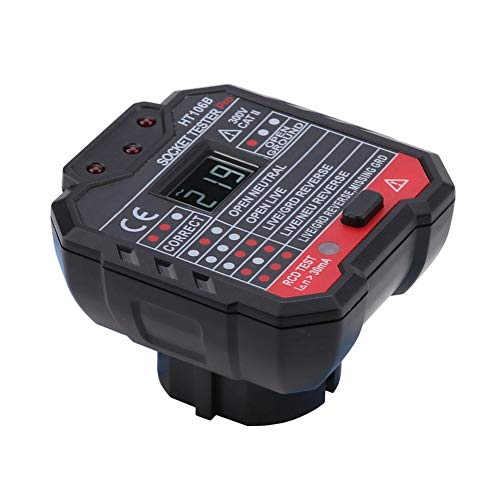
Figure 6.2: The HT106B Socket Tester displaying a voltage reading on its LCD screen.
7. Maintenance
The Walfront HT106B Socket Tester is designed for low maintenance. Follow these guidelines to ensure its longevity:
- Cleaning: Wipe the device with a dry, soft cloth. Do not use abrasive cleaners or solvents.
- Storage: Store the tester in a cool, dry place, away from direct sunlight and extreme temperatures. Keep it in its original packaging or a protective case when not in use.
- Inspection: Periodically inspect the tester for any signs of damage, such as cracks in the casing or bent/corroded prongs. Do not use if damaged.
8. Troubleshooting
If you encounter issues with your HT106B Socket Tester, refer to the following common problems and solutions:
- Tester does not light up or display anything:
- Ensure the socket is live and within the tester's voltage range (AC 48-250V).
- Check if the socket itself is faulty by testing it with a known working appliance.
- Inspect the tester for physical damage.
- Inconsistent readings:
- Ensure the tester is fully inserted into the socket.
- Test multiple sockets to confirm if the issue is with the tester or a specific outlet.
- RCD/GFCI test does not trip the breaker:
- Verify that the socket is indeed protected by an RCD/GFCI.
- Ensure the socket is correctly wired according to the tester's indication before performing the RCD/GFCI test.
- If the RCD/GFCI still does not trip, the RCD/GFCI unit itself may be faulty and requires inspection by a qualified electrician.
For issues not covered here, please contact Walfront customer support.
9. Specifications
| Model Number | HT106B (Wal frontu3fqhksg7y-02) |
| Voltage Range | AC 48~250V |
| Frequency Range | 45-65Hz |
| GFCI Test Current | >5mA |
| RCD Test Current | >30mA |
| Voltage Measurement Accuracy | ±(2.0%+2) |
| LCD Display | Yes |
| Backlight | Yes |
| Operating Temperature | 0°C - 40°C (32°F - 104°F) |
| Operating Humidity | 20% - 75% RH |
| Storage Temperature | -10°C - 50°C (14°F - 122°F) |
| Storage Humidity | 20% - 80% RH |
| Altitude | ≤2000m |
| Dimensions (L x W x H) | Approx. 66 × 62 × 60mm (2.6 × 2.4 × 2.4in) |
| Weight | Approx. 79-90g (2.8-3.2oz) |
10. Warranty and Support
Walfront products are manufactured to high-quality standards. For information regarding warranty coverage, technical support, or replacement parts, please refer to the warranty card included with your purchase or visit the official Walfront website. Please retain your proof of purchase for warranty claims.
For direct support, you may contact Walfront customer service through the contact information provided on their official website or through the retailer where the product was purchased.
Ask a question about this manual
Ask about setup, troubleshooting, compatibility, parts, safety, or missing instructions. Manuals+ will review the question and use this page’s manual context to help answer it.