
1. Introduction and Overview
The Verbatim Wireless Cube Bluetooth Speaker is designed to deliver powerful bass in a compact, travel-friendly form factor. It supports TWS (True Wireless Stereo) functionality, allowing two speakers to be paired for an enhanced audio experience. Beyond music playback, this speaker integrates a built-in microphone for convenient hands-free calling. Equipped with a rechargeable battery, it offers up to 5 hours of continuous playtime on a single charge. A dedicated on/off button helps conserve battery life when the speaker is not in active use.

Front view of the Verbatim Wireless Cube Bluetooth Speaker, showcasing its compact, cube design and control buttons.
2. Package Contents
Verify that all items are present in the package:
- Bluetooth® Speaker
- Charging Cable
3. Product Features
- TWS Stereo Sound: Ability to pair two Verbatim Wireless Cube Bluetooth Speakers for a true stereo audio experience with powerful bass.
- Integrated Microphone: Facilitates hands-free calling directly through the speaker.
- Rechargeable Battery: Provides up to 5 hours of continuous audio playback.
- Convenient Carrying Strap: Enhances portability and ease of transport.
- Broad Compatibility: Works with most Bluetooth-enabled devices, including smartphones, tablets, and laptops.

Side view of the speaker, highlighting the flexible carrying strap for portability.
4. Setup
4.1 Charging the Speaker
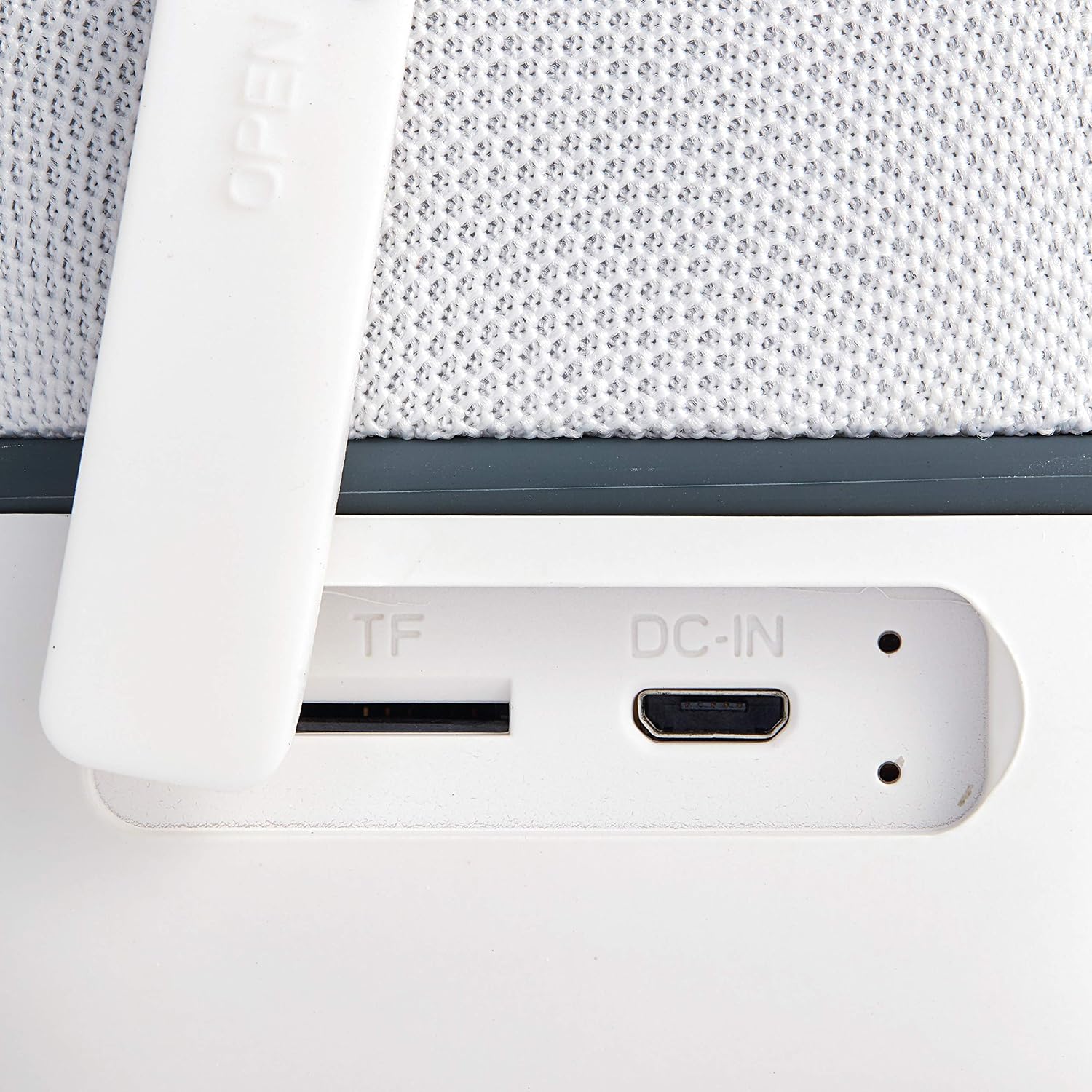
- Connect the provided charging cable to the DC-IN port on the speaker.
- Connect the other end of the charging cable to a compatible USB power source (e.g., computer USB port, USB wall adapter).
- The charging indicator light will illuminate during charging and turn off when the battery is fully charged.
4.2 Powering On/Off
- To power on the speaker, press and hold the power button (␦) on the front panel until the indicator light illuminates.
- To power off the speaker, press and hold the power button (␦) again until the indicator light turns off.

A detailed view of the speaker's side, showing the TF (microSD) card slot and the micro-USB DC-IN charging port, protected by a rubber flap.
5. Operating Instructions
5.1 Bluetooth Pairing
- Ensure the speaker is powered on and in pairing mode (indicated by a flashing LED light).
- On your Bluetooth-enabled device (e.g., smartphone, tablet), navigate to the Bluetooth settings and enable Bluetooth.
- Search for available devices and select "Verbatim Cube Speaker" from the list.
- Once successfully paired, the LED indicator on the speaker will stop flashing and remain solid.
5.2 Playing Audio
- After successful pairing, initiate audio playback from your connected device. The sound will be transmitted through the speaker.
5.3 Volume Control and Track Navigation
- Press the '+' button to increase the volume.
- Press the '-' button to decrease the volume.
- Press and hold the '+' button to skip to the next track.
- Press and hold the '-' button to go to the previous track.
5.4 Hands-Free Calling
- To answer an incoming call, press the power button (␦) once.
- To end an active call, press the power button (␦) once again.
- To reject an incoming call, press and hold the power button (␦).
5.5 TWS (True Wireless Stereo) Pairing (Optional)
- Ensure both Verbatim Wireless Cube Bluetooth Speakers are powered off.
- Power on both speakers. They will automatically enter pairing mode.
- On one of the speakers, double-press the power button (␦). This speaker will attempt to pair with the second speaker.
- Once successfully paired, you will hear an audible confirmation. The LED on one speaker will be solid, and the other will flash, indicating it is ready to pair with your device.
- Connect your device to the primary speaker via Bluetooth as described in section 5.1 "Bluetooth Pairing".
The speaker positioned on a desk, demonstrating its compact size suitable for home or office use, alongside a smartphone to illustrate connectivity.
6. Maintenance
- Keep the speaker away from water, liquids, and excessive moisture to prevent damage.
- Avoid exposing the speaker to extreme temperatures (hot or cold) or direct sunlight for prolonged periods.
- Clean the speaker's exterior with a soft, dry, lint-free cloth. Do not use harsh chemicals, solvents, or abrasive cleaners.
- When not in use for extended periods, store the speaker in a cool, dry place.
7. Troubleshooting
| Problem | Solution |
|---|---|
| Speaker won't turn on. | Ensure the battery is sufficiently charged. Connect the speaker to a power source using the provided charging cable. |
| Cannot pair via Bluetooth. | Ensure the speaker is in pairing mode (flashing LED). Verify Bluetooth is enabled on your device. Make sure the speaker is within the operational range (33 feet). Try restarting both the speaker and your Bluetooth device. |
| No sound from the speaker. | Check the volume levels on both the speaker and the connected device. Confirm that the speaker is successfully paired with your device. |
| Sound distortion or intermittent connection. | Move the speaker closer to the connected device. Ensure there are no significant obstacles (e.g., walls, large metal objects) blocking the Bluetooth signal. Reduce interference from other wireless devices. |

The speaker attached to a backpack, illustrating its portability and the use of the carrying strap for outdoor activities.
8. Specifications
| Feature | Detail |
|---|---|
| Model Name | Wireless Cube Bluetooth Speaker - White |
| Item Model Number | 70227 |
| Connectivity Technology | Bluetooth |
| Wireless Communication Technology | Bluetooth |
| Bluetooth Range | Up to 33 Feet (10 meters) |
| Battery Life | Up to 5 Hours |
| Output Power | 5W |
| Frequency Response | 100Hz-20KHz |
| Sensitivity | 85db ± 2db |
| Built-in Microphone | Yes |
| Item Weight | 9.9 ounces (0.62 Pounds) |
| Product Dimensions (LxWxH) | 3.03 x 0.62 x 2.91 inches |
| Material | ABS or PC-ABS |
| Power Source | Battery Powered |
| Water Resistance Level | Not Water Resistant |
| Manufacturer | Verbatim Americas, LLC |
| UPC | 023942702276 |
9. Warranty and Support
The Verbatim Wireless Cube Bluetooth Speaker is covered by a 1-Year Limited Warranty. This warranty protects against defects in materials and workmanship under normal use.
For technical assistance, troubleshooting, or to inquire about warranty claims, please contact Verbatim Americas, LLC customer service. Refer to the official Verbatim website or product packaging for the most current contact information.

A graphic seal confirming the product's 1-year limited warranty.


