
Introduction
Thank you for choosing the Remax RB-X3 Portable Bluetooth Speaker with Wireless Microphone. This manual provides essential information for setting up, operating, and maintaining your device. Please read it thoroughly before use to ensure optimal performance and longevity of your product.
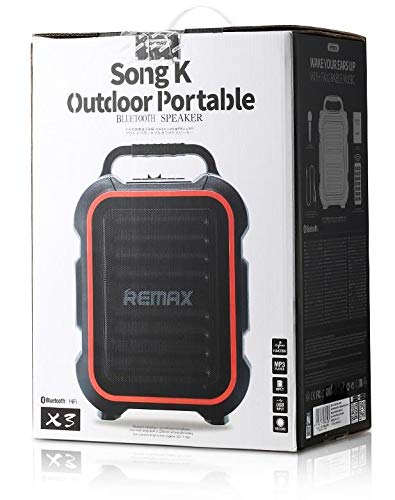
Image: The Remax RB-X3 portable Bluetooth speaker, black with red accents, shown alongside its wireless microphone.
Package Contents
Ensure all items are present in the package:
- Remax RB-X3 Bluetooth Speaker
- Wireless Microphone
- Charging Cable (USB)
- User Manual
Setup
1. Charging the Speaker
Before first use, fully charge the speaker. Connect the provided USB charging cable to the speaker's charging port and a suitable USB power adapter (not included). The charging indicator light will show the charging status.
2. Powering On/Off
Press and hold the Power button on the speaker for approximately 3 seconds to turn it on or off. A voice prompt or indicator light will confirm the status.
3. Bluetooth Pairing
- Turn on the speaker. It will automatically enter Bluetooth pairing mode, indicated by a flashing LED light and a voice prompt.
- On your mobile device (smartphone, tablet, etc.), enable Bluetooth and search for available devices.
- Select "RB-X3" from the list of devices.
- Once paired, the speaker will provide an audible confirmation, and the LED light will stop flashing.

Image: The Remax RB-X3 speaker displaying its model number and key features like Bluetooth, TF card input, USB input, MP3 player, and record function.
Operating Instructions
1. Bluetooth Audio Playback
After successful pairing, you can play audio from your connected device. Use your device's controls or the speaker's buttons (if available) to adjust volume, play/pause, and skip tracks.
2. Using the Wireless Microphone
Turn on the wireless microphone. It will automatically connect to the speaker. Speak into the microphone for karaoke or public address functions. Adjust the microphone volume using the dedicated controls on the speaker, if present.
3. USB and SD/MMC Card Playback
Insert a USB flash drive or an SD/MMC card (with MP3 audio files) into the respective port on the speaker. The speaker will automatically detect the storage device and begin playing audio files. Use the speaker's controls to navigate tracks.

Image: Close-up view of the Remax RB-X3 speaker's control panel, showing the USB port, SD/MMC card slot, and a digital display indicating "BLUE" for Bluetooth mode.
4. Volume Control
Use the volume control knob or buttons on the speaker to adjust the overall sound output. You can also control the volume from your connected Bluetooth device.
Maintenance
- Cleaning: Wipe the speaker and microphone with a soft, dry cloth. Do not use abrasive cleaners or solvents.
- Storage: Store the device in a cool, dry place away from direct sunlight and extreme temperatures.
- Battery Care: To prolong battery life, fully charge the speaker before long periods of inactivity and recharge it at least once every three months.
- Water Resistance: This speaker is designed for outdoor use but may not be fully waterproof. Avoid exposing it to heavy rain or submerging it in water.

Image: A person carrying the Remax RB-X3 portable speaker by its handle, demonstrating its portability for outdoor use.
Troubleshooting
| Problem | Possible Cause | Solution |
|---|---|---|
| No power | Battery is depleted. | Charge the speaker fully. |
| Cannot connect via Bluetooth | Speaker is not in pairing mode or too far from device. | Ensure speaker is in pairing mode. Move device closer to speaker. Restart both devices. |
| No sound | Volume is too low or muted. Incorrect input source selected. | Increase volume on speaker and connected device. Check input mode (Bluetooth, USB, SD/MMC). |
| Microphone not working | Microphone is off or not paired. | Ensure microphone is turned on and within range of the speaker. |
If you encounter issues not listed here, please contact customer support.
Specifications
| Feature | Detail |
|---|---|
| Brand Name | Remax |
| Model Number | RB-X3 |
| Speaker Type | Portable Bluetooth Speaker |
| Connectivity Technology | Wireless (Bluetooth) |
| Maximum Speaker Output Power | 20 Watts |
| Audio Output Mode | Stereo |
| Special Features | Bluetooth, Wireless Microphone, USB Input, SD/MMC Card Input, MP3 Player, Record Function |
| Compatible Devices | Multiple (Universal) |
| Color | Black |
| Item Weight | 4.1 Kilograms |
| Shape | Rectangular |
| Mounting Type | Floor Standing |
Warranty and Support
For warranty information and customer support, please refer to the documentation included with your purchase or visit the official Remax website. Keep your proof of purchase for any warranty claims.
Contact Information: Please refer to the manufacturer's official website for the most up-to-date contact details for support.


