
Introduction
This manual provides essential instructions for the safe and efficient operation of your KINGONE K9 Super Bass Portable Bluetooth Speaker. Please read this manual thoroughly before using the device and retain it for future reference.
The KINGONE K9 is a portable Bluetooth speaker featuring powerful stereo sound, multiple input options including Bluetooth, MicroSD, and AUX, and convenient touch controls. It also supports hands-free calling and NFC for easy pairing.
Package Contents
Ensure all items are present in the package:
- KINGONE K9 Super Bass Portable Bluetooth Speaker
- Micro USB Charging Cable
- 3.5mm Audio Cable (AUX)
- User Manual (this document)
Product Overview
The KINGONE K9 speaker is designed for portability and high-quality audio. Below is an image illustrating the speaker and its packaging.
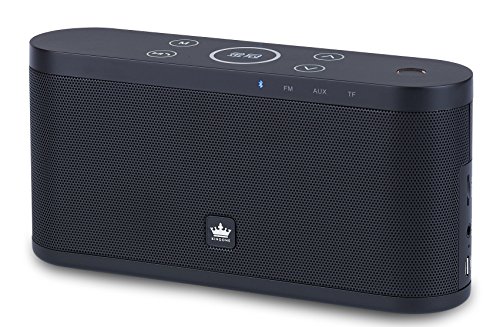
Image: The KINGONE K9 Super Bass Portable Bluetooth Speaker (left) shown next to its metallic-finish packaging (right).
Key Features:
- Bluetooth 4.0 Connectivity: Supports A2DP, AVRCP, HFP, HSP profiles for stable wireless audio streaming.
- NFC Support: For quick and easy pairing with compatible devices.
- Multiple Playback Modes: Bluetooth, MicroSD card, and AUX input.
- Hands-free Calling: Built-in microphone for answering phone calls.
- Touch Controls: Intuitive touch-sensitive buttons for volume, track navigation, and play/pause.
- Powerful Stereo Sound: 2 x 5W output for a rich audio experience.
- Portable Design: Compact dimensions and a 2200mAh battery for extended use.
Controls and Functions
The speaker features touch-sensitive controls located on the top panel. Familiarize yourself with these controls for optimal use:
- Power Button: Press and hold for 3 seconds to power on/off.
- Play/Pause Button: Tap to play or pause audio. During a call, tap to answer/end.
- Volume Up (+): Tap to increase volume.
- Volume Down (-): Tap to decrease volume.
- Next Track (>>): Tap to skip to the next track.
- Previous Track (<<): Tap to go to the previous track.
- Mode Button (M): Tap to switch between Bluetooth, MicroSD, and AUX input modes.
Setup
1. Charging the Speaker
- Connect the Micro USB charging cable to the speaker's charging port.
- Connect the other end of the USB cable to a DC 5V USB power source (e.g., computer USB port, USB wall adapter).
- The charging indicator light will illuminate.
- Charging typically takes 4-5 hours for a full charge. The indicator light will change or turn off once fully charged.
2. Powering On/Off
- To power on, press and hold the Power button for approximately 3 seconds until you hear an audible prompt.
- To power off, press and hold the Power button for approximately 3 seconds until you hear an audible prompt.
3. Bluetooth Pairing
- Ensure the speaker is powered on and in Bluetooth mode (indicated by a flashing blue LED). If not, press the 'M' (Mode) button to switch to Bluetooth mode.
- Enable Bluetooth on your mobile device (smartphone, tablet, laptop).
- Search for available Bluetooth devices. You should see "KINGONE K9" in the list.
- Select "KINGONE K9" to pair. Once paired, the speaker will emit an audible confirmation, and the blue LED will stop flashing and remain solid.
- The speaker will automatically reconnect to the last paired device when powered on, if the device's Bluetooth is active and within range.
4. NFC Pairing (for compatible devices)
- Ensure NFC is enabled on your compatible smartphone or tablet.
- Power on the KINGONE K9 speaker.
- Gently tap your NFC-enabled device against the NFC area on the speaker (refer to the speaker's diagram for exact location, usually marked with an NFC logo).
- Your device will prompt you to confirm the pairing. Accept the connection.
5. AUX Input Connection
- Connect one end of the 3.5mm audio cable to the AUX port on the speaker.
- Connect the other end of the 3.5mm audio cable to the headphone jack or audio output port of your external audio device.
- Press the 'M' (Mode) button on the speaker to switch to AUX mode.
- Audio will now play through the speaker from your connected device. Control playback and volume from your external device.
6. MicroSD Card Playback
- Insert a MicroSD (TF) card with MP3 audio files into the MicroSD card slot on the speaker.
- Press the 'M' (Mode) button to switch to MicroSD card mode.
- The speaker will automatically begin playing audio files from the card.
- Use the speaker's touch controls for play/pause, next track, and previous track.
Operating Instructions
Volume Control
- Tap the 'Volume Up (+)' button to increase the volume.
- Tap the 'Volume Down (-)' button to decrease the volume.
Track Navigation (Bluetooth/MicroSD modes)
- Tap the 'Next Track (>>)' button to skip to the next song.
- Tap the 'Previous Track (<<)' button to go back to the beginning of the current song or to the previous song.
Hands-free Calling
- When a call comes in while connected via Bluetooth, the speaker will ring.
- Tap the 'Play/Pause' button to answer the incoming call.
- Tap the 'Play/Pause' button again to end the call.
- To reject an incoming call, press and hold the 'Play/Pause' button for a few seconds.
Maintenance
- Keep the speaker away from water, moisture, and extreme temperatures.
- Clean the speaker with a soft, dry cloth. Do not use abrasive cleaners or solvents.
- Avoid dropping the speaker or subjecting it to strong impacts.
- When not in use for extended periods, store the speaker in a cool, dry place and charge it periodically to maintain battery health.
Troubleshooting
- No Power:
- Ensure the speaker is fully charged.
- Check the charging cable and power adapter for damage.
- No Sound:
- Increase the volume on both the speaker and your connected device.
- Ensure the speaker is in the correct input mode (Bluetooth, AUX, MicroSD).
- If using Bluetooth, ensure the device is properly paired and within the 10-meter operating range.
- If using AUX, ensure the 3.5mm cable is securely connected to both devices.
- Bluetooth Disconnection:
- Move your device closer to the speaker.
- Ensure there are no obstructions between the speaker and your device.
- Turn off and on Bluetooth on your device, then try re-pairing.
- Controls Not Responding:
- Ensure the speaker is powered on.
- Try restarting the speaker.
Specifications
| Model | K9 |
| Bluetooth Version | 4.0 |
| Bluetooth Profiles | A2DP, AVRCP, HFP, HSP |
| Operating Range | Up to 10 meters (33 feet) |
| Output Power | 2 x 5W (Total 10W) |
| Channel Configuration | 2.0 Stereo |
| Input Options | Bluetooth, MicroSD (TF Card), AUX (3.5mm) |
| Battery Capacity | 2200mAh |
| Charging Input | DC 5V (Micro USB) |
| Charging Time | 4-5 hours |
| Dimensions (L x W x H) | 22 cm x 12 cm x 15 cm (approx.) |
| Weight | 1.5 kg (approx.) |
| Control Method | Touch |
| Special Features | NFC, Hands-free Calling, Portable |
Safety Information
- Do not expose the speaker to direct sunlight, heat sources, or open flames.
- Do not disassemble, repair, or modify the device yourself. This may void the warranty and cause damage.
- Keep out of reach of children.
- Dispose of the product and its battery responsibly according to local regulations.
- Avoid listening at high volumes for prolonged periods to prevent hearing damage.
Warranty and Support
For warranty information or technical support, please refer to the documentation provided at the time of purchase or contact your retailer. Keep your proof of purchase for warranty claims.