
1. Introduction
This manual provides detailed instructions for the installation, operation, and maintenance of your Star Sat SR-4080HD Extreme satellite receiver. Please read this manual thoroughly before using the device to ensure proper functionality and to maximize your viewing experience. Keep this manual for future reference.
2. Safety Information
- Ensure the power supply voltage matches the requirements specified on the device.
- Do not expose the receiver to rain, moisture, or extreme temperatures.
- Avoid placing the device near heat sources or in direct sunlight.
- Do not open the receiver casing. Refer all servicing to qualified personnel.
- Keep the device away from children.
- Disconnect the power plug during lightning storms or when unused for long periods.
3. Package Contents
Verify that all items listed below are included in your package:
- Star Sat SR-4080HD Extreme Satellite Receiver
- Remote Control
- IR/External Display
- HDMI Cable
- Mount Bracket
- 12V Power Adapter
- 2x AAA Batteries
- WiFi Dongle

Figure 3.1: Included components for the Star Sat SR-4080HD Extreme. This image displays the satellite receiver, remote control, IR/external display, HDMI cable, mounting bracket, 12V power adapter, 2 AAA batteries, and a WiFi dongle.
4. Product Overview
The Star Sat SR-4080HD Extreme is a compact and powerful satellite receiver designed for high-definition viewing. It supports Full HD and 4Kx2K resolutions, offering a wide range of features for an enhanced entertainment experience.

Figure 4.1: Front view of the Star Sat SR-4080HD Extreme satellite receiver. The device is black with a perforated top surface for ventilation and features the Star Sat logo and model name.
4.1. Ports and Connections
Familiarize yourself with the various ports on your receiver:
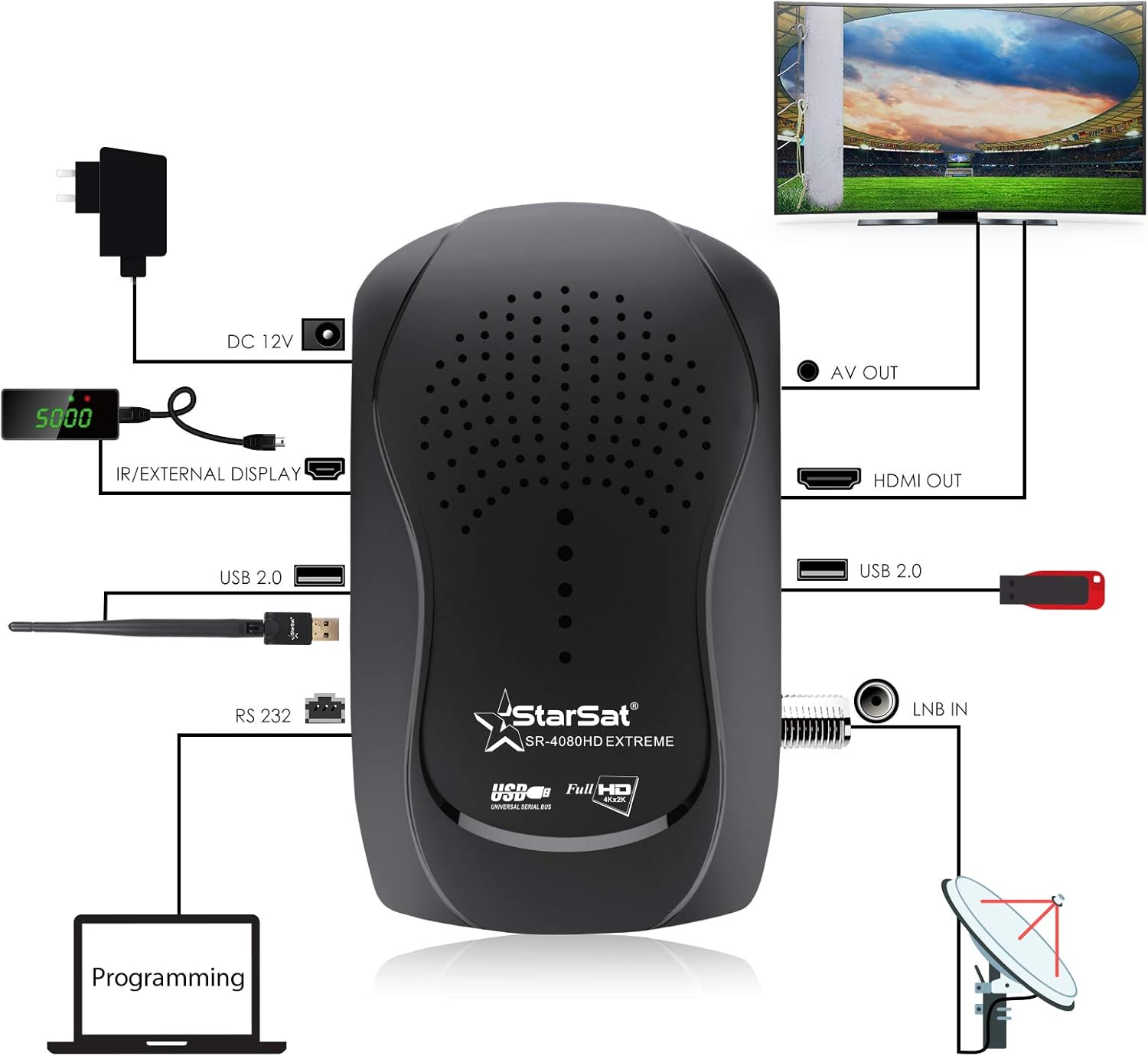
Figure 4.2: Connection diagram illustrating the various ports and their typical connections. This includes DC 12V power input, IR/External Display port, USB 2.0 ports, RS 232 port for programming, LNB IN for satellite dish connection, HDMI OUT, and AV OUT.
- LNB IN: Connects to your satellite dish.
- HDMI OUT: Connects to your television for high-definition video and audio.
- AV OUT: Connects to older televisions or audio systems using composite video and stereo audio.
- USB 2.0: Two ports for connecting USB devices such as the WiFi dongle, external storage for PVR, or for software upgrades.
- IR/External Display: Connects the external IR sensor and display unit.
- DC 12V: Power input for the receiver.
- RS232: Serial port for advanced programming or firmware updates.

Figure 4.3: Close-up view of the rear ports on the Star Sat SR-4080HD Extreme, showing the Tuner (LNB IN), one USB port, DV-OUT (HDMI), and AV port.
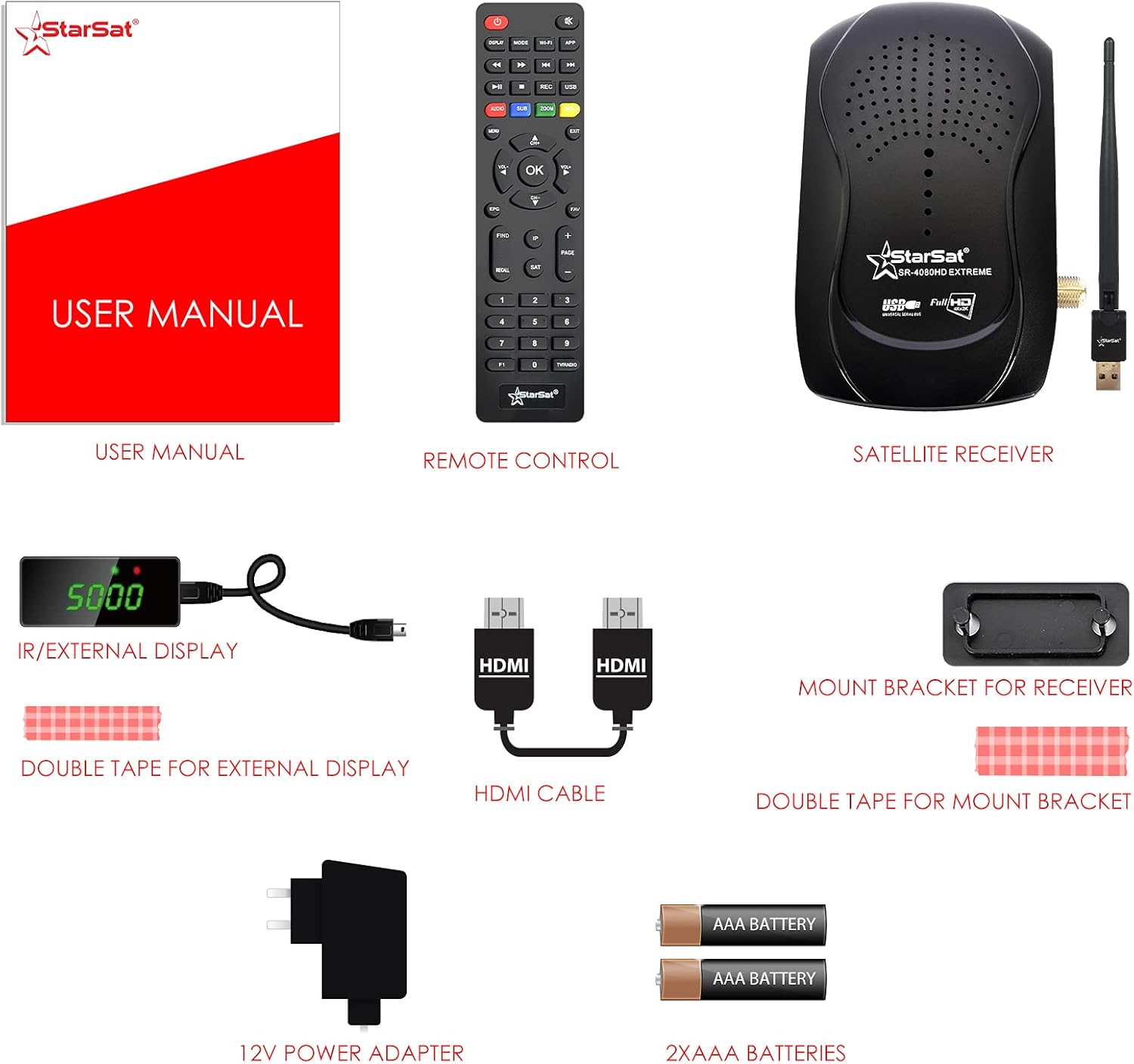
Figure 4.4: Close-up view of the side ports on the Star Sat SR-4080HD Extreme, displaying the DC-12V power input, IR-EX port, a second USB port, and the RS232 port.
5. Setup Guide
5.1. Connecting the Receiver
- Connect Satellite Dish: Connect the coaxial cable from your satellite dish LNB to the LNB IN port on the receiver.
- Connect to TV: Use an HDMI cable to connect the HDMI OUT port on the receiver to an HDMI input on your television. Alternatively, use the AV cable for older TVs.
- Connect IR/External Display: Plug the external IR sensor and display unit into the IR/External Display port. Position the sensor where it can receive signals from the remote control.
- Connect WiFi Dongle: Insert the provided WiFi dongle into one of the USB 2.0 ports.
- Connect Power: Connect the 12V power adapter to the DC 12V input on the receiver, then plug the adapter into a power outlet.
Figure 5.1: Visual guide for connecting the Star Sat SR-4080HD Extreme to a television and satellite dish, including power and peripheral connections.
5.2. Initial Setup and Channel Scan
- Power On: Turn on your television and select the correct HDMI input. Power on the satellite receiver.
- Language Selection: Follow the on-screen prompts to select your preferred language.
- Satellite Configuration: Navigate to the 'Installation' or 'Setup' menu. Select your satellite(s) and configure DiSEqC settings if applicable (supports DiSEqC 1.0/1.1/1.2/1.3(USALS) and Unicable).
- Channel Search: Perform a channel scan. Options typically include:
- Blind Search: Scans all available frequencies for channels.
- Multi-satellite Search: Scans multiple selected satellites.
- Network Search: Uses network information to find channels.
- Manual Search: Allows you to input specific transponder frequencies.
- Save Settings: Save the scanned channels and exit the setup menu.
6. Operating Instructions
6.1. Basic Operation
- Use the CH+/CH- buttons on the remote control to change channels.
- Use the VOL+/VOL- buttons to adjust the volume.
- Press OK to view the channel list.
- Press MENU to access the main menu for settings and features.
6.2. Electronic Program Guide (EPG)
The receiver supports a multi-language Electronic Program Guide (EPG) for 'Now/Next Daily, Weekly' program information. Press the EPG button on your remote to access program schedules and details.
6.3. PVR (Personal Video Recorder) Functionality
Connect a USB storage device to one of the USB ports to enable PVR functions. You can record live TV programs, pause, and rewind. Refer to the on-screen menu for specific PVR controls and scheduling options.
6.4. Media Playback via USB
The USB 2.0 interface allows for playback of various media files from a connected USB storage device. Navigate to the 'Media' or 'USB' section in the main menu to browse and play your content.
6.5. Network Connectivity (WiFi)
With the included WiFi dongle, you can connect your receiver to your home network. This enables features such as YouTube access (if supported by firmware) and other internet-based services. Go to 'Network Settings' in the menu to configure your WiFi connection.
7. Maintenance
7.1. Cleaning
Wipe the receiver with a soft, dry cloth. Do not use liquid cleaners or abrasive materials, as they may damage the surface.
7.2. Software Upgrade
Software and additional data can be upgraded via the USB 2.0 interface. Visit the official Star Sat website for the latest firmware updates and instructions. Always follow the upgrade procedure carefully to avoid damaging the device.
8. Troubleshooting
If you encounter issues with your receiver, refer to the following common problems and solutions:
- No Power: Ensure the power adapter is securely connected to both the receiver and a working power outlet. Check the power indicator light on the receiver or external display.
- No Signal: Verify that the satellite dish cable is properly connected to the LNB IN port. Check your satellite dish alignment and LNB settings in the installation menu.
- No Picture/Sound: Ensure the HDMI or AV cable is securely connected to both the receiver and the TV. Select the correct input source on your television.
- Remote Control Not Working: Check the batteries in the remote control and replace them if necessary. Ensure there are no obstructions between the remote and the IR sensor.
- Receiver Freezes/Responds Slowly: Try restarting the receiver by disconnecting and reconnecting the power. Ensure the firmware is up to date.
For further assistance, please contact Star Sat customer support or visit their official website.
9. Specifications
| Model | SR-4080HD Extreme |
| Satellite Compliance | DVG-S/DVB-S2 (MPEG-II/MPEG-IV/H.264) |
| Satellite Reception | SCPC & MCPC from Ku and C Band satellites |
| LNB Support | Universal, Single, Single S & C Band Wideband |
| Code Rates | 1/2, 3/5, 2/3, 3/4, 4/5, 5/6, 7/8, 8/9, 9/10 |
| DiSEqC Support | 1.0/1.1/1.2/1.3 (USALS), Unicable |
| Search Modes | Blind search, Multi-satellite, Network, Manual |
| Video System | PAL/NTSC |
| Aspect Ratio | Variable (4:3, 16:9) with PAN&SCAN or letterbox |
| Output Resolution | 480p/i, 576p/i, 720p, 1080i, 1080p (50/60Hz) |
| OSD | True full Color (32bits), 720x576/1280x720 (configurable) |
| Memory | 100+ satellites, 1000 transponders, 5000 channels |
| Favorite Groups | 32+ groups, parental lock supported |
| Menu Languages | English, French, Russian, Greek, Italian, Arabic, Farsi, Ukrainian, Swedish, Spanish, Turkish, German, etc. |
| Audio Languages | Multi-language audio |
| Subtitle Output | Multi-language DVG subtitle |
| EPG | Now/Next Daily, Weekly Electronic Program Guide, Multi EPG |
| Teletext | Teletext output through OSD |
| Software Upgrade | Via USB |
| USB Interface | USB 2.0 (2 ports) |
| Connectivity Technology | Wi-Fi (dongle included) |
| HDMI Ports | 1 |
| Audio Output Mode | Stereo, Surround |
| Supported Audio Format | Dolby Digital, DTS, AAC, MP3, PCM |
| Compatible Devices | Television |
| Product Dimensions | 5.4D x 14.1W x 20.2H cm |
| Weight | 350 g |
| Color | Black |
10. Warranty and Support
For warranty information, technical support, or further inquiries, please visit the official Star Sat website or contact your local dealer.
Official Website: http://starsat.com
