
Other M99
M99 Sport Smart Watch User Manual
Model: M99 | Brand: Other
1. Introduction
Thank you for choosing the M99 Sport Smart Watch. This device is designed to enhance your daily life with its advanced features, including Bluetooth calling, a full touch screen, and comprehensive health monitoring. It boasts an IP68 water resistance rating, making it suitable for various activities. This manual provides essential information on setting up, operating, maintaining, and troubleshooting your new smart watch to ensure optimal performance.

Figure 1: Front view of the M99 Sport Smart Watch, showcasing its round display and black strap.
2. Setup
2.1 Charging the Device
Before first use, fully charge your M99 Smart Watch. Connect the magnetic charging cable to the charging points on the back of the watch and plug the USB end into a compatible power adapter (not included). A full charge typically takes approximately 2 hours.

Figure 2: The smart watch display showing the charging indicator and estimated battery life. The watch offers 5-7 days of daily use and up to 30 days of standby time on a single charge.
2.2 Power On/Off
- Power On: Press and hold the side button for a few seconds until the screen lights up.
- Power Off: Press and hold the side button, then select the 'Power Off' option on the screen.
2.3 App Installation and Pairing
To unlock the full functionality of your M99 Smart Watch, download the companion application on your smartphone. The watch is compatible with both Android and iOS operating systems.
- Scan the QR code provided in the watch's packaging or search for the designated app in your phone's app store.
- Install and open the application.
- Enable Bluetooth on your smartphone.
- In the app, follow the on-screen instructions to search for and pair with your M99 Smart Watch. Ensure the watch is powered on and within Bluetooth range.
- Confirm the pairing request on both your phone and the watch.
3. Operating Instructions
3.1 Basic Navigation
- Swipe Up/Down: Navigate through menus and notifications.
- Swipe Left/Right: Access quick functions or different data screens.
- Tap: Select an item or confirm an action.
- Side Button: Press to return to the home screen or wake the device.
3.2 Bluetooth Call Functionality
The M99 Smart Watch allows you to make and receive calls directly from your wrist when connected to your smartphone via Bluetooth.
- Making Calls: Access the dial pad or contact list on the watch to initiate a call.
- Receiving Calls: When a call comes in, the watch will display the caller ID. You can answer or reject the call directly from the watch screen.
- Call History: View your recent call history on the watch.

Figure 3: Illustrations of the M99 Smart Watch's Bluetooth call features, including the dial pad, recent call log, and options to answer or reject incoming calls.
3.3 Health Monitoring
The M99 Smart Watch is equipped with sensors to monitor various health metrics. Please note: This device is not a medical device and should not be used for medical diagnosis or treatment.
- Heart Rate Monitoring: Real-time tracking of your heart rate.
- Blood Pressure Monitoring: Provides estimated blood pressure readings.
- Blood Oxygen Monitoring: Measures your blood oxygen saturation (SpO2) levels.
- Sleep Monitoring: Tracks your sleep patterns and quality.
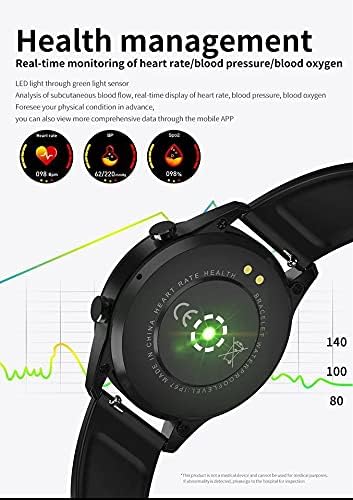
Figure 4: The back of the M99 Smart Watch showing the green light sensors used for heart rate, blood pressure, and blood oxygen monitoring.
3.4 Activity Monitoring
Track your daily activities and workouts:
- Sports Modes: Select from various sports modes to track specific activities.
- Step Counter: Records your daily steps, distance, and calories burned.
- Sedentary Reminder: Notifies you to move after periods of inactivity.
3.5 Notifications and Other Features
Receive notifications from your smartphone directly on your watch. The M99 also includes:
- Message Reminder: Get alerts for incoming messages.
- Alarm Clock: Set alarms to wake you up or remind you of tasks.
- Find Phone: Use your watch to locate your paired smartphone.
- Bluetooth Pictures: Remotely control your phone's camera.
- Multi-language Support: The watch supports various languages.

Figure 5: An overview of the M99 Smart Watch's capabilities, including low power consumption, Bluetooth phone, activity monitoring, heart rate, sleep, blood pressure, blood oxygen, alarm clock, find phone, and multi-language support.
4. Maintenance
4.1 Water Resistance (IP68)
The M99 Smart Watch has an IP68 water resistance rating, meaning it is protected against dust ingress and can withstand immersion in water up to 1.5 meters for 30 minutes. It is suitable for daily use, such as hand washing, rain, and shallow swimming. However, it is not recommended for hot showers, saunas, or diving, as steam and high water pressure can compromise the seals.
4.2 Cleaning and Care
- Wipe the watch and strap regularly with a soft, damp cloth.
- Avoid using harsh chemicals, cleaning solvents, or strong detergents, as these can damage the watch's finish and seals.
- Ensure the charging contacts are clean and dry before charging to prevent corrosion.
4.3 Storage
When not in use for extended periods, store the watch in a cool, dry place away from direct sunlight and extreme temperatures. It is advisable to charge the watch periodically to maintain battery health.
5. Troubleshooting
- Watch not turning on: Ensure the watch is fully charged. If it still doesn't turn on, try holding the side button for an extended period (10-15 seconds) for a forced restart.
- Cannot pair with smartphone:
- Ensure Bluetooth is enabled on your phone and the watch.
- Make sure the watch is within the phone's Bluetooth range (typically 10 meters).
- Restart both the watch and the phone.
- Clear the Bluetooth cache on your phone or forget the device and try pairing again.
- Inaccurate health readings:
- Ensure the watch is worn snugly on your wrist, not too tight or too loose.
- Keep the sensor area on the back of the watch clean.
- Avoid excessive movement during readings.
- Notifications not appearing:
- Check notification permissions in your phone's settings for the companion app.
- Ensure the app is running in the background and not being closed by battery optimization settings.
- Verify that notifications are enabled within the companion app for specific applications.
6. Specifications
| Feature | Description |
|---|---|
| Model Number | M99 |
| Display | 1.28 inch Full Touch Screen |
| Connectivity | Bluetooth |
| Compatible OS | Android & iOS |
| RAM Size | 128 MB |
| Water Resistance | IP68 |
| Battery Life (Daily Use) | 5-7 Days |
| Battery Life (Standby) | Up to 30 Days |
| Charging Time | Approx. 2 Hours |
| Material | Plastic |
| Item Weight | 120 g |
| Special Features | Lightweight, Bluetooth Call, Health Monitoring (HR, BP, SpO2), Activity Tracking |
7. Warranty and Support
Specific warranty terms and conditions for the M99 Sport Smart Watch may vary depending on your region and point of purchase. Please refer to the warranty information provided at the time of purchase or contact your retailer for details.
For technical support or further assistance, please contact the seller or manufacturer through the contact information provided with your product or on their official website. Ensure you have your model number (M99) and proof of purchase ready when seeking support.
Related documentsM99

Ask a question about this manual
Ask about setup, troubleshooting, compatibility, parts, safety, or missing instructions. Manuals+ will review the question and use this page’s manual context to help answer it.