
Mayer MMO40D
Mayer Electric Oven Instruction Manual
Model: MMO40D
Brand: Mayer
1. Introduction
Thank you for choosing the Mayer Electric Oven MMO40D. This manual provides essential information for the safe and efficient operation, maintenance, and troubleshooting of your new appliance. Please read this manual thoroughly before first use and keep it for future reference.
The Mayer MMO40D is a versatile electric oven designed for various cooking needs, featuring a 40-liter capacity, adjustable thermostat, and multiple cooking functions including convection and rotisserie.
2. Important Safety Instructions
When using electrical appliances, basic safety precautions should always be followed to reduce the risk of fire, electric shock, and injury to persons, including the following:
- Read all instructions before using the oven.
- Do not touch hot surfaces. Use handles or knobs.
- To protect against electric shock, do not immerse cord, plugs, or the appliance in water or other liquid.
- Close supervision is necessary when any appliance is used by or near children.
- Unplug from outlet when not in use and before cleaning. Allow to cool before putting on or taking off parts.
- Do not operate any appliance with a damaged cord or plug, or after the appliance malfunctions or has been damaged in any manner.
- The use of accessory attachments not recommended by the appliance manufacturer may cause injuries.
- Do not use outdoors.
- Do not let cord hang over edge of table or counter, or touch hot surfaces.
- Do not place on or near a hot gas or electric burner, or in a heated oven.
- Extreme caution must be used when moving an appliance containing hot oil or other hot liquids.
- Always attach plug to appliance first, then plug cord into the wall outlet. To disconnect, turn any control to "off", then remove plug from wall outlet.
- Do not use appliance for other than intended use.
- Oversized foods or metal utensils must not be inserted in a toaster oven as they may create a fire or risk of electric shock.
- A fire may occur if the oven is covered or touching flammable material, including curtains, draperies, walls, and the like, when in operation.
- Do not place any of the following materials in the oven: paper, cardboard, plastic, or any materials not specifically designed for oven use.
- Do not store any materials other than manufacturer's recommended accessories in this oven when not in use.
- Do not place cooking utensils or baking dishes on the glass door.
3. Package Contents
Upon unpacking your Mayer Electric Oven MMO40D, please ensure all the following items are present and in good condition:
- 1 x Mayer Electric Oven (MMO40D)
- 1 x Rotisserie spit
- 1 x Rotisserie spit handle
- 1 x Aluminum bake tray
- 1 x Tray handle
- 1 x Wire rack
If any items are missing or damaged, please contact Mayer customer support immediately.
4. Product Overview
Familiarize yourself with the components and controls of your Mayer Electric Oven MMO40D.

Figure 4.1: Front view of the Mayer Electric Oven MMO40D, showcasing its sleek black and silver design with a large glass door and control panel on the right.

Figure 4.2: Angled view of the Mayer Electric Oven MMO40D, providing a perspective of its compact size and overall aesthetic.

Figure 4.3: Close-up of the control panel, detailing the four rotary knobs for Upper Temperature, Function, Bottom Temperature, and Timer settings.

Figure 4.4: Interior view of the oven with the door open, showing the heating elements, fan for convection, and the removable wire rack.

Figure 4.5: Rear view of the oven, displaying the power cord connection and ventilation grilles for heat dissipation.
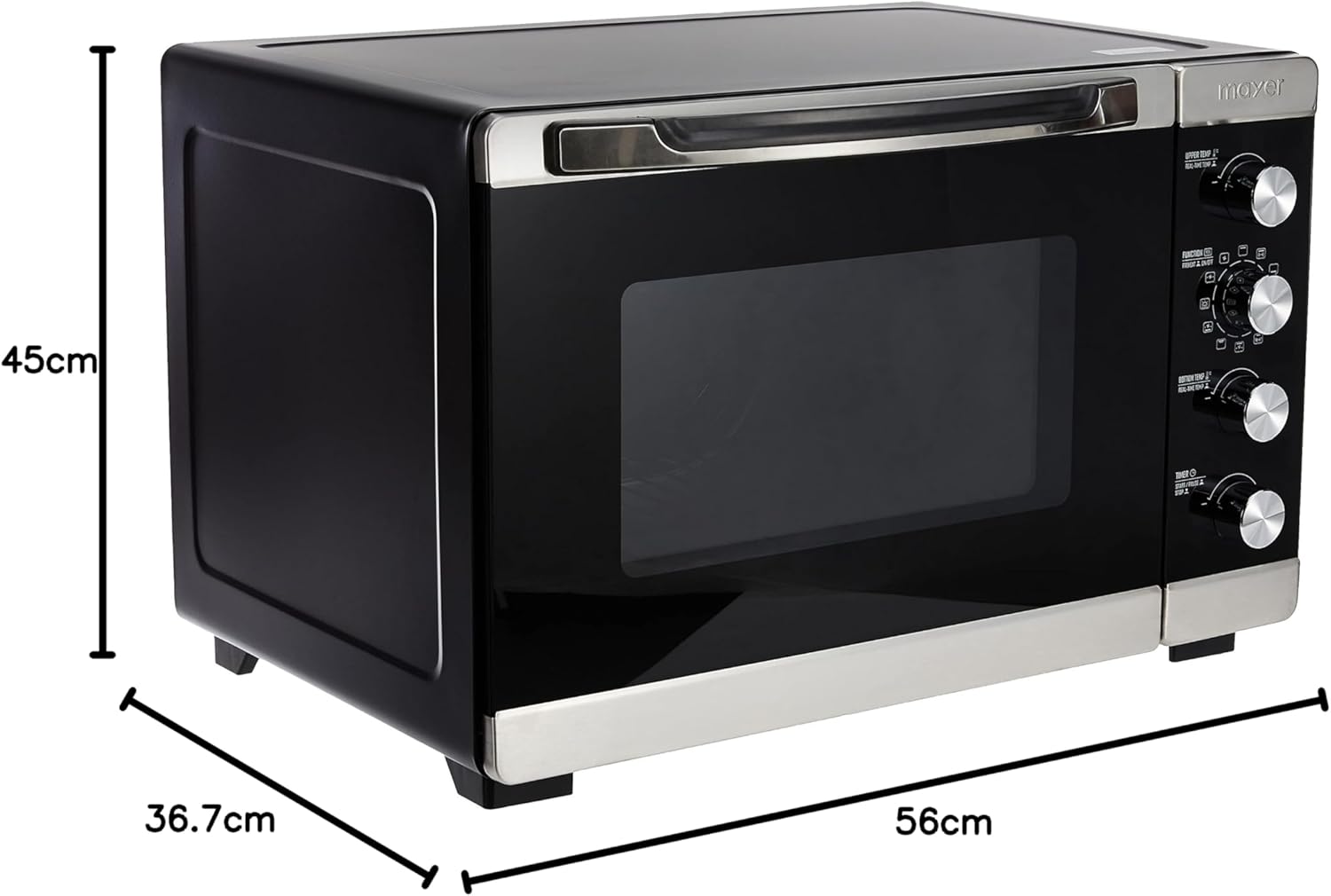
Figure 4.6: Angled view of the oven with key dimensions highlighted: 56cm width, 36.7cm depth, and 45cm height.
Control Panel Description:
- Upper Temperature Knob: Adjusts the temperature for the upper heating elements (60 - 230 °C). Displays real-time temperature.
- Function Knob: Selects the cooking mode (e.g., preheat, top heat, bottom heat, both heat, convection, rotisserie, or combinations). Features 12 stage functions.
- Bottom Temperature Knob: Adjusts the temperature for the bottom heating elements (60 - 230 °C). Displays real-time temperature.
- Timer Knob: Sets the cooking duration up to 180 minutes. Includes Start/Pause and Stop functions. Features a 5-minute power cut-off memory function.
5. Setup and First Use
5.1 Unpacking and Placement
- Carefully remove the oven and all accessories from the packaging.
- Remove any packing materials, stickers, or protective films from the oven.
- Place the oven on a stable, flat, heat-resistant surface. Ensure there is adequate ventilation space (at least 10-15 cm) around all sides of the oven for proper air circulation.
- Do not place the oven near flammable materials or directly under a cabinet that could be damaged by heat.
5.2 Before First Use
- Wash the wire rack, bake tray, rotisserie spit, and handles in warm, soapy water. Rinse thoroughly and dry completely.
- Wipe the interior and exterior of the oven with a damp cloth.
- Plug the oven into a grounded electrical outlet (220-240V~50/60Hz).
- To eliminate any manufacturing odors, operate the oven empty for approximately 15 minutes at the maximum temperature (230°C) using the 'Both Heat' function. Ensure the area is well-ventilated during this process. A slight odor or smoke is normal during initial use.
- Allow the oven to cool completely before its first cooking use.
6. Operating Instructions
The Mayer MMO40D Electric Oven offers various functions for diverse cooking requirements.
6.1 Basic Operation
- Place Food: Place your food on the wire rack or bake tray, then insert it into the desired rack position inside the oven.
- Set Temperature: Turn the 'Upper Temp' and/or 'Bottom Temp' knobs to select the desired cooking temperature (60 - 230 °C). The real-time temperature display will show the current temperature.
- Select Function: Turn the 'Function' knob to choose the appropriate cooking mode. Options include:
- Top Heat
- Bottom Heat
- Both Heat (Top and Bottom)
- Convection (Fan-assisted cooking for even heat distribution)
- Rotisserie (for roasting meats on a spit)
- Combinations of heating elements with convection or rotisserie.
- Set Timer: Turn the 'Timer' knob to set the cooking duration, up to 180 minutes. The oven will begin heating once the timer is set. The power indicator light will illuminate.
- Monitoring: The internal oven light allows you to monitor cooking progress without opening the door.
- Completion: The oven will automatically turn off when the timer reaches zero, and a bell will sound.
6.2 Special Functions
- Preheat: For best results, preheat the oven to the desired temperature before placing food inside. Select the desired temperature and function, and allow the oven to reach temperature before inserting food.
- Convection Cooking: When the convection function is selected, the internal fan circulates hot air, ensuring more even cooking and faster results. This is ideal for baking and roasting.
- Rotisserie Function: To use the rotisserie, secure the food onto the rotisserie spit. Insert the spit into the designated slots inside the oven. Select the rotisserie function on the 'Function' knob. This is perfect for roasting whole chickens or large cuts of meat.
- 5-Minute Power Cut-Off Memory: If power is briefly interrupted during cooking, the oven retains the timer setting for up to 5 minutes, resuming operation once power is restored.
7. Cleaning and Maintenance
Regular cleaning and proper maintenance will extend the life of your Mayer Electric Oven.
- Always unplug the oven from the power outlet and allow it to cool completely before cleaning.
- Clean the interior: Wipe the interior surfaces with a damp cloth and mild detergent. For stubborn stains, a non-abrasive cleaner designed for ovens can be used. Avoid harsh chemicals or abrasive pads that could damage the non-stick coating.
- Clean the exterior: Wipe the exterior surfaces with a soft, damp cloth. Do not use abrasive cleaners or scourers.
- Clean accessories: The wire rack, bake tray, rotisserie spit, and handles can be washed in warm, soapy water. Rinse thoroughly and dry completely before storing or reinserting into the oven.
- Do not immerse the oven body, cord, or plug in water or any other liquid.
- Regularly check the power cord for any signs of damage. If damaged, contact qualified service personnel for repair.
8. Troubleshooting
Before contacting customer service, please refer to the following common issues and their solutions:
| Problem | Possible Cause | Solution |
|---|---|---|
| Oven does not turn on. | Not plugged in; power outage; timer not set. | Ensure oven is securely plugged into a working outlet. Check household circuit breaker. Set the timer knob to the desired cooking time. |
| Food not cooking evenly. | Incorrect rack position; oven not preheated; too much food. | Use the recommended rack position. Always preheat the oven. Avoid overcrowding the oven; cook in smaller batches if necessary. Utilize the convection function for better heat distribution. |
| Excessive smoke during cooking. | Food residue inside oven; fatty foods splattering. | Clean the oven interior thoroughly. Use a drip tray under fatty foods. Ensure proper ventilation. |
| Timer not working. | Knob not turned past the initial mark. | Ensure the timer knob is turned past the 'OFF' position to activate. |
| Oven light not working. | Bulb burnt out. | Contact customer service for bulb replacement instructions or professional repair. |
9. Specifications
| Feature | Detail |
|---|---|
| Model | MMO40D |
| Brand | Mayer |
| Capacity | 40 Liters |
| Power | 1800 - 2100W |
| Voltage | 220-240V~50/60Hz |
| Temperature Control | Adjustable from 60 - 230 °C |
| Timer | Up to 180 minutes |
| Special Features | Convection cooking, Rotisserie function, Top/Bottom/Both heat selection, Power indicator light, Internal oven light, Real-time temperature display, 5 minutes power cut-off memory function, Double Glass Door, 12 stage function |
| Material | Alloy Steel |
| Product Dimensions (D x W x H) | 45D x 56W x 36.7H cm |
| Item Weight | Approximately 15.5 kg |
10. Warranty and Support
Mayer products are manufactured to the highest quality standards. For specific warranty terms and conditions, please refer to the warranty card included with your purchase or visit the official Mayer website. Keep your purchase receipt as proof of purchase for warranty claims.
For technical support, service, or inquiries regarding your Mayer Electric Oven MMO40D, please contact Mayer customer service through their official channels. You may also find additional resources, including a PDF user guide, on the product's Amazon listing page: Mayer MMO40D User Guide (PDF).
Related documentsMMO40D

Ask a question about this manual
Ask about setup, troubleshooting, compatibility, parts, safety, or missing instructions. Manuals+ will review the question and use this page’s manual context to help answer it.