
Introduction
This instruction manual provides detailed guidance for the installation, operation, and maintenance of your GOTOTOP Wall Mounted Digital Push Button Combination Key Lock Box. This lock box is designed to securely store keys and access cards, offering convenient access for authorized users. Its robust construction and weather-resistant features make it suitable for both indoor and outdoor use.
Please read this manual thoroughly before installation and use to ensure proper function and security.
Package Contents
Verify that all items listed below are included in your package:
- 1x Wall Mount Key Storage Security Lock Unit
- 1x Rubber Weather Cover
- 1x Set of Fixing Screws (for wall mounting)
- 1x Small Key (for code setting mechanism)
- 1x Instruction Manual

Image: All components included in the package, showing the lock box, rubber cover, mounting screws, small key, and instruction manual.
Product Overview
The GOTOTOP Key Lock Box features a durable zinc alloy construction with a 10-digit push-button combination mechanism. It is designed for wall mounting and includes a protective rubber cover.

Image: Front view of the key lock box, showing the 10 push buttons, 'OPEN' slider, and 'CLEAR' button.

Image: Rear view of the lock box housing, illustrating the pre-drilled holes for wall mounting.

Image: The key lock box with its front panel detached from the main housing, revealing the internal structure.

Image: Close-up of the internal code setting mechanism, showing the small screws that are turned to set the combination.
Setup and Installation
The key lock box is designed for wall mounting. No external power source is required for operation.
Mounting Instructions:
- Choose a Location: Select a suitable wall or door surface for mounting. Consider accessibility and discretion.
- Mark Drilling Points: Hold the lock box housing against the desired mounting surface. Use a pencil to mark the positions of the pre-drilled holes on the back of the unit.
- Drill Holes: Using an appropriate drill bit for your wall type, drill pilot holes at the marked positions.
- Secure the Lock Box: Align the lock box housing with the drilled holes. Insert the provided fixing screws and tighten them securely to mount the unit to the surface.
- Attach Rubber Cover: For outdoor use or added protection, place the rubber weather cover over the mounted lock box.
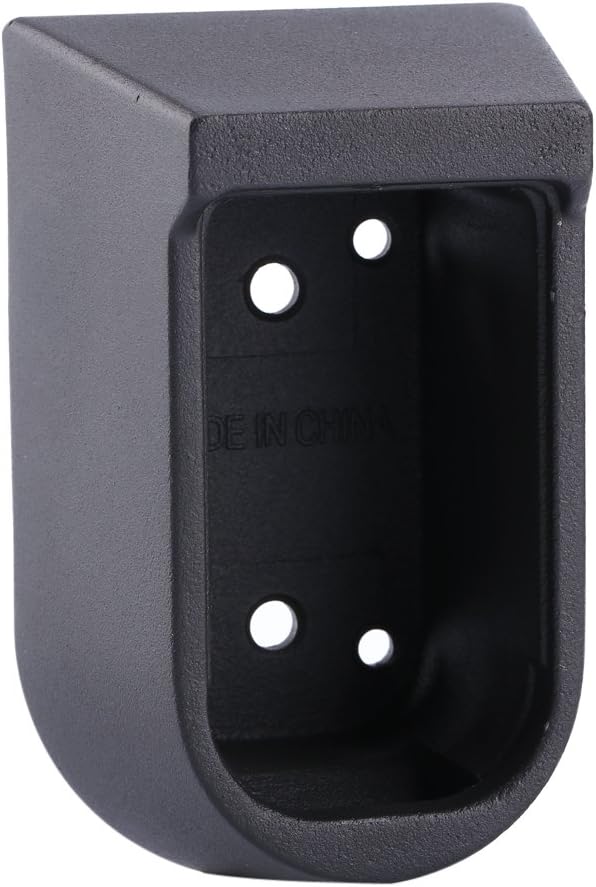
Image: The empty housing of the key lock box, showing the interior and mounting holes, ready for installation.
Operating Instructions
Initial Opening:
- Locate the black button marked 'CLEAR' on the front panel. Slide it down.
- Locate the silver button marked 'OPEN'. Slide it down.
- The front cover can now be opened and removed.
Setting Your Custom Code:
Your custom code must consist of a minimum of 3 numbers. You can use any combination of the 10 available digits.
- With the front cover removed (as per 'Initial Opening' steps), locate the white internal cover.
- Remove the single center screw on the white cover to detach it.
- You will see ten small black screws, each with a small arrow pointing upwards.
- Using the small key provided, turn the arrows on the screws corresponding to your chosen code numbers from facing upwards to facing downward. For example, if your code is '1-2-3-4', turn the screws for digits 1, 2, 3, and 4 so their arrows point downward. All other arrows should remain pointing upward.
- Once your code is set, slide the black 'CLEAR' button down.
- Replace the white internal cover and secure it with its single center screw.
- Reattach the front cover to the main housing.
Important Note: Always press the 'CLEAR' button after attempting to open the key keeper or after setting a new code to reset the mechanism.

Image: Close-up of the key lock box's front panel, highlighting the numbered push buttons, 'OPEN' slider, and 'CLEAR' button.
Maintenance
To ensure the longevity and proper function of your key lock box, follow these maintenance guidelines:
- Weather Protection: Always use the provided rubber cover, especially when the lock box is installed outdoors, to protect it from water and environmental elements.
- Cleaning: Periodically wipe the exterior of the lock box with a soft, damp cloth to remove dirt and grime. Avoid using abrasive cleaners or solvents.
- Mechanism Check: Occasionally check the push buttons and sliders to ensure they move freely. If they become stiff, a small amount of graphite lubricant can be applied.
Troubleshooting
If you encounter issues with your key lock box, consider the following:
- Lock Box Not Opening:
- Ensure you are entering the correct combination.
- Always press the 'CLEAR' button before entering the code and before sliding the 'OPEN' button.
- Check if any buttons are stuck or obstructed.
- Difficulty Setting Code:
- Ensure the small key is fully inserted and turned correctly to change the arrow direction for each chosen digit.
- Verify that the white internal cover is properly aligned and secured after setting the code.
- Loose Mounting: If the lock box feels loose on the wall, re-tighten the mounting screws.
Specifications
| Brand | GOTOTOP |
| Model Number | ECHO-US-JYJJ107100-02 |
| Lock Type | Push Button Combination |
| Mechanism | 10 Digital |
| Material | Zinc Alloy |
| Mounting Type | Wall Mount |
| Special Feature | Corrosion Resistant |
| Outer Dimensions (approx.) | 10.5 cm x 6.5 cm x 5.5 cm (4.13 in x 2.56 in x 2.17 in) |
| Item Weight (approx.) | 1.02 pounds (0.46 kg) |
| Water Resistance Level | Not Water Resistant (use rubber cover for protection) |
Customer Support
For any questions regarding your GOTOTOP Key Lock Box, including product size or operational inquiries, please contact our customer service. We aim to provide a satisfactory response within 24 hours.
Please ensure you have checked the applicable model number before contacting support.
For more information about GOTOTOP products, you may visit the official GOTOTOP Store.