
1. Introduction
This manual provides essential information for the installation, operation, and maintenance of the Cisco Catalyst 3850 48-Port PoE IP Base Switch, model WS-C3850-48PW-S. The Cisco Catalyst 3850 Series is designed as an enterprise-class stackable access-layer switch, offering full convergence between wired and wireless networks on a unified platform. It integrates Cisco's Unified Access Data Plane (UADP) application-specific integrated circuit (ASIC) to facilitate consistent wired-wireless policy enforcement, application visibility, and optimization.
This device supports full IEEE 802.3at Power over Ethernet Plus (PoE+), modular and field-replaceable network modules, redundant fans, and power supplies, ensuring high availability and flexibility for network deployments.
2. Product Overview
The Cisco Catalyst 3850 48-Port PoE IP Base Switch is a robust networking solution. Below is an image illustrating the front panel of the switch, highlighting its 48 Gigabit Ethernet ports with Power over Ethernet Plus (PoE+) capabilities.
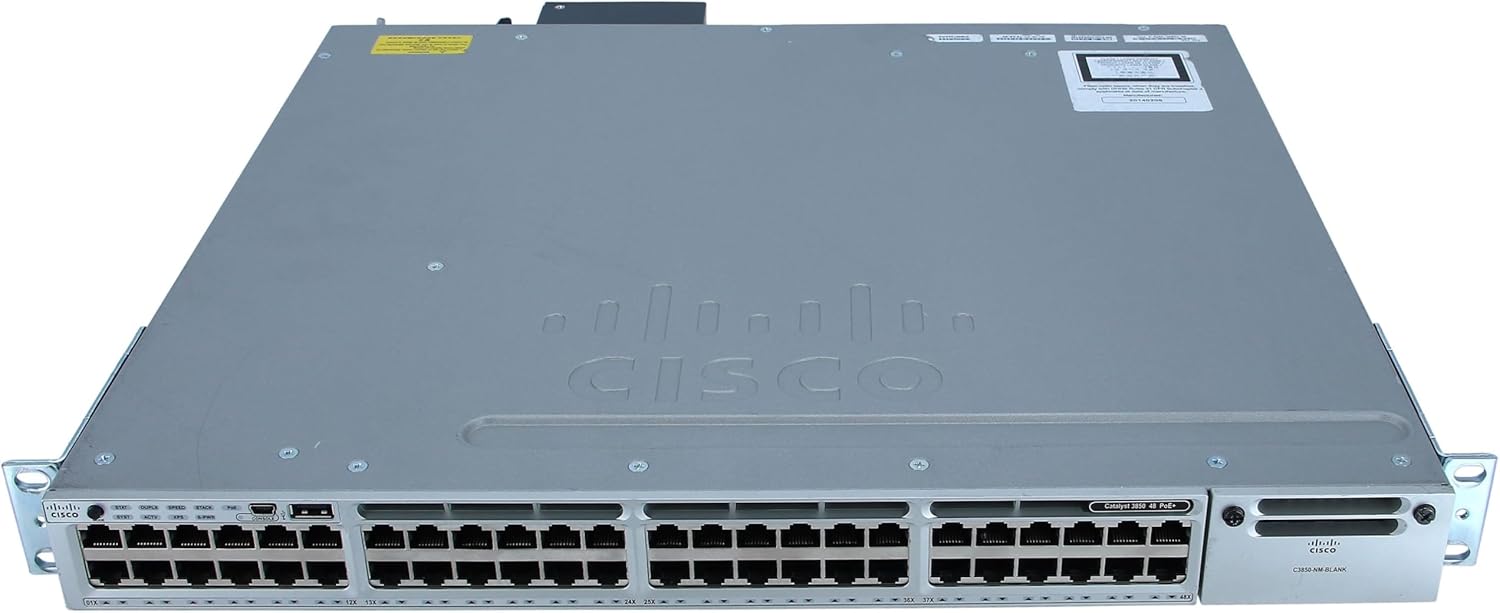
Figure 1: Front Panel of Cisco Catalyst 3850 48-Port PoE IP Base Switch
This image displays the front of the Cisco Catalyst 3850 switch. It features 48 RJ-45 Ethernet ports, each capable of 10/100/1000Mbps data transfer with Power over Ethernet Plus (PoE+). To the left of the ports, there are LED indicators for various statuses such as System (SYST), Redundant Power System (RPS), Stack (STACK), and PoE. On the right side, a blank network module slot is visible, labeled "C3850-NM BLANK", indicating modular expandability. The overall chassis is gray with the Cisco logo prominently displayed.
Key Features:
- 48-Port Gigabit Ethernet with PoE+: Provides 48 ports supporting 10/100/1000Mbps data and IEEE 802.3at Power over Ethernet Plus, with a 435-watt power budget.
- Unified Wired and Wireless Access: Offers full convergence on a single platform for simplified network management.
- Cisco UADP ASIC: Enables uniform wired-wireless policy enforcement, enhanced application visibility, flexibility, and optimization.
- StackWise-480 Technology: Provides high resilience and scalability for stacking multiple switches.
- Modular Network Modules: Supports field-replaceable network modules for future expansion and flexibility.
- Redundant Components: Features redundant fans and power supplies to ensure continuous operation.
- Advanced Layer 3 Features: Includes auto-negotiation, ARP support, trunking, VLAN support, auto-uplink (auto MDI/MDI-X), IGMP snooping, Syslog support, IPv6 support, Rapid Spanning Tree Protocol (RSTP), and Multiple Spanning Tree Protocol (MSTP) support.
3. Setup and Installation
3.1 Unpacking and Inspection
- Carefully remove the switch from its packaging.
- Inspect the switch for any signs of physical damage. If damage is observed, contact your supplier immediately.
- Verify that all components listed in the packing list are present.
3.2 Rack Mounting (Optional)
The Cisco Catalyst 3850 switch can be installed in a standard 19-inch equipment rack. Use the provided rack-mount brackets and screws to secure the switch. Ensure adequate airflow around the unit for proper cooling.
3.3 Connecting Power
- Connect the power cord to the AC power connector on the rear panel of the switch.
- Plug the other end of the power cord into a grounded electrical outlet.
- The switch will begin its power-on self-test (POST) sequence. Observe the system status LEDs on the front panel.
3.4 Network Connections
- Connect Ethernet cables from your network devices (computers, IP phones, wireless access points) to the RJ-45 ports on the front panel.
- For devices requiring Power over Ethernet (PoE+), ensure they are connected to the appropriate ports. The switch will automatically detect and provide power if the device is PoE+ compliant.
- For uplink connections to other network devices or the core network, use the appropriate uplink ports (if a network module is installed) or standard Gigabit Ethernet ports.
4. Operating the Switch
4.1 Initial Configuration
Upon initial power-up, the switch will load its operating system. Access to the command-line interface (CLI) for configuration is typically done via a console cable connected to the console port on the front panel, or via a network connection if the switch has obtained an IP address.
- Connect a terminal emulator (e.g., PuTTY, Tera Term) to the console port using a serial cable.
- Configure basic settings such as hostname, IP address, subnet mask, and default gateway.
- Set up user accounts and passwords for secure access.
4.2 LED Indicators
The front panel LEDs provide visual status of the switch's operation:
- SYST (System): Indicates overall system status (e.g., green for normal operation, amber for fault).
- RPS (Redundant Power System): Indicates the status of an optional external redundant power supply.
- STACK: Indicates the status of the switch in a StackWise-480 stack.
- PoE: Indicates the Power over Ethernet status for the ports.
- Port Status LEDs: Each port has LEDs indicating link status, activity, speed, and duplex mode.
4.3 Advanced Features
The Cisco Catalyst 3850 supports a wide range of advanced networking features:
- VLANs: Configure Virtual Local Area Networks to segment network traffic.
- Spanning Tree Protocols (RSTP/MSTP): Prevent network loops and provide path redundancy.
- Quality of Service (QoS): Prioritize critical network traffic.
- Security Features: Implement access control lists (ACLs), port security, and 802.1X authentication.
- StackWise-480: Create a unified switching system with multiple Catalyst 3850 switches for increased bandwidth and redundancy.
Refer to the comprehensive Cisco documentation for detailed configuration guides on these advanced features.
5. Maintenance
5.1 General Care
- Keep the switch in a clean, dust-free environment with adequate ventilation.
- Ensure operating temperature and humidity are within specified ranges.
- Avoid blocking ventilation openings.
5.2 Software Updates
Regularly check the Cisco website for the latest software updates and security patches. Keeping the switch's operating system up-to-date ensures optimal performance, stability, and security.
5.3 Component Replacement
The Cisco Catalyst 3850 Series supports modular and field-replaceable network modules, redundant fans, and power supplies. Refer to the specific component's documentation for replacement procedures. Always power down the switch and disconnect power before replacing internal components.
6. Troubleshooting
6.1 Power Issues
- No Power: Verify the power cord is securely connected to both the switch and the power outlet. Check the power source.
- System LED Amber: Indicates a system fault. Check logs via console for specific error messages.
6.2 Network Connectivity Issues
- No Link Light: Ensure the Ethernet cable is properly connected at both ends. Test with a different cable or port. Verify the connected device is powered on.
- Slow Performance: Check for network congestion, duplex mismatches, or errors on the port. Verify port speed settings.
- PoE Device Not Powering On: Confirm the device is PoE+ compliant. Check the PoE status LED on the switch. Verify the switch's PoE power budget is not exceeded.
6.3 Console Access Issues
- No Output on Console: Verify the console cable is correctly connected. Check terminal emulator settings (baud rate, data bits, parity, stop bits, flow control). Typical settings are 9600 baud, 8 data bits, no parity, 1 stop bit, no flow control.
For more detailed troubleshooting, consult the official Cisco documentation or contact Cisco technical support.
7. Specifications
| Feature | Detail |
|---|---|
| Model Number | WS-C3850-48PW-S |
| Ports | 48 x 10/100/1000Base-T Gigabit Ethernet with PoE+ |
| PoE Standard | IEEE 802.3at PoE+ (Power over Ethernet Plus), Cisco Universal Power Over Ethernet |
| PoE Power Budget | 435 watts |
| Switching Capacity | (Not specified in input, placeholder for typical value if known) |
| Forwarding Rate | (Not specified in input, placeholder for typical value if known) |
| Stacking Bandwidth | StackWise-480 (480 Gbps) |
| Dimensions (H x W x D) | 21.8 x 21 x 9.1 inches |
| Weight | 24.1 pounds |
| Manufacturer | CISCO SYSTEMS - ENTERPRISE |
| Date First Available | January 3, 2019 |
8. Warranty and Support
This product is offered as a renewed item. Renewed products are typically eligible for replacement or refund under the Amazon Renewed Guarantee if not satisfied with the purchase. Specific warranty terms may vary depending on the seller and region. Please refer to the purchase documentation or the Amazon Renewed program details for precise warranty information.
Technical Support:
For technical assistance, configuration guidance, or advanced troubleshooting, it is recommended to consult the official Cisco documentation available on the Cisco website. For issues related to the renewed product's functionality or warranty claims, please contact the seller or Amazon Renewed support directly.
- Cisco Documentation: Cisco Catalyst 3850 Series Support
- Amazon Renewed Support: Refer to your Amazon order details for specific support contacts.


