
Introduction
Thank you for choosing the XIHADA Universal Garage Door Opener Remote. This compact and versatile device is designed to clone and program codes from various original remotes, allowing you to control multiple garage doors and gates with a single key fob. It supports a wide range of frequencies from 280MHZ to 868MHZ. Please read this manual carefully before use to ensure proper setup and operation.
Safety Information
- Always ensure the area around the garage door or gate is clear before operating the remote.
- Keep the remote control out of reach of children.
- Do not attempt to open the remote casing unless for battery replacement.
- Avoid exposing the remote to extreme temperatures, moisture, or direct sunlight for prolonged periods.
- Dispose of old batteries responsibly according to local regulations.
Product Features
- Universal Compatibility: Clones and programs with major brands and models (refer to compatibility list).
- Multi-Frequency Support: Operates across a wide range of frequencies (280MHZ - 868MHZ).
- 4-Button Design: Capable of cloning up to 4 different original remotes into one device.
- Compact and Portable: Smaller than a business card, fits comfortably on a keychain with a built-in clip.
- Easy Programming: Simple cloning process from your existing working remote.

Figure 1: Front view of the XIHADA Universal Remote with its four programmable buttons.
Compatibility
Before purchasing and programming, it is crucial to verify compatibility. This universal remote is designed to clone codes from a wide range of existing remotes. However, certain brands and models are NOT compatible.
Important Compatibility Notes:
- Your original remote must be working to clone its codes. The XIHADA Universal Remote cannot be programmed without a working original remote.
- For garage doors, you must have access to the LEARN BUTTON on the garage door opener receiver.
Non-Compatible Brands & Models:
The following brands and models are NOT compatible with the XIHADA Universal Remote:
- Chamberlain / Liftmaster Security 2.0, 2.0+ Garage Door Opener
- Chamberlain Garage door Opener with MYQ / Liftmaster Garage Door Opener with MYQ
- LiftMaster 8500W Garage Door Opener / Liftmaster 892LT / LiftMaster 811LMX / LiftMaster 893LM
- Chamberlain B 6713T Garage Opener / Chamberlain B 6753T Smart Garage Opener
- Condo's garage door opener, Ryobi, Softens Doors, Blue Sea, Allister, Amarr, Atoms, Doorking/DKS, Lynx, Merik, Stanley, Skylink, Wayne Dalton, Martin, SACO Gate Opener.

Figure 2: Partial compatibility list for various garage door and gate opener brands and models.

Figure 3: Another view of the extended compatibility list for remote controls.
Setup and Programming
The XIHADA Universal Remote can clone up to four different original remotes, even if they operate on different frequencies. Follow the steps below for programming. For a visual guide, please refer to the official programming video.
Official Programming Video:
Video: XIHADA Universal Remote Programming & Duplication Guide. This video demonstrates the step-by-step process for cloning your original remote to the universal remote, including specific instructions for both gate and garage door openers.
Method 1: General Cloning (for Gates & Simple Rolling Codes)
This method is suitable for many entry gates and some garage door openers where direct cloning is possible.
- Clear Existing Codes: Hold down Button 1 (top-left) and then press Button 2 (top-right) FOUR times. Release both buttons. The LED on the universal remote will emit a quick flash every 2 seconds, indicating it is ready for learning.
- Position Remotes: Place your original remote very close to the universal remote, ideally back-to-back or face-to-face, about 2-3 cm apart.
- Initiate Cloning: Hold down the button on your original remote that you wish to copy. Simultaneously, the LED on the universal remote will start to flash quickly, indicating it is learning codes.
- Store Code: While the LED on the universal remote is flashing quickly, press any button on the universal remote where you want to store the copied code. The LED will turn off once the code is successfully stored.

Figure 4: Visual guide for the cloning process, showing button presses and remote positioning.
Method 2: Programming for Garage Door Openers (Requires LEARN Button)
For many garage door openers, an additional step involving the opener's "LEARN" button is required after cloning.
- Perform Cloning (Steps 1-4 from Method 1): First, clone your original garage door remote to the universal remote using the steps described in "Method 1: General Cloning".
- Access LEARN Button: Locate the "LEARN" button on your garage door opener receiver (the mechanical unit that opens the door). The LED on your garage door opener should be ON when ready.
- Activate Universal Remote: Next, just press the same button you programmed on the universal remote. The lights on your garage door opener should either flash or go on or off, depending on the brand of the opener, indicating successful pairing.
Once these steps are completed, your XIHADA Universal Remote should be ready to operate your garage door.
Method 3: Specific Programming for BFT Brand Remotes
For BFT brand remotes, a slightly different initial programming sequence is required to transmit the seed code.
- Clear Existing Codes: Hold down Button 1 (top-left) and then press Button 2 (top-right) FOUR times. Release both buttons. The LED on the universal remote will emit a quick flash every 2 seconds.
- Transmit Seed Code from Original BFT Remote: Place the original BFT remote in front of the universal remote. Press the button of the original BFT remote that you want to copy. The universal remote's LED will turn on with a fixed light, and then emit a double flash every 2 seconds.
- Activate Seed Code Transmission: On the original BFT remote, press Button 1 and Button 2 simultaneously. The universal remote's LED will flash quickly.
- Store Code: Press the button on the universal remote where you want to store the code. The LED will turn off once the code is successfully stored.
- Activate LEARN Button on Receiver: Take the universal remote to your garage door opener receiver. Activate the LEARN button on the receiver to insert the new remote.
Operation
After successful programming, operating your garage door or gate is simple. Each button on the XIHADA Universal Remote corresponds to the code you cloned to it.
- Press and Hold: Press and hold the programmed button on your universal remote for approximately 1-2 seconds until your garage door or gate begins to open or close.
- Range: The remote offers a good operating range, allowing you to activate your opener from a distance.

Figure 5: Operating the universal remote to open a garage door.

Figure 6: The universal remote can control various types of gates and garage doors.

Figure 7: The universal remote in use to open an entry gate.
Maintenance
Battery Installation and Replacement:
The XIHADA Universal Remote uses one CR2032 3V battery (included). When the remote's range decreases or the LED indicator becomes dim, it's time to replace the battery.
- Carefully open the remote casing using a small flat-head screwdriver or similar tool at the designated notch.
- Remove the old CR2032 battery.
- Insert a new CR2032 3V battery with the positive (+) side facing up.
- Close the remote casing securely.
No other regular maintenance is required for this device.
Troubleshooting
If you encounter issues with your XIHADA Universal Remote, please refer to the common problems and solutions below:
| Problem | Possible Cause / Solution |
|---|---|
| Remote does not program or clone. |
|
| Remote has short range or inconsistent operation. |
|
| Garage door opener lights flash but door doesn't move (after programming). |
|
If these solutions do not resolve your issue, please contact customer support for further assistance.
Specifications
| Attribute | Detail |
|---|---|
| Brand | XIHADA |
| Model Number | ML999-09 |
| Product Dimensions | 2.36 x 1.38 x 0.39 inches (6.0 x 3.5 x 1.0 cm) |
| Item Weight | 0.634 ounces |
| Working Frequency Range | 280MHZ-350MHZ / 380MHZ-450MHZ / 867MHZ-868MHZ |
| Battery | 1 x CR2032 3V (included) |
| Max Number of Supported Codes | 4 (one per button) |
| Compatible Devices | Universal Garage Doors, Gates, and other compatible remote-controlled devices. |
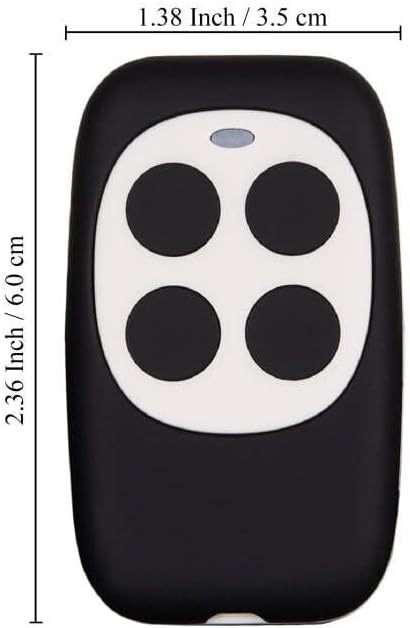
Figure 8: Physical dimensions of the XIHADA Universal Remote.
Customer Support
For any questions regarding compatibility, programming, or troubleshooting that are not covered in this manual, please do not hesitate to contact us.
Contact Method: Please reach out to us via Amazon email. We aim to respond to all inquiries within 24 hours.
While specific warranty details are not provided in this manual, please retain your proof of purchase for any potential support claims.