
1. Product Overview
The ABLEGRID AC DC Adapter is a replacement power supply designed to provide reliable and efficient charging for your Philips NL9206AD-4 BeardTrimmer 7300 Shaver and other compatible devices. This adapter features a wide input voltage range (100-240VAC) for global use and incorporates multiple safety protections to ensure the longevity of both the adapter and your device.
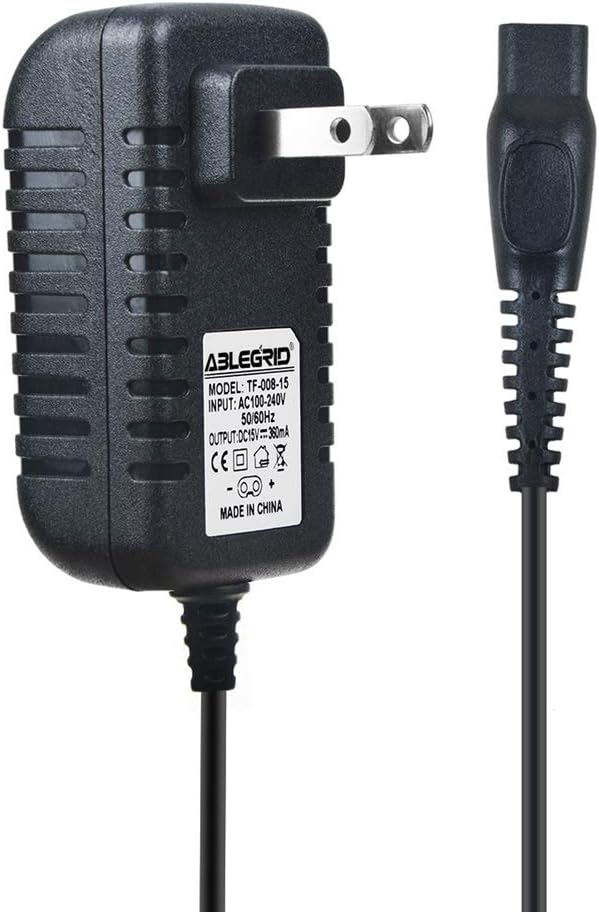
Image 1.1: The ABLEGRID AC DC Adapter, showing the main adapter unit and the connected power cord with its specialized connector.
Key Features:
- Wide Input Voltage: 100-240VAC 50/60Hz, suitable for worldwide use.
- Safety Protections: Equipped with Over Voltage Output Protection (OVP), Over Current Output Protection (OCP), and Short Circuit Output Protection (SCP).
- Compatibility: Specifically designed for Philips NL9206AD-4 BeardTrimmer 7300 Shaver, and other Philips trimmers/shavers with the same charging port.
- Durable Design: Tested units in great working condition.

Image 1.2: Visual representation of the multiple protection features of the ABLEGRID adapter, including temperature, over-charging, over-voltage, and short-circuit protection.
2. Setup
Before using your ABLEGRID AC DC Adapter, please ensure you have the correct device and a suitable power outlet.
Initial Setup Steps:
- Verify Compatibility: Confirm that your Philips BeardTrimmer or Shaver model is NL9206AD-4 or another compatible model that uses the same charging port as shown in the product images.
- Inspect Adapter: Before first use, visually inspect the adapter and its cord for any signs of damage. Do not use if damaged.
- Prepare Device: Ensure your Philips device is clean and dry before connecting the adapter.

Image 2.1: This image displays various power adapter interfaces, with the correct barrel connector type for the Philips shaver highlighted, ensuring users select the appropriate adapter.
3. Operating Instructions
Using the ABLEGRID AC DC Adapter is straightforward. Follow these steps for safe and effective charging.
Charging Your Device:
- Connect to Device: Insert the specialized connector of the ABLEGRID adapter firmly into the charging port of your Philips BeardTrimmer or Shaver.
- Plug into Outlet: Plug the AC adapter into a standard wall outlet (100-240V).
- Monitor Charging: Your device should indicate that it is charging (e.g., a charging light or display icon). Refer to your Philips device's manual for specific charging indicators.
- Disconnect: Once your device is fully charged, first unplug the adapter from the wall outlet, then disconnect the connector from your device.

Image 3.1: The ABLEGRID adapter shown connected to a Philips shaver, illustrating its use for charging. Other compatible shaver models are visible in the background.
Note: The adapter is designed for efficient charging. Actual charging speed may vary depending on the device's battery level and model.
4. Maintenance
Proper care and maintenance will extend the life of your ABLEGRID AC DC Adapter.
Care Instructions:
- Keep Dry: Do not expose the adapter to water or excessive moisture.
- Clean Gently: Disconnect the adapter from power before cleaning. Use a soft, dry cloth to wipe the surface. Do not use liquid cleaners or aerosols.
- Store Properly: When not in use, store the adapter in a cool, dry place, away from direct sunlight and extreme temperatures. Avoid tightly winding the cord.
- Avoid Stress: Do not pull on the cord to unplug the adapter from the wall or device. Always grasp the plug or connector directly.
5. Troubleshooting
If you encounter issues with your ABLEGRID AC DC Adapter, refer to the following common problems and solutions.
Common Issues and Solutions:
| Problem | Possible Cause | Solution |
|---|---|---|
| Device not charging. | Adapter not fully plugged in; device not compatible; faulty outlet; damaged adapter/cord. | Ensure adapter is fully inserted into both device and wall outlet. Verify device compatibility. Try a different wall outlet. Inspect adapter for damage; if damaged, discontinue use. |
| Adapter feels warm during use. | Normal operation; excessive load. | A slight warmth is normal. If it becomes excessively hot or emits smoke/smell, immediately unplug and discontinue use. Ensure proper ventilation around the adapter. |
| Device charges slowly. | Device battery condition; background processes on device. | Ensure the device is not being used heavily while charging. Battery degradation over time can affect charging speed. |
If the problem persists after trying these solutions, please contact ABLEGRID customer support.
6. Specifications
Detailed technical specifications for the ABLEGRID AC DC Adapter.
| Feature | Detail |
|---|---|
| Brand | ABLEGRID |
| Model | Compatible with Philips NL9206AD-4 BeardTrimmer 7300 Shaver |
| Input Voltage | 100-240VAC, 50/60Hz |
| Connectivity Technology | DC Barrel |
| Connector Type | Barrel Connector |
| Compatible Devices | Beard Trimmer/Shaver (Philips NL9206AD-4 BeardTrimmer 7300 Shaver, other compatible Philips trimmers and shavers with the same charging port) |
| Included Components | 2-Pin Power Cord |
| Special Feature | Travel-friendly design |
| Country of Origin | China |
7. Warranty and Support
This product is from a small business brand, ABLEGRID. For any inquiries or support, please refer to the seller's return policy and contact information provided at the point of purchase.
Return Policy:
Typically, a 30-day return/replacement policy applies. Please check the specific terms with your retailer at the time of purchase.
Contacting Support:
For technical assistance or warranty claims, please reach out to the seller directly through the platform where the product was purchased. Provide your order number and a detailed description of the issue.