
1. Introduction
Thank you for choosing the Naweisz NP3005 30V 5A DC Power Supply. This precision adjustable regulated switching power supply is designed for a wide range of applications including electronic maintenance, laboratory work, scientific research, teaching, and DIY projects. It features a 3-digital LED display for clear readings of voltage and current, along with automatic conversion between Constant Voltage (CV) and Constant Current (CC) modes. This manual provides essential information for safe and efficient operation of your device.
2. Safety Information
Please read and understand all safety instructions before operating the device. Failure to follow these instructions may result in electric shock, fire, or damage to the product.
- Always connect the power supply to a grounded outlet.
- Do not operate the device in wet or damp conditions.
- Ensure proper ventilation to prevent overheating. Do not block the cooling fan or vents.
- Avoid short-circuiting the output terminals.
- Do not attempt to open or modify the power supply. Refer all servicing to qualified personnel.
- Disconnect power before making any connections or disconnections to the output terminals.
3. Product Overview
The Naweisz NP3005 DC Power Supply is designed for ease of use and reliability. Below are the key components and features:
Key Features:
- Adjustable Output: 0-30 Volts and 0-5 Amps.
- 3-Digital LED Display: Bright and easy-to-read display with 0.1V and 0.01A resolution.
- CC & CV Auto Conversion: Automatically switches between constant voltage and constant current modes based on load changes.
- High Quality & Stability: Features a high-quality circuit board, built-in cooling fan with thermo-sensor, and two heat sinks for stable output and prolonged life.
- Multiple Protections: Includes anti-reverse connection, limit current protection, thermal protection, voltage overload protection, and short-circuit protection.
Front Panel Components:

Figure 1: Front Panel Layout. This image illustrates the front panel of the Naweisz NP3005 DC Power Supply, highlighting the Voltage Output Display, Current Output Display, C.V. Constant Indicator Light, C.C. Constant Indicator Light, Output Voltage Fine adjustment knob, Output Current Fine adjustment knob, Output Voltage Coarse adjustment knob, Output Current Coarse adjustment knob, and the Power Switch.
Rear Panel Components:

Figure 2: Rear Panel Layout. This image displays the rear panel of the Naweisz NP3005 DC Power Supply, showing the Cooling Fan, AC Power Input, and Fuse Box.
4. Setup
Follow these steps to set up your Naweisz NP3005 DC Power Supply:
- Unpack: Carefully remove the power supply and all accessories from the packaging. Verify that all components listed in the package contents are present.
- Placement: Place the power supply on a stable, level surface with adequate ventilation. Ensure that the cooling fan and air vents are not obstructed.
- Power Connection: Connect the provided US power cord to the AC Power Input on the rear panel of the power supply, then plug the other end into a grounded electrical outlet.
- Output Leads: Connect the 4mm Alligator Clip Leads (red for positive, black for negative) to the corresponding output terminals on the front panel. Ensure connections are secure.
- Initial Power On: Before connecting any load, turn on the power supply using the Power Switch on the front panel. The LED display should illuminate.
5. Operating Instructions
Operating the Naweisz NP3005 involves adjusting voltage and current to meet your application's requirements.
Adjusting Voltage and Current:
- Power On: Ensure the power supply is turned on.
- Set Voltage: Use the Output Voltage Coarse knob for large adjustments and the Output Voltage Fine knob for precise adjustments to set the desired output voltage. Observe the Voltage Output Display.
- Set Current Limit: Use the Output Current Coarse knob for large adjustments and the Output Current Fine knob for precise adjustments to set the desired current limit. Observe the Current Output Display. It is recommended to set the current limit before connecting the load to prevent damage.
- Connect Load: Once voltage and current limits are set, connect your device or circuit to the output leads.
- Constant Voltage (CV) and Constant Current (CC) Modes:
- When the output voltage is stable and the current drawn by the load is below the set current limit, the power supply operates in Constant Voltage (CV) mode. The C.V. indicator light will be illuminated.
- If the load attempts to draw more current than the set limit, the power supply will automatically switch to Constant Current (CC) mode. The output voltage will decrease to maintain the set current, and the C.C. indicator light will be illuminated.
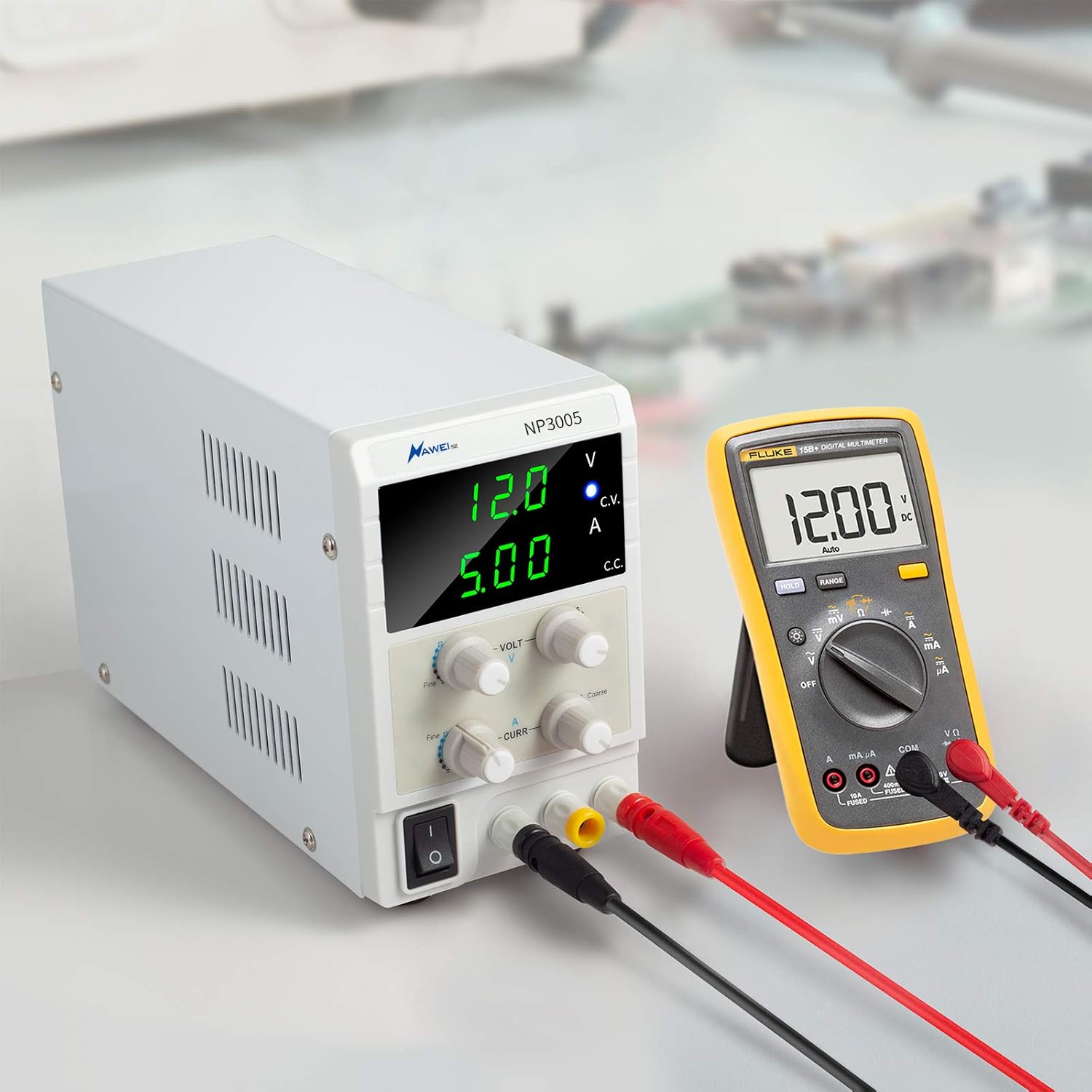
Figure 3: Power Supply in Operation. This image shows the Naweisz NP3005 DC Power Supply actively providing power, with its output connected to a multimeter to demonstrate voltage and current measurement during operation.
6. Maintenance
Proper maintenance ensures the longevity and reliable operation of your power supply.
- Cleaning: Disconnect the power supply from the main power source before cleaning. Use a soft, dry cloth to wipe the exterior. Do not use abrasive cleaners or solvents.
- Ventilation: Regularly check that the cooling fan and air vents are free from dust and debris. A built-in cooling fan with a thermo-sensor helps maintain optimal operating temperature.
- Storage: When not in use for extended periods, store the power supply in a cool, dry place away from direct sunlight and extreme temperatures.
7. Troubleshooting
If you encounter issues with your Naweisz NP3005, refer to the table below for common problems and solutions.
| Problem | Possible Cause | Solution |
|---|---|---|
| No power, display off | Power cord not connected, power switch off, blown fuse. | Check power cord connection. Ensure power switch is ON. Check and replace fuse if necessary (refer to rear panel for fuse specifications). |
| No output voltage/current | Output leads not connected correctly, voltage/current set to zero, internal protection triggered. | Ensure output leads are securely connected. Adjust voltage and current knobs to desired values. Disconnect load, power cycle the unit, and re-test. |
| Output voltage/current unstable | Loose connections, faulty load, power supply operating near its limits. | Check all connections for tightness. Test with a different load. Ensure the load is within the power supply's 30V/5A limits. |
| Overload/Short-circuit protection activates frequently | Load drawing excessive current, short circuit in the load, current limit set too low. | Verify the load's current requirements. Check the load for any short circuits. Increase the current limit if appropriate for the load. |
| Display readings differ from external multimeter | Minor calibration differences, external meter inaccuracy. | Small discrepancies are normal. For critical applications, rely on a calibrated external multimeter. If the difference is significant, contact support. |
8. Specifications
Below are the technical specifications for the Naweisz NP3005 DC Power Supply:
| Feature | Specification |
|---|---|
| Model Number | NP3005 |
| Output Voltage | 0-30V DC (Adjustable) |
| Output Current | 0-5A DC (Adjustable) |
| Display Type | 3-Digital LED Display |
| Voltage Resolution | 0.1V |
| Current Resolution | 0.01A |
| Maximum Power | 150 Watts |
| Input Voltage | 100-120Vac (US) / 220-240Vac (EU/UK) (Note: Check specific unit for input voltage range) |
| Cooling | Built-in fan with thermo-sensor |
| Protections | Anti-reverse connection, limit current, thermal, voltage overload, short-circuit |
| Dimensions (approx.) | 22.6 cm (L) x 8.2 cm (W) x 13.8 cm (H) |
| Item Weight | 200 g (0.44 lbs) |
| Material | Metal and Plastic |
| Included Accessories | 1* DC bench power supply host, 1* 4mm Alligator Clip Leads with Banana Plug (20 inch), 1* US power cord, 1* user manual |
9. Warranty & Support
Naweisz is committed to providing high-quality products and customer satisfaction.
- Warranty: This product comes with a 36-month warranty from the date of purchase.
- Returns: Enjoy a 30-day free return period.
- Technical Support: Lifetime technical support is available for this product.
- Contact: For warranty claims, technical assistance, or any questions, please contact Naweisz customer service through your original purchase platform or visit the official Naweisz website for contact details.


