Introduction
This manual provides detailed instructions for the NEEWER NW760 TTL Flash Speedlite. Please read this manual thoroughly before using the product to ensure proper operation and to maximize its performance. Keep this manual for future reference.
Safety Information
- Do not disassemble or modify the flash unit.
- Keep the unit dry. Do not expose to rain or moisture.
- Do not touch the flash tube after firing, as it can be hot.
- Use only specified batteries (AA batteries).
- Keep out of reach of children.
Product Overview
The NEEWER NW760 TTL Flash Speedlite is a versatile lighting solution for photographers, offering powerful output and flexible control. It features a 76Ws maximum output and maintains a consistent 5600K±200K cool daylight color temperature. The flash supports automatic or manual flash coverage adjustment for 20-200mm focal lengths, expandable to 14mm with the built-in diffusion panel.

Figure 1: NEEWER NW760 TTL Flash Speedlite and its retail packaging.
Key Features:
- Potent Camera Flash: 76Ws output, stable 5600K±200K daylight for consistent brightness and color.
- Versatile Flash Modes: TTL (auto), M (manual), MULTI (stroboscopic) with 81 output levels.
- Adjustable Flash Angles & Effects: -7-120° tilt, 360° rotation, built-in reflector, and wide-angle diffusion panel.
- Integrated 2.4G Wireless Q System: Supports 4 master groups, 5 slave groups, 32 channels, and 99 IDs, compatible with QPro-N TTL Trigger.
- Nikon Camera Compatibility: Designed for various Nikon models, includes USB Type-C port and PC sync jack.
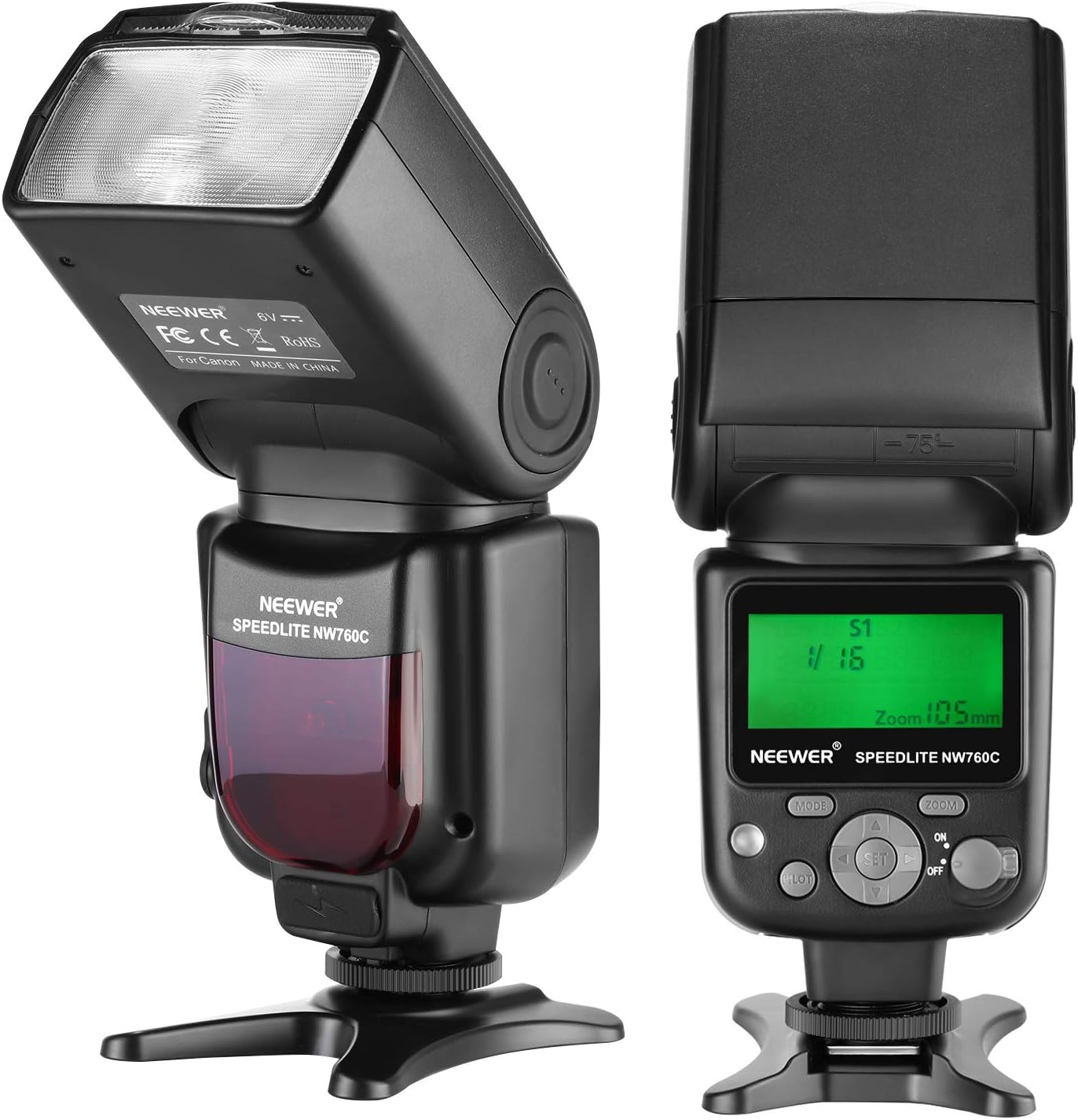
Figure 2: Front and rear views of the flash unit, highlighting the control panel and LCD display.
Setup
1. Battery Installation
The NW760 Speedlite is powered by four AA batteries. Ensure the batteries are inserted with correct polarity.
- Open the battery compartment cover located on the side of the flash unit.
- Insert four AA batteries according to the polarity indicators (+/-).
- Close the battery compartment cover securely.

Figure 3: Detailed views of the battery compartment, hot shoe, and external ports.
2. Mounting to Camera
The flash unit can be mounted directly onto your camera's hot shoe.
- Slide the flash unit's mounting foot into the camera's hot shoe.
- Tighten the locking ring or lever on the flash unit to secure it in place.

Figure 4: The flash unit securely mounted on a camera hot shoe.
Operating Instructions
1. Power On/Off
To power on the flash, slide the ON/OFF switch to the 'ON' position. To power off, slide it to 'OFF'.
2. Flash Modes
Press the MODE button to cycle through the available flash modes:
- TTL (Through-The-Lens): Automatic flash exposure control. The flash output is automatically adjusted based on the camera's metering system.
- M (Manual): Allows manual adjustment of flash output from 1/1 to 1/128 power. Use the dial or buttons to set the desired power level.
- MULTI (Stroboscopic): Fires a series of rapid flashes during a single exposure, ideal for capturing multiple movements of a subject.
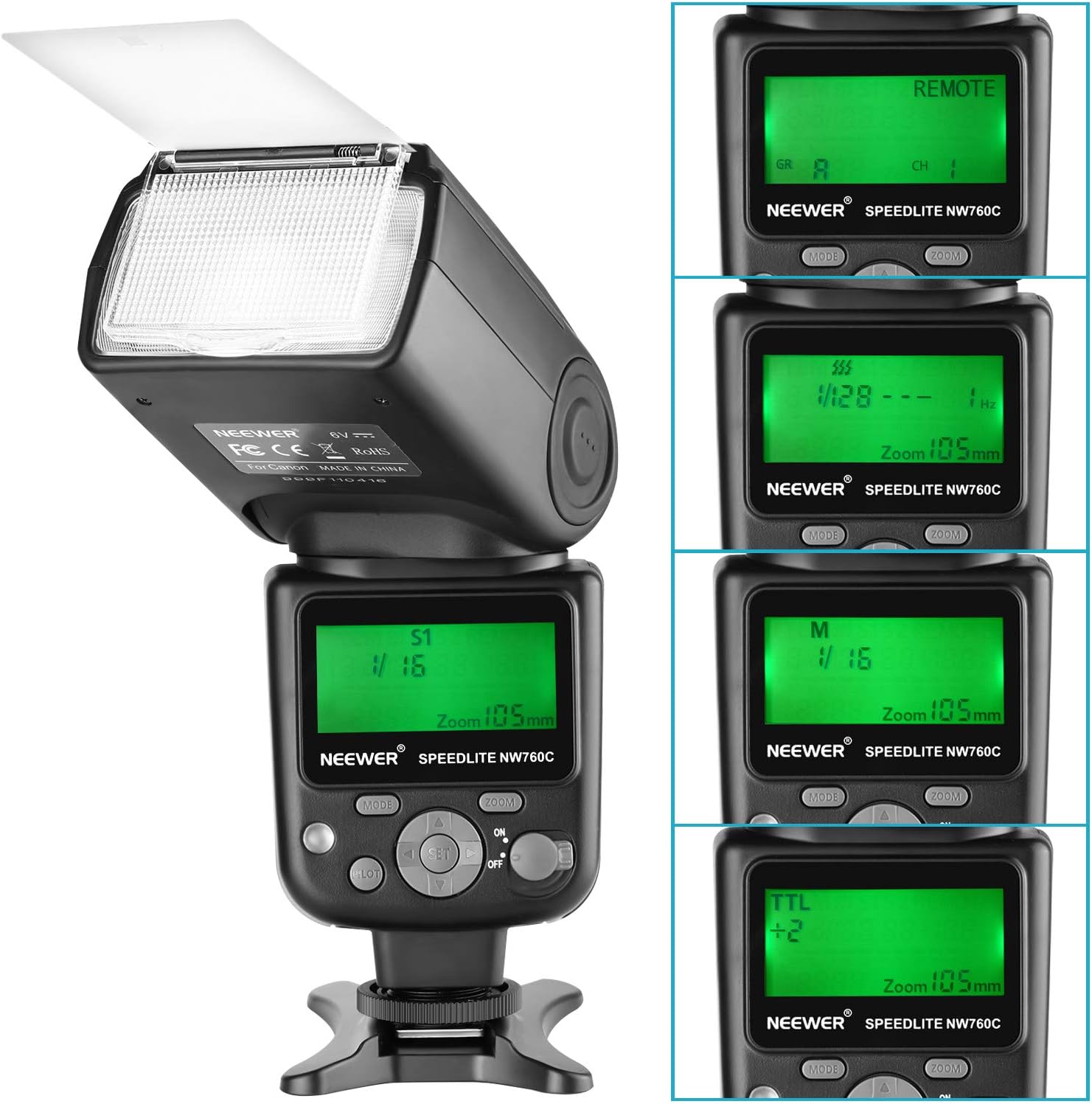
Figure 5: Various LCD screen displays illustrating different flash modes (TTL, M, MULTI) and settings.
3. Zoom Function
The flash head's zoom position can be adjusted automatically or manually to match the lens's focal length, covering 20-200mm.
- In TTL mode, the zoom typically adjusts automatically.
- In M or MULTI mode, press the ZOOM button and use the dial to manually set the desired focal length.
4. Adjustable Flash Head
The flash head can be tilted and rotated for bounce flash photography, allowing you to direct light off ceilings or walls for softer illumination.
- Tilt: The flash head can tilt from -7° to 120° vertically.
- Rotation: The flash head can rotate 360° horizontally.

Figure 6: Illustration of the flash head's tilting capability for bounce flash.
5. Built-in Diffusion Panel and Reflector
The NW760 includes a wide-angle diffusion panel and a reflector card, which can be pulled out from the flash head.
- Diffusion Panel: Pull out the wide-angle diffusion panel to soften the light and expand flash coverage to 14mm.
- Reflector Card: Pull out the reflector card to create a catchlight in the subject's eyes when using bounce flash.

Figure 7: The flash head with the wide-angle diffusion panel extended.
6. 2.4G Wireless Q System
The integrated 2.4G wireless system allows the NW760 to function as a master or slave unit with compatible NEEWER QPro-N TTL triggers.
- Set the flash to wireless mode (usually indicated by a wireless icon on the LCD).
- Configure the group (A, B, C, D), channel (1-32), and ID (01-99) to match your trigger and other flash units.
- Refer to your QPro-N TTL trigger manual for detailed wireless setup instructions.
Maintenance
- Clean the flash unit regularly with a soft, dry cloth. Do not use solvents or abrasive cleaners.
- Remove batteries if the flash will not be used for an extended period to prevent leakage.
- Store the flash in a cool, dry place, away from direct sunlight and extreme temperatures.
Troubleshooting
Flash Not Firing:
- Check battery levels and ensure they are inserted correctly.
- Ensure the flash is securely mounted on the camera's hot shoe.
- Verify camera and flash settings are compatible (e.g., flash enabled in camera menu).
- If using wireless, confirm group, channel, and ID settings match between trigger and flash.
Incorrect Exposure:
- In TTL mode, ensure camera metering is appropriate for the scene.
- In Manual mode, adjust flash power output.
- Check flash compensation settings on both the flash and camera.
Flash Overheating:
- Continuous high-power flashes can cause overheating. Allow the flash to cool down.
- The flash may have a built-in thermal protection system that temporarily disables firing.
Specifications
| Feature | Specification |
|---|---|
| Brand | NEEWER |
| Model Number | 10089084 (NW760) |
| Max Output | 76Ws |
| Color Temperature | 5600K±200K |
| Flash Modes | TTL, M, MULTI |
| Flash Coverage | 20-200mm (14mm with wide panel) |
| Tilt Angle | -7° to 120° |
| Rotation Angle | 360° |
| Power Source | 4x AA Batteries |
| Full Power Flashes | Up to 230 |
| Wireless System | Integrated 2.4G Q System |
| Compatible Mountings | Nikon |
| Connectivity Technology | Wired, Wireless (USB Type-C, PC Sync Jack) |
| Item Weight | 1.06 pounds |
| Package Dimensions | 8.35 x 3.62 x 2.76 inches |
Warranty and Support
For warranty information and technical support, please refer to the official NEEWER website or contact NEEWER customer service directly. Keep your purchase receipt as proof of purchase.
Official NEEWER Website: www.neewer.com


