
Introduction
This manual provides instructions for the assembly, operation, and maintenance of the SHW L-Shaped Office Computer Corner Table, Model OD-41L-E. This desk is designed to optimize space for various uses, including office work and gaming setups.
Setup
The SHW L-Shaped Office Computer Corner Table requires assembly. Step-by-step instructions and all necessary hardware are included. It is recommended that two people assemble the desk for ease and safety. The assembly process is designed to be straightforward, with clearly labeled parts.

Image showing the dimensions of the SHW L-Shaped Office Computer Corner Table: 51 inches (129.5 cm) wide on each side, 19 inches (48.3 cm) deep, and 28.5 inches (72.4 cm) high. The overall depth from the corner to the front edge is 44 inches (111.8 cm).

Image of the assembled SHW L-Shaped Office Computer Corner Table in an office setting, demonstrating its L-shape and space-saving design. A laptop and office chair are shown with the desk.
Operating
The SHW L-Shaped Office Computer Corner Table is designed for versatile use in home offices, dorm rooms, or gaming setups. Its L-shape provides ample surface area for multiple monitors, peripherals, and work materials. For user comfort, the desk includes a footrest bar. Adjustable glides are integrated into the desk legs to ensure stability on uneven floor surfaces.

Image showing the SHW L-Shaped Office Computer Corner Table from a front-side angle, with a laptop, lamp, and plant on its surface, illustrating typical use.
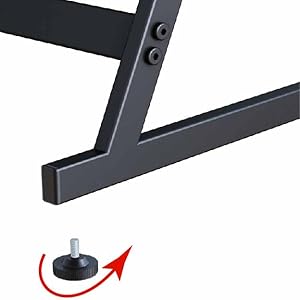
Close-up image of an adjustable glide on the desk leg, used for leveling the desk on uneven floors.
Maintenance
To maintain the SHW L-Shaped Office Computer Corner Table, follow these guidelines:
- For surfaces made of engineered wood, wipe with a damp cloth.
- Regularly dust metal and wooden parts to keep them clean.
- Avoid using harsh chemicals or abrasive cleaners that may damage the finish.
Troubleshooting
This section addresses common concerns and safety information for the SHW L-Shaped Office Computer Corner Table.
- Stability Issues: If the desk wobbles, adjust the integrated glides on the bottom of the legs to stabilize the desk on uneven floors.
- Tipping Prevention: Ensure the desk is properly positioned and stable to prevent accidental tipping.
- Weight Limit: Do not exceed the recommended weight limit for the desk to ensure structural integrity and safety. Overloading the desk can lead to damage or instability.
Specifications
The following are the technical specifications for the SHW L-Shaped Office Computer Corner Table, Model OD-41L-E.
| Feature | Detail |
|---|---|
| Brand | SHW |
| Model Number | OD-41L-E |
| Shape | L-Shape |
| Desk Design | Computer Desk |
| Product Dimensions (D x W x H) | 129.5D x 129.5W x 72.4H Centimetres (51" W x 19" D x 28.5" H) |
| Colour | Espresso |
| Style | Modern |
| Base Material | Metal (Alloy Steel) |
| Top Material Type | Engineered Wood |
| Finish Type | Powder Coated |
| Special Features | Adjustable Glides, Footrest |
| Item Weight | 16 Kilograms |
| Assembly Required | Yes |
| Recommended People for Assembly | 2 |
| Product Care Instructions | Wipe with Damp Cloth for Surfaces, Dust Metal and Wooden Parts Regularly |
Warranty
The SHW L-Shaped Office Computer Corner Table comes with a 1-year warranty against manufacturer defects. This warranty is provided by the exclusive seller, EP Family Direct.
Support
For product support or inquiries, please contact the manufacturer:
SHWSanta Fe Springs, CA 90670, US
Additional information and products can be found at the official SHW Store: SHW Store on Amazon.ca