
1. Introduction
Thank you for purchasing the Mistral Stand Fan MSF040. This manual provides essential information for the safe and efficient operation, assembly, maintenance, and troubleshooting of your new fan. Please read these instructions thoroughly before use and retain them for future reference.

Figure 1: Fully assembled Mistral Stand Fan MSF040. This image displays the fan's overall design, including the circular base, adjustable stand pole, and the fan head with its protective grille.
2. Important Safety Instructions
To reduce the risk of fire, electric shock, or injury, always follow these basic safety precautions:
- Read all instructions before using this fan.
- Ensure the power supply voltage matches the rating label on the fan.
- Do not operate any fan with a damaged cord or plug. If the cord or plug is damaged, contact qualified service personnel for repair or replacement.
- Unplug the fan from the power outlet when not in use, before cleaning, or before moving it.
- Do not immerse the fan, plug, or cord in water or other liquids.
- Keep the fan out of reach of children and pets. Close supervision is necessary when the fan is used near children.
- Do not insert fingers or any objects through the grille when the fan is operating.
- Place the fan on a stable, level surface to prevent it from tipping over.
- Do not use the fan in wet or damp locations, such as bathrooms or laundry areas.
- Do not block air openings or operate near curtains or other materials that could block airflow.
3. Package Contents
Upon opening the package, please ensure all the following components are present:
- Fan Motor Unit with Rear Grille
- Fan Blade
- Front Grille
- Grille Locking Nut
- Blade Cap
- Stand Pole (Upper and Lower sections)
- Round Base
- Base Fixing Screw
- Power Cord (integrated)
- User Manual
4. Assembly Instructions
Follow these steps to assemble your Mistral Stand Fan MSF040:
- Assemble the Base: Place the stand pole onto the round base. Secure it from underneath the base using the provided base fixing screw. Ensure it is tightened firmly.
- Attach the Motor Unit: Insert the fan motor unit onto the top of the stand pole. Secure it with the pole locking screw, if present, or by twisting until it clicks into place.
- Install the Rear Grille: Place the rear grille onto the motor unit, aligning the notches. Secure it with the grille locking nut, turning clockwise until tight.
- Mount the Fan Blade: Slide the fan blade onto the motor shaft, ensuring the pin on the shaft aligns with the groove on the blade. Secure it with the blade cap, turning counter-clockwise until tight.
- Attach the Front Grille: Position the front grille over the rear grille, aligning the clips. Secure the front grille by pressing the clips firmly around the edge until it is fully closed.
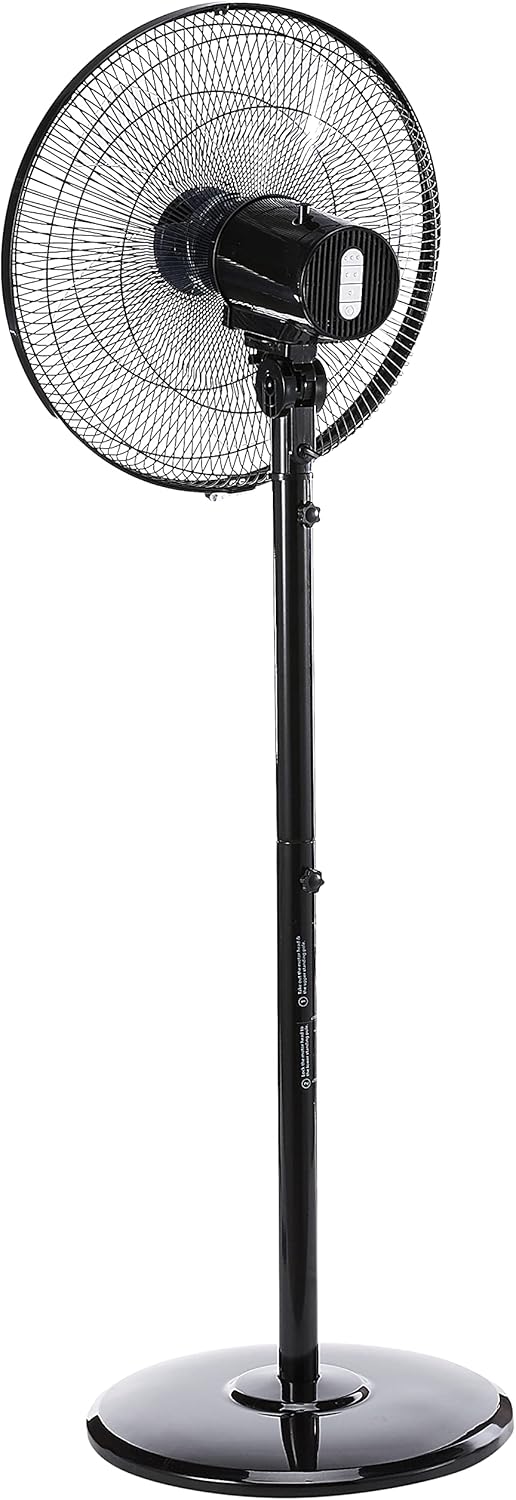
Figure 2: Side view of the fan, illustrating the adjustable height feature of the stand pole. The pole can be extended or retracted to suit different user preferences.
5. Operating Instructions
Once assembled, your Mistral Stand Fan MSF040 is ready for operation:
- Power Connection: Insert the power plug into a suitable electrical outlet.
- Power On/Off: Use the power button on the control panel to turn the fan on or off.
- Speed Selection: The fan offers 3 speed selections. Press the speed control buttons on the control panel to cycle through low, medium, and high settings.
- Oscillation: To activate the left and right oscillation, press the oscillation button on the control panel. Press it again to stop oscillation.
- Tilt Adjustment: The fan head can be tilted 30° up or down. Gently adjust the fan head to your desired angle.
- Height Adjustment: The stand pole features a convertible height mechanism. Loosen the height adjustment knob on the stand pole, adjust to the desired height, and then tighten the knob firmly.

Figure 3: Close-up view of the fan's control panel, featuring tactile buttons for power, speed selection, and oscillation.
6. Maintenance and Cleaning
Regular cleaning and maintenance will ensure optimal performance and extend the lifespan of your fan:
- Always unplug the fan from the power outlet before cleaning.
- Wipe the exterior surfaces of the fan with a soft, damp cloth. Do not use abrasive cleaners or solvents.
- For thorough cleaning of the fan blades, the front grille can be carefully removed. Refer to the assembly instructions in reverse order for safe disassembly and reassembly.
- Ensure all parts are completely dry before plugging the fan back in and operating it.
- Store the fan in a cool, dry place when not in use for extended periods.
7. Troubleshooting
If you encounter any issues with your fan, please refer to the following common problems and solutions:
- Fan does not turn on:
- Check if the power cord is securely plugged into a working electrical outlet.
- Ensure the power button on the control panel is pressed.
- Verify that the household circuit breaker or fuse has not tripped.
- Fan makes unusual noise:
- Unplug the fan and check for any obstructions (e.g., loose debris, wires) in the fan blades or grilles.
- Ensure all parts are securely assembled and tightened.
- Fan does not oscillate:
- Ensure the oscillation button on the control panel has been pressed.
If the problem persists after checking these points, please contact customer support.
8. Specifications
| Feature | Detail |
|---|---|
| Brand | MISTRAL |
| Model | MSF040 |
| Electric Fan Design | Floor Fan / Pedestal Fan |
| Blade Type | 5 ABS blade |
| Speed Selection | 3 speeds |
| Oscillation | Left & right oscillation |
| Tilt Adjustment | 30° up & down |
| Height Adjustment | Convertible height |
| Controller Type | Button Control (Tactile) |
| Material | Plastic |
| Colour | Black |
| Power Source | Corded Electric |
| Item Weight | 5.35 Kilograms |
| Included Components | Cord |

Figure 4: Close-up of the power plug, indicating the corded electric power source for the fan.
9. Warranty and Support
Your Mistral Stand Fan MSF040 comes with a 2 Year Local (Singapore) Warranty. Please retain your proof of purchase for warranty claims.
For technical support, service, or warranty inquiries, please contact Mistral customer service through their official channels. Refer to the product packaging or the official Mistral website for contact details.


