
1. Introduction
The Yakima Overhaul HD is a heavy-duty, adjustable truck bed rack system designed for transporting various cargo, including kayaks, surfboards, bikes, lumber, and other equipment. Constructed from robust aluminum with a durable powder-coat finish, it offers a high carrying capacity and features integrated tie-down points and T-slot attachments for secure loading. The adjustable height design allows for customization to suit different load sizes and vehicle configurations.
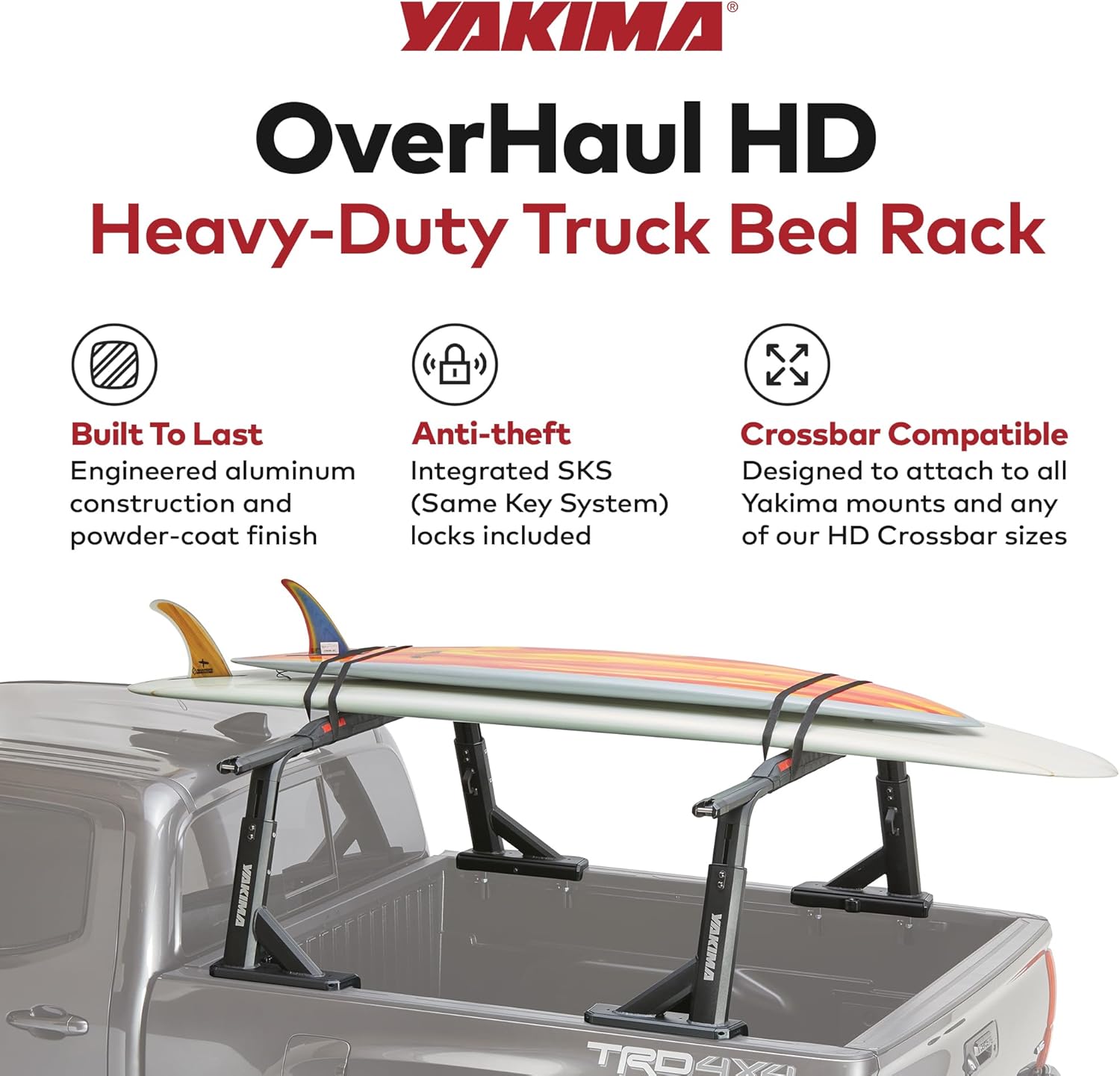
Image: Yakima Overhaul HD Truck Bed Rack with surfboards, highlighting its robust design and cargo-carrying capabilities.
2. Components
The Yakima Overhaul HD system includes the following main components:
- Vertical Uprights (Towers)
- Horizontal Crossbars (HD Bars - sold separately)
- Bed Rail Bases
- Mounting Hardware (bolts, washers, nuts, wrenches)
- Integrated SKS (Same Key System) Locks
- Built-in Bottle Opener (integrated into towers)

Image: All components of the Yakima Overhaul HD Truck Bed Rack, including towers, bases, and various hardware pieces.
3. Setup (Installation)
Follow these steps for proper installation of your Yakima Overhaul HD Truck Bed Rack. Refer to the detailed instruction manual included with your product for specific diagrams and torque specifications.
3.1 Unboxing and Preparation
- Carefully unbox all components. Verify that all parts listed in the manual are present.
- Ensure all nuts and bolts are labeled for easy identification during assembly.
- Clean the truck bed rails thoroughly where the rack will be mounted.
3.2 Crossbar Assembly (HD Bars sold separately)
- Use the included 4mm wrench to remove the end cap screws from one end of each HD Crossbar.
- Pop off the end caps.
- Slide two threaded plates into the bottom of each crossbar, ensuring the side with the scale is facing down.
- Replace the end caps and tighten the screws.
3.3 Bed Rail Base Installation
- Place a locking base on the driver's side and a non-locking base on the passenger's side of the truck bed rails.
- Loosely attach the clamps to the bases using the 10mm wrench, screws, and square washers. Do not fully tighten yet.
- Measure to ensure both front bases are the same distance from the cab.
- Space the clamps as wide apart as possible on each base.
- Tighten the clamps with the 10mm wrench.
3.4 Tower Installation
- Loosen the spring-loaded receivers on the bases using the 4mm and 6mm wrenches.
- Position one tower on each of the bases, with the long part of the tower facing towards the rear of the bed.
- Partially tighten the receivers to hold the towers in place.
- Grab one of your assembled HD Crossbars and slide the plates towards the middle.
- Set the crossbar onto the towers, plate side down.
- Measure to ensure the crossbar is centered on the truck.
- Slide the plates so they line up with the holes in the towers.
- Install the hardware (bolts, washers, nuts) and tighten with the 6mm wrench.
- Fully tighten the towers to the bases with the 6mm and 4mm wrenches.
- Repeat the process for the rear towers and crossbar.
3.5 Locking the Rack
- Attach the SKS locks to the lock posts on the bases.
- Use the key to lock down your rack, securing it to the truck bed.
3.6 Track Adapter Kit (for Toyota/Nissan Bed Tracks)
If your truck has factory-installed bed tracks (e.g., Toyota Tacoma/Tundra, Nissan Titan/Frontier), you will need the Yakima Bed Track Adapter Kit 1 (sold separately) for proper installation. Follow the instructions provided with the adapter kit.
Video: Yakima OutPost HD Truck Rack Installation. This video demonstrates the general installation process for Yakima HD truck racks.
Video: YAKIMA Bed Track Adapter Kit 1. This video provides instructions for installing the rack with a bed track adapter kit.
4. Operating Instructions
4.1 Adjusting Rack Height
The Overhaul HD features an adjustable height design. To adjust the height, loosen the appropriate fasteners on the towers, slide the towers to the desired height, and then securely tighten all fasteners. Ensure both towers are adjusted to the same height for stability.

Image: Close-up view of the adjustable height mechanism and integrated tie-down points on the Yakima Overhaul HD rack.
4.2 Securing Cargo
- Utilize the integrated tie-down points on the towers and crossbars to secure your cargo with straps or ropes.
- The T-slot attachments on the crossbars allow for mounting various Yakima accessories (sold separately) to further customize your hauling setup.
- Always ensure cargo is evenly distributed and securely fastened to prevent shifting during transit.

Image: A truck equipped with the Yakima Overhaul HD rack, demonstrating its use for transporting multiple surfboards securely.

Image: A truck with the Yakima Overhaul HD rack, configured to carry a kayak, showcasing its versatility for water sports equipment.
Video: Yakima- Overhaul HD Product Tour. This video highlights the key features and benefits of the Overhaul HD rack system.
5. Maintenance
- Regularly inspect all bolts, nuts, and clamps for tightness. Re-tighten as necessary, especially after initial installation and heavy use.
- Clean the rack periodically with mild soap and water to remove dirt, road grime, and salt. Rinse thoroughly and dry.
- Check the powder-coat finish for any signs of damage or wear. Touch up minor scratches to prevent corrosion.
- Lubricate moving parts, such as the height adjustment mechanisms and SKS locks, with a silicone-based lubricant to ensure smooth operation.
6. Troubleshooting
6.1 Rack Feels Loose or Unstable
- Ensure all mounting hardware (clamps, bolts, nuts) is tightened to the specified torque.
- Verify that the bed rail bases are correctly positioned and secured on the truck bed rails.
- Confirm that the towers are properly seated in the bases and their fasteners are tight.
6.2 Difficulty Adjusting Height
- Ensure all height adjustment fasteners are sufficiently loosened before attempting to slide the towers.
- Clean any debris or dirt from the sliding mechanisms.
- Apply a silicone-based lubricant to the sliding surfaces if movement is stiff.
6.3 SKS Locks Not Functioning
- Ensure the key is fully inserted and turned correctly.
- Check for any obstructions or debris in the lock mechanism.
- Apply a small amount of graphite lubricant to the lock cylinder if it is stiff.
7. Specifications
| Model Name | Overhaul HD |
| Model Number | 8001151 |
| Color | Black |
| Material | Aluminum |
| Item Dimensions (L x W x H) | 27 x 19.25 x 15 inches |
| Item Weight | 50.5 Pounds |
| Load Capacity (On-Road) | 500 Pounds |
| Load Capacity (Off-Road) | 300 Pounds |
| Mounting Type | Clamp Mount, Truck Bed Mount |
| Is Foldable | No |
| Included Components | Built-in Bottle Opener |

Image: Visual representation of the Yakima Overhaul HD rack, detailing its maximum load capacities and physical dimensions.
8. Warranty
The Yakima Overhaul HD Adjustable Truck Bed Rack is covered by a manufacturer's limited lifetime warranty. Please refer to the official Yakima website or your product registration for full warranty terms and conditions.
9. Support
For additional support, technical assistance, or to purchase replacement parts, please visit the official Yakima website or contact their customer service department. Ensure you have your product model number (8001151) and proof of purchase available when seeking support.


