
1. Introduction
This manual provides detailed instructions for the installation, operation, and maintenance of the EverSale Mean Well SP-240-12 Single Output Power Supply. This device is designed to provide a stable 12V DC output with a 240W capacity, featuring an active Power Factor Correction (PFC) function for enhanced efficiency. Please read this manual thoroughly before using the product to ensure safe and optimal performance.
2. Key Features
- Universal AC input / Full range compatibility.
- Built-in active Power Factor Correction (PFC) function.
- Protections: Short circuit, Overload, Over voltage, Over temperature.
- Forced air cooling by built-in DC fan (for SP-200 / 240 models).
- Built-in fan ON/OFF control for SP-240 model.
- 100% full load burn-in test for reliability.
- 3 years warranty.
3. Safety Information
Observe the following safety precautions to prevent injury or damage to the power supply and connected equipment:
- Electrical Hazard: This unit operates with high voltage. Do not open the casing or attempt to repair the unit. Refer all servicing to qualified personnel.
- Proper Grounding: Ensure the power supply is properly grounded to prevent electrical shock.
- Ventilation: Do not block ventilation openings. Ensure adequate airflow around the unit to prevent overheating.
- Environment: Install the unit in a dry, well-ventilated area, away from direct sunlight, heat sources, and moisture.
- Load Capacity: Do not exceed the specified output wattage (240W) or current (20A) to avoid damage.
- Input Voltage: Verify that the input voltage range matches your local power supply before connecting.
4. Product Overview

Figure 4.1: Front and top view of the Mean Well SP-240-12 power supply, showing the ventilation grille and terminal block for connections.
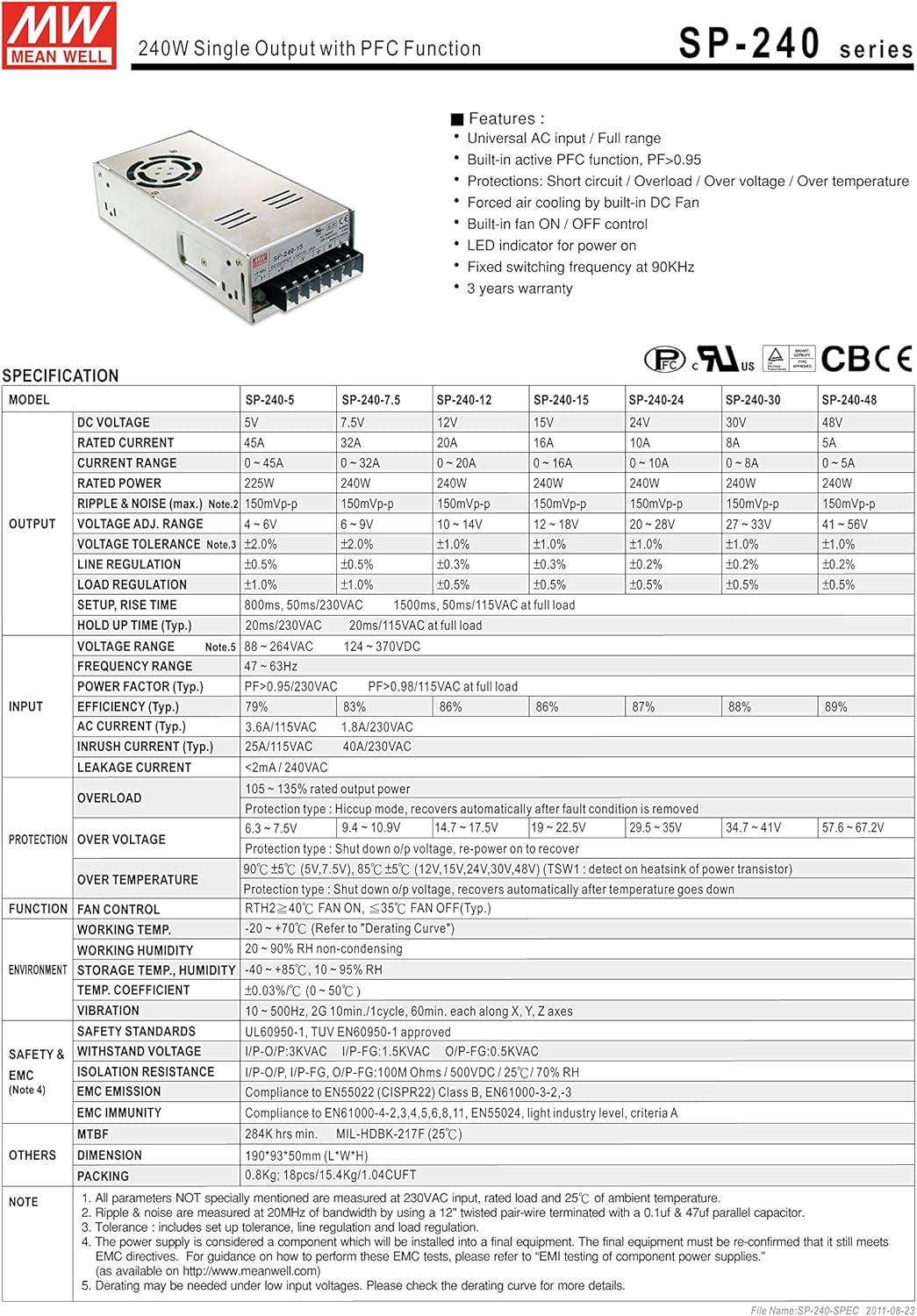
Figure 4.2: Detailed specification sheet for the Mean Well SP-240 series, including electrical characteristics, protection features, and environmental conditions.

Figure 4.3: Mechanical dimensions and internal block diagram of the Mean Well SP-240 series, illustrating component layout and circuit flow.
5. Setup Instructions
Follow these steps for proper installation of your SP-240-12 power supply:
- Mounting: Securely mount the power supply in a suitable enclosure or location, ensuring adequate space for ventilation around all sides.
- Input Wiring: Connect the AC input wires to the designated 'L' (Live), 'N' (Neutral), and 'FG' (Frame Ground) terminals. Ensure correct polarity and a secure connection.
- Output Wiring: Connect your DC load to the '+V' (Positive) and '-V' (Negative) output terminals. Observe correct polarity to prevent damage to your devices.
- Voltage Adjustment (Optional): If voltage adjustment is required, use a small screwdriver to carefully turn the 'V ADJ' potentiometer. Monitor the output voltage with a multimeter to ensure it is within the acceptable range for your application.
- Final Check: Before applying power, double-check all connections for security and correct polarity.
6. Operating Instructions
Once installed and wired correctly, operating the SP-240-12 power supply is straightforward:
- Power On: Apply AC power to the input terminals. The power supply will initiate operation.
- Monitoring: Observe the connected devices to ensure they are receiving stable power. The built-in fan will activate as needed to maintain optimal operating temperature.
- Power Off: Disconnect the AC input power to shut down the unit.
7. Maintenance
Regular maintenance helps ensure the longevity and reliable operation of your power supply:
- Cleaning: Periodically clean the exterior of the unit and ventilation openings to prevent dust accumulation, which can impede airflow and lead to overheating. Use a soft, dry cloth. Do not use liquid cleaners.
- Inspection: Regularly inspect all wiring connections for tightness and signs of wear or damage.
- Environment: Ensure the operating environment remains within the specified temperature and humidity ranges.
8. Troubleshooting
If you encounter issues with your power supply, refer to the following common problems and solutions:
- No Output Power:
- Check the AC input power connection.
- Verify that the input voltage is within the specified range.
- Ensure the output load is not exceeding the power supply's capacity. Disconnect the load and test the output voltage.
- Check for tripped circuit breakers or blown fuses in the input line.
- Output Voltage Fluctuates:
- Ensure the load is stable and not drawing intermittent current spikes.
- Check for loose connections at the output terminals.
- Overheating:
- Ensure adequate ventilation around the unit. Clear any obstructions from the fan or vents.
- Reduce the load if it is consistently near the maximum capacity.
If the problem persists after attempting these solutions, contact customer support.
9. Technical Specifications
| Specification | Value |
|---|---|
| Model Number | SP-240-12 |
| Output Voltage | 12 Volts |
| Output Current | 20 Amps |
| Output Wattage | 240 Watts |
| Input Voltage | Universal AC input / Full range |
| Cooling Method | Forced Air (Built-in DC fan) |
| Product Dimensions (L x W x H) | 7.83 x 3.9 x 1.97 inches |
| Item Weight | 2 pounds |
| UPC | 888777028539 |
| Compatible Devices | Personal Computer |
10. Warranty and Support
This EverSale Mean Well SP-240-12 Power Supply comes with a 3-year warranty from the date of purchase, covering defects in materials and workmanship under normal use.
For technical support, warranty claims, or any inquiries regarding your product, please contact the seller, Create Power, through your purchase platform or their official support channels. Please have your purchase details and model number ready when contacting support.