
FLYCAM B-FLCM-FLN-01
FLYCAM Flowline Starter Instruction Manual
Model: B-FLCM-FLN-01
Product Overview
The FLYCAM Flowline Starter is a body-worn camera support system designed to redistribute the weight of camera and gimbal setups from the arms and shoulders to the hips and back. This system enhances comfort and stability during prolonged shooting sessions, allowing for smoother, more dynamic camera movements.

Figure 1: Front and back view of the FLYCAM Flowline Starter on a mannequin, illustrating its design for weight distribution.
Key Features
- Weight Redistribution System: Breathable harness evenly distributes camera weight across the back, reducing arm and shoulder strain.
- Flexible 180° Top Bar Rotation: Allows smooth and dynamic camera movements from different angles.

Figure 2: The top bar of the Flowline Starter can rotate 180 degrees, providing flexibility for various shooting angles.
- Adjustable Support Rope: Compatible with camera and gimbal setups between 3kg to 7.5kg (6lb to 16lb).
- Spring Tension Adjustment: Customizable tension knob balances the load on the support rope for optimal stability.

Figure 3: Detail of the tension adjustment knob located on the back of the Flowline vest, used to fine-tune the support rope's tension.
- High-Quality Storage Bag: Includes a durable bag for protected transport and storage.

Figure 4: The included high-quality storage bag, designed to protect the Flowline Starter during transport.
Specifications
| Attribute | Value |
|---|---|
| Payload Capacity (Min - Max) | 3kg - 7.5kg (6lb - 16lb) |
| Support Arm Rotation | 180° |
| Flowline Weight (Complete) | 3.6kg / 8lb |
| Height (Mounted) | 100cm | 39.4inch |
| Height (Folded) | 64cm |
| Suspension Line Material | 3mm Nylon |
| Suspension Line Length (Fully Stretched) | 152.5cm | 60inch |
| Top Bar Length | 480mm |
| Waist Hip Strap Length (Min-Max) | 81cm - 125cm (32 inch - 49 inch) |
| Product Weight (without Packing) | 3.8kg / 8.3lb |
| Product Dimensions | 25 x 20 x 13 inches |
| Model Number | ((B-FLCM-FLN) |
| UPC | 713239961553 |
Note: Using Placid (FLCM-FLN-PLA) or Edge V1 (FLCM-EDGE-V1) with this Flowline model will impact the minimum and maximum payload capacities.

Figure 5: Payload capacity chart illustrating the supported weight ranges for various Flowline systems, including the Flowline Starter.
Setup Instructions
- Unpacking: Carefully remove all components from the storage bag. Verify that all parts listed in the "In the Box" section are present.
- Assembling the Vest:
- Unfold the vest and ensure all straps are untangled.
- Adjust the shoulder and waist straps to fit your body comfortably and securely. The vest should sit snugly on your hips and shoulders to effectively distribute weight.

Figure 6: The Flowline Starter vest is designed for comfortable and breathable body support, essential for proper weight distribution.
- Attaching the Top Bar:
- Insert the vertical support pole of the top bar into the designated slot on the back of the vest.
- Secure the pole using the locking mechanism, ensuring it is firmly in place and does not wobble.
- Connecting the Camera Setup:
- Attach the support rope's hook to the handle of your camera, cage, or gimbal setup. Ensure the connection point is robust and can support the weight.

Figure 7: The support hook easily attaches to the handle of your camera, cage, or gimbal setup.
- Initial Balance Adjustment:
- With the camera attached, use the spring tension adjustment knob on the back of the vest to balance the load. Turn the knob clockwise to increase tension for heavier setups and counter-clockwise to decrease tension for lighter setups.
- The goal is for the camera to feel weightless or nearly weightless in your hands, allowing for effortless vertical movement.
Operating Instructions
- Wearing the System:
- Once assembled and balanced, wear the Flowline Starter vest. Ensure all buckles are fastened and straps are adjusted for a snug fit.
- The system should feel comfortable, with the majority of the camera's weight supported by the vest, not your arms.
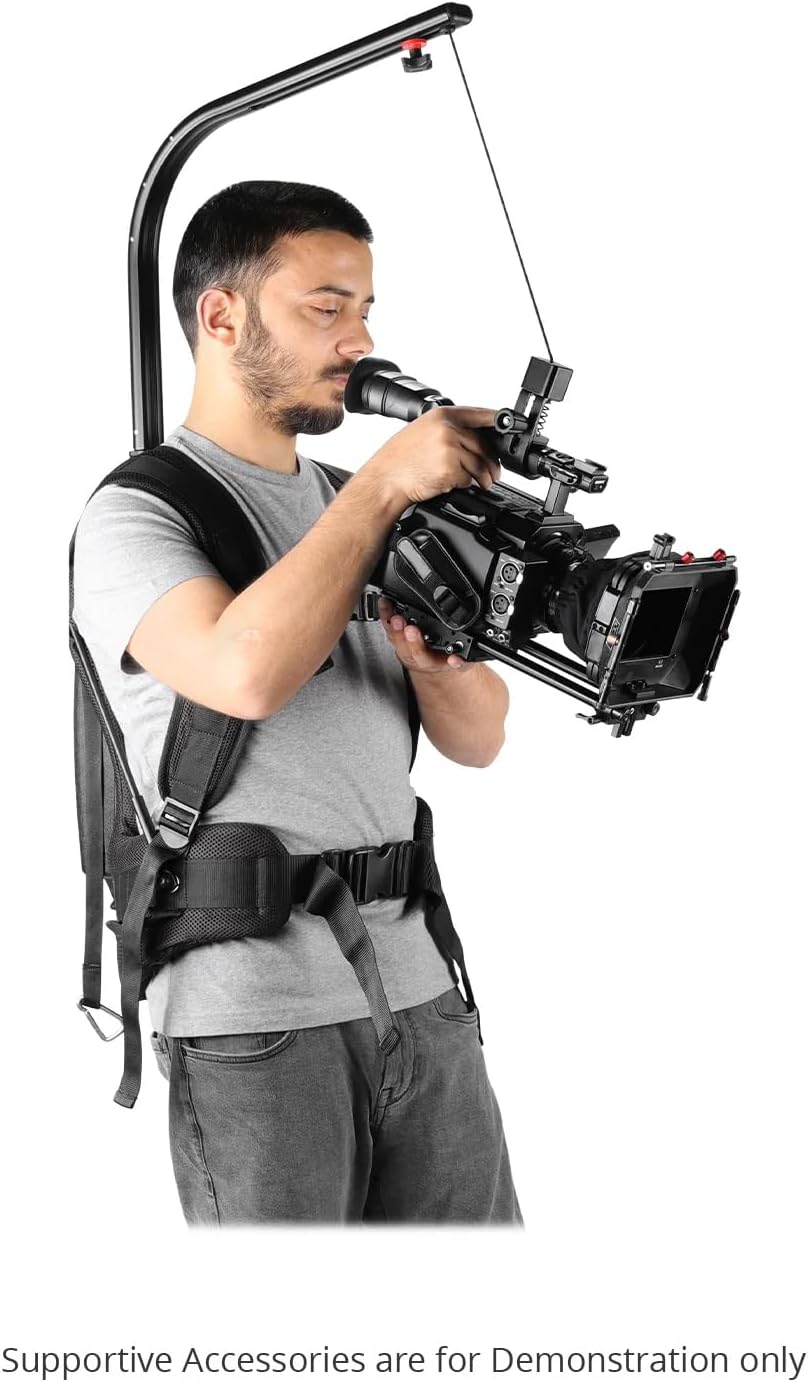
Figure 8: A user demonstrating the proper way to wear the Flowline Starter with a camera rig, showing how the system supports the camera's weight.
- Adjusting Camera Position:
- To adjust the horizontal position of your camera setup, use the slide knob on the top bar. This allows you to move the camera forward or backward to achieve optimal balance and framing.

Figure 9: The slide knob on the top bar enables easy adjustment of the camera's position forward or backward.
- Dynamic Movements:
- The 180° rotation of the top bar allows for wide range of motion. Practice moving the camera smoothly from side to side, up and down, and rotating around your body to achieve desired shots.
- Maintain a relaxed posture and let the Flowline system bear the weight, focusing on guiding the camera.
Maintenance
- Cleaning: Wipe down the vest and metal components with a soft, damp cloth after each use to remove dust and sweat. Avoid harsh chemicals.
- Storage: When not in use, store the Flowline Starter in its provided storage bag in a cool, dry place, away from direct sunlight and extreme temperatures.
- Inspection: Periodically inspect all straps, buckles, and the support rope for signs of wear, fraying, or damage. Ensure all locking mechanisms are functioning correctly.
- Lubrication: The internal mechanisms are generally maintenance-free. Do not attempt to lubricate internal components unless specifically instructed by the manufacturer.
Troubleshooting
- Problem: Camera feels too heavy or not properly supported.
- Solution:
- Verify that your camera setup's weight is within the 3kg to 7.5kg (6lb to 16lb) payload capacity.
- Adjust the spring tension knob on the back of the vest. Turn it clockwise to increase tension until the camera feels balanced and light.
- Ensure the vest is worn correctly and snugly, with the waist and shoulder straps properly tightened to distribute weight effectively.
- Problem: Support rope does not retract or extend smoothly.
- Solution:
- Check for any obstructions or kinks in the support rope's path.
- Ensure the tension knob is not overtightened or too loose. Adjust it to find the optimal balance.
- Inspect the rope for any fraying or damage that might impede its movement. If damaged, contact support for replacement.
- Problem: Top bar feels loose or wobbly.
- Solution:
- Ensure the vertical support pole is fully inserted into the vest's slot and its locking mechanism is securely engaged.
- Check if any screws or fasteners on the top bar assembly are loose and tighten them if necessary.
Warranty and Support
FLYCAM products are designed for durability and performance. For specific warranty information, please refer to the documentation included with your purchase or visit the official FLYCAM website. For technical support, troubleshooting assistance, or spare parts, please contact FLYCAM customer service.
Manufacturer: Flycam
Contact Information: Please visit the FLYCAM Store on Amazon or the official manufacturer's website for support details.
Related documentsB-FLCM-FLN-01


Ask a question about this manual
Ask about setup, troubleshooting, compatibility, parts, safety, or missing instructions. Manuals+ will review the question and use this page’s manual context to help answer it.