
1. Introduction
This manual provides detailed instructions for the installation, operation, and maintenance of the TUSK Pannier Soft Luggage Mount, Model 188-508-0001. This system is designed to facilitate the secure attachment of soft luggage to your dual sport motorcycle, primarily for use with TUSK Pannier Racks. It is constructed from durable aluminum with a black powder coat finish.
2. Safety Information
WARNING: This product contains chemicals known to the State of California to cause cancer and birth defects or other reproductive harm. For more information, visit www.P65Warnings.ca.gov.
Always ensure all mounting hardware is securely tightened before operation. Regularly inspect the mount and luggage for any signs of wear or damage. Do not exceed the weight capacity recommended by your motorcycle or luggage manufacturer. Improper installation or overloading can lead to loss of control or damage.
3. Package Contents
Verify that all components are present before beginning installation:
- TUSK Pannier Soft Luggage Mount Plates (2 units)
- Mounting Hardware (bolts, washers, nuts)
- Instruction Sheet (this document)

Figure 3.1: Overview of the TUSK Pannier Soft Luggage Mount plate. This image shows the black aluminum plate with various slots and bolt holes for attachment to pannier racks and soft luggage.
4. Setup and Installation
The TUSK Pannier Soft Luggage Mount is primarily designed for direct attachment to TUSK Pannier Racks. Adaptation for other pannier rack systems may require drilling new mounting holes.
4.1 Tools Required
- Wrench set (appropriate sizes for supplied hardware)
- Hex key set (if applicable to hardware)
- Drill and drill bits (if adapting to non-TUSK racks)
- Measuring tape or ruler
- Marker or pencil
4.2 Installation Steps (for TUSK Pannier Racks)
- Position the Mount: Align one TUSK Pannier Soft Luggage Mount plate against the side of your TUSK Pannier Rack. Ensure the orientation allows for optimal luggage placement and clearance from exhaust or moving parts.
- Secure with Hardware: Use the provided bolts, washers, and nuts to attach the mount plate to the pannier rack. Start by hand-tightening all fasteners to allow for minor adjustments.
- Adjust and Tighten: Once properly aligned, progressively tighten all fasteners evenly until secure. Do not overtighten.
- Repeat for Other Side: Install the second mount plate on the opposite side of the motorcycle following the same procedure.

Figure 4.1: Rear view of the TUSK Pannier Soft Luggage Mount installed on a motorcycle's pannier rack. Note the secure attachment points to the rack frame.

Figure 4.2: Side view of the TUSK Pannier Soft Luggage Mount installed on a motorcycle. This perspective highlights the clearance and positioning relative to the motorcycle's rear wheel and exhaust.
4.3 Adapting for Other Pannier Racks
If using non-TUSK pannier racks, careful measurement and drilling may be necessary. The mount plates feature multiple slots and holes to accommodate various configurations. It is recommended to use the mount plate as a template to mark drilling locations on your existing rack, ensuring proper alignment and structural integrity.
4.4 RotoPax and Fuel Pack Integration
The TUSK Pannier Soft Luggage Mount includes pre-drilled mounting holes specifically designed for RotoPax mounts and 1-gallon fuel packs. Refer to your RotoPax or fuel pack instructions for specific attachment procedures to the TUSK mount.
5. Operating Instructions
Once the TUSK Pannier Soft Luggage Mounts are securely installed on your motorcycle, you can attach your soft luggage.
- Prepare Luggage: Ensure your soft luggage is packed and closed according to its manufacturer's instructions.
- Position Luggage: Place the soft luggage against the installed mount plate. The mount is designed to work with most soft luggage systems.
- Secure Luggage: Utilize the straps and attachment points on your soft luggage to secure it to the slots and openings on the TUSK mount plate. Ensure straps are routed correctly and tightened to prevent movement during travel.
- Verify Security: Before riding, gently pull and push on the luggage to confirm it is firmly attached and does not wobble. Adjust straps as necessary.
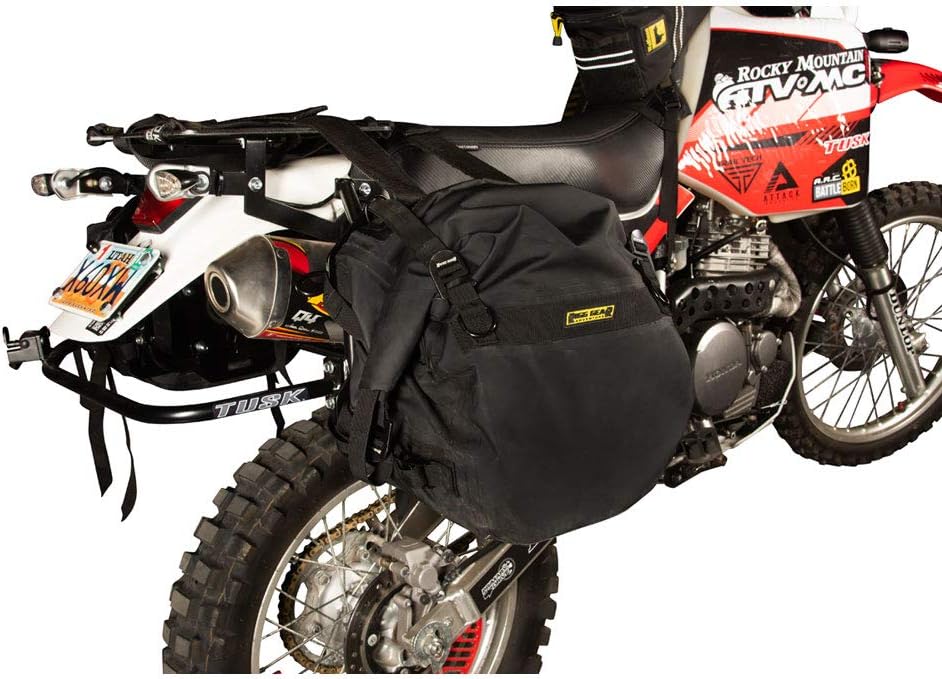
Figure 5.1: Soft luggage securely attached to the TUSK Pannier Soft Luggage Mount on a motorcycle. The image demonstrates how the luggage straps integrate with the mount's design.
6. Maintenance
To ensure the longevity and performance of your TUSK Pannier Soft Luggage Mount, follow these maintenance guidelines:
- Regular Inspection: Periodically check all bolts and fasteners for tightness. Vibrations from riding can cause hardware to loosen over time.
- Cleanliness: Clean the mount plates with mild soap and water to remove dirt, mud, and road grime. Avoid abrasive cleaners that could damage the powder coat finish.
- Damage Check: Inspect the aluminum plates for any cracks, bends, or significant scratches that could compromise structural integrity. Replace damaged components immediately.
- Corrosion Prevention: While the black powder coat offers protection, promptly address any chips or deep scratches to prevent aluminum corrosion.
7. Troubleshooting
This section addresses common issues you might encounter with the TUSK Pannier Soft Luggage Mount.
- Mount Rattles:
Ensure all mounting hardware is fully tightened. If rattling persists, especially between the mount plate and the pannier rack, consider adding a thin layer of adhesive weather stripping or rubber washers between the contact surfaces to dampen vibrations.
- Soft Luggage Does Not Fit Securely:
Verify that your soft luggage straps are correctly routed through the available slots on the mount plate and are tightened sufficiently. Some soft luggage designs may require creative strapping solutions. Ensure the luggage is not overloaded, which can affect its shape and stability.
- Mount Does Not Align with Non-TUSK Racks:
As noted in the installation section, adapting to non-TUSK racks may require custom drilling. Carefully measure and mark new hole locations to ensure proper alignment and secure attachment. If unsure, consult a professional for assistance.
8. Specifications
| Attribute | Detail |
|---|---|
| Model Number | 188-508-0001 |
| Brand | TUSK |
| Material | 3/16" Aluminum |
| Color | Black (Powder Coat Finish) |
| Item Weight (per mount) | Approximately 5.6 lbs (11.2 lbs for the pair) |
| Mounting Type | Rack Mount |
| Compatibility | Designed for TUSK Pannier Racks; adaptable to other racks with modification. Includes mounting holes for RotoPax mount and 1-gallon fuel pack. |
9. Warranty and Support
For warranty information or technical support regarding your TUSK Pannier Soft Luggage Mount, please contact TUSK Off-Road directly through their official website or customer service channels. Keep your purchase receipt and model number (188-508-0001) handy when contacting support.
Official TUSK Website: www.tuskoffroad.com
Note: The provided JSON did not contain specific warranty details. Please refer to the manufacturer's official documentation or website for the most current warranty policy.