
Introduction
This manual provides essential information for the safe and efficient use of your Brondi Stallion HEAVY DUTY mobile phone. The Brondi Stallion is a rugged device designed for durability, featuring IP68 certification for total water and dust protection, dual SIM capability, and a 2.4-inch display. Please read this manual thoroughly before operating your device.
Setup
Package Contents
Before you begin, ensure all items are present in the package:
- Brondi Stallion Mobile Phone
- Battery
- Earphones
- Charger (USB cable and power adapter)
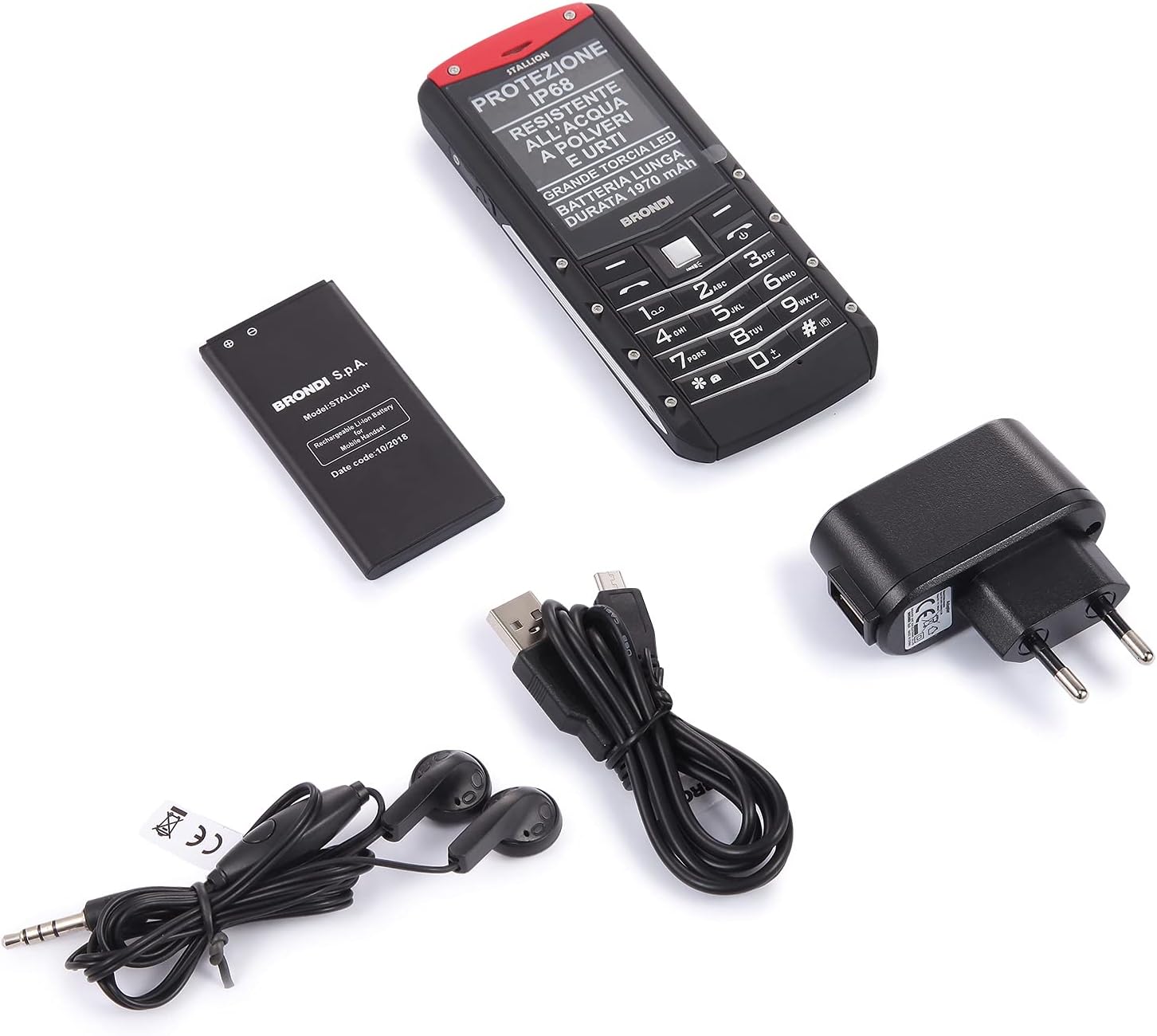
Image: Contents of the Brondi Stallion HEAVY DUTY package, including the phone, battery, charger, and earphones.
Inserting the SIM Card(s) and Battery
- Carefully remove the back cover of the phone.
- Insert your SIM card(s) into the designated slot(s). This device supports Dual SIM functionality.
- Insert the battery into its compartment, ensuring the contacts align correctly.
- Replace the back cover, ensuring it is securely fastened to maintain the IP68 seal.
Charging the Device
- Connect the micro-USB end of the charging cable to the phone's charging port.
- Connect the USB power adapter to a wall outlet.
- Allow the phone to charge fully before initial use. The charging indicator will show the battery status.
Powering On/Off
- To power on: Press and hold the Power button until the screen illuminates.
- To power off: Press and hold the Power button, then select 'Power off' from the options.
Operating Instructions

Image: Front and back view of the Brondi Stallion HEAVY DUTY mobile phone, showcasing its robust design.
Basic Functions
- Making Calls: Enter the phone number using the keypad and press the Call button.
- Answering Calls: Press the Call button when the phone rings.
- Sending Messages: Navigate to the 'Messages' menu, select 'New Message', enter your text, and send to the desired contact.
- Dual SIM: The phone supports two SIM cards. You can select which SIM to use for calls or messages from the phone's settings or during the action.
Camera
The Brondi Stallion features a 1.3 MP rear camera. To use the camera:
- Navigate to the 'Camera' application from the main menu.
- Frame your subject on the display.
- Press the designated button to capture a photo.
LED Torch
The phone is equipped with a large LED torch. Access this feature from the shortcuts or the main menu to activate/deactivate the light.
Audio Features
- Loudspeaker: The phone includes a loudspeaker for hands-free calls or media playback.
- Earphones: Connect the included earphones to the 3.5mm jack for private listening or hands-free communication.
- Bluetooth: Enable Bluetooth in the settings to connect to compatible wireless accessories.
- FM Radio: The phone has a built-in FM radio function, which can often be used without earphones.
Maintenance

Image: Rear view of the Brondi Stallion HEAVY DUTY, highlighting the IP68 water and dust resistance rating.
Water and Dust Resistance (IP68)
The Brondi Stallion is IP68 certified, meaning it is protected against dust ingress and can withstand immersion in water up to 1.5 meters for 30 minutes. To maintain this protection:
- Ensure all port covers (charging port, earphone jack) are securely closed before exposing the phone to water or dust.
- Do not intentionally submerge the phone in water beyond the specified depth or duration.
- If the phone gets wet, dry it thoroughly with a clean cloth before charging or opening any ports.
Cleaning
Use a soft, dry cloth to clean the phone's exterior. Avoid using harsh chemicals or abrasive materials, which can damage the device's surface or compromise its water resistance.
Battery Care
- Avoid exposing the battery to extreme temperatures.
- Use only the original charger provided with the device.
- If the phone will not be used for an extended period, charge the battery to about 50% before storing it.
Port Covers
The protective rubber covers for the charging port and earphone jack are crucial for maintaining the phone's IP68 rating. Handle them with care, as they can be fragile. Ensure they are always properly sealed when not in use.
Troubleshooting
Common Issues and Solutions
- Phone not turning on: Ensure the battery is correctly inserted and charged. Connect the charger and try again.
- No network signal: Check if the SIM card is properly inserted. Verify that you are in an area with network coverage. Restart the phone.
- Cannot make/receive calls: Check your SIM card balance or subscription status. Ensure the phone is not in airplane mode.
- Sound issues: Check the volume settings. Ensure earphones are properly connected if in use. Clean the speaker grille if it appears blocked.
ILIAD SIM Card Specific Setup
If you are using an ILIAD SIM card and experience connectivity issues, particularly if the phone does not connect to the network automatically, follow these steps:
- Insert the ILIAD SIM card into a 4G-compatible smartphone.
- In the smartphone's network settings, manually select the network type to 3G or GSM.
- Perform a manual network search and select ILIAD from the available networks.
- Once the ILIAD SIM card has successfully connected to the network in the smartphone, reinsert it into your Brondi Stallion. It should now connect to the ILIAD network.
Specifications

Image: Side view of the Brondi Stallion HEAVY DUTY mobile phone, showing its robust profile.
| Feature | Specification |
|---|---|
| Brand | Brondi |
| Model Name | Stallion |
| Operating System | Proprietary |
| Memory Capacity (Max Flash Supported) | 32 GB |
| Screen Size | 2.4 Inches |
| Resolution | 320 x 240 Pixels |
| Wireless Provider | All carriers |
| Cellular Technology | 2G |
| Connectivity Technology | USB |
| Color | Black |
| SIM Card Slots | Dual SIM |
| Input | Micro-USB |
| Water Resistance Level | IP68 (Waterproof) |
| Rear Camera Resolution | 1.3 MP |
| Battery Capacity | 1970 mAh |
| Dimensions | 5.7 x 1.6 x 13.9 cm |
| Talk Time | 6 Hours |
| Model Year | 2019 |
Warranty Information
The Brondi Stallion HEAVY DUTY mobile phone comes with a 2-year warranty from the date of purchase. This warranty covers manufacturing defects under normal use. Please retain your proof of purchase for warranty claims. The warranty does not cover damage caused by misuse, accidents, unauthorized repairs, or failure to follow the instructions in this manual.
Support
For further assistance, technical support, or warranty claims, please refer to the contact information provided with your product packaging or visit the official Brondi website. Ensure you have your product model and serial number ready when contacting support.