
Introduction
The TCL 32" Class HD (720P) Roku Smart LED TV (32S321) offers a comprehensive entertainment experience, providing access to a vast library of movies and TV episodes, along with connectivity for your cable box, gaming console, and other devices all from its intuitive interface. Its user-friendly remote simplifies content access in high definition. This manual provides essential information for setting up, operating, and maintaining your new television.
What's in the Box
- TCL 32" Class HD (720P) Roku Smart LED TV (32S321)
- Remote Control
- TV Stand Legs (if not wall-mounting)
- Power Cable
- Quick Start Guide
Setup
Physical Setup
Your TCL Roku TV can be set up on a stand or wall-mounted. Ensure proper ventilation around the TV.

Figure 1: Front view of the TCL 32S321 Roku TV.
Connecting Devices
The TV features multiple input ports for various devices. Connect your cable box, gaming console, or other media players using HDMI cables. For older devices, an AV input is available. The TV also includes a USB port for media playback and a built-in tuner for over-the-air HD content via an antenna.
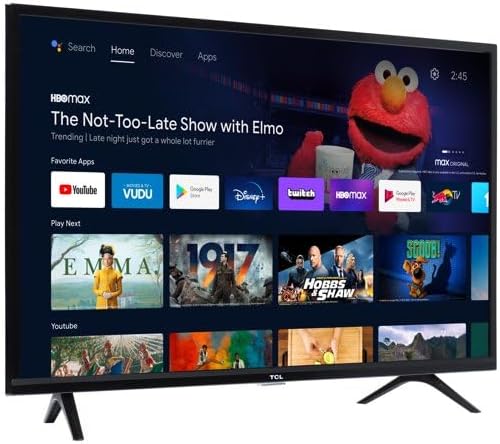
Figure 2: Rear view of the TCL 32S321 TV showing input ports.
Initial Power On and Network Setup
After connecting the power cable, press the power button on the remote control. Follow the on-screen instructions to select your language, connect to your Wi-Fi network, and activate your Roku account. This process will enable access to streaming features and app downloads.
Operating
Remote Control Usage
The included remote control is designed for simplicity and ease of use. It features dedicated buttons for popular streaming services like Netflix, Disney+, Apple TV+, and Prime Video, allowing quick access to your favorite content. The directional pad and 'OK' button are used for navigating menus and making selections.
Navigating the Roku Interface
The Roku TV interface provides a centralized hub for all your entertainment. From the home screen, you can access:
- Home: Your main dashboard with recommended content and installed apps.
- Live TV: Access to over-the-air channels via antenna or live streaming services.
- What to Watch: Curated content suggestions.
- Streaming Store: Browse and download new streaming channels (apps) such as Hulu, Tubi, HBO Max, Peacock, and CBS Sports.
- Search: Find movies, TV shows, actors, or channels across various platforms.
- Settings: Adjust TV and network configurations.
Use the directional arrows on your remote to move between options and the 'OK' button to select.
Maintenance
To ensure the longevity and optimal performance of your TCL Roku TV, follow these maintenance guidelines:
- Cleaning: Gently wipe the screen with a soft, dry microfiber cloth. For stubborn smudges, slightly dampen the cloth with water. Avoid harsh chemicals or abrasive materials.
- Ventilation: Ensure adequate airflow around the TV. Do not block ventilation openings.
- Power: Unplug the TV from the power outlet during lightning storms or when left unattended for long periods.
Troubleshooting
If you encounter issues with your TCL Roku TV, refer to the following common solutions:
| Problem | Possible Cause / Solution |
|---|---|
| No Power | Ensure the power cable is securely plugged into both the TV and a working electrical outlet. Check if the outlet has power. |
| No Picture / Sound | Verify that the correct input source is selected. Check all cable connections (HDMI, AV, Antenna). Restart connected devices. |
| Remote Not Responding | Replace the batteries in the remote. Ensure there are no obstructions between the remote and the TV's IR sensor. |
| Cannot Connect to Wi-Fi | Check your Wi-Fi password. Restart your router and modem. Ensure the TV is within range of your Wi-Fi signal. Some users have reported intermittent Wi-Fi issues; a TV restart or network reset may help. |
| Slow Performance / Lag | Close unused applications. Restart the TV by unplugging it for 30 seconds and plugging it back in. Ensure your internet connection is stable and fast enough for streaming. |
| No Over-the-Air Channels | Ensure an antenna is properly connected to the "CABLE/ANT" input. Perform a channel scan in the TV's settings. Adjust antenna position or consider a stronger antenna if signals are weak. |
Specifications
| Feature | Detail |
|---|---|
| Brand | TCL |
| Model Number | 32S321 (Note: Some documentation may refer to 32D310) |
| Screen Size | 32 Inches |
| Display Technology | LED |
| Resolution | 1366 x 768 (720P HD) |
| Refresh Rate | 60 Hz |
| Product Dimensions | 28.9 x 7.2 x 19.2 inches (with stand) |
| Item Weight | 8.6 Pounds |
| Connectivity Technology | USB, HDMI (3 inputs) |
| Output Wattage | 5 Watts (Audio) |
| On-mode Power Consumption | 44.00 watts |
Warranty and Support
For warranty information, please refer to the warranty card included with your product or visit the official TCL support website. For technical assistance, troubleshooting, or service inquiries, please contact TCL customer support. Keep your purchase receipt and product serial number handy for faster service.
Online Support: www.tcl.com/us/en/support


