
Petbank ZFF1-AUX-US-1
Petbank Automatic Fish Feeder Instruction Manual
Model: ZFF1-AUX-US-1
Introduction
Thank you for purchasing the Petbank Automatic Fish Feeder. This device is designed to provide convenient and reliable automatic feeding for your aquarium fish, ensuring they receive consistent nutrition even when you are away. Its rechargeable battery, large capacity, and intelligent programming options make aquarium maintenance easier and more efficient.
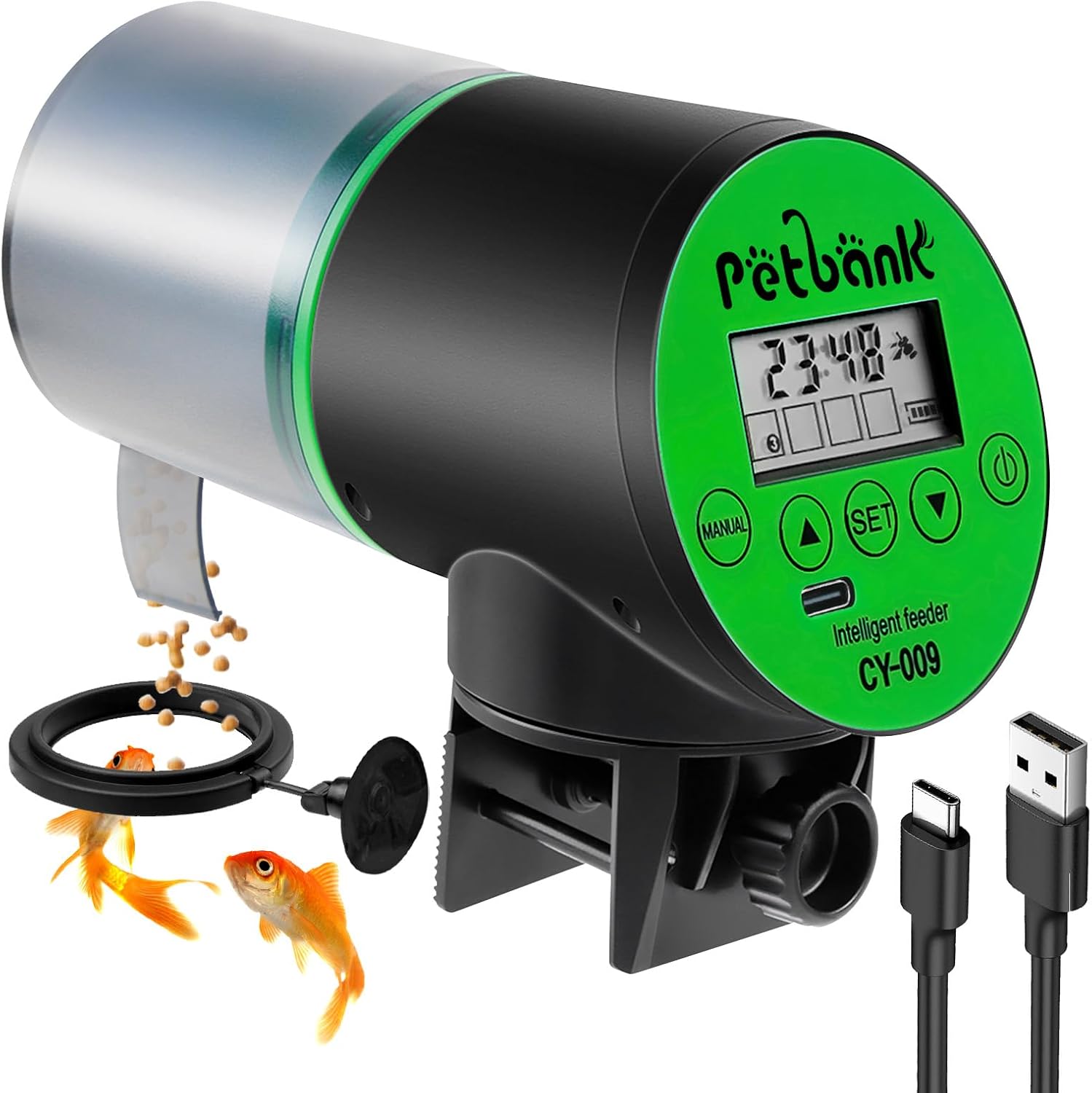
Figure 1: Petbank Automatic Fish Feeder and accessories.
Safety Information
- Ensure the feeder is securely mounted to prevent it from falling into the aquarium.
- Do not immerse the feeder in water. It is not waterproof.
- Keep the USB charging port dry. Moisture can cause corrosion.
- Use only the provided USB charging cable or a compatible low-amp charger.
- Keep out of reach of children and pets.
- Do not attempt to disassemble or repair the unit yourself. Contact customer support if issues arise.
Package Contents
- Petbank Automatic Fish Feeder (CY-009)
- Adjustable Mounting Base
- Double-sided Sticker
- USB Charging Cable
- User Manual
Setup
1. Charging the Feeder
The feeder is equipped with a large-capacity rechargeable battery. For first-time use, it is recommended to charge the device for at least 10 hours to ensure sufficient working voltage. Connect the provided USB cable to the feeder's USB-C port and a compatible USB power source.

Figure 2: USB charging port on the feeder.
2. Mounting Options
The feeder offers two primary mounting methods:
Method 1: Tank Glass Clamp (≤ 24mm thick)
- Attach the adjustable mounting base to the feeder.
- Position the clamp over the edge of the aquarium glass (up to 24mm thick).
- Tighten the screw on the clamp until the feeder is securely fastened to the glass.
- The base allows for 360° rotation, enabling optimal positioning over the feeding area.

Figure 3: Feeder mounted using the tank glass clamp.
Method 2: Tank Top Cover (Adhesive)
- Remove the adjustable mounting base from the feeder.
- Peel off the protective film from the double-sided sticker.
- Attach the sticker to the bottom of the feeder.
- Carefully position and press the feeder onto a clean, dry surface of your tank's top cover, ensuring the dispensing opening is over the feeding area.

Figure 4: Feeder attached to tank lid using adhesive.
3. Filling the Food Container
The feeder has a 200ml large-capacity feed bucket suitable for various fish feeds such as granules and powders. To fill:
- Open the loading sliding cover on the top of the feeder.
- Pour the desired fish food into the container.
- Close the loading sliding cover securely.

Figure 5: Filling the feeder with fish food.
Operating Instructions
1. Power On/Off
Long press the power button (⏻) for 3 seconds to switch the feeder on or off.
2. Clock Setting
- Press the "SET" button for 3 seconds. The hour/minute number will flash.
- Press the "▲" or "▼" keys to adjust the hour/minute.
- Press "SET" again to save the clock settings and enter the feeding settings.
3. Feeding Time and Cycle Setting (Custom Mode)
You can set up to 4 feeding times per day, with 1-3 rotations (feeding circles) each time.
- After setting the clock, the feeding time setting will appear. The hour/minute number will flash.
- Press "▲" or "▼" to adjust the feeding time.
- Press "SET" to move to the feeding circle number setting.
- Press "▲" or "▼" to adjust the number of feeding circles (1, 2, or 3).
- To set multiple feeding times in a day (up to 4), repeat the previous steps.
- If you are finished setting, press the "MANUAL" button to save the current settings and exit.
4. Smart Interval Feeding Mode
This mode allows for preset feeding intervals.
- Press the "▲" and "▼" keys simultaneously to cycle through default feeding settings:
- Feed every 8 hours
- Feed every 12 hours
- Feed every 24 hours
- Feed every 48 hours
- To exit this mode and return to custom settings, press the "▲" and "▼" keys simultaneously again.

Figure 6: Smart Interval Feeding Mode options.
5. Manual Feeding
Press the "MANUAL" button for instant feeding. The feeder will perform one rotation and dispense food.
Video 1: Demonstration of manual feeding and setting up the feeder.
This video demonstrates how to use the manual feeding function and provides a comprehensive guide to setting up the automatic fish feeder, including mounting options and programming the feeding schedule.
6. Adjusting Feeding Amount
The feeding adjusting cap allows you to control the amount of food dispensed per rotation. Slide the cap to increase or decrease the opening size.

Figure 7: Adjusting the feeding amount using the slider.
Maintenance
1. Cleaning
Regularly clean the food container and dispensing mechanism to prevent clogs and ensure proper operation. The manufacturer recommends hand washing only for the food container.
2. Battery Life
The feeder can be used for 3-6 months on a single charge, depending on the number of feedings set. Monitor the battery indicator on the LCD screen and recharge when low.
Troubleshooting
- Feeder not dispensing food: Check if the food container is empty. Ensure the dispensing opening is not clogged. Verify the battery level.
- Feeder not turning on: Ensure the power button is pressed for 3 seconds. Charge the battery.
- Incorrect feeding times: Re-check your clock settings and feeding schedule programming.
- Battery not charging: Ensure the USB cable is properly connected. Try a different USB power source.
- To reset all settings: Long press the "▼" button for 5 seconds to delete all settings.
Video 2: Detailed review and setup guide for the Petbank Automatic Fish Feeder.
This video offers an in-depth review of the feeder, covering its features, setup, and operation, which may help in resolving common issues.
Specifications
| Feature | Detail |
|---|---|
| Brand | Petbank |
| Model Name | ff01 (CY-009) |
| Item Model Number | ZFF1-AUX-US-1 |
| Color | Green |
| Material | Silicone, Plastic, Rubber |
| Item Weight | 11.3 ounces |
| Product Dimensions | 6.5 x 4.72 x 3.46 inches |
| Power Source | Rechargeable USB (USB-C port) |
| Feeding Capacity | 200ml |
| Feeding Schedule | Up to 4 feedings/day, 1-3 rotations/feed. Interval options: 8H, 12H, 24H, 48H. |
| Tank Compatibility | Fits 600L (158 US gallons / 131 UK gallons) fish tanks. Clamp for glass ≤ 24mm. |
Warranty and Support
For warranty information or technical support, please refer to the contact details provided on the product packaging or the official Petbank website. Keep your purchase receipt for any warranty claims.
Related documentsZFF1-AUX-US-1

Ask a question about this manual
Ask about setup, troubleshooting, compatibility, parts, safety, or missing instructions. Manuals+ will review the question and use this page’s manual context to help answer it.