
Introduction
This manual provides comprehensive instructions for the safe installation, operation, and maintenance of the Mount Plus MP-LPA36-443W outdoor full motion TV wall mount. Designed for televisions ranging from 32 inches to 70 inches, this mount offers robust weather resistance and flexible viewing options for outdoor spaces. Please read all instructions carefully before beginning installation to ensure proper setup and safe use.
Product Features
- Outdoor Durability: High-quality powder-coated finish prevents scratches and rust. The TV mount has successfully passed a 90-hour salt spray test, ensuring resilience in harsh outdoor conditions.
- Corrosion Resistance: Features stainless steel screws for added protection against salt air, specifically designed for environments near oceans.
- Versatile Design: Engineered for patios, decks, and balconies, providing a weatherproof solution for mounting your TV outdoors.
- TV Size Compatibility: Fits most 32-inch to 70-inch televisions.
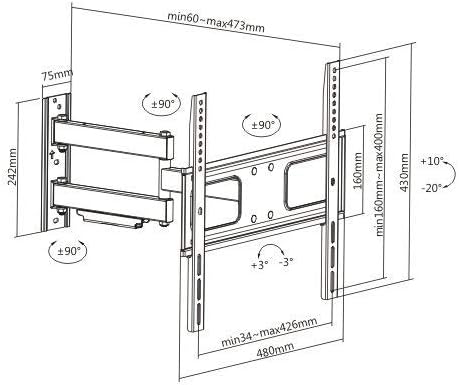
- VESA Support: Compatible with VESA patterns 200x200, 300x200, 300x300, 400x200, 400x300, and 400x400 mm.
- Adjustable Viewing Angles: Offers a tilt range of +10° to -20° and a swivel range of +90° to -90°.
- Adjustable Profile: Extends from 2.4 inches (minimum) to 18.6 inches (maximum) from the wall.
- High Weight Capacity: Heavy-duty construction supports TVs up to 110 lbs (50 kg).
- Security Feature: Includes an anti-theft design for enhanced protection in outdoor settings.


Package Contents
Please refer to the product packaging for a complete and accurate list of all included components and hardware. Typically, the package contains:
- Wall Plate Assembly
- TV Brackets (x2)
- Mounting Hardware Kit (screws, anchors, washers, spacers)
- Instruction Manual
Safety Information
WARNING: Failure to read and follow these instructions may result in serious personal injury, property damage, or voiding of your warranty. If you do not understand these instructions or have doubts about the safety of the installation, please contact Mount Plus customer service or a qualified professional installer.
- Weight Capacity: Do not exceed the maximum weight capacity of 110 lbs (50 kg). Exceeding this limit can result in instability and potential injury.
- Wall Structure: Ensure the mounting surface can safely support the combined weight of the mount and the television. For concrete or masonry walls, professional installation is highly recommended.
- Tools & Safety: Always use appropriate tools and wear safety gear during installation.
- Children: Keep children and pets away from the installation area.
- Damage: Do not install if the product or any hardware is damaged.
Setup and Installation
Before installation, ensure you have all necessary tools and hardware. It is recommended to have at least two people for safe installation.
Installation Steps:
- Verify Wall Type: Identify if your wall is made of wood studs, concrete, or masonry. This will determine the appropriate mounting hardware and drilling technique.
- Mark Drilling Points: Position the wall plate assembly on the desired location on the wall. Use a pencil to mark the drilling points. Ensure the wall plate is level using a spirit level.
- Drill Pilot Holes: Drill pilot holes at the marked locations. The size and depth of the holes will depend on your wall type and the specific anchors/screws being used.
- Attach Wall Plate: Secure the wall plate assembly to the wall using the provided lag bolts and washers. Tighten all fasteners firmly, but do not overtighten.
- Attach TV Brackets: Secure the two vertical TV brackets to the back of your television using the appropriate VESA-compatible screws, washers, and spacers from the hardware kit. Ensure they are centered and securely fastened.
- Mount TV: With assistance, carefully lift the television and hook the TV brackets onto the wall plate assembly. Ensure the TV is securely seated. Install the safety screws or locking mechanisms to prevent accidental dislodgement.

Video Installation Guide:
For a visual step-by-step installation guide, please watch the official product video below:
Video: An animated demonstration of the Mount Plus MP-LPA36-443W TV wall mount installation process and its full motion capabilities.
Operating Instructions
The Mount Plus MP-LPA36-443W offers flexible adjustments for optimal viewing.
- Tilt Adjustment: To adjust the vertical tilt angle of your TV, loosen the tilt adjustment knobs on the TV brackets. Carefully tilt the TV to your desired angle (between +10° and -20°), then re-tighten the knobs to secure the position.
- Swivel Adjustment: To swivel the TV horizontally, gently push or pull the side of the television to rotate it left or right. The mount allows for a wide swivel range of +90° to -90°, depending on TV size and wall clearance.
- Level Adjustment: The mount features a post-installation level adjustment of up to ±3°. This allows for minor rotational adjustments to ensure your TV is perfectly horizontal after mounting.

Maintenance
Regular maintenance helps ensure the longevity and safe operation of your TV mount.
- Check Fasteners: Periodically inspect all screws, bolts, and connections to ensure they remain tight. Re-tighten if any looseness is detected.
- Cleaning: Clean the mount with a soft, damp cloth. Avoid using harsh chemicals or abrasive cleaners, as these can damage the protective finish.
- Corrosion Inspection: For outdoor installations, regularly inspect the mount for any signs of wear, rust, or corrosion, especially in areas exposed to moisture or salt air.
Troubleshooting
- TV Not Level: If the TV appears unlevel after installation, use the built-in level adjustment feature (if applicable) or carefully re-adjust the wall plate if necessary. Ensure all mounting points are secure.
- Mount Difficult to Move: Check if any pivot point bolts are overtightened. Loosen them slightly to allow for smoother movement. Do not loosen to the point of instability.
- Mount Feels Unstable: Immediately remove the TV from the mount. Re-check all wall and TV fasteners. Verify that the wall structure is adequate for the combined weight and that all installation steps were followed correctly. Consult a professional if uncertainty persists.
Specifications
| Feature | Specification |
|---|---|
| Model Number | MP-LPA36-443W |
| TV Size Compatibility | 32" - 70" |
| VESA Compatibility | 200x200, 300x200, 300x300, 400x200, 400x300, 400x400 mm |
| Weight Capacity | 110 lbs (50 kg) |
| Tilt Range | +10° to -20° |
| Swivel Range | +90° to -90° |
| Profile from Wall | 2.4" (min) to 18.6" (max) |
| Material | Stainless Steel, Powder-coated |
| Item Weight | 8.14 pounds |
| Package Dimensions | 19.88 x 10.83 x 3.11 inches |
| UPC | 638845988629 |
Warranty and Support
For detailed warranty information, technical assistance, or to inquire about replacement parts, please contact Mount Plus customer service. Refer to your product packaging or the official Mount Plus website for the most current contact details and support resources.


