
1. Introduction
Thank you for choosing the FreeSUB ST-210 Automatic Mini Double Station Mug Heat Press Machine. This manual provides essential information for the safe and efficient operation, setup, and maintenance of your new heat press. Please read this manual thoroughly before using the machine to ensure proper function and to prevent damage or injury. Keep this manual for future reference.
2. Safety Instructions
- Always connect the machine to a grounded power outlet.
- Do not operate the machine with wet hands or in damp conditions.
- The heating elements become extremely hot during operation. Avoid direct contact with heated surfaces to prevent burns.
- Keep children and pets away from the machine during operation.
- Ensure adequate ventilation in the work area to dissipate heat and any fumes from sublimation inks.
- Unplug the machine from the power source when not in use or before cleaning and maintenance.
- Do not attempt to modify or repair the machine yourself. Contact qualified service personnel for assistance.
- Place the machine on a stable, heat-resistant surface.
3. Package Contents
Upon unpacking, please verify that all components are present and undamaged. The standard package for the FreeSUB ST-210 includes:
- FreeSUB ST-210 Double Station Mug Heat Press Machine (Main Unit)
- Power Cable
- User Manual (this document)
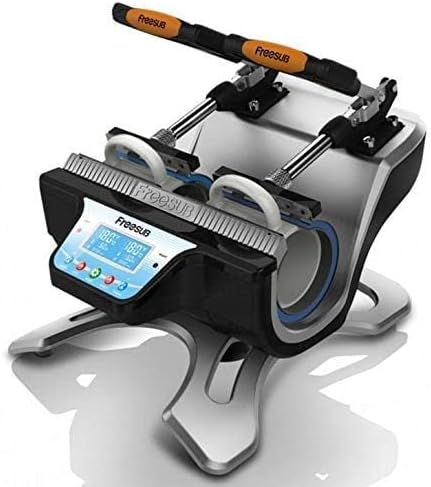
Image 3.1: Packaging of the FreeSUB ST-210 Heat Press Machine. The image displays two views of the product packaging, showing the machine inside a box with 'FreeSUB' branding and '5.6 kg' weight indication.
4. Product Overview
The FreeSUB ST-210 is an automatic mini double station mug heat press machine designed for efficient mug personalization. It features two independent heating stations, allowing for simultaneous pressing of two mugs.
Key Components:
- Heating Elements: Two cylindrical heating pads designed to fit standard mugs.
- Control Panel: Digital display for temperature and time settings, along with control buttons.
- Pressure Handles: Mechanisms to apply even pressure to the mugs during pressing.
- Base Unit: Sturdy frame supporting all components.

Image 4.1: Front-angled view of the FreeSUB ST-210 Double Station Mug Heat Press Machine. The image highlights the two mug pressing stations, the digital control panel, and the orange-handled pressure levers.
5. Setup
- Unpacking: Carefully remove the heat press machine from its packaging. Retain the packaging for future storage or transport.
- Placement: Place the machine on a flat, stable, and heat-resistant surface in a well-ventilated area. Ensure there is enough space around the machine for safe operation and heat dissipation.
- Power Connection: Connect the power cable to the machine and then plug it into a grounded electrical outlet. Ensure the power supply matches the machine's requirements.
- Initial Inspection: Before first use, inspect the heating elements and all connections for any visible damage.
6. Operating Instructions
This section outlines the steps for operating your FreeSUB ST-210 heat press machine to transfer designs onto mugs.
6.1. Powering On and Setting Parameters
- Turn on the machine using the power switch (if available) or by plugging it in. The digital control panel will illuminate.
- Use the control panel buttons to set the desired temperature and time for your sublimation transfer. Refer to your sublimation paper and ink manufacturer's recommendations for optimal settings. Typical settings for ceramic mugs are around 180-200°C (356-392°F) for 180-240 seconds.
- Allow the machine to preheat until it reaches the set temperature. The display will indicate when the target temperature is reached.
6.2. Preparing and Pressing Mugs
- Prepare your mug by cleaning its surface.
- Securely attach your sublimation transfer paper (with the design printed) to the mug using heat-resistant tape. Ensure the design is flat against the mug surface.
- Carefully place the prepared mug into one of the heating stations. Ensure the mug is centered and the design area is fully covered by the heating element.
- Lower the pressure handle to apply firm, even pressure to the mug. The machine is designed to apply appropriate pressure automatically.
- Repeat steps 2-4 for the second mug if you are pressing two simultaneously.
- Once the set time has elapsed, the machine will typically alert you with an audible signal.
- Carefully lift the pressure handle and remove the hot mug(s) using heat-resistant gloves.
- Immediately peel off the transfer paper from the mug. Be cautious as the mug will be very hot.
- Allow the mug to cool completely before handling or using.
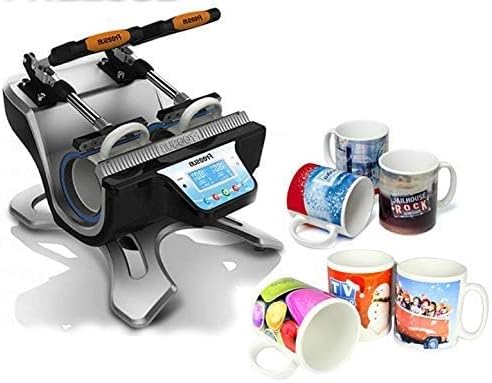
Image 6.1: The FreeSUB ST-210 Heat Press Machine shown with several personalized mugs. This image illustrates the machine's capability to produce custom mugs, with various designs displayed on the finished products.
7. Maintenance
Regular maintenance ensures the longevity and optimal performance of your heat press machine.
- Cleaning: After each use, allow the machine to cool down completely. Wipe down the exterior surfaces with a soft, dry cloth. For stubborn stains on non-heated parts, a slightly damp cloth can be used. Do not use abrasive cleaners or solvents.
- Heating Elements: Keep the heating elements clean and free of debris. Avoid scratching the surface. If sublimation ink or paper residue adheres to the heating element, gently wipe it off when the machine is cool.
- Storage: When not in use, store the machine in a clean, dry environment, away from direct sunlight and extreme temperatures.
- Inspection: Periodically check the power cord for any signs of wear or damage. Ensure all moving parts operate smoothly.
8. Troubleshooting
This section addresses common issues you might encounter with your FreeSUB ST-210 heat press machine.
- Machine Not Powering On:
- Check if the power cable is securely plugged into both the machine and the electrical outlet.
- Verify that the power outlet is functional by testing it with another device.
- Check for any tripped circuit breakers.
- Uneven Heat or Poor Transfer Quality:
- Ensure the mug is properly centered within the heating element.
- Verify that the pressure is evenly applied.
- Check your temperature and time settings against the recommendations for your sublimation materials.
- Ensure the sublimation paper is securely taped to the mug and not shifting during pressing.
- Error Codes on Display:
- If an error code appears, consult the manufacturer's specific error code guide (if provided separately) or contact customer support.
- Machine Overheating:
- Ensure the machine is in a well-ventilated area and not obstructed.
- If overheating persists, power off the machine and unplug it immediately. Contact customer support.
If you encounter an issue not listed here or if troubleshooting steps do not resolve the problem, please contact FreeSUB customer support for further assistance.
9. Specifications
| Specification | Detail |
|---|---|
| Brand | FreeSUB |
| Model | ST-210 |
| Item Weight | 5.6 Kilograms |
| Material | Aluminum or Steel Alloy |
| Recommended Use | Mug personalization |
10. Warranty and Support
For warranty information, please refer to the warranty card included with your product or visit the official FreeSUB website. Warranty terms and conditions may vary by region and purchase date.
For technical support, spare parts, or service inquiries, please contact FreeSUB customer service through their official channels. Have your model number (ST-210) and purchase details ready when contacting support.
