
Introduction
The Genius SW-HF2.1 800 is a three-component speaker system designed to deliver rich, deep bass and clear audio. This system features a 20W total output power, a 4-inch subwoofer for powerful bass, and two 3-inch wide-band conical speakers for crisp mid and high frequencies. It is suitable for various audio sources including desktop computers, laptops, players, and smartphones. The system includes a wired remote control for convenient volume and bass level adjustments, power control, a headphone jack, and an auxiliary line input.
Safety Information
- Ensure the power supply voltage matches the requirements specified on the speaker system.
- Do not expose the unit to rain or moisture to prevent fire or electric shock.
- Avoid placing the speaker system near heat sources such as radiators, heat registers, stoves, or other apparatus (including amplifiers) that produce heat.
- Protect the power cord from being walked on or pinched, particularly at plugs, convenience receptacles, and the point where they exit from the apparatus.
- Unplug this apparatus during lightning storms or when unused for long periods of time.
- Refer all servicing to qualified service personnel. Servicing is required when the apparatus has been damaged in any way, such as power-supply cord or plug is damaged, liquid has been spilled or objects have fallen into the apparatus, the apparatus has been exposed to rain or moisture, does not operate normally, or has been dropped.
Package Contents
Please check the package contents upon unpacking to ensure all components are present:
- 1 x Subwoofer unit
- 2 x Satellite speakers
- 1 x Wired remote control
- 1 x Audio input cable (3.5mm stereo jack)
- 1 x User manual
Product Features
- Stylish design with a wooden case for enhanced acoustics.
- Powerful bass delivered by a 4-inch subwoofer driver.
- Crystal-clear mid and high frequencies from 3-inch satellite speakers.
- Versatile connectivity: compatible with PCs, laptops, smartphones, CD/MP3 players.
- Functional wired remote control with volume and bass adjustment.
- Integrated headphone jack on the wired remote for private listening.
- Auxiliary line input on the wired remote for connecting additional audio devices.
- Color LED indicator for power status.
Setup
- Placement: Place the subwoofer on a flat, stable surface, preferably on the floor for optimal bass response. Position the satellite speakers on either side of your listening area, facing towards you, for the best stereo imaging.
- Connect Satellite Speakers: Connect the cables from the satellite speakers to the corresponding output jacks on the back of the subwoofer unit. Ensure a secure connection.
- Connect Wired Remote Control: Plug the wired remote control cable into the dedicated port on the subwoofer.
- Connect Audio Source:
- For PC/Laptop: Connect one end of the 3.5mm audio input cable to the "Line In" jack on the wired remote control and the other end to the audio output (headphone jack) of your computer.
- For Smartphone/MP3 Player: Connect one end of the 3.5mm audio input cable to the "Line In" jack on the wired remote control and the other end to the headphone jack of your device.
- Power Connection: Plug the power cord of the subwoofer into a standard electrical outlet.
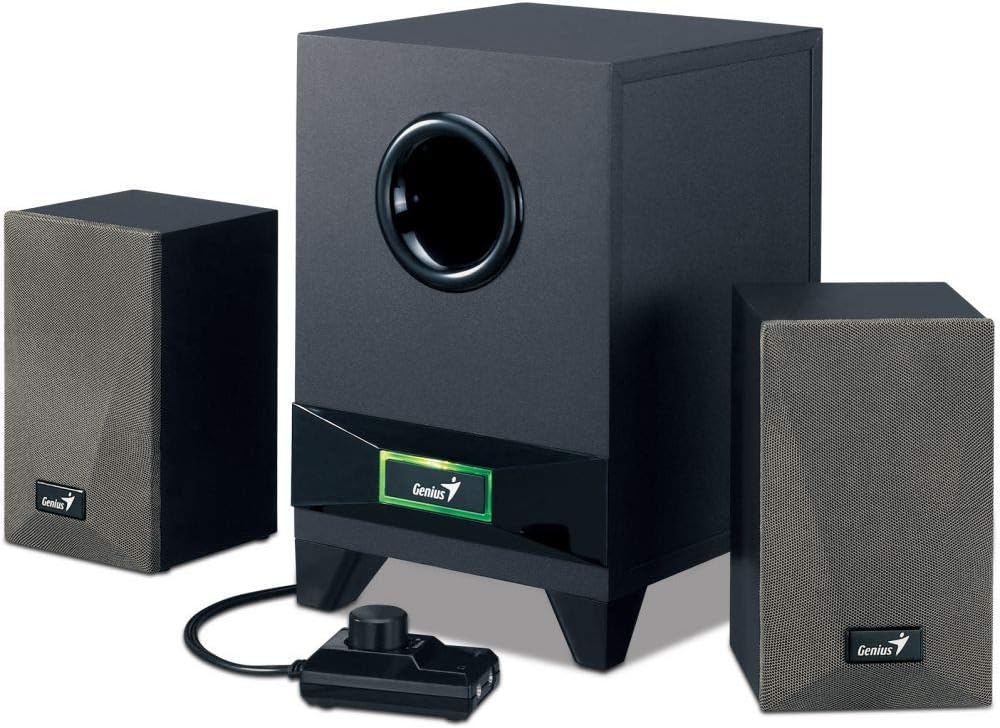
Image: The complete Genius SW-HF2.1 800 speaker system, showing the subwoofer, two satellite speakers, and the wired remote control unit. This illustrates the main components of the system.

Image: The Genius SW-HF2.1 800 speaker system with a smartphone connected to the wired remote control's auxiliary input. This demonstrates a typical setup for mobile devices.
Operating Instructions
- Power On/Off: Press the power button located on the wired remote control to turn the speaker system on or off. The color LED indicator on the subwoofer will illuminate when the system is powered on.
- Adjust Volume: Rotate the large knob on the wired remote control clockwise to increase the volume and counter-clockwise to decrease it.
- Adjust Bass: Use the smaller knob on the wired remote control to adjust the bass level to your preference. Rotate clockwise for more bass, counter-clockwise for less.
- Headphone Use: To listen privately, plug your headphones into the headphone jack on the wired remote control. The speaker output will automatically mute when headphones are connected.
- Auxiliary Input: The "Line In" jack on the wired remote control allows for quick connection of additional audio devices without needing to access the back of the subwoofer.
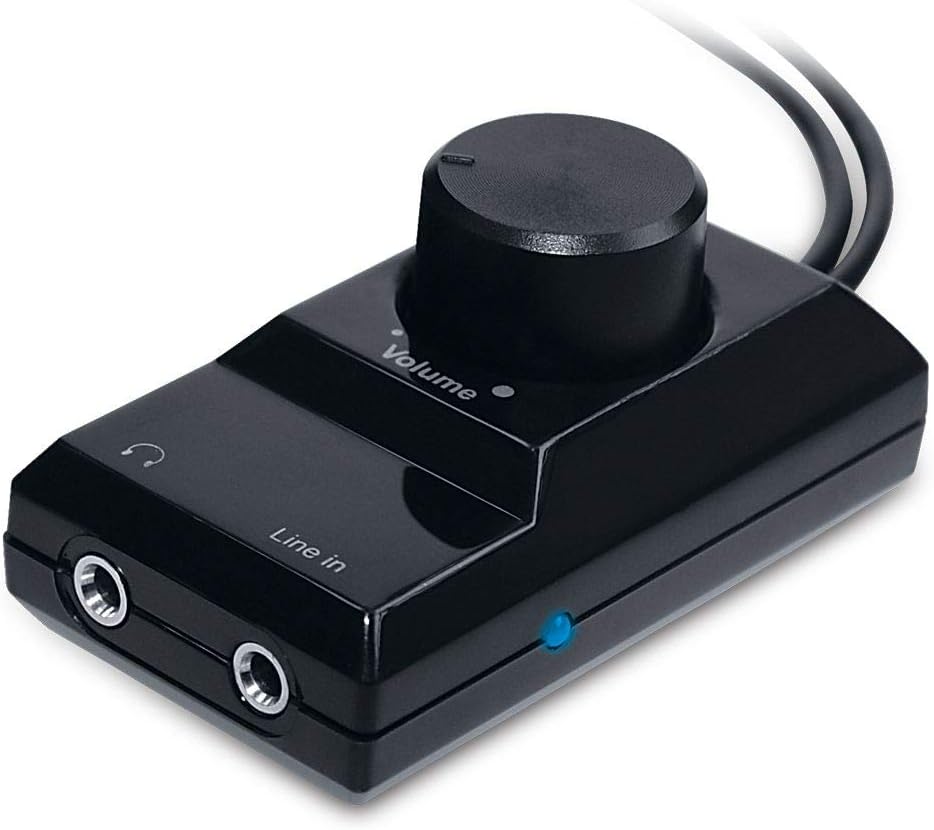
Image: A close-up view of the wired remote control unit, showing the volume knob, line-in port, and headphone jack. This highlights the primary controls for the speaker system.
Maintenance
- Cleaning: Use a soft, dry cloth to clean the surfaces of the speakers and subwoofer. Do not use liquid cleaners or aerosol sprays, as they may damage the finish or internal components.
- Ventilation: Ensure that the subwoofer and satellite speakers have adequate ventilation. Do not block any ventilation openings.
- Storage: If storing the system for an extended period, unplug it from the power outlet and store it in a cool, dry place away from direct sunlight and extreme temperatures.
Troubleshooting
| Problem | Possible Cause | Solution |
|---|---|---|
| No sound |
|
|
| Distorted sound |
|
|
| Weak bass |
|
|
Specifications
- Model: SW-HF2.1 800
- Total Output Power: 20 Watts (RMS)
- Subwoofer Driver: 4 inches
- Satellite Speaker Drivers: 3 inches (each)
- Connectivity: 3.5mm audio input
- Controls: Wired remote control with Volume, Bass, Power, Headphone Jack, Auxiliary Line Input
- Material: Wood (for subwoofer and satellites)
- Color: Black

Image: The underside of the Genius SW-HF2.1 800 subwoofer, clearly showing the 4-inch speaker driver. This illustrates the component responsible for the powerful bass output.
Warranty and Support
For warranty information and technical support, please refer to the warranty card included with your product or visit the official Genius website. Keep your purchase receipt as proof of purchase for warranty claims.
Manufacturer: Genius
Date First Available: 12 January 2019