
EPEVER LS1024B
EPEVER LandStar LS1024B PWM Solar Charge Controller User Manual
Model: LS1024B | Brand: EPEVER
1. Introduction
This manual provides detailed instructions for the installation, operation, and maintenance of the EPEVER LandStar LS1024B PWM Solar Charge Controller. This device is designed to manage the power flow from a solar panel to a battery bank and DC load, ensuring efficient and safe charging and discharging.
The LS1024B controller features automatic 12V/24V system voltage recognition, multiple charging options (Sealed, Gel, Flooded, User-defined), and various load working modes. It incorporates industrial-standard MOSFET open architecture for reliable performance and comprehensive electronic protections.
2. Safety Information
Please read all instructions and warnings carefully before installation and operation. Failure to follow these instructions may result in electric shock, fire, or severe injury.
- Ensure all wiring is correctly polarized and securely connected.
- Install the controller in a well-ventilated area, away from flammable materials.
- Do not disassemble or attempt to repair the controller yourself. Contact qualified personnel for service.
- Always disconnect the solar panel and battery power before installing or moving the controller.
- A fuse should be installed on the battery positive line, as close to the battery as possible (suggested distance within 150mm).
3. Product Features
- Support 4 Charging Options: Sealed, Gel, Flooded, and User-defined.
- Multiple Load Working Modes: Manual Control, Light ON/OFF, Light On+Timer, and Time Control.
- Equipped with industrial standard MOSFET open architecture, ensuring no mechanical switch.
- 12V/24V Auto Work, Max PV 50V input, and Real-time Energy Statistics.
- High Efficient PWM Charging Method and convenient checking via three LED indicators.
4. Components and Indicators
Familiarize yourself with the various parts and indicators of the LS1024B controller.
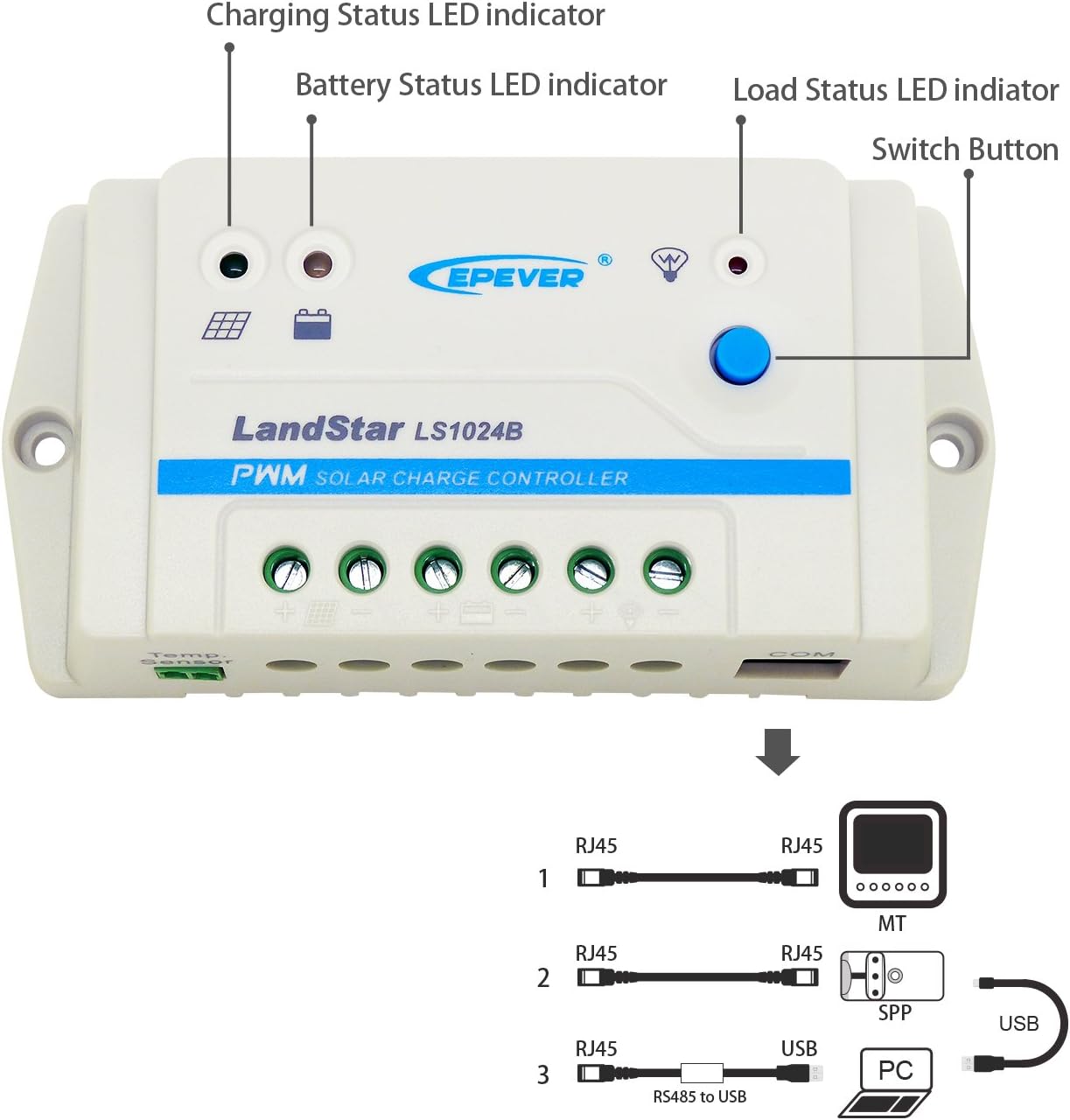
Figure 4.1: Front view of the LS1024B controller with key components labeled.
- Charging Status LED indicator: Shows the status of solar charging.
- Battery Status LED indicator: Displays the battery's charge level.
- Load Status LED indicator: Indicates the status of the DC load output.
- Switch Button: Used for controlling the load output and navigating settings.
- PV Terminals: Connect to the solar panel.
- Battery Terminals: Connect to the battery bank.
- Load Terminals: Connect to the DC load.
- Temp. Sensor Port: For connecting an optional remote temperature sensor.
- COM Port (RJ45): For communication with external devices like an MT50 remote meter or PC via an RS485 to USB cable.

Figure 4.2: Top-down view of the EPEVER LS1024B Solar Charge Controller, showing the terminals and indicators clearly.

Figure 4.3: Bottom view of the EPEVER LS1024B Solar Charge Controller, showing the mounting holes and heat sink design.
5. Setup and Installation
Follow these steps for proper installation of your solar charge controller.
5.1 Wiring Sequence
It is crucial to connect the components in the correct sequence to prevent damage to the controller or other system components. Always connect the battery first.

Figure 5.1: Recommended wiring sequence for the LS1024B controller.
- Connect the Battery: Connect the battery to the charge controller's battery terminals (marked with a battery symbol). Pay close attention to polarity (+ and -). The battery indicator on the controller should turn green. If not, refer to the troubleshooting section. A battery fuse should be installed on the positive line, as close to the battery as possible (suggested distance within 150mm).
- Connect the Solar Panel: Connect the solar panel to the charge controller's PV terminals (marked with a solar panel symbol). Ensure correct polarity.
- Connect the Load: Connect the DC load to the charge controller's load terminals (marked with a light bulb symbol). Ensure correct polarity.
Important: Disconnect in the reverse order: first the solar panel, then the load, and finally the battery.
5.2 Mounting
Mount the controller vertically on a flat, solid surface, ensuring adequate air circulation around the unit for heat dissipation. Avoid direct sunlight, high temperatures, and humid environments.
6. Operating Instructions
6.1 LED Indicators
The LS1024B features three LED indicators to display system status:
- Charging Status LED (Solar Panel Icon):
- Green Solid: Charging.
- Green Flashing: Float charging.
- Off: No charging.
- Battery Status LED (Battery Icon):
- Green Solid: Battery full.
- Green Flashing: Battery normal.
- Red Solid: Battery low voltage.
- Red Flashing: Battery over-discharge.
- Load Status LED (Light Bulb Icon):
- Green Solid: Load ON.
- Off: Load OFF.
- Red Flashing: Load overload/short circuit.
6.2 Load Control Button
The blue button on the controller is used to control the DC load output and cycle through load working modes.
- Short Press: Toggles the load output ON/OFF (in Manual Control mode).
- Long Press (5 seconds): Cycles through the load working modes. The Load Status LED will flash to indicate the current mode.
6.3 Load Working Modes
The LS1024B supports several load working modes:
- Manual Control: Load is turned ON/OFF by pressing the button.
- Light ON/OFF: Load turns ON at dusk and OFF at dawn.
- Light On + Timer: Load turns ON at dusk and stays ON for a set number of hours.
- Time Control: Load turns ON and OFF based on pre-set times (requires external programming via PC software or MT50 remote meter).
Note: Detailed configuration of "Light On + Timer" and "Time Control" modes typically requires an external communication device (e.g., MT50 remote meter or PC software via RS485 to USB cable).
Figure 6.1: The COM port (RJ45) on the LS1024B for connecting communication accessories.
7. Maintenance
Regular maintenance ensures optimal performance and longevity of your solar charge controller.
- Cleanliness: Keep the controller clean and free from dust and debris. Use a dry cloth for cleaning.
- Connections: Periodically check all wiring connections for tightness and corrosion. Loose connections can cause overheating and damage.
- Ventilation: Ensure the area around the controller remains well-ventilated and free from obstructions to allow for proper heat dissipation.
- Battery Inspection: Regularly inspect the battery for any signs of damage, swelling, or leaks. Ensure battery terminals are clean.
8. Troubleshooting
This section addresses common issues you might encounter with your LS1024B controller.
| Problem | Possible Cause | Solution |
|---|---|---|
| No LED indicators are ON. | Battery not connected or reverse polarity; Battery voltage too low. | Check battery connections and polarity. Ensure battery voltage is above the low voltage disconnect threshold. |
| Charging Status LED is OFF during daylight. | Solar panel not connected or reverse polarity; PV voltage too low; PV short circuit. | Check solar panel connections and polarity. Ensure sufficient sunlight and PV voltage. Check for PV short circuits. |
| Load Status LED is OFF when it should be ON. | Load is OFF (manual control); Battery low voltage disconnect; Load overload/short circuit. | Press the load button to turn ON. Charge battery. Check load for overload or short circuit. |
| Battery Status LED is Red Flashing. | Battery over-discharge. | Charge the battery immediately. Reduce load. |
9. Technical Specifications
Detailed specifications for the EPEVER LS1024B Solar Charge Controller.
| Nominal System Voltage | 12V/24V Auto Work |
| Max. PV Voltage | 50V |
| Rated Charge/Discharge Current | 10A |
| Equalize Charging Voltage (Sealed) | 14.6V |
| Equalize Charging Voltage (Flooded) | 14.8V |
| Boost Charging Voltage (Sealed) | 14.4V |
| Boost Charging Voltage (Gel) | 14.2V |
| Boost Charging Voltage (Flooded) | 14.6V |
| Float Charging Voltage (Sealed/Gel/Flooded) | 13.8V |
| Low Voltage Reconnect Voltage (Sealed/Gel/Flooded) | 12.6V |
| Low Voltage Disconnect Voltage (Sealed/Gel/Flooded) | 11.1V |
| Self-consumption | 8.4mA (12V); 7.8mA (24V) |
| Temperature Compensation Coefficient | -3mV/℃/2V (25℃) |
| Enclosure | IP30 |
| Grounding | Common Positive |
| Working Environment Temperature | -35℃ to +55℃ |
| Overall Dimension | 138 × 69.3 × 37 mm (5.43 x 2.72 x 1.46 inches) |
| Net Weight | 0.13 kg (4.6 ounces) |
9.1 Electronic Protections
- PV short circuit protection
- PV reverse polarity protection
- Battery over voltage protection
- Battery over discharge protection
- Battery reverse polarity protection
- Battery overheating protection
- Load short circuit protection
- Load overload protection
- Controller overheating protection
10. Warranty and Support
10.1 Warranty Information
The EPEVER LS1024B solar charge controller is warranted to be free from defects in materials and workmanship for a period of two years from the date of shipment to the original end user.
Notice: The manufacturer is not responsible for any damage to the product due to operator's misuse, incorrect battery parameters, unreasonable system configuration, unauthorized repair, or exceeding the specified parameters.
10.2 Customer Support
For technical assistance, troubleshooting beyond this manual, or warranty claims, please contact EPEVER customer support or visit the official EPEVER website for further resources and contact information.
Related documentsLS1024B


Ask a question about this manual
Ask about setup, troubleshooting, compatibility, parts, safety, or missing instructions. Manuals+ will review the question and use this page’s manual context to help answer it.