
1. Introduction
Thank you for choosing the POPP SM-001 Electric Microwave Motion Sensor. This device utilizes advanced microwave technology to detect movement, providing automated lighting control for enhanced convenience and energy efficiency. It can detect motion through non-metallic doors, windows, and thin walls, making it versatile for various indoor applications. Please read this manual carefully before installation and use to ensure proper operation and safety.
2. Safety Information
- Electrical Hazard: Installation should only be performed by a qualified electrician or competent person. Ensure power is disconnected at the main circuit breaker before any installation or maintenance.
- Indoor Use Only: This device has an IP20 rating, meaning it is protected against solid objects over 12.5mm but has no protection against water. Do not install in wet or damp environments.
- Voltage: Operate only within the specified voltage range of 220-240V AC.
- Load Capacity: Do not exceed the maximum load capacity of 1200W for incandescent lights or 300W for LED lights.
- Interference: Avoid installing near large metallic objects or other microwave-emitting devices that could interfere with its operation.
3. Product Overview
The POPP SM-001 is a compact microwave motion sensor designed for surface mounting. It features adjustable settings for detection range, time delay, and ambient light sensitivity.

Figure 3.1: POPP SM-001 Microwave Motion Sensor in its packaging.
3.1 Dimensions
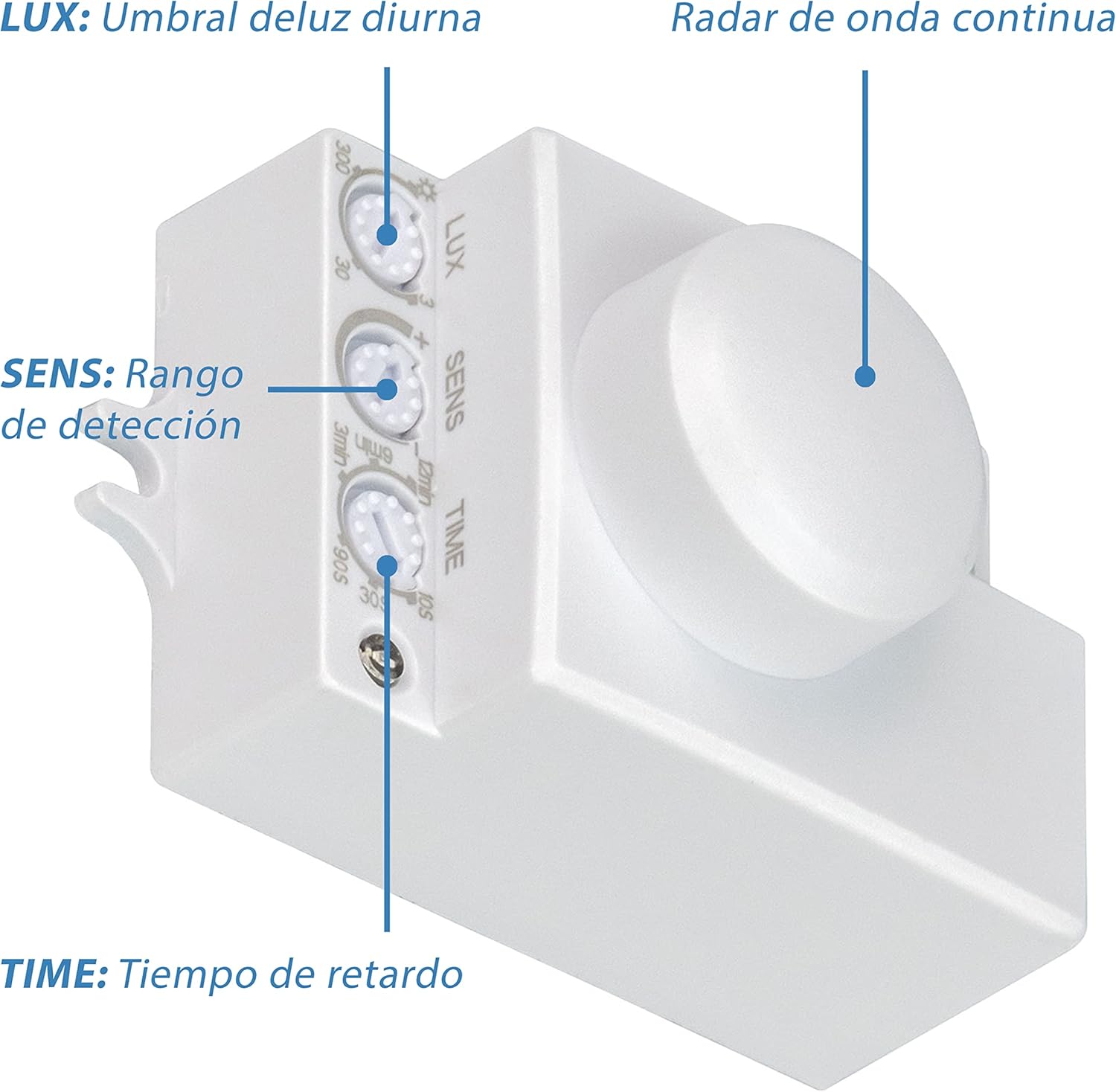
Figure 3.2: Dimensions of the POPP SM-001 sensor. The sensor measures approximately 39.4mm in width, 54.5mm in length, and 37.2mm in depth.
3.2 Adjustment Dials

Figure 3.3: The sensor features three adjustment dials: LUX for ambient light threshold, SENS for detection range, and TIME for delay time.
4. Specifications
| Feature | Specification |
|---|---|
| Brand | Popp |
| Model Number | SM-001 |
| Operating Voltage | 220-240V AC |
| Radar Frequency | 5.8GHz |
| Detection Angle | 180° - 360° (Adjustable) |
| Detection Range | 5-15m (Wall), 1-8m radius (Ceiling) |
| Installation Height | 1.5-3.5m (Wall), 2-8m (Ceiling) |
| Time Delay | 10s ±3s to 12min ±1min (Adjustable) |
| Ambient Light Sensitivity (LUX) | 3-2000 Lux (Adjustable) |
| Max Incandescent Load | 1200W |
| Max LED Load | 300W |
| IP Rating | IP20 |
| Mounting Type | Surface (Wall, Ceiling) |
| Product Weight | 40g |
| Batteries Required | No |
5. Installation (Setup)
Before proceeding with installation, ensure the main power supply is switched off to prevent electrical shock. This sensor is designed for surface mounting on walls or ceilings.
5.1 Mounting Location
- For wall installations, mount the sensor at a height between 1.5m and 3.5m.
- For ceiling installations, mount the sensor at a height between 2m and 8m.
- Choose a location free from obstructions that might block the microwave signal.
- Avoid direct exposure to heat sources, air conditioning vents, or strong electromagnetic fields.
5.2 Wiring Diagram
Follow the wiring diagram carefully. Incorrect wiring can damage the device or pose a safety risk.

Figure 5.1: Wiring connections for the POPP SM-001 sensor. Connect the Live (L), Neutral (N), and Load (L') wires as indicated. The load is the light fixture or device to be controlled.
- Disconnect power at the main circuit breaker.
- Connect the Live (L) wire from the power supply to the 'L' terminal on the sensor.
- Connect the Neutral (N) wire from the power supply to the 'N' terminal on the sensor.
- Connect the Live wire of your light fixture (Load) to the 'L'' terminal on the sensor.
- Connect the Neutral wire of your light fixture to the Neutral (N) wire of the power supply.
- Secure all connections properly.
5.3 Mounting the Sensor

Figure 5.2: Example of ceiling installation using screws and anchors. Ensure the sensor is securely fastened.
- Mark the desired mounting position on the wall or ceiling.
- Drill pilot holes if necessary and insert wall anchors.
- Secure the sensor to the mounting surface using appropriate screws.
- After mounting and wiring, restore power and test the sensor.
6. Operating Instructions
The POPP SM-001 sensor has three adjustable dials to customize its operation:
Figure 6.1: Close-up of the adjustment dials for LUX, SENS, and TIME.
6.1 LUX (Ambient Light Sensitivity)
This dial controls the ambient light threshold at which the sensor will activate.
- Turn the dial towards the "3" (moon icon) setting for activation only in low light conditions (e.g., night).
- Turn the dial towards the "2000" (sun icon) setting for activation in all light conditions (day and night).
6.2 SENS (Detection Range)
This dial adjusts the sensitivity of the microwave radar, effectively controlling the detection range.
- Turn the dial towards "-" for a shorter detection range (e.g., 1m for ceiling, 5m for wall).
- Turn the dial towards "+" for a longer detection range (e.g., 8m for ceiling, 15m for wall).

Figure 6.2: Illustration of the 360° detection range from a ceiling-mounted sensor, extending up to 8 meters in radius.
6.3 TIME (Time Delay)
This dial sets how long the connected light will remain on after the last detected motion.
- Turn the dial towards "10S" for a shorter delay (approximately 10 seconds).
- Turn the dial towards "12MIN" for a longer delay (approximately 12 minutes).
7. Maintenance
The POPP SM-001 Microwave Motion Sensor requires minimal maintenance.
- Cleaning: Gently wipe the sensor's surface with a soft, dry cloth. Do not use abrasive cleaners, solvents, or excessive moisture.
- No User-Serviceable Parts: Do not attempt to open or repair the sensor. Doing so will void the warranty and may pose an electrical hazard.
8. Troubleshooting
| Problem | Possible Cause | Solution |
|---|---|---|
| Light does not turn on when motion is detected. |
|
|
| Light stays on continuously. |
|
|
| Detection range is too short or inconsistent. |
|
|
9. Warranty and Support
POPP products are manufactured to high-quality standards. While specific warranty details are not provided in this manual, please refer to the product packaging or the retailer's website for warranty information.
For technical support or inquiries, please contact your retailer or the manufacturer directly. Keep your purchase receipt as proof of purchase for any warranty claims.
Manufacturer: POPP
Please refer to the product packaging or the retailer's website for official support channels.


