
1. Introduction
The NovaStar TB6 is a multimedia player from the Taurus series, specifically designed for small and medium-sized LED full-color displays. This device facilitates program publishing and screen control through various interfaces including PC, mobile phones, and LAN. It supports remote centralized publishing and monitoring, offering a versatile solution for LED display management.
2. Key Features
- 1.3 MP loading capacity, supporting a maximum resolution of 4096x1080 pixels.
- Equipped with 2 primary and 2 standby Ethernet ports for reliable connectivity.
- Features 8GB of internal storage space for content.
- Supports dual-Wi-Fi modes (Wi-Fi AP and Wi-Fi STA) for flexible wireless connections.
- Allows for manual and time-based switching between synchronous and asynchronous display modes.
- Powerful hardware processing with an eight-core processor and 2GB operating memory.
- Supports 1080P video hardware decoding.
- HDMI input full-screen self-adaptive display.
- Supports HDMI loop and HDMI input mode.
3. Product Overview
This section provides a visual guide to the NovaStar TB6 LED Video Controller, highlighting its physical components and connection ports.

Figure 3.1: Front view of the NovaStar TB6 LED Video Controller, showcasing its compact design and status indicator lights.
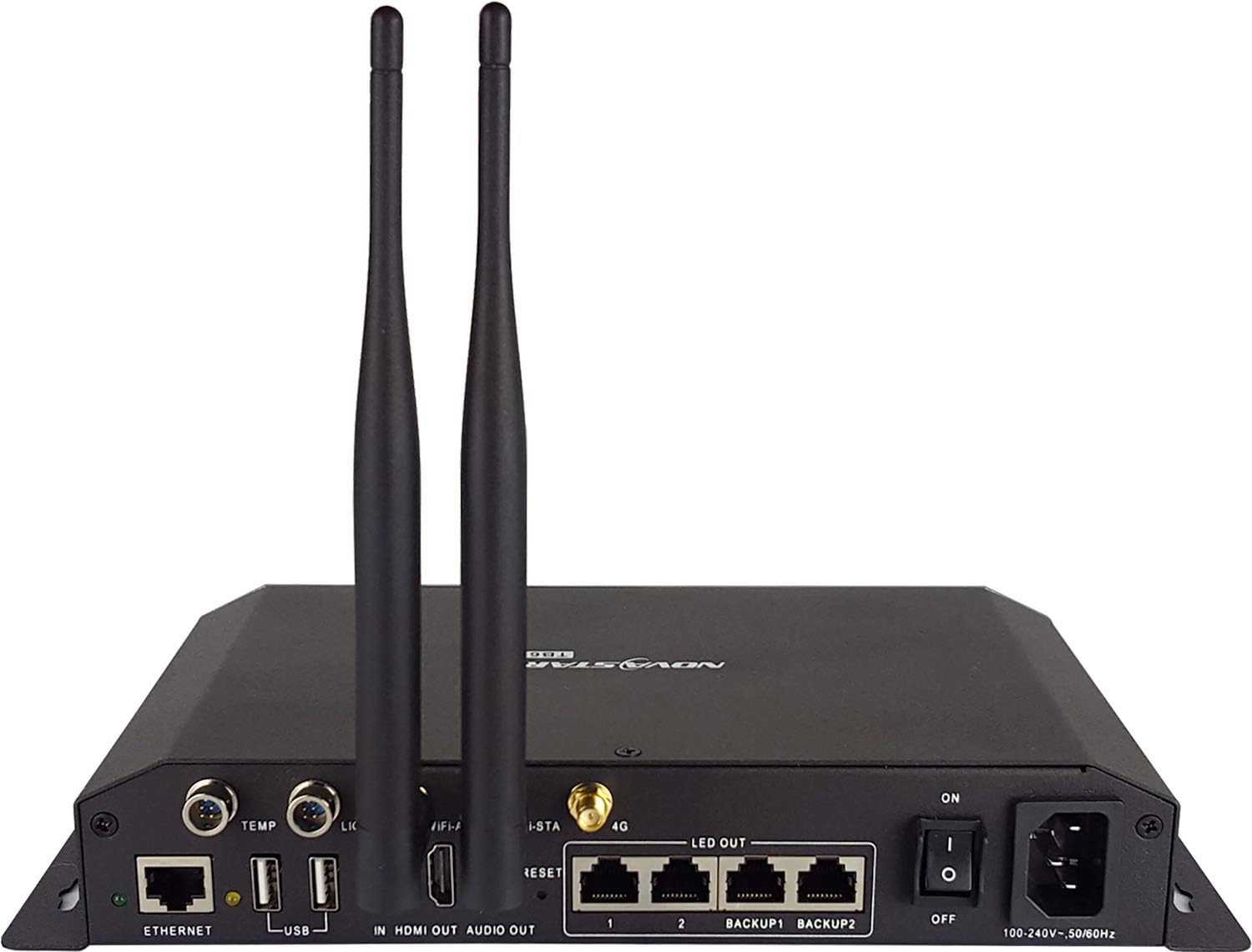
Figure 3.2: Rear view of the NovaStar TB6 LED Video Controller, highlighting the various input/output ports and antennas.
3.1 Front Panel Indicators
- PWR: Power indicator. Illuminates when the device is powered on.
- SYS: System status indicator. Indicates the operational status of the system.
- CLOUD: Cloud service connection indicator. Shows connection status to cloud services.
- RCR: Recording status indicator. Indicates if recording is active.
3.2 Rear Panel Connections
- ETHERNET: Network port for LAN connection to a router or switch.
- USB: USB ports for connecting peripheral devices or for firmware updates.
- HDMI IN: HDMI input port for connecting video sources such as a computer or media player.
- HDMI OUT: HDMI output port, typically used for local monitoring or HDMI loop-through.
- AUDIO OUT: 3.5mm audio output jack.
- LED OUT 1, 2, BACKUP1, BACKUP2: Ethernet output ports for connecting to LED display receiving cards.
- ON/OFF: Power switch for turning the device on or off.
- 100-240V~50/60Hz: AC power input connector.
- Antennas: Connectors for Wi-Fi antennas to enable wireless communication.
4. Setup
4.1 Unpacking and Inspection
- Carefully remove the TB6 controller and all accessories from its packaging.
- Inspect the device for any visible damage that may have occurred during shipping.
- Verify that all components listed in the packing list are present.
4.2 Power Connection
- Connect the provided AC power cable to the 100-240V~50/60Hz input on the rear panel of the TB6.
- Plug the other end of the power cable into a grounded electrical outlet.
- Turn on the device using the ON/OFF switch. The PWR indicator on the front panel should illuminate.
4.3 Network Connection
- Wired Connection: Connect an Ethernet cable from your network router or switch to the ETHERNET port on the rear panel of the TB6.
- Wireless Connection (Wi-Fi): Attach the provided Wi-Fi antennas to the antenna connectors on the rear panel. The TB6 supports dual-Wi-Fi modes (AP and STA). For detailed Wi-Fi setup and configuration, refer to the ViPlex Handy software manual.
4.4 Video Source Connection
- Connect your video source device (e.g., computer, media player, camera) to the HDMI IN port on the rear panel using a high-quality HDMI cable.
4.5 LED Display Connection
- Connect Ethernet cables from the LED OUT ports (1, 2, BACKUP1, BACKUP2) on the rear panel of the TB6 to the input ports of your LED display receiving cards. Follow the wiring diagram provided with your LED display system.
5. Operating Instructions
5.1 Software Control
- The NovaStar TB6 is primarily controlled and managed using the ViPlex Handy software application. This software is available for PC, tablet, and mobile phone platforms.
- Download and install the latest version of ViPlex Handy from the official NovaStar website or your device's respective app store.
- Connect the ViPlex Handy software to the TB6 via a local area network (LAN) or Wi-Fi. Ensure both devices are on the same network.
5.2 Program Publishing
- Utilize the ViPlex Handy software to create, edit, and publish content programs. These programs are stored on the TB6's internal 8GB storage.
- The software enables remote centralized publishing and monitoring of content, allowing for efficient management of your LED display.
5.3 Synchronous and Asynchronous Modes
- The TB6 supports both synchronous and asynchronous display modes, offering flexibility for various applications.
- Synchronous Mode: In this mode, content from the HDMI input is displayed in real-time on the LED screen. This is suitable for live events or dynamic content.
- Asynchronous Mode: Content previously uploaded and stored on the TB6 is played back independently, without requiring a continuous external video source. This is ideal for scheduled content playback.
- Switching between these modes can be performed manually or scheduled through the ViPlex Handy control software.
5.4 HDMI Input Full-Screen Self-Adaptive Display
- When using the HDMI input, the TB6 automatically adjusts the display to fit the full screen of the connected LED display, optimizing content presentation.
5.5 HDMI Loop & HDMI Input Mode
- The TB6 supports HDMI loop-through functionality, allowing the HDMI input signal to be passed to another device via the HDMI OUT port. This is useful for daisy-chaining or local monitoring.
- The specific configuration for HDMI loop and input modes can be managed through the ViPlex Handy software.
6. Maintenance
6.1 Cleaning
- Before cleaning, ensure the TB6 is powered off and disconnected from the power source.
- Use a soft, dry, and lint-free cloth to gently wipe the exterior surfaces of the controller.
- Do not use liquid cleaners, aerosol sprays, or abrasive materials directly on the device, as these can cause damage.
- Periodically check and clear any dust or debris from the ventilation openings to ensure proper airflow and prevent overheating.
6.2 Software and Firmware Updates
- Regularly check the official NovaStar website for the latest firmware updates for the TB6 controller.
- Ensure your ViPlex Handy software application is always updated to the latest version to maintain compatibility and access new features.
- Follow the instructions provided with the updates carefully to avoid any issues during the update process.
7. Troubleshooting
7.1 No Power
- Check Power Cable: Ensure the power cable is securely connected to both the TB6 and a functional power outlet.
- Power Switch: Verify that the ON/OFF switch on the rear panel is in the "ON" position.
- Outlet Functionality: Test the power outlet with another device to confirm it is supplying power.
7.2 No Display Output
- LED Display Connection: Confirm that the Ethernet cables from the TB6's LED OUT ports are correctly connected to the LED display receiving cards.
- Video Source: Ensure your video source is active, powered on, and properly connected to the HDMI IN port.
- Software Settings: Check the display settings and program playback status within the ViPlex Handy software.
- Display Mode: Verify that the TB6 is configured for the correct display mode (synchronous for live input, asynchronous for stored content).
7.3 Network Connection Issues
- Wired Connection: Inspect the Ethernet cable for damage and ensure it is securely plugged into both the TB6 and your network router/switch. Check the status indicators on your network equipment.
- Wi-Fi Connection: Ensure the Wi-Fi antennas are properly attached. Verify Wi-Fi settings (SSID, password) in the ViPlex Handy software. Confirm the control device and TB6 are on the same Wi-Fi network.
- Restart Devices: Try restarting the TB6, your router, and the control device.
- Firewall: Check firewall settings on your control device to ensure they are not blocking communication with the TB6.
7.4 Software Cannot Connect to TB6
- Network Connectivity: Ensure the TB6 and the device running ViPlex Handy are on the same local network.
- IP Address/Device ID: Verify that the correct IP address or device ID is being used for connection in the software.
- Software Version: Ensure you are using a compatible and up-to-date version of ViPlex Handy.
- Restart: Restart both the TB6 and the control device.
8. Specifications
| Feature | Detail |
|---|---|
| Model | TB6 |
| Brand | NovaStar |
| Loading Capacity | 1.3 MP (4096x1080 pixels max) |
| Ethernet Ports | 2 primary / 2 standby |
| Internal Storage | 8GB |
| Operating Memory | 2GB |
| Processor | Eight-core |
| Connectivity Technology | Ethernet, Dual Wi-Fi (AP & STA) |
| Video Input | HDMI |
| Video Output | Ethernet (LED OUT) |
| Resolution (HDMI Input) | 1080p |
| Special Features | HDMI input full-screen self-adaptive display, HDMI loop & HDMI input mode |
| Product Dimensions | 6.57 x 5.34 x 0.87 inches |
| Item Weight | 3 pounds |
| Power Input | 100-240V~50/60Hz |
| Date First Available | January 2, 2019 |
9. Warranty Information
This NovaStar product is covered by a standard manufacturer's warranty. For specific warranty terms, conditions, and duration, please refer to the warranty card included with your product packaging. It is recommended to retain your proof of purchase for any warranty claims. For detailed information, please contact NovaStar customer support directly.
10. Support
For technical assistance, troubleshooting, or further inquiries regarding your NovaStar TB6 LED Video Controller, please contact NovaStar customer support through their official channels.
You can also visit the official NovaStar store on Amazon for product information and updates: NovaStar Store


