
Introduction
This manual provides instructions for the Proxicast ANT-124-SMA-2PK 4G/LTE External Magnetic Loaded Coil Antenna. This antenna is designed to enhance signal strength and data speeds for compatible 4G/LTE routers, modems, and hotspots equipped with SMA connectors. Proper installation and placement are crucial for optimal performance.
Key Features
- Boosts signal strength and data speeds on AT&T, Verizon, T-Mobile, Bell, Telus, Rogers, Telcel, Movistar, and most other cellular carriers.
- Offers longer range and enhanced throughput as a high-gain direct replacement antenna.
- Allows flexible positioning for maximum signal reception, suitable for vending machines, ATMs, kiosks, M2M, IoT, or desktop use.
- Compatible with any 3G/4G/LTE router, modem, or hotspot with an SMA jack.
- Includes a 6.5~8 dBi 12.6-inch omni-directional loaded coil whip antenna on a 1.75-inch magnetic mounting base, plus a 10 ft coax cable with an SMA male connector.
- Supports 4G only. For 4G + 5G support, refer to models ANT-124-95G-2PK or ANT-124-WAV-2PK.
- Not intended for use on moving vehicles.
Package Contents
- 2 x Proxicast 6.5~8 dBi 4G/LTE External Magnetic Loaded Coil Antennas (ANT-124-SMA-2PK)
Setup Instructions
1. Connecting the Antennas
The Proxicast ANT-124-SMA-2PK antennas feature SMA male connectors for easy attachment to compatible 4G/LTE routers, modems, or hotspots. Ensure your device has SMA female ports for connection.
- Locate the external antenna ports on your 4G/LTE device. These are typically labeled or covered by small plugs.
- Carefully align the SMA male connector of the antenna with the device's port.
- Gently screw the connector onto the port. Tighten fully by hand only. Do not use tools, as over-tightening can damage the connectors.
- If using two antennas for MIMO (Multiple-Input Multiple-Output) compatible modems, connect both antennas to their respective ports.

Image: Two Proxicast 4G/LTE magnetic antennas, ready for connection.

Image: Detailed view of the SMA Male connector on the antenna cable.

Image: Proxicast antennas connected to a compatible 4G/LTE router.
2. Antenna Placement
The antennas feature a magnetic mounting base for flexible placement. Optimal placement is critical for maximizing signal reception.
- The magnetic base allows for easy attachment to any suitable metal surface.
- Orient the antenna vertically for best performance.
- Position the antenna near an outside wall and as high as possible to minimize obstructions.
- If your modem supports MIMO, use two identical antennas spaced approximately 22 inches apart for optimal performance.
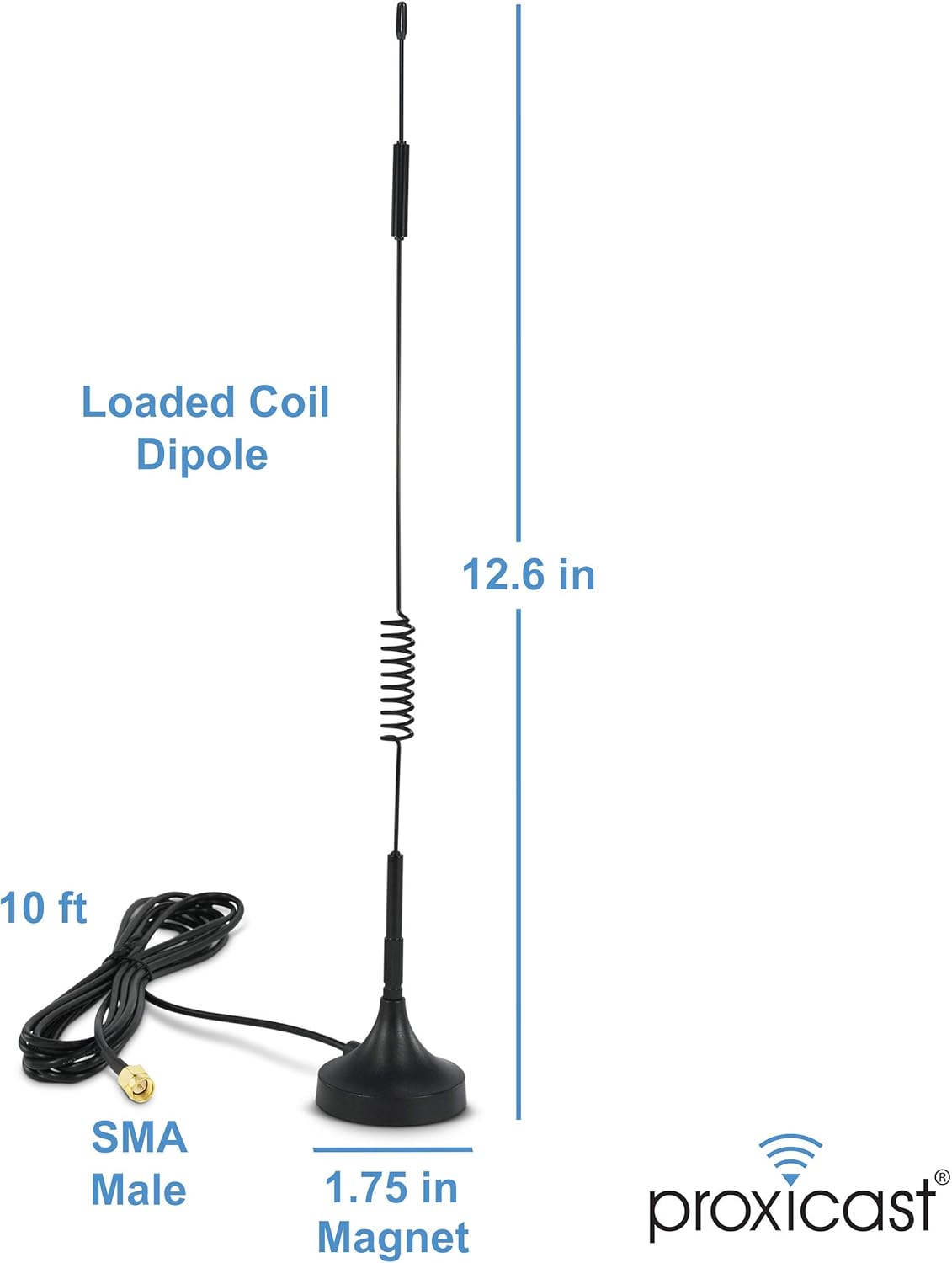
Image: Proxicast antenna showing its dimensions and magnetic base.

Image: Comparison illustrating the 1.75-inch magnetic base of the Proxicast antenna.
Operating Instructions
Once connected and properly positioned, the Proxicast ANT-124-SMA-2PK antenna will passively enhance the reception of 4G/LTE cellular signals for your compatible device. The antenna is omni-directional, meaning it receives signals from all directions. To find the strongest signal, you may need to experiment with the antenna's exact placement and orientation.
- After connecting, monitor your device's signal strength indicator.
- Slightly rotate the antenna on its vertical axis to identify the position that yields the strongest signal.
- The antenna is designed to work with 4G networks. It does not support 5G.
Important Placement Guidelines
- Orientation: Always orient the antenna vertically.
- Location: Position the antenna near an outside wall and as high as possible to minimize signal obstruction.
- Avoid Interference: Keep the antenna away from potential sources of interference such as:
- CRT/TVs
- Lighting fixtures
- Radios
- Microwaves
- Other wireless devices
- Large vertical metal or concrete objects
- Low-E or tinted/coated windows
- MIMO Setup: If your modem supports MIMO, use two identical antennas spaced approximately 22 inches apart for optimal performance.
- Outdoor Use: This antenna is not intended for permanent outdoor use unless properly weather-sealed.
- Vehicle Use: This antenna is not intended for use on moving vehicles.
Technical Specifications
| Specification | Value |
|---|---|
| Product Dimensions | 1.75 x 1.75 x 12.5 inches |
| Item Weight | 3 ounces |
| Item Model Number | ANT-124-SMA-2PK |
| Antenna Type | External Magnetic Loaded Coil Antenna - SMA |
| Brand | Proxicast |
| Number of Channels | 1 |
| Impedance | 50 Ohm |
| Maximum Range | 52800 Feet |
| UPC | 617237751355 |
| Manufacturer | Proxicast |
| Date First Available | September 9, 2016 |
Troubleshooting
- No Signal Improvement: Ensure the antennas are securely connected to your device's SMA ports. Experiment with different vertical orientations and positions to find the optimal signal. Verify that there are no major obstructions between the antenna and the nearest cell tower.
- Loose Connection: Always hand-tighten the SMA connectors. If connections become loose, re-tighten them by hand.
- Device Compatibility: Confirm your router, modem, or hotspot is compatible with external SMA antennas and supports 4G/LTE frequencies.
- MIMO Setup: If using two antennas for MIMO, ensure they are spaced approximately 22 inches apart.
Warranty and Support
For warranty information, technical support, or further assistance with your Proxicast ANT-124-SMA-2PK antenna, please refer to the official Proxicast website or contact their customer service directly. Keep your purchase receipt for warranty claims.