
1. Introduction
Thank you for choosing the Pretty Love Susie Thrusting Vibrator. This manual provides essential information for the safe and effective operation, maintenance, and care of your device. Please read these instructions thoroughly before first use and retain them for future reference.
The Pretty Love Susie Thrusting Vibrator is designed for internal and external stimulation. It features powerful vibrations with 12 distinct vibration patterns and 4 thrusting modes. Constructed from body-safe, soft silicone, this device is USB rechargeable and fully waterproof, allowing for use in wet environments. Key characteristics include its high-quality material and user-friendly operation.
2. Product Overview
2.1 Key Features
- Material: High-quality, body-safe silicone construction.
- Modes: 12 distinct vibration patterns and 4 thrusting modes.
- Power: USB rechargeable for convenience.
- Waterproof: Fully waterproof design for versatile use and easy cleaning.
- Controls: Intuitive and easy-to-use control panel.
2.2 Components
Familiarize yourself with the main components of your device:

Figure 1: Front view of the Pretty Love Susie Thrusting Vibrator, showing the main body and control panel.

Figure 2: Back view of the device, highlighting the USB charging port at the base.

Figure 3: The product packaging, indicating the brand, model, and key features like USB rechargeability.
3. Setup
3.1 Initial Charging
Before first use, fully charge the device. The device is equipped with a USB rechargeable battery.
- Locate the charging port at the base of the device.
- Insert the provided USB charging cable into the port.
- Connect the other end of the USB cable to a compatible USB power source (e.g., computer, USB wall adapter).
- The indicator light will illuminate during charging and typically change or turn off when fully charged. Refer to the indicator light behavior for your specific model.
- Charging time may vary, but typically takes 2-4 hours for a full charge.
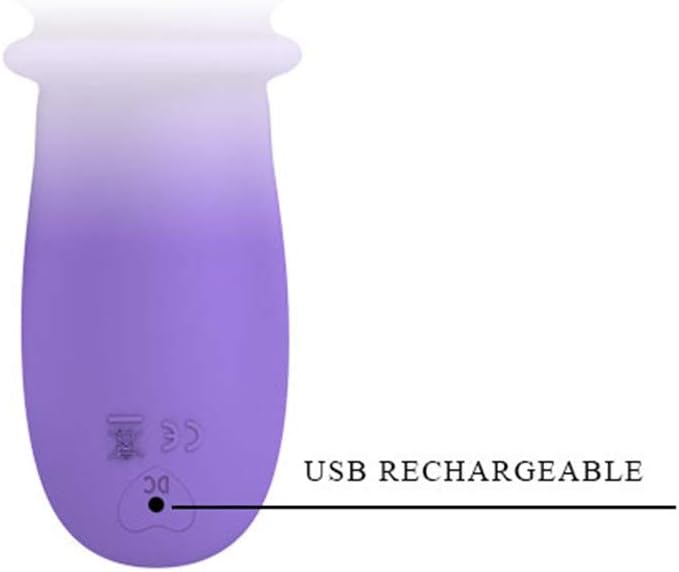
Figure 4: Detail of the USB charging port located at the base of the device.
4. Operating Instructions
The device features a simple control panel for easy operation.

Figure 5: Control panel with Power, Vibration, and Up & Down (Thrusting) buttons.
4.1 Power On/Off
- To turn ON: Press and hold the Power button (⑂) for 2-3 seconds.
- To turn OFF: Press and hold the Power button (⑂) for 2-3 seconds.
4.2 Adjusting Vibration Modes
- Once the device is powered on, press the Vibration button (∿) to cycle through the 12 different vibration patterns.
- Each press will switch to the next mode.
4.3 Adjusting Thrusting Modes
- Once the device is powered on, press the Up & Down button (⇅) to cycle through the 4 different thrusting modes.
- Each press will switch to the next mode.
5. Cleaning and Maintenance
Proper cleaning and maintenance ensure hygiene and prolong the lifespan of your device.
- Before and After Each Use: Clean the device thoroughly.
- Cleaning: Wash the device with warm water and a mild, toy-safe soap. Avoid harsh detergents or alcohol-based cleaners, as these can damage the silicone material.
- Rinsing: Rinse the device thoroughly under warm running water to remove all soap residue.
- Drying: Pat dry with a lint-free cloth or allow it to air dry completely before storage.
- Waterproof: The device is fully waterproof, making cleaning easy and safe.
6. Storage
Store your device in a clean, dry, and dust-free environment. Keep it away from direct sunlight, extreme temperatures, and other silicone products to prevent material degradation or reactions.
7. Troubleshooting
If you encounter any issues with your device, refer to the following common problems and solutions:
| Problem | Possible Cause | Solution |
|---|---|---|
| Device does not turn on. | Battery is depleted. | Charge the device fully (refer to Section 3.1). |
| Device does not charge. | Charging cable or power source issue. | Ensure the USB cable is securely connected. Try a different USB port or power adapter. |
| Vibrations are weak or inconsistent. | Low battery. | Recharge the device. |
| Buttons are unresponsive. | Device may be locked or require a reset. | Ensure the device is fully charged. Try turning the device off and on again. |
If the problem persists after attempting these solutions, please contact customer support.
8. Specifications
Detailed specifications for the Pretty Love Susie Thrusting Vibrator Model 6080:
| Feature | Detail |
|---|---|
| Product Name | Susie Thrusting Vibrator |
| Model Number | 6080 |
| Brand | Pretty Love |
| Material | Silicone |
| Color | Purple |
| Dimensions (L x W x H) | 30.4 x 15.4 x 2.54 cm (11.97 x 6.06 x 1.0 inches) |
| Weight | 510 grams (1.12 lbs) |
| Power Source | USB Rechargeable |
| Vibration Modes | 12 |
| Thrusting Modes | 4 |
| Waterproof | Yes |

Figure 6: Dimensional diagram of the device, indicating a length of 252mm and a width of 39mm.
9. Safety Information
Please read and adhere to the following safety guidelines:
- Material Safety: This device is made from body-safe silicone. Discontinue use if you experience any irritation or allergic reaction.
- Medical Conditions: Consult a healthcare professional before use if you have any medical conditions, are pregnant, or have recently undergone surgery.
- Discomfort: Discontinue use immediately if you experience any pain, discomfort, or unusual sensations.
- Not for Medical Use: This device is intended for personal use only and is not a medical device.
- Children: Keep out of reach of children.
- Charging: Only use the provided charging cable or a compatible USB cable. Do not use the device while it is charging.
- Damage: Do not use the device if it appears damaged or defective.
10. Disposal
When disposing of the device, please follow local regulations for electronic waste. Do not dispose of electronic devices with general household waste. Proper disposal helps prevent potential negative consequences for the environment and human health.
11. Warranty and Support
For warranty information, technical support, or any questions not covered in this manual, please contact the manufacturer or your retailer. Keep your proof of purchase for warranty claims.
