
1. Important Safety Information
Please read this manual thoroughly before operating the SYMA S39 RC Helicopter. Failure to follow these instructions may result in injury or damage to the product.
- Adult Supervision: This product is recommended for users aged 8 and above. Adult supervision is advised for younger users.
- Flight Environment:
- Fly in open, clear areas, away from people, pets, and obstacles.
- Avoid flying near power lines, trees, water, or busy roads.
- For outdoor use, ensure there is no wind. The helicopter is lightweight and can be affected by even slight breezes.
- Indoors, avoid areas with strong air currents from fans or air conditioning.
- Battery Safety:
- Use only the provided charger and batteries.
- Do not overcharge or short-circuit batteries.
- Do not expose batteries to extreme temperatures or direct sunlight.
- Remove batteries from the helicopter and remote control when not in use.
- Propeller Safety: Keep fingers, hair, and loose clothing away from rotating propellers.
- Impacts: In case of a crash, immediately cut the throttle to prevent further damage. Inspect the helicopter for damage before the next flight.

Image: The SYMA S39 RC Helicopter is designed for safe indoor play, as shown with a child observing the helicopter in a living room setting. The product adheres to safety standards, indicated by the visible certificates.
2. Package Contents
Verify that all items are present in the package:
- SYMA S39 RC Helicopter (1)
- Remote Control Transmitter (1)
- Rechargeable Li-Po Batteries (2)
- USB Charging Cable (1)
- Spare Main Blades (2)
- Spare Tail Blade (1)
- Screwdriver (1)
- Instruction Manual (This document)

Image: The SYMA S39 RC Helicopter package includes the helicopter, a remote control, and two batteries for extended flight time.
3. Product Overview
The SYMA S39 is a 3.5-channel RC helicopter designed for beginners and casual flyers. It features a durable alloy frame, a built-in gyroscope for stable flight, and multi-protection features to enhance durability during minor impacts.

Image: The SYMA S39 RC Helicopter, showcasing its red and white body, main rotor, tail rotor, and front LED light.
Key Features:
- 3.5 Channel Control: Allows for Up/Down, Forward/Backward, and Left/Right rotation.
- Gyro Stabilizer: Provides enhanced stability and control during flight.
- Altitude Hold: Maintains a consistent altitude automatically, simplifying flight for beginners.
- High/Low Speed Mode: Adjustable speed settings for different skill levels and environments.
- Durable Construction: Features an alloy frame and flexible propellers for improved crash resistance.
- LED Lights: Front LED light for visibility and enhanced flight experience in low-light conditions.

Image: Diagram illustrating the anti-collision design elements of the S39, such as the soft balance bar, flexible propellers, and robust metal body construction.
4. Setup
4.1 Charging the Helicopter Battery
- Ensure the helicopter's power switch is in the "OFF" position.
- Connect the USB charging cable to the helicopter's charging port.
- Plug the other end of the USB cable into a USB power source (e.g., computer USB port, USB wall adapter).
- The indicator light on the USB cable will illuminate during charging and turn off when charging is complete.
- Charging typically takes approximately 50-60 minutes. Do not leave unattended during charging.

Image: The helicopter battery is charged using the provided USB cable, which can be connected to a laptop or other USB power source.
4.2 Installing Remote Control Batteries
- Open the battery compartment on the back of the remote control using a screwdriver.
- Insert 4 x AA batteries (not included) into the compartment, ensuring correct polarity (+/-).
- Close the battery compartment and secure it with the screw.
4.3 Pairing the Helicopter and Remote Control
- Place the helicopter on a flat, level surface.
- Turn on the helicopter's power switch. The helicopter's indicator light will flash.
- Turn on the remote control. The remote's indicator light will flash.
- Push the left joystick (throttle) all the way up, then pull it all the way down.
- Both the helicopter and remote control indicator lights will become solid, indicating successful pairing.
- The helicopter is now ready for flight.

Image: The SYMA S39 helicopter and its corresponding remote control, ready for pairing and flight.
5. Operating Instructions
5.1 Basic Controls
| Control Stick | Action | Helicopter Movement |
|---|---|---|
| Left Joystick (Throttle) - Up | Push up | Ascend (Fly Up) |
| Left Joystick (Throttle) - Down | Pull down | Descend (Fly Down) |
| Left Joystick (Direction) - Left/Right | Move left/right | Rotate Left/Right |
| Right Joystick (Direction) - Up | Push up | Fly Forward |
| Right Joystick (Direction) - Down | Pull down | Fly Backward |
5.2 Take-off and Landing
- Take-off: After pairing, slowly push the left joystick (throttle) upwards. The helicopter will ascend. Adjust the throttle to maintain desired altitude.
- Landing: Slowly pull the left joystick (throttle) downwards. The helicopter will descend. Reduce throttle completely upon landing.
5.3 Altitude Hold Function
The SYMA S39 features an altitude hold function. Once the helicopter reaches a desired height, release the left joystick (throttle). The helicopter will automatically maintain its current altitude, allowing you to focus on directional control.
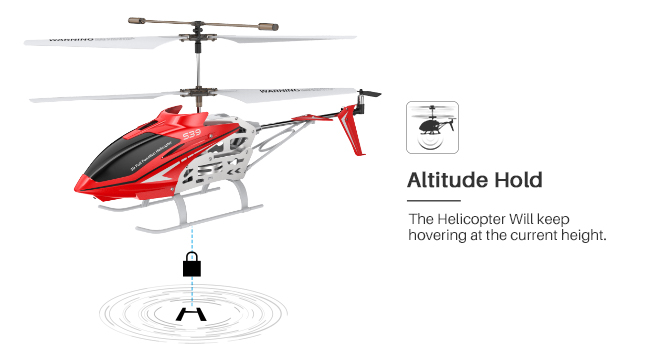
Image: The Altitude Hold function allows the helicopter to maintain a stable height without constant throttle input.
5.4 High/Low Speed Mode
The remote control has a button to switch between High and Low speed modes. Low speed is recommended for beginners and indoor flight, while High speed offers more responsiveness for experienced pilots or outdoor flight in calm conditions.
5.5 Trim Adjustment
If the helicopter drifts in a certain direction without input, use the trim buttons on the remote control to correct its flight path. Adjust the trim in the opposite direction of the drift until the helicopter hovers stably.
5.6 Non-Interference Technology
The SYMA S39 utilizes 2.4GHz radio frequency technology, which allows multiple helicopters to be flown simultaneously without interference, provided they are properly paired to their respective remotes.
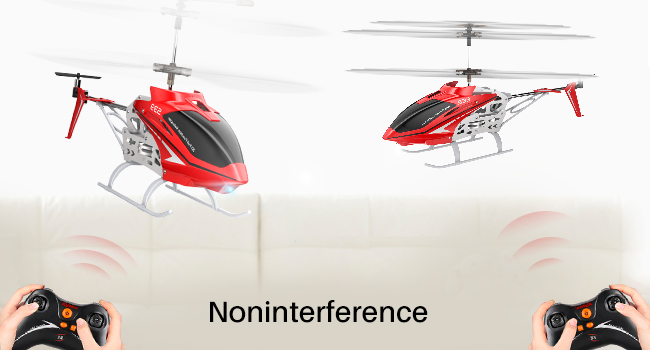
Image: Multiple SYMA S39 helicopters can be flown at the same time without signal interference, enabling group play.
5.7 LED Lights
The helicopter is equipped with a front LED light, which can be useful for orientation during flight and for flying in dimly lit environments.

Image: The helicopter's LED lights provide visibility and enhance the flight experience, especially in darker settings.
6. Maintenance
- Cleaning: Use a soft, dry cloth to clean the helicopter and remote control. Do not use water or chemical cleaners.
- Propeller Inspection: Regularly check propellers for damage (cracks, bends). Replace damaged propellers immediately using the provided spare parts and screwdriver.
- Battery Storage: Store batteries in a cool, dry place. For long-term storage, charge batteries to approximately 50% capacity.
- General Care: Avoid exposing the helicopter to direct sunlight or extreme temperatures.
7. Troubleshooting
| Problem | Possible Cause | Solution |
|---|---|---|
| Helicopter does not respond to remote. | Not paired, low remote battery, helicopter not powered on. | Ensure helicopter and remote are powered on. Re-pair the devices (Section 4.3). Replace remote batteries. |
| Helicopter cannot take off or flies weakly. | Low helicopter battery, damaged propellers, motor issue. | Charge helicopter battery fully. Check propellers for damage and replace if necessary. Contact support if motor issue is suspected. |
| Helicopter drifts during flight. | Needs trim adjustment, strong air currents. | Adjust trim buttons on the remote control. Fly in a calmer environment. |
| Helicopter crashes frequently. | Lack of experience, flying in confined spaces. | Practice in open areas. Start with Low speed mode. Ensure proper safety precautions are followed. |
8. Specifications
- Model: S39
- Brand: SYMA
- Channels: 3.5 Channel
- Dimensions: 13 x 2.36 x 5.91 inches (33 x 6 x 15 cm)
- Item Weight: 14.4 ounces (408 grams)
- Material: Alloy, Plastic
- Flight Time: Approximately 5-10 minutes (per battery)
- Charging Time: Approximately 50-60 minutes
- Control Range: Up to 30 meters (approx. 98 feet)
- Recommended Age: 8+ years
9. Warranty and Support
SYMA products are manufactured with high-quality standards. For warranty information or technical support, please contact SYMA customer service.
- Phone: +1 (718) 312-0558
- Email: usa@symatoys.com (USA)
Please have your model number (S39) and purchase details ready when contacting support.

Image: SYMA provides customer support for product inquiries and assistance.


