
1. Introduction
The G-MARK G440 is a professional 4-channel UHF wireless microphone system designed for clear and stable audio transmission. This system is suitable for various applications including home parties, karaoke, church events, speeches, school functions, and conferences. It features rechargeable handheld microphones, automatic frequency matching, and individual volume controls for precise audio balance.

Figure 1: G-MARK G440 Wireless Microphone System components.
Multiple Uses
The G440 system offers versatile capabilities for various indoor and outdoor activities. Its robust design and reliable performance make it ideal for:
- Home Karaoke
- Live Performances
- Church Services
- Speeches and Presentations
- School Events
- Conferences and Meetings

Figure 2: The G-MARK G440 system is suitable for various applications.
2. What's in the Box
The G-MARK G440 Wireless Microphone System package includes the following items:
- 1 x Wireless Receiver
- 4 x UHF Handheld Wireless Microphones
- 4 x Antennas
- 1 x Power Adapter
- 1 x 1/4" Audio Cable
- 4 x Roll Rings (Anti-slip rings)
- 1 x User Manual
- Batteries (2 Unknown batteries required for microphones)

Figure 3: All components included in the G-MARK G440 package.

Figure 4: Visual representation of the 'All in One Box' contents.
3. Product Features
- 4-Channel UHF Wireless System: Features a 4-channel UHF cordless microphone receiver and sensitive unidirectional wireless handheld microphones. Dynamic cartridges limit feedback and interference, ensuring smooth sound pickup and easy transmission.
- Superior Wireless Performance: Operates on frequencies from 520 MHz to 580 MHz for stable signal and minimal distortion. Microphones automatically match frequencies upon power-on.
- Individual Volume Control: Each of the four wireless microphones has its own volume control on the receiver for precise vocal balance.
- Extended Range: Offers a reliable performance range of up to 250 feet in open space (line of sight), surpassing wired microphone limitations.
- Auto-Scan Function: The UHF wireless system includes an auto-scan function to automatically search for and pair with the least interference channel.
- Easy to Use: Simple setup with ON/MUTE/OFF switches on both the karaoke mic and bodypack. Automatic connection when turned on, offering plug-and-play convenience.
- High Sensitivity Microphone Core: High fidelity moving ring type wheat head design effectively prevents howling.
- High-Definition LCD Screen: Each channel group can be fine-tuned and controlled via a professional brand tuner team calibration, achieving precise vocal balance.

Figure 5: Stable signal transmission up to 250 feet.

Figure 6: Long distance stable transmission range.

Figure 7: Cardioid pickup pattern for accurate sound capture.
4. Setup Guide
Follow these steps to set up your G-MARK G440 Wireless Microphone System:
- Connect Power: Use the included UL-listed plug to connect the power supply to the receiver.
- Install Antennas: Securely screw the four antennas into their designated ports on the back of the receiver.
- Connect to Audio System: Connect the receiver to your amplifier, audio mixer, karaoke machine, or PA system using the 1/4" audio cable or XLR cables (not included for individual channels).
- Insert Batteries: Open the microphone handle and insert the required batteries (2 Unknown batteries per microphone).
- Power On: Turn on the wireless receiver and then turn on each handheld microphone. The system will automatically connect and match frequencies.
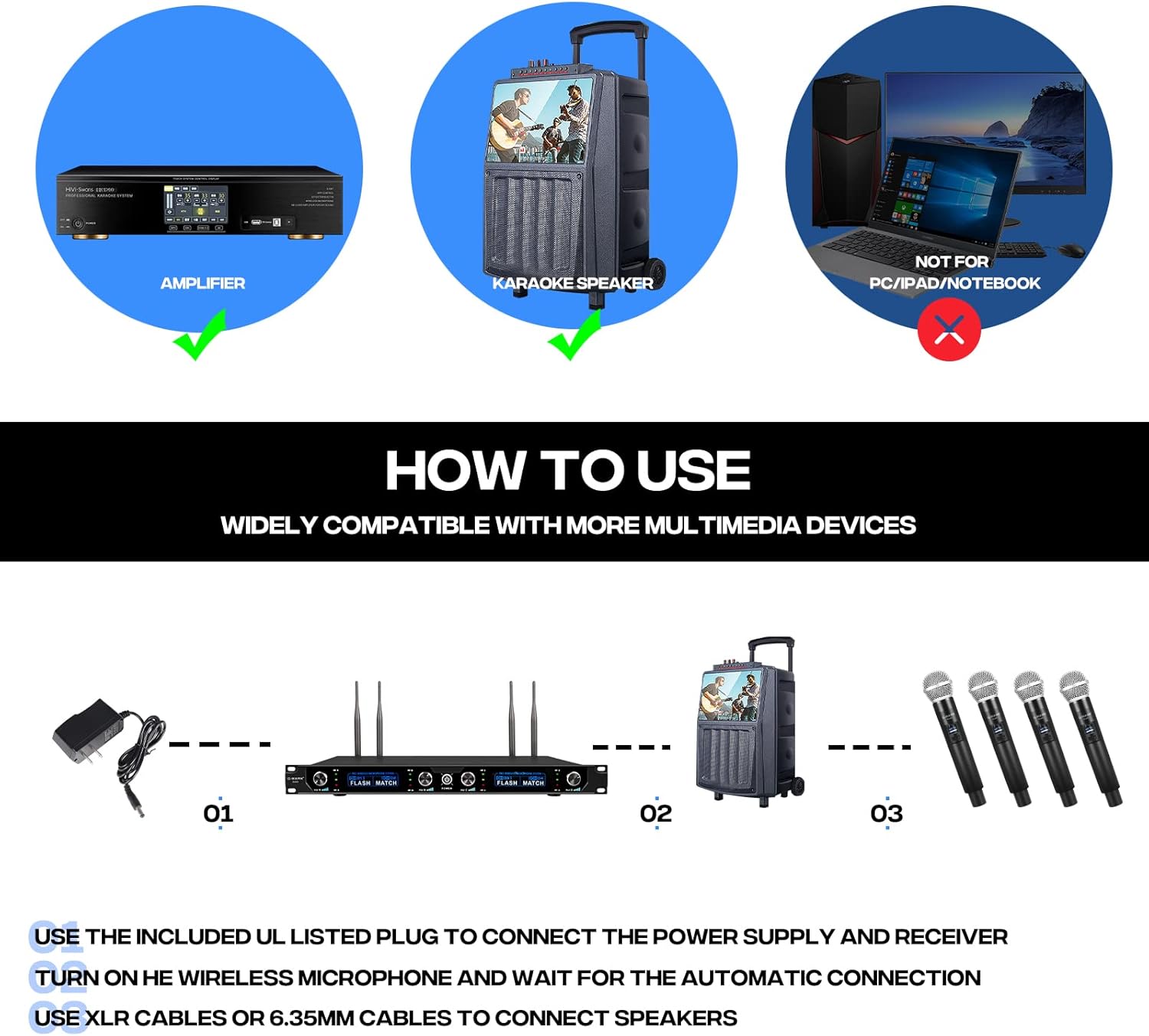
Figure 8: Basic connection diagram for the G-MARK G440 system.

Figure 9: Front and back panel overview of the G-MARK G440 receiver.

Figure 10: The G-MARK G440 receiver offers multiple connectivity options.
Setup Video
Video 1: Step-by-step guide on setting up a similar 4-channel wireless microphone system.
5. Operating Instructions
Once the system is set up, operating it is straightforward:
- Power On: Ensure both the receiver and microphones are powered on. They should automatically connect.
- Adjust Volume: Use the individual volume knobs (Vol A, Vol B, Vol C, Vol D) on the receiver to adjust the output level for each microphone.
- Monitor Display: The receiver features an HD LCD screen that displays channel information, frequency, and signal strength for each microphone.
- Microphone Usage: Speak directly into the microphone. The unidirectional polar pattern ensures clear sound pickup and minimizes background noise.
- Mute Function: Use the ON/MUTE/OFF switch on the microphone to temporarily mute the audio without powering off the unit.

Figure 11: Front panel of the G-MARK G440 receiver with controls labeled.

Figure 12: High-definition LCD screen for channel control.

Figure 13: High sensitivity microphone core for clear audio.

Figure 14: Damping adjustment knob for improved sound quality.
Operation Videos
Video 2: G-MARK G440 Wireless Microphone overview and sound test.
Video 3: Demonstration of a 4-channel professional wireless microphone system.
Video 4: Review of microphone quality and features.
6. Troubleshooting
If you encounter issues with your G-MARK G440 system, consider the following:
- No Sound: Ensure all cables are securely connected, the receiver and microphones are powered on, and microphone volumes are turned up. Check the audio system's input selection and volume.
- Interference/Poor Signal: Verify that the receiver antennas are properly installed and extended. Ensure there are no large metal objects or other wireless devices blocking the line of sight between the microphones and the receiver. The auto-scan function should help find clear frequencies.
- Microphone Not Connecting: Confirm that the microphone batteries are charged and correctly inserted. Power cycle both the microphone and receiver to re-establish connection. The system should auto-connect.
- Low Microphone Volume: Adjust the individual volume knob for the specific microphone on the receiver. Check the microphone's internal volume settings if available.
- Microphone Not Powering On: Replace or recharge the batteries in the handheld microphone.
7. Specifications
| Feature | Specification |
|---|---|
| Model Name | G440 |
| Brand | G-MARK |
| Number of Channels | 4 |
| Connectivity Technology | UHF, Wireless, XLR |
| Wireless Microphone Frequency | 500 MHz (520 MHz to 580 MHz operating range) |
| Microphone Form Factor | Handheld |
| Polar Pattern | Unidirectional |
| Material | Metal |
| Item Weight | 0.3 Kilograms (10.6 ounces) |
| Item Dimensions (L x W x H) | 21.65 x 12.6 x 5.51 inches |
| Audio Sensitivity | 80 Decibels |
| Signal-to-Noise Ratio | 120 dB |
| Frequency Response | 15 KHz |
| Power Source | Corded Electric |
| Compatible Devices | Amplifier, Audio Mixer, Karaoke Machine, PA System, Personal Computer |
8. Maintenance
To ensure the longevity and optimal performance of your G-MARK G440 Wireless Microphone System, follow these maintenance guidelines:
- Cleaning: Use a soft, dry cloth to clean the receiver and microphones. Avoid using liquid cleaners or abrasive materials, as they may damage the finish or internal components.
- Battery Care: Remove batteries from the microphones if they will not be used for an extended period to prevent leakage and damage.
- Storage: Store the system in a cool, dry place away from direct sunlight, extreme temperatures, and high humidity. Keep components in their original packaging or a protective case when not in use.
- Antenna Care: Handle antennas carefully to avoid bending or breaking. Ensure they are securely attached during operation.
9. Warranty and Support
For warranty information or technical support, please refer to the contact details provided in your user manual or visit the official G-MARK website. Keep your purchase receipt as proof of purchase for any warranty claims.


