
lightmaXX LIG0015652-000
lightmaXX Nano PAR FX 3x 4 W LED RGBW User Manual
Model: LIG0015652-000
1. Introduction
Thank you for purchasing the lightmaXX Nano PAR FX 3x 4 W LED RGBW. This compact and powerful LED PAR spot is designed for various lighting applications, offering vibrant RGBW color mixing and dynamic strobe effects. This manual provides essential information for safe operation, setup, and maintenance of your device. Please read it thoroughly before use.
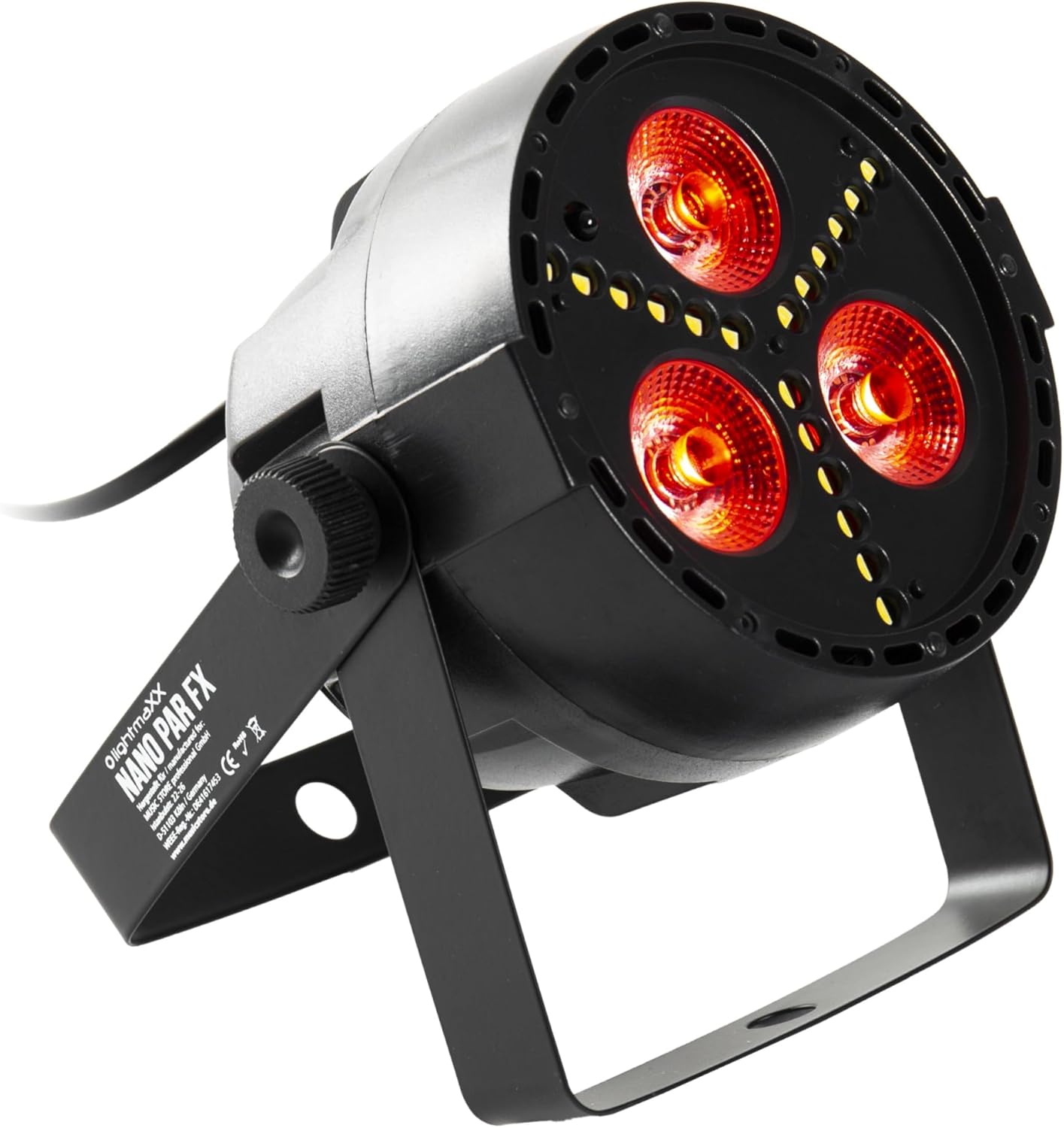
Figure 1: lightmaXX Nano PAR FX LED PAR Spot
2. Safety Instructions
To ensure safe operation, please observe the following safety instructions:
- Power Supply: Connect the device only to a grounded power outlet with the correct voltage (230V AC).
- Ventilation: Ensure adequate ventilation around the unit. Do not block ventilation openings.
- Moisture: Do not expose the device to rain or moisture. Do not use it in damp environments.
- Temperature: Operate the device within the specified temperature range. Avoid extreme heat or cold.
- Handling: Handle the device with care. Avoid dropping or subjecting it to strong impacts.
- Maintenance: Refer all servicing to qualified service personnel. Do not attempt to repair the unit yourself.
- Light Output: Avoid looking directly into the light source, as it can cause eye damage.
3. Setup
3.1 Physical Placement
The lightmaXX Nano PAR FX is designed as a floor spot but can also be mounted using its adjustable bracket. Ensure the mounting surface or location is stable and can support the weight of the fixture. Allow sufficient space around the unit for proper ventilation.
3.2 Connections
Connect the power cable to a suitable power outlet. For DMX control, connect a DMX cable from your DMX controller to the DMX IN port of the fixture. If linking multiple units, connect a DMX cable from the DMX OUT port of the first fixture to the DMX IN port of the next, and so on.

Figure 2: Rear panel with DMX ports and control display
4. Operating Instructions
4.1 Control Panel
The rear panel features a digital display and four control buttons: MENU, UP, DOWN, and ENTER. These buttons allow you to navigate through the settings and select various operating modes.
- MENU: Press to cycle through the main menu options.
- UP: Increases values or moves up in menu options.
- DOWN: Decreases values or moves down in menu options.
- ENTER: Confirms a selection or enters a submenu.
4.2 Remote Control
The lightmaXX Nano PAR FX comes with an infrared (IR) remote control for convenient operation. Ensure there is a clear line of sight between the remote and the fixture's IR receiver.

Figure 3: Product with Remote Control
4.3 Operating Modes
The fixture offers several built-in operating modes, accessible via the control panel or remote:
- Auto Mode: Cycles through pre-programmed light shows automatically.
- Sound Mode: Reacts to music or sound via a built-in microphone.
- Jump Mode: Changes colors abruptly.
- Fade Mode: Smoothly transitions between colors.
- Strobe Mode: Produces a flashing light effect.
4.4 Color Mixing
The Nano PAR FX features RGBW LEDs, allowing for a wide spectrum of colors. You can select individual colors or mix them to create custom hues using the remote control or DMX.

Figure 4: Examples of color outputs

Red Light Output

Green Light Output
4.5 DMX Operation
For professional control, the Nano PAR FX can be operated via DMX512. Set the DMX address using the control panel. Consult the DMX channel chart (typically found in a separate DMX manual or product sheet) for specific channel assignments for color, dimming, strobe, and mode control.
5. Maintenance
5.1 Cleaning
Regular cleaning helps maintain optimal performance and extends the lifespan of your fixture.
- Disconnect the power before cleaning.
- Use a soft, lint-free cloth to wipe the exterior.
- For lenses, use a specialized lens cleaner and a soft cloth to avoid scratches.
- Do not use abrasive cleaners or solvents.
5.2 Storage
When not in use, store the fixture in a dry, dust-free environment, preferably in its original packaging or a protective case.
6. Troubleshooting
| Problem | Possible Cause | Solution |
|---|---|---|
| No power | Power cable disconnected; no power from outlet; faulty fuse. | Check power cable connection; test outlet; replace fuse if necessary. |
| No light output | Fixture in standby; incorrect mode selected; DMX signal issue. | Check power and mode settings; verify DMX connection and address. |
| Remote control not working | Battery low/dead; IR receiver blocked; too far from fixture. | Replace battery; ensure clear line of sight; move closer to fixture. |
| DMX control issues | Incorrect DMX address; faulty DMX cable; DMX controller issue. | Verify DMX address; test DMX cable; check DMX controller. |
7. Specifications
| Feature | Specification |
|---|---|
| Brand | lightmaXX |
| Manufacturer | lightmaXX |
| Model Number | LIG0015652-000 |
| Product Dimensions (L x W x H) | 12.9 x 12.9 x 12.8 cm |
| Item Weight | 620 grams |
| Style | Modern |
| Color | Black (fixture), RGBW (light output) |
| Maximum Watts | 20 Watts |
| Voltage | 230 Volts (AC) |
| Bulb Type | Light Emitting Diode (LED) |
| Light Source Type | Diode électroluminescente (LED) |
8. Warranty and Support
This product is subject to the standard return policy of 30 days from the date of purchase. For technical support, service, or warranty inquiries, please contact your retailer or the lightmaXX customer service department. Please have your model number (LIG0015652-000) and proof of purchase ready when contacting support.
Ask a question about this manual
Ask about setup, troubleshooting, compatibility, parts, safety, or missing instructions. Manuals+ will review the question and use this page’s manual context to help answer it.