1. Important Safety Instructions
Please read all instructions carefully before using the VIVOHOME 3-in-1 Multifunctional Stand Mixer. Keep this manual for future reference.
- Always unplug the appliance from the power supply before assembling, disassembling, or cleaning.
- Do not immerse the motor base in water or any other liquid. Clean with a damp cloth only.
- Keep hands, hair, clothing, as well as spatulas and other utensils away from moving beaters during operation to prevent injury and/or damage to the mixer.
- Never operate the appliance with a damaged cord or plug, or after the appliance malfunctions or has been dropped or damaged in any manner.
- Close supervision is necessary when any appliance is used by or near children.
- Do not use outdoors.
- Do not let the cord hang over the edge of a table or counter.
- Do not use attachments not recommended or sold by the manufacturer.
- Ensure the tilt-head is securely locked down before operation.
- The appliance is equipped with overheat protection. If the motor overheats, it will automatically shut down. Allow it to cool down before resuming use.
2. Product Overview and Components
The VIVOHOME 3-in-1 Multifunctional Stand Mixer is designed to simplify your kitchen tasks with its versatile functions.
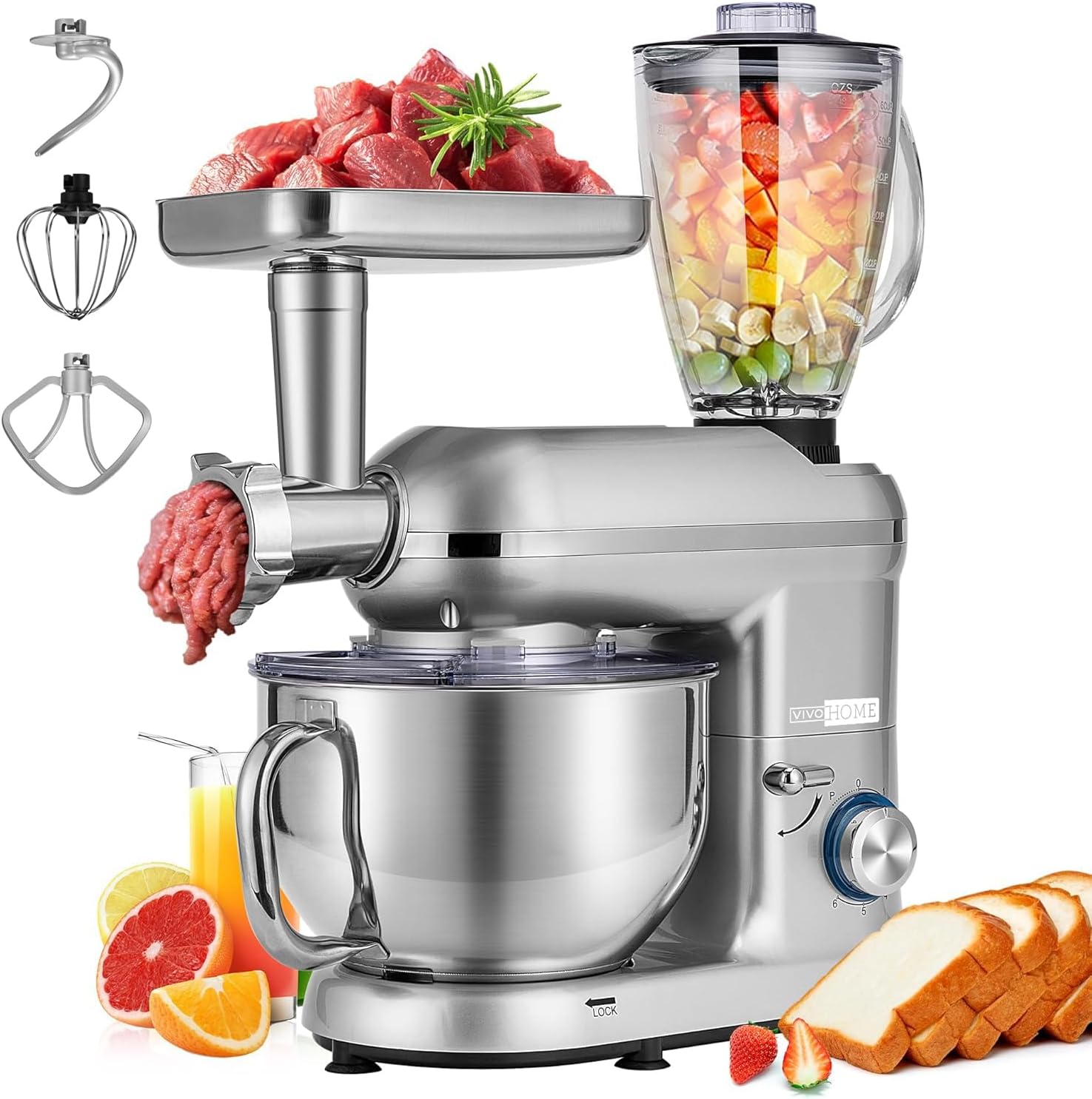
Figure 2.1: VIVOHOME 3-in-1 Stand Mixer with all attachments (mixer, meat grinder, blender).
Main Components:
- Mixer Base: The main unit housing the 650W motor and speed control knob.
- 6-Quart Stainless Steel Bowl: Large capacity mixing bowl with a handle.
- Splash Guard: Transparent cover to prevent splashing during mixing.
- Dough Hook: For kneading heavy doughs like bread and pizza.
- Mixing Beater: For general mixing, such as batters, cookies, and mashed potatoes.
- Wire Whisk: For whipping eggs, cream, and light batters.
- Meat Grinder Attachment: Connects to the front port for grinding meat. Includes various grinding plates and a meat pusher.
- Juice Blender Attachment: 1.5L glass blender that attaches to the top port for blending liquids and soft ingredients.

Figure 2.2: Overview of mixing accessories including dough hook, mixing beater, and wire whisk.

Figure 2.3: Key features of the mixer base, including the comfortable handle, tilt-head design, non-slip feet, and splash guard.
3. Setup Instructions
3.1 Assembling the Stand Mixer:
- Place the mixer base on a stable, flat, and dry surface. Ensure the non-slip feet are firmly gripping the counter.
- Lift the tilt-head by pushing the release lever (located on the side of the mixer base) and raising the head until it locks into place.
- Place the stainless steel mixing bowl onto the base, aligning the locking groove, and twist clockwise until it is securely locked.
- Attach the desired accessory (dough hook, mixing beater, or wire whisk) by pushing it upwards onto the attachment shaft and twisting slightly to lock it into place.
- Lower the tilt-head by pushing the release lever and gently lowering the head until it clicks into its locked position.
- Attach the splash guard by aligning it over the bowl and securing it.

Figure 3.1: The 6-quart mixing bowl features a locking groove design for secure placement.
3.2 Attaching the Meat Grinder:
- Ensure the mixer is unplugged.
- Remove the front cover from the mixer head.
- Insert the meat grinder attachment into the front power hub, aligning the drive shaft with the mixer's internal mechanism. Twist to secure.
- Assemble the meat grinder components (auger, blade, grinding plate, and locking ring) as per the grinder's specific instructions.
- Place the filling tray on top of the grinder.

Figure 3.2: Step-by-step visual guide for installing the meat grinder attachment.
3.3 Attaching the Juice Blender:
- Ensure the mixer is unplugged.
- Remove the top cover from the mixer head.
- Place the 1.5L glass blender onto the top power hub, aligning it correctly, and twist to secure.
- Ensure the blender lid is securely fastened before operation.
4. Operating Instructions
The VIVOHOME 3-in-1 Stand Mixer features a 6+P speed control knob for precise operation.

Figure 4.1: The 6+P speed control knob allows for versatile settings.
4.1 Using the Stand Mixer (Mixing):
- Ensure the mixer is properly assembled with the desired mixing attachment and bowl.
- Add ingredients to the mixing bowl.
- Plug the mixer into a power outlet.
- Turn the speed control knob to the desired setting:
- Speeds 1-2 (Low): Ideal for mixing without splashing, combining dry ingredients, or slow stirring.
- Speeds 3-4 (Medium): Suitable for general mixing, beating batters, and creaming butter and sugar.
- Speeds 5-6 (High): Best for whipping cream, egg whites, or kneading dough.
- "P" (Pulse): Provides powerful bursts for quick mixing or breaking down chunks. Release to stop.
- When finished, turn the speed knob to "0" and unplug the appliance.
- Lift the tilt-head to remove the bowl and attachment.
Video 4.1: Demonstrates the VIVOHOME 3-in-1 Multifunctional Stand Mixer in action, showcasing its various functions and ease of use.

Figure 4.2: Examples of different mixing tasks for each attachment: Wire Whisk for cake/cream puff, Dough Hook for pizza/bread, Mixing Beater for salad/mashed potato.
4.2 Using the Meat Grinder:
- Ensure the meat grinder attachment is securely installed.
- Cut meat into small pieces that fit into the feeding tube.
- Place a bowl under the meat outlet to collect the ground meat.
- Plug in the mixer and turn the speed knob to a medium setting (e.g., Speed 3-4).
- Use the meat pusher to guide the meat into the grinder. Never use your fingers.
- When finished, turn the speed knob to "0" and unplug the appliance.

Figure 4.3: The meat grinder attachment is suitable for mincing meat, cucumbers, carrots, and potatoes, offering coarse, medium, and fine grinding options.
4.3 Using the Juice Blender:
- Ensure the juice blender attachment is securely installed and the lid is on.
- Add ingredients to the blender jar. Do not exceed the 1.5L max capacity.
- Plug in the mixer and turn the speed knob to a desired setting (e.g., Speed 4-6 or Pulse for quick bursts).
- When finished, turn the speed knob to "0" and unplug the appliance.
- Carefully remove the blender jar and pour the contents.

Figure 4.4: The 1.5L juice blender is perfect for making vegetable juice, fruit juice, smoothies, and milkshakes.
Video 4.2: This video demonstrates the multi-functional capabilities of the VIVOHOME mixer, including its meat grinding and juice blending functions.
5. Maintenance and Cleaning
Proper cleaning and maintenance will ensure the longevity and optimal performance of your VIVOHOME Stand Mixer.
5.1 Cleaning the Mixer Base:
- Always unplug the mixer before cleaning.
- Wipe the exterior of the mixer base with a soft, damp cloth. Do not use abrasive cleaners or immerse the base in water.
5.2 Cleaning Attachments and Bowls:
- The stainless steel mixing bowl, dough hook, mixing beater, and wire whisk should be washed with warm, soapy water. While some components may be advertised as dishwasher safe, hand washing is recommended to preserve their finish and longevity.
- For the meat grinder and juice blender attachments, disassemble all parts and wash them thoroughly with warm, soapy water. Rinse and dry immediately to prevent rust on metal parts.
- Ensure all parts are completely dry before reassembling or storing.
6. Troubleshooting
If you encounter any issues with your VIVOHOME Stand Mixer, refer to the following common problems and solutions:
| Problem | Possible Cause | Solution |
|---|---|---|
| Mixer does not turn on. | Not plugged in; Overheat protection activated; Speed knob not at "0". | Ensure power cord is securely plugged in. Allow mixer to cool down for 30 minutes. Turn speed knob to "0" before turning on. |
| Attachment not mixing ingredients thoroughly. | Bowl not properly locked; Too much or too little ingredients; Incorrect attachment for task. | Ensure bowl is twisted and locked. Adjust ingredient quantities. Use appropriate attachment (e.g., dough hook for heavy dough, whisk for light mixtures). |
| Meat grinder is jammed or slow. | Meat pieces too large; Bones or hard material in meat. | Cut meat into smaller pieces. Ensure no bones or hard materials are fed into the grinder. Disassemble and clear any blockages. |
| Blender not blending smoothly. | Too little liquid; Ingredients too large or hard. | Add more liquid. Cut ingredients into smaller pieces. Use the Pulse function for tough ingredients. |
If the problem persists after trying these solutions, please contact VIVOHOME customer support.
7. Specifications
- Brand: VIVOHOME
- Model Name: 3 in 1 Electric Multi-functional Stand Mixer
- Item Model Number: 3 in 1 Blender548
- Color: Sliver
- Product Dimensions: 8.8"D x 17"W x 21"H
- Item Weight: 17 Pounds
- Motor Power: 650W
- Capacity: 6 Quarts (Mixing Bowl), 1.5 Liters (Blender)
- Controls Type: Knob (6+P Speed Control)
- Blade Material: Aluminum, Stainless Steel
- Container Material: ABS, Steel, Aluminum (for various parts)
- Is Dishwasher Safe: No (for main unit)
- UPC: 885469877444
8. Warranty and Support
VIVOHOME products are designed for quality and reliability. For warranty information, product support, or to purchase replacement parts, please refer to the warranty card included with your product or visit the official VIVOHOME website.
You can also visit the VIVOHOME Store on Amazon for more information: VIVOHOME Store