
Introduction
This manual provides instructions for the safe and effective use of your Fosmon Outdoor Wireless Remote Control, Model C-10739. This remote is designed to operate compatible Fosmon outdoor 1-outlet and 2-outlet switches, such as models C-10683 and C-10741US, allowing convenient control of various outdoor electrical devices.

Image: The Fosmon Outdoor Wireless Remote Control, a compact black device with a single button.
Safety Information
- Read all instructions thoroughly before operating this device.
- Do not expose the remote control to extreme temperatures, direct sunlight for extended periods, or excessive moisture.
- Ensure the battery is installed correctly according to polarity markings.
- Keep the remote control out of reach of children.
- Dispose of used batteries responsibly according to local regulations.
Package Contents
- 1x Fosmon Outdoor Wireless Remote Control (Model C-10739)
- 1x CR2032 Battery (pre-installed or included)
Product Features
- 100ft RF Remote Range: The remote operates up to 100 feet (30 meters) in open areas. Its RF signal can transmit through walls, windows, doors, and furniture, eliminating the need for direct line-of-sight.
- Flexible Pairing Combinations: This remote supports versatile pairing. You can pair multiple remotes to control a single outdoor outlet, or pair one remote to control multiple outdoor outlets simultaneously.
- Portable Design: The remote is compact and includes a keychain loop for easy carrying, storage, or organization.
- Ergonomic Design: Designed for comfortable and easy use.

Image: A hand holding the black Fosmon remote control, with a snowy window and Christmas lights in the background, illustrating the 100ft remote distance capability.

Image: A person's hand putting the compact remote control into a jeans pocket, with dimensions (1.57in / 37mm width, 3.2in / 81mm length) shown, emphasizing its compact and portable design.
Setup and Pairing Instructions
To use your Fosmon Outdoor Wireless Remote Control, it must first be paired with a compatible Fosmon outdoor outlet switch.
- Plug in the Outlet: Connect your Fosmon outdoor outlet switch (e.g., C-10683 or C-10741US) into a power source.
- Observe LED: The LED indicator on the outdoor outlet receiver will begin flashing. This indicates it is in pairing mode.
- Press Remote Button: While the LED on the receiver is flashing, press the main button on your Fosmon remote control. The LED on the receiver should stop flashing and remain solid, indicating successful pairing.
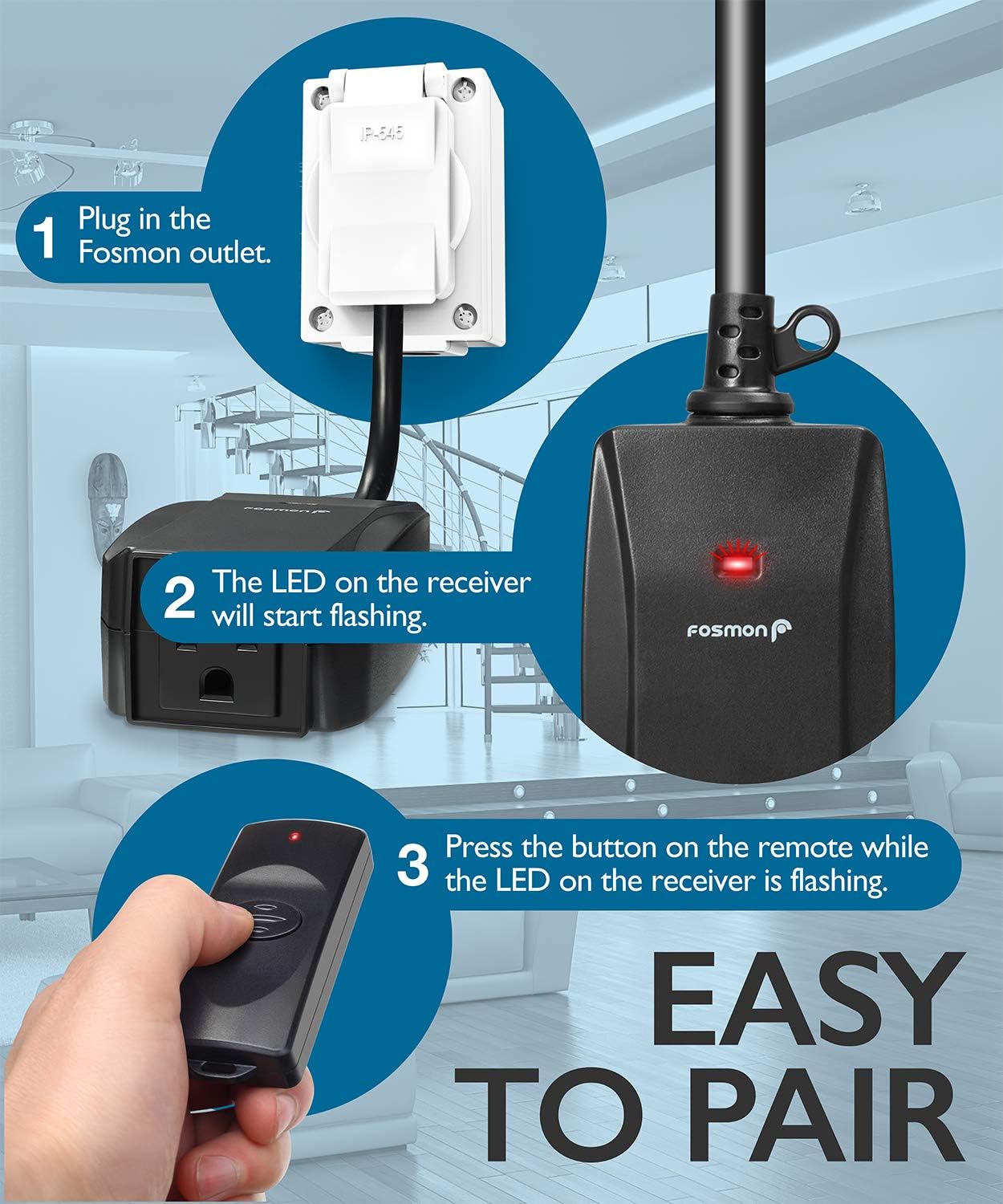
Image: A diagram illustrating the pairing process: 1. Plug in the Fosmon outlet. 2. The LED on the receiver flashes. 3. Press the remote button while the LED is flashing.
Flexible Pairing:
- To pair multiple remotes with one outlet, repeat the pairing steps for each additional remote.
- To pair one remote with multiple outlets, repeat the pairing steps for each additional outlet.

Image: A hand holding the remote control, superimposed over a collage of outdoor scenes including a water fountain, a Christmas tree with lights, and hanging light bulbs, demonstrating its use for controlling various appliances.
Operating Instructions
Once paired, simply press the button on the remote control to toggle the connected outdoor outlet switch ON or OFF. The remote acts as a toggle switch for the power supply to the connected device.
Maintenance
- Battery Replacement: The remote uses one CR2032 battery. If the remote's indicator light does not illuminate or its range decreases significantly, replace the battery. To replace, open the battery compartment (usually a small slot on the side or back) and insert a new CR2032 battery, ensuring correct polarity.
- Cleaning: Wipe the remote control with a soft, dry cloth. Do not use abrasive cleaners or immerse in water.
Troubleshooting
| Problem | Possible Cause | Solution |
|---|---|---|
| Remote does not control the outlet. | Battery is dead or incorrectly installed. Remote is not paired with the outlet. Outlet is not powered. | Check and replace the CR2032 battery. Re-pair the remote with the outlet following the 'Setup and Pairing Instructions'. Ensure the outdoor outlet is plugged in and receiving power. |
| Remote range is reduced. | Low battery. Excessive obstructions (thick walls, metal structures). Interference from other RF devices. | Replace the CR2032 battery. Try operating the remote closer to the outlet or from a different position. Minimize other RF interference if possible. |
Specifications
- Manufacturer: Fosmon
- Model Number: C-10739
- Item Weight: 1.76 ounces
- Package Dimensions: 5 x 3 x 0.5 inches
- Color: Black (Remote)
- Item Package Quantity: 1
- Special Features: Ergonomic
- Batteries Included: Yes
- Battery Type: CR2032
- Connectivity Technology: Radio Frequency (RF)
- Max Number of Outlets Controlled by this Remote: Multiple (when paired)
- Max Number of Remotes Controlling One Outlet: Multiple (when paired)
Warranty and Support
- Warranty: This product is covered by a limited lifetime warranty. Please refer to the official Fosmon website for full warranty details and terms.
- Customer Support: Fosmon offers 24/7 free customer support. For assistance, please visit the Fosmon Store on Amazon or their official website.


