1. Introduction
This user manual provides comprehensive instructions for the setup, operation, and maintenance of your SHARP LC-32HI5012E HD Ready Smart LED TV. Please read this manual thoroughly before using your television to ensure proper functionality and safety.
The SHARP LC-32HI5012E is an 81 cm (32-inch) HD Ready Smart LED TV featuring Active Motion 200 technology for enhanced picture quality and a Triple Tuner for versatile reception options. It includes integrated Wi-Fi and a Harman/Kardon sound system for a complete entertainment experience.
2. Package Contents
Upon opening the package, please verify that all the following items are included:
- SHARP LC-32HI5012E Main Unit
- Remote Control (with batteries)
- User Manual (this document)

Image: Front view of the SHARP LC-32HI5012E television, displaying a vibrant city skyline on its screen. This image shows the slim bezel design and the central SHARP logo.
3. Setup
3.1 Assembling the Stand
Carefully place the TV screen-down on a soft, flat surface to prevent damage. Attach the two stand feet to the designated slots at the bottom of the TV, securing them with the provided screws. Ensure the stand is firmly attached before proceeding.
3.2 Connecting Peripherals
Your TV offers various connection options for external devices:
- HDMI Ports (x3): Connect Blu-ray players, game consoles, or set-top boxes.
- USB Ports (x2): For media playback from USB drives.
- Antenna In (RF): Connect your terrestrial antenna for DVB-T/T2HD reception.
- Sat In: Connect your satellite dish for DVB-S/S2 reception.
- RJ45 (LAN): For wired internet connection.
- CI+ Port: For conditional access modules (CAM) to view encrypted channels.
- Mini Component/YPbPr, Mini AV Composite: For older analog devices.
- Digital Optical Audio Output: For connecting to external audio systems.
- Audio out / Headphone: For headphones or external speakers.

Image: Rear view of the SHARP LC-32HI5012E television, highlighting the arrangement of various input and output ports for connecting external devices.
3.3 Initial Power On and First-Time Setup
After connecting all necessary cables, plug the power cord into an electrical outlet. Press the power button on the remote control or the TV. The first-time setup wizard will guide you through:
- Language selection.
- Network connection (Wi-Fi or wired LAN).
- Channel scanning for DVB-C, DVB-S/S2, or DVB-T/T2HD.
- Time zone and other basic settings.
4. Operating Instructions
4.1 Basic TV Functions
- Power On/Off: Use the power button on the remote or TV.
- Volume Control: Use the VOL +/- buttons.
- Channel Selection: Use CH +/- or number buttons.
- Input Source: Press the SOURCE button to switch between HDMI, AV, TV, etc.
- Menu Navigation: Use arrow keys and OK button to navigate menus.
4.2 Smart TV Features
Your SHARP LC-32HI5012E is equipped with integrated Wi-Fi and offers access to various smart features:
- Pre-installed Apps: Access popular streaming services like Netflix and YouTube directly.
- Web Browser: Browse the internet directly from your TV.
- Aquos Net+: Access additional online content and services provided by Sharp.
Ensure your TV is connected to the internet for full Smart TV functionality.
4.3 Audio System
The integrated Harman/Kardon sound system provides a high-quality audio experience with excellent dynamics and clarity. Adjust audio settings in the TV menu to customize your sound preferences.
5. Maintenance
5.1 Cleaning the Screen
To clean the screen, gently wipe it with a soft, lint-free cloth. For stubborn marks, slightly dampen the cloth with water or a specialized screen cleaner. Do not spray liquid directly onto the screen.
5.2 General Care
- Keep the TV away from direct sunlight and heat sources.
- Ensure adequate ventilation around the TV.
- Unplug the TV from the power outlet during lightning storms or when left unattended for long periods.
6. Troubleshooting
If you encounter any issues with your TV, please refer to the following common problems and solutions before contacting support.
| Problem | Possible Cause | Solution |
|---|---|---|
| No Power | Power cord unplugged, power outlet issue. | Check power cord connection. Try a different outlet. |
| No Picture, but Sound is Present | Incorrect input source, faulty cable. | Verify correct input source. Check HDMI/AV cable connections. |
| No Sound | Volume muted or too low, external audio system issue. | Unmute volume, increase volume. Check external audio connections. |
| Cannot Connect to Wi-Fi | Incorrect password, router issue, TV too far from router. | Re-enter password. Restart router. Move TV closer or use wired connection. |
7. Specifications
| Feature | Detail |
|---|---|
| Brand | SHARP |
| Model Number | LC-32HI5012E |
| Screen Technology | LED |
| Resolution | HD Ready (1366 x 768 pixels) |
| Screen Diagonal | 81.3 cm (32 inches) |
| Refresh Rate | 60 Hz |
| Special Feature | Internet (Smart TV) |
| Supported Internet Services | Netflix, YouTube, Browser |
| Connectivity Technology | USB, HDMI, LAN, Wi-Fi |
| Tuners | DVB-C, DVB-S/S2, DVB-T/T2HD |
| Audio System | Harman/Kardon |
| Product Dimensions (W x H x D) | 74 x 49.1 x 18 cm (with stand) |
| Weight | 4.8 Kilograms |
| Mounting Type | Table Mount |
7.1 Energy Efficiency
The SHARP LC-32HI5012E has an energy efficiency rating of F. For detailed energy consumption information, please refer to the energy label and product information sheet.

Image: Energy efficiency label for the SHARP LC-32HI5012E television, showing its energy class F and power consumption details.
For more details, visit the official EPREL database: https://eprel.ec.europa.eu/qr/402565
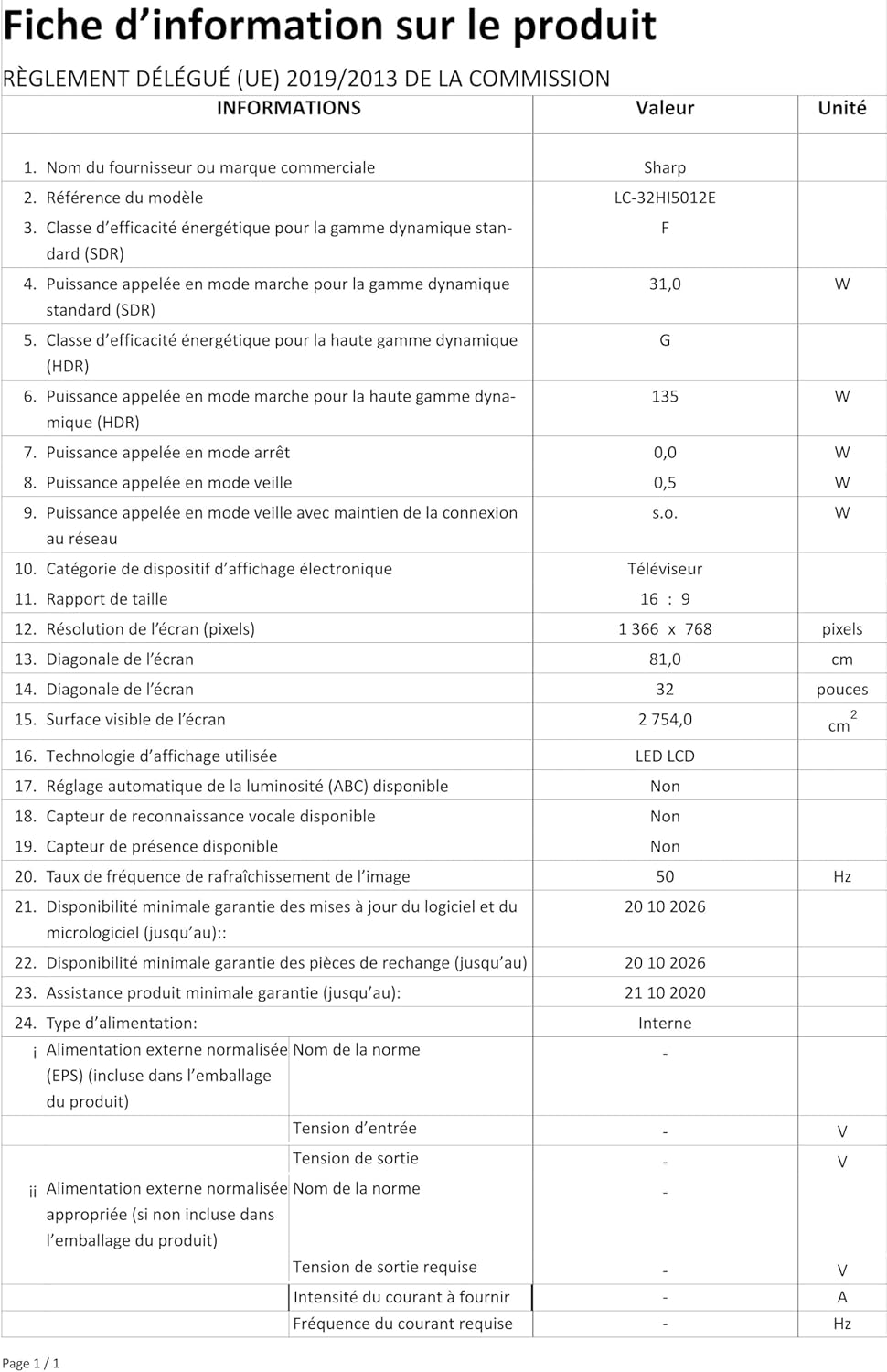
Image: Product information sheet detailing technical specifications and compliance information for the SHARP LC-32HI5012E television.
8. Warranty and Support
For warranty information, please refer to the warranty card included with your product or visit the official SHARP website. Keep your purchase receipt as proof of purchase for any warranty claims.
For technical support or service inquiries, please contact SHARP customer service. Contact details can typically be found on the SHARP official website or in the product packaging.


