
Introduction
This manual provides essential information for the safe and effective operation of your FERVE F-2505 Battery Charger. Please read these instructions thoroughly before use and retain for future reference.
The FERVE F-2505 is an automatic battery charger designed for both 6V and 12V lead-acid batteries, including liquid, gel, and AGM types, with capacities ranging from 4 to 120 Ah. It features dual intensity charging (2A for 6V, 2-4A for 12V) and an LCD display to monitor the charging process and battery status. The unit is IP65 protected and comes with two output cables: one with clamps and one with terminals for permanent installation.
Important Safety Information
WARNING: Read all safety warnings and instructions. Failure to follow the warnings and instructions may result in electric shock, fire, and/or serious injury.
- Always wear eye protection and protective clothing when working with batteries.
- Ensure adequate ventilation during charging to prevent accumulation of explosive gases.
- Never smoke or allow sparks or flames in the vicinity of the battery or charger.
- Disconnect the AC power supply before making or breaking connections to the battery.
- Do not charge frozen batteries.
- Keep out of reach of children.
- Do not expose the charger to rain or wet conditions unless specifically designed for such environments (IP65 rating provides protection against dust and low-pressure water jets, but avoid submersion).
- If the supply cord is damaged, it must be replaced by the manufacturer, its service agent, or similarly qualified persons in order to avoid a hazard.
Package Contents
The FERVE F-2505 Battery Charger package includes:
- 1 x FERVE F-2505 Battery Charger
- 1 x Output cable with battery clamps
- 1 x Output cable with ring terminals
Product Overview
The FERVE F-2505 is a versatile and automatic battery charger. Its intelligent design allows for efficient and safe charging of various battery types.
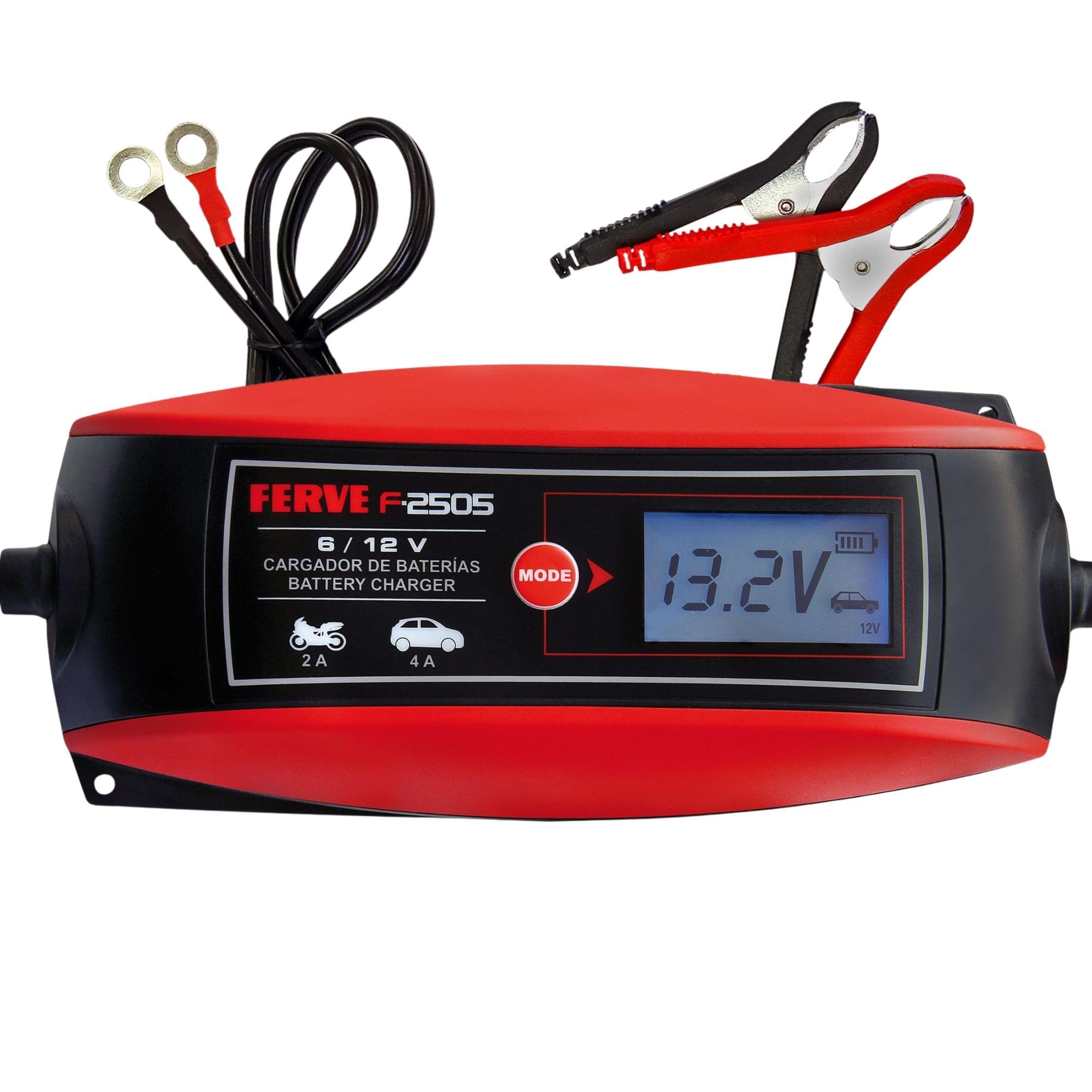
Image: The FERVE F-2505 battery charger in use, connected to a vehicle battery.
Key Features:
- Automatic Charging: Detects battery voltage and charges automatically.
- Dual Voltage Support: Compatible with 6V and 12V batteries.
- Dual Intensity Charging: Provides 2A for 6V batteries and 2-4A for 12V batteries.
- LCD Display: Shows charging progress and real-time battery voltage.
- Battery Type Compatibility: Suitable for liquid, gel, and AGM lead-acid batteries.
- IP65 Protection: Offers protection against dust and water splashes.
- Multiple Functions: Includes automatic charge, charge restart, battery test, and alternator test.

Image: The FERVE F-2505 charger highlighting its 4-in-1 capabilities: automatic charge, charge restart, battery test, and alternator test.

Image: The FERVE F-2505 charger demonstrating compatibility with Liquid, Gel, AGM, and Start/Stop batteries, as well as 6V and 12V systems for motorcycles, cars, and other vehicles.
Setup and Connection
- Prepare the Battery: Ensure the battery terminals are clean and free of corrosion. If necessary, clean them with a wire brush and a mixture of baking soda and water. Dry thoroughly.
- Connect the Charger to the Battery:
- Using Clamps: Connect the RED (+) clamp to the positive battery terminal and the BLACK (-) clamp to the negative battery terminal. Ensure a secure connection.
- Using Ring Terminals (for permanent installation): Connect the RED (+) ring terminal to the positive battery post and the BLACK (-) ring terminal to the negative battery post. Secure with the battery nuts.
- Connect to AC Power: Plug the charger's AC power cord into a standard electrical outlet (100-240V AC).
- Initial Display: The LCD display will illuminate, showing the current battery voltage and charging status.

Image: A user connecting the FERVE F-2505 battery charger to a vehicle battery using the provided clamps.
Operating Instructions
Automatic Charging Process
The FERVE F-2505 charger is fully automatic. Once connected to the battery and AC power, it will automatically detect the battery voltage (6V or 12V) and begin the appropriate charging cycle.
The LCD display will show the current battery voltage and the charging status. The charger will automatically adjust the charging current (2A for 6V, 2-4A for 12V) based on the battery's needs.
Charging Modes
The charger features different charging stages to optimize battery health and longevity:
- Desulfation: If a deeply discharged or sulfated battery is detected, the charger may enter a desulfation mode to recover the battery.
- Soft Start: Gradually increases current to protect the battery.
- Bulk Charge: Charges the battery to approximately 80% capacity at maximum current.
- Absorption Charge: Charges the battery to 100% capacity at a decreasing current.
- Float/Maintenance Charge: Once fully charged, the charger switches to a maintenance mode, providing a small current to keep the battery at optimal voltage without overcharging.
Using the MODE Button
The "MODE" button on the charger allows you to cycle through different display information or select specific charging profiles if available (refer to the LCD display for options). Typically, the charger operates automatically, but this button may offer options for specific battery types or diagnostic views.
Maintenance
- Cleaning: Keep the charger clean and dry. Wipe the casing with a soft, damp cloth. Do not use solvents or abrasive cleaners.
- Cable Inspection: Regularly inspect the charging cables and clamps/terminals for any signs of damage, wear, or corrosion. Replace damaged components immediately.
- Storage: Store the charger in a cool, dry place when not in use. Ensure cables are neatly coiled to prevent damage.
- Battery Care: Ensure battery terminals are clean and connections are secure before and after charging.
Troubleshooting
| Problem | Possible Cause | Solution |
|---|---|---|
| Charger does not turn on. | No AC power; Faulty outlet; Damaged power cord. | Check AC power connection and outlet. Inspect power cord for damage. |
| Charger connected but not charging. | Incorrect battery connection; Battery voltage too low for detection; Severely sulfated battery. | Ensure correct polarity (+ to +, - to -). Check battery voltage; if extremely low, try a different charger or consult a professional. The charger may attempt desulfation for sulfated batteries. |
| LCD shows an error code. | Reverse polarity; Short circuit; Internal fault. | Disconnect immediately. Check battery connections for correct polarity. Inspect cables for shorts. If error persists, contact customer support. |
| Battery not fully charging. | Battery capacity too large for charger; Battery is faulty or at end of life. | Ensure battery capacity is within the charger's recommended range (4-120 Ah). Test the battery with a dedicated battery tester. |
Specifications
| Feature | Detail |
|---|---|
| Model | F-2505 |
| Brand | FERVE |
| Input Voltage | 100-240V AC |
| Output Voltage | 6V DC, 12V DC |
| Charging Current (6V) | 2A |
| Charging Current (12V) | 2A - 4A |
| Battery Capacity Range | 4 Ah - 120 Ah |
| Battery Types | Lead-acid (Liquid, Gel, AGM) |
| Protection Rating | IP65 |
| Dimensions | 3.35 x 10.24 x 2.56 inches (8.5 x 26 x 6.5 cm) |
| Weight | 1.36 pounds (0.62 kg) |
| Certifications | CE |
Warranty and Support
FERVE products are manufactured to high-quality standards. This product comes with a standard manufacturer's warranty. For specific warranty terms and conditions, please refer to the documentation included with your purchase or visit the official FERVE website.
For technical support, troubleshooting assistance, or warranty claims, please contact FERVE customer service through their official channels. Please have your product model number (F-2505) and purchase details ready when contacting support.


