
Nulaxy NX09
Nulaxy Bluetooth FM Transmitter NX09 User Manual
Model: NX09
Introduction
Thank you for choosing the Nulaxy Bluetooth FM Transmitter NX09. This device allows you to stream music from your Bluetooth-enabled devices to your car's FM radio, make hands-free calls, and charge your devices with its integrated QC3.0 and 5V/1A USB ports. It also supports music playback from USB flash drives and microSD cards.
Please read this manual carefully before using the product to ensure proper operation and to maximize its features.
Product Overview
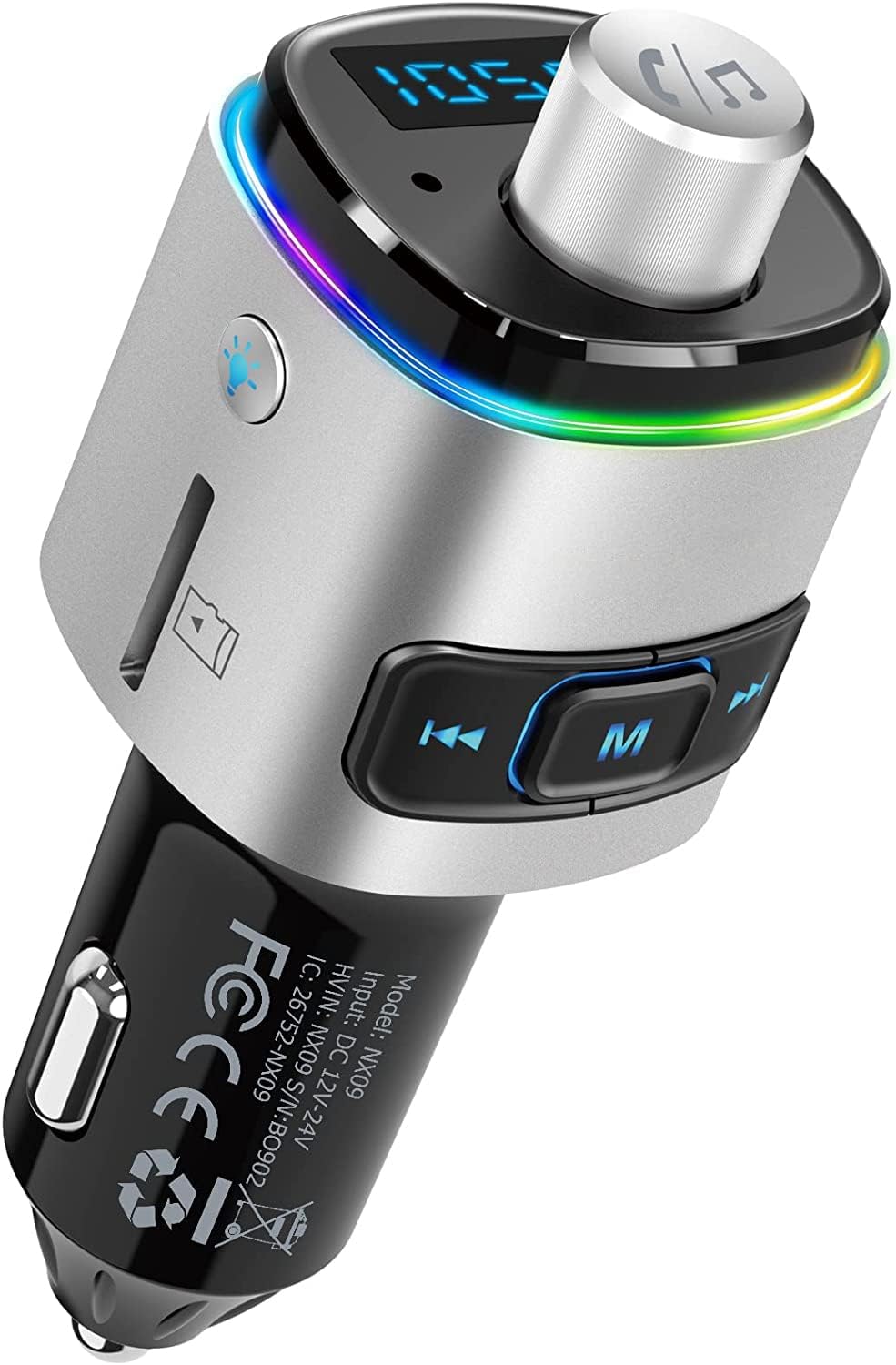
Image: Nulaxy Bluetooth FM Transmitter NX09, showing its compact design with a silver finish, LED display, control knob, and USB ports.
The Nulaxy NX09 is designed for convenience and functionality in your vehicle. Key features include:
- Bluetooth V5.0: For stable and fast wireless connection.
- QC3.0 Quick Charge: Rapid charging for compatible devices.
- Hands-free Calling: Built-in microphone with CVC noise-cancellation.
- Voice Assistant Support: Activate Siri or Google Assistant.
- Multiple Music Playback Modes: Bluetooth, USB Flash Drive (up to 32GB), microSD Card (up to 32GB).
- 7-Color LED Backlight: Customizable ambient lighting.
- Voltage Detection: Monitor your car battery's condition.
Setup Instructions
- Insert into Car Cigarette Lighter: Plug the Nulaxy NX09 into your car's 12V-24V cigarette lighter socket. The device will power on and display the current car battery voltage.
- Tune Car FM Frequency: Adjust your car's FM radio to an empty or "blank" channel. This means a frequency with no active broadcast, typically indicated by static or silence. Choose a frequency between 88.1 MHz and 107.9 MHz.
- Set Transmitter Frequency:

Image: Diagram illustrating how to set the FM frequency on the Nulaxy NX09 to match the car radio's blank channel.
On the NX09, long press the "Previous" or "Next" button (often labeled with arrow icons) to enter frequency adjustment mode. Then, repeatedly press the "Previous" or "Next" buttons to adjust the transmitter's frequency to match the blank channel you selected on your car radio.
- Bluetooth Connection:

Image: Visual showing the Nulaxy NX09 connected via Bluetooth 5.0 to a smartphone, with options for USB flash drive and microSD card music playback.
Enable Bluetooth on your smartphone or other audio device. Search for "NX09" in the list of available Bluetooth devices and select it to connect. Once connected, you can stream audio from your device to your car's speakers.
Operating Instructions
Music Playback
The Nulaxy NX09 supports three modes for music playback:
- Bluetooth: After successful Bluetooth pairing, music from your connected device will automatically play through your car's FM radio.
- USB Flash Drive: Insert a USB flash drive (up to 32GB) containing WMA, MP3, WAV, APE, or FLAC audio files into the designated USB port (5V/1A port). The device will automatically detect and play music from the drive.
- microSD Card: Insert a microSD card (up to 32GB) with supported audio formats into the microSD card slot. Music will begin playing automatically.
Use the "Previous" and "Next" buttons on the device to skip tracks. The central 'M' button can be used to switch between music sources (Bluetooth/USB/microSD) if multiple sources are connected.
Hands-free Calling

Image: Illustration of the hands-free calling function, showing an incoming call notification on a smartphone and the device's control button.
The NX09 features CVC noise-cancellation technology for clear calls. Use the central 'M' button for call management:
- Answer Call: Press the 'M' button once.
- End Call: Press the 'M' button once during a call.
- Reject Call: Long press the 'M' button.
- Redial Last Number: Double-press the 'M' button.
Voice Assistant

Image: Depiction of activating voice assistant (Siri/Google Assistant) by long-pressing the music note button on the device.
Long press the music note button (often integrated into the main control knob) for 3 seconds to activate your smartphone's voice assistant (Siri or Google Assistant). You can then use voice commands for navigation, sending texts, or making calls.
Charging Devices

Image: Close-up of the Nulaxy NX09 showing the QC3.0 and 5V/1A USB charging ports, with battery charge level indicators.
The NX09 is equipped with two USB charging ports:
- QC3.0 Port: Provides up to 4X faster charging for compatible devices.
- 5V/1A Port: Standard charging port, also functions as the USB flash drive input.
You can charge two devices simultaneously.
LED Backlight Control

Image: Display of the Nulaxy NX09 showing various LED backlight colors: Red, Green, Blue, Yellowish Green, Purple, Cyan, and Silver White.
The device features a 7-color LED backlight. Press the dedicated light button (often a small button with a lightbulb icon) to cycle through the available colors (Red, Green, Blue, Yellowish Green, Purple, Cyan, Silver White) or to turn the backlight off.
Voltage Detection
Upon plugging in, the NX09's LED display will show your car battery's voltage. This allows you to monitor its condition. If the voltage drops below 12V, it is recommended to check or replace your car battery.
Maintenance
- Cleaning: Use a soft, dry cloth to clean the device. Do not use liquid cleaners or aerosols.
- Storage: When not in use for extended periods, store the device in a cool, dry place away from direct sunlight and extreme temperatures.
- Avoid Impact: Do not drop or subject the device to strong impacts, as this may damage internal components.
- Power Source: Ensure the device is only used with 12V-24V car cigarette lighter sockets.
Troubleshooting
| Problem | Possible Cause | Solution |
|---|---|---|
| No power/Device not turning on. | Loose connection; Car cigarette lighter socket issue; Blown fuse in car. | Ensure the device is firmly plugged in. Test the car socket with another device. Check your car's fuse box for a blown fuse related to the cigarette lighter. |
| Static or poor audio quality. | FM frequency interference; Volume levels mismatched. | Find a new "blank" FM frequency on your car radio and set the transmitter to match it. Adjust the volume on both the transmitter and your car radio to an optimal level (usually 70-80% on the transmitter and adjust car radio volume). |
| Bluetooth not connecting. | Device not in pairing mode; Incorrect device selected; Bluetooth disabled on phone. | Ensure Bluetooth is enabled on your phone. Restart both the transmitter and your phone. Forget "NX09" in your phone's Bluetooth settings and re-pair. |
| USB/microSD music not playing. | Unsupported file format; Card/drive not inserted correctly; Corrupted files. | Ensure files are WMA, MP3, WAV, APE, or FLAC. Reinsert the USB drive/microSD card. Try a different drive/card or reformat the current one. |
| Charging is slow or not working. | Cable issue; Device not compatible with QC3.0; Overload. | Try a different charging cable. Ensure your device supports QC3.0 for fast charging. Avoid charging too many high-power devices simultaneously. |
Specifications
| Feature | Detail |
|---|---|
| Model | NX09 |
| Brand | Nulaxy |
| Connectivity Technology | Wireless (Bluetooth) |
| Wireless Standard | Bluetooth V5.0 |
| Tuner Technology | FM |
| FM Frequency Range | 88.1 - 107.9 MHz |
| Input Voltage | 12-24 Volts (DC) |
| USB Charging Ports | 1 x QC3.0, 1 x 5V/1A |
| Supported Music Formats | WMA, MP3, WAV, APE, FLAC |
| Supported Storage | USB Flash Drive (≤32GB), MicroSD Card (≤32GB) |
| Special Features | Hands-Free Calls, Voice Assistant Support, 7-Color LED Backlight, Battery Voltage Detection, 6 Security Protections (Overcurrent, Overvoltage, Overcharge, Overload, Overheat, Short Circuit) |
| Item Weight | 50 g |
| Dimensions | 11.3 x 4.9 x 4.2 cm (Parcel Dimensions) |
Warranty and Support
Nulaxy products are designed with quality and reliability in mind. For specific warranty information regarding your Nulaxy Bluetooth FM Transmitter NX09, please refer to the warranty card included with your purchase or visit the official Nulaxy website.
If you encounter any issues or have questions about your product, please contact Nulaxy customer support through their official channels. You can often find support contact information on the Nulaxy website or through the retailer where you purchased the product.
For more information, you may visit the Nulaxy Store on Amazon.
Related documentsNX09


Ask a question about this manual
Ask about setup, troubleshooting, compatibility, parts, safety, or missing instructions. Manuals+ will review the question and use this page’s manual context to help answer it.