
1. Introduction
This manual provides essential information for the safe and efficient operation, installation, and maintenance of your Dukers DUC72R 18.9 cu. ft. 3-Door Undercounter Commercial Refrigerator. Please read these instructions thoroughly before installation and use. Retain this manual for future reference.
2. Safety Information
Important Safety Instructions:
- Ensure the refrigerator is properly grounded.
- Do not store explosive substances such as aerosol cans with a flammable propellant in this appliance.
- Keep ventilation openings clear of obstruction.
- Do not use mechanical devices or other means to accelerate the defrosting process, other than those recommended by the manufacturer.
- Do not damage the refrigerant circuit.
- Only qualified service personnel should perform repairs.
- Disconnect power before cleaning or servicing.
3. Package Contents
Verify that all components are present and undamaged upon unpacking:
- Dukers DUC72R Undercounter Commercial Refrigerator Unit
- 3 x Adjustable Shelves
- 4 x Casters (wheels)
- 9 ft. Power Cord (pre-attached)
- Instruction Manual
4. Setup
4.1 Placement
Select a location that is level, stable, and capable of supporting the weight of the refrigerator when fully loaded. Ensure adequate clearance around the unit for proper ventilation. Avoid direct sunlight or heat sources. The unit dimensions are approximately 72 1/4 inches (W) x 31 1/2 inches (D) x 36 inches (H).

Image: Diagram showing the front and side dimensions of the Dukers DUC72R undercounter refrigerator, including height, width, and depth measurements.
4.2 Caster Installation
If casters are not pre-installed, carefully tilt the unit and screw the casters into the designated threaded holes at the bottom corners of the refrigerator. Ensure all casters are securely tightened before returning the unit to an upright position.
4.3 Power Connection
Connect the 9 ft. power cord to a dedicated 115V/60Hz electrical outlet. The unit requires a NEMA 5-15P plug. Do not use extension cords or adapters.
4.4 Initial Cleaning
Before first use, clean the interior and exterior surfaces with a mild detergent and warm water. Rinse thoroughly and dry with a soft cloth.
4.5 Initial Startup
After connecting power, allow the refrigerator to operate empty for at least 2-4 hours to reach its stable operating temperature before loading with products.
5. Operating Instructions
5.1 Temperature Control
The unit features digital temperature controls with an LED display for precise adjustment. The recommended operating temperature range is 33-41°F (approximately). Refer to the control panel instructions for specific temperature setting procedures.
5.2 Loading the Refrigerator
Distribute products evenly on the shelves to ensure proper airflow. Do not block the internal air vents. The unit is equipped with high-quality coated stainless adjustable shelves.

Image: The Dukers DUC72R undercounter refrigerator with all three doors open, revealing the interior compartments and adjustable shelves loaded with food containers.
5.3 Door Operation
The doors are self-closing to maintain internal temperature efficiency. They also feature a stay-open function at 60 degrees for convenient loading and unloading.
5.4 Automatic Defrost
This refrigerator features an automatic defrost system, eliminating the need for manual defrosting. The system periodically melts frost buildup on the evaporator coil, with the water draining into an evaporation pan.
5.5 Product Overview Video
Video: An overview of Dukers commercial undercounter refrigerators, highlighting key features and design elements relevant to the DUC72R model.
6. Maintenance
6.1 Cleaning the Interior and Exterior
Regularly clean the stainless steel interior and exterior surfaces with a mild, non-abrasive cleaner and a soft cloth. The interior features rounded corners for easy cleaning and to prevent corrosion. Avoid harsh chemicals or abrasive pads that can scratch the stainless steel.
6.2 Condenser Coil Cleaning
The condenser coil should be cleaned regularly (every 3-6 months, depending on environment) to ensure efficient operation. Disconnect power before cleaning. Use a brush or vacuum cleaner to remove dust and debris from the coil fins. A clean condenser helps maintain optimal cooling performance and energy efficiency.
6.3 Gasket Inspection
Inspect door gaskets regularly for cracks, tears, or signs of wear. Damaged gaskets can lead to air leaks and reduced cooling efficiency. Replace worn gaskets promptly.
6.4 Shelf Cleaning
Remove shelves and clean them with warm, soapy water. Rinse and dry thoroughly before placing them back into the unit.
7. Troubleshooting
Before contacting customer support, review the following common issues and solutions:
| Problem | Possible Cause | Solution |
|---|---|---|
| Refrigerator not cooling | Power supply issue; thermostat set too high; condenser coil dirty; door not sealing properly. | Check power connection; adjust thermostat; clean condenser coil; inspect door gaskets. |
| Excessive noise | Unit not level; fan obstruction; loose components. | Ensure unit is level; check for obstructions around fan; contact service if noise persists. |
| Water on floor | Drain line clogged; evaporation pan overflowing. | Clear drain line; ensure unit is level and drain is clear. |
| Door not closing properly | Gasket damaged or dirty; unit not level; hinges misaligned. | Clean or replace gasket; level the unit; adjust hinges if necessary. |
8. Specifications
Key technical specifications for the Dukers DUC72R Commercial Refrigerator:
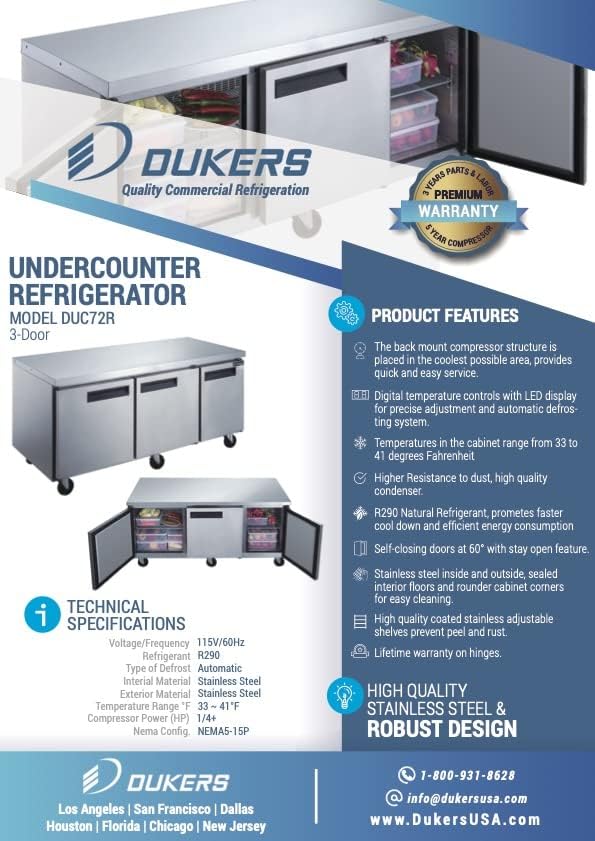
Image: Graphic detailing product features and technical specifications for the Dukers DUC72R undercounter refrigerator.
| Specification | Detail |
|---|---|
| Model Number | DUC72R |
| Dimensions (W x D x H) | 72 1/4" x 31 1/2" x 36" |
| Capacity | 18.96 cu. ft. |
| Temperature Range | 33-41°F |
| Voltage / Frequency | 115V / 60Hz |
| Amperage | 3.4 Amps |
| Wattage | 380 watts |
| Refrigerant | R290 Natural Refrigerant |
| Plug Type | NEMA 5-15P |
| Certifications | NSF/ANSI 7 Standard, ETL Listed / ETL Sanitation |
| Number of Doors | 3 |
| Included Shelves | 3 |
| Defrost System | Automatic |
| Material | Stainless Steel (Interior & Exterior) |
9. Warranty Information
The Dukers DUC72R Commercial Refrigerator comes with the following manufacturer's warranty:
- Parts & Labor: 2 Years
- Compressor: 5 Years
Note: This warranty applies to commercial use only. There is no residential warranty. Please contact the manufacturer directly for warranty claims or detailed terms and conditions.
10. Customer Support
For technical assistance, service inquiries, or warranty claims, please contact Dukers customer support:
- Phone: 1-800-931-8628
- Email: info@dukersusa.com
- Website: www.dukersusa.com


