
Introduction
This manual provides essential information for the safe and efficient use of your Whirlpool WSFO 3O23 PF X dishwasher. Please read these instructions carefully before installation and operation, and keep them for future reference.
Safety Information
Always follow basic safety precautions when using electrical appliances to reduce the risk of fire, electric shock, and injury to persons. This appliance is intended for household use only.
- Ensure the appliance is properly grounded.
- Do not operate the dishwasher if it is damaged.
- Keep children away from the dishwasher, especially when it is operating.
- Use only detergents and rinse aids specifically designed for dishwashers.
- Sharp items should be loaded with points down to prevent injury.
Setup and Installation
The Whirlpool WSFO 3O23 PF X is a freestanding dishwasher designed for easy integration into your kitchen. Proper installation is crucial for optimal performance and safety.
Unpacking
Carefully remove all packaging materials. Inspect the dishwasher for any damage that may have occurred during transit. Report any damage to your retailer immediately.
Placement
Place the dishwasher on a level, stable floor. Ensure there is adequate space for the door to open fully. The appliance dimensions are 59 cm (Depth) x 45 cm (Width) x 85 cm (Height).

Image: Diagram showing the external dimensions of the Whirlpool WSFO 3O23 PF X dishwasher. The height is 85 cm, width is 45 cm, and depth is 59 cm. This diagram is essential for planning the installation space.
Electrical Connection
Connect the dishwasher to a properly grounded electrical outlet. The appliance operates on 220 Volts at 50 Hz. A power connector cable is included. Do not use extension cords or adapters.
Water Connection
Connect the water inlet hose to a cold water supply with a minimum pressure of 0.04 MPa and a maximum of 1 MPa. Connect the drain hose to a suitable drain pipe, ensuring it is securely fastened to prevent leaks.
Operating Instructions
Your Whirlpool WSFO 3O23 PF X dishwasher is equipped with advanced features for efficient and convenient dishwashing.
Control Panel Overview
The control panel is located on the front of the dishwasher and features a digital display and various program selection buttons.
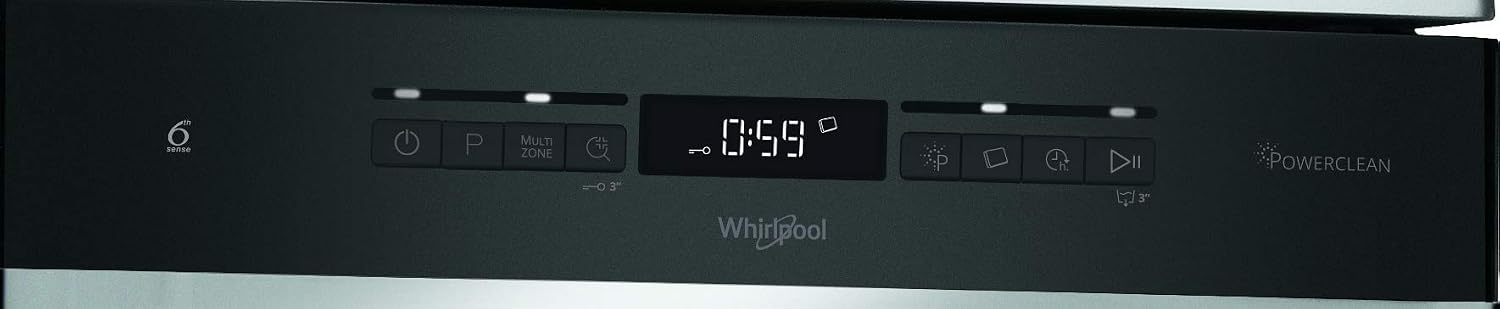
Image: A detailed view of the dishwasher's control panel, showing the digital timer, program indicators, and various function buttons like Multi-zone and Delayed Start. This panel allows users to select wash programs and options.
Loading the Dishwasher
This dishwasher has a capacity for 10 place settings. Load dishes carefully to ensure water can reach all surfaces.

Image: This image provides a clear view of the dishwasher's interior, with the upper and lower racks extended, illustrating how dishes can be organized and loaded for optimal cleaning.
Upper Rack
Ideal for cups, glasses, small plates, and bowls.

Image: The upper rack is shown with cups and small plates, demonstrating its capacity and flexible loading options for smaller items.
Lower Rack
Suitable for dinner plates, serving dishes, and larger items.

Image: The lower rack is depicted holding multiple dinner plates, showcasing its design for larger items.
Cutlery Tray
Place cutlery individually in the dedicated tray to ensure thorough cleaning.

Image: A close-up of the dedicated cutlery tray, designed to hold forks, knives, and spoons efficiently for thorough cleaning.
Adding Detergent and Rinse Aid
Fill the detergent dispenser with the appropriate amount of dishwasher detergent. Add rinse aid to the dispenser as needed to improve drying performance and prevent spots.
Wash Programs and Options
The dishwasher offers various programs and options to suit different cleaning needs:
- 6th SENSE Technology: This intelligent technology uses sensors to detect the level of dirt and automatically adjusts resources, eliminating the need for pre-washing.
- Multi-zone Wash: Allows you to clean a small load of dishes by selecting only the upper or lower basket, optimizing water and energy consumption.
- Delayed Start: Set the dishwasher to start at a more convenient time, saving energy during off-peak hours.
- Power Clean Pro: Powerful water jets at the back of the dishwasher target stubborn dirt, providing intensive cleaning for heavily soiled items.

Image: This image captures the powerful water jets of the Power Clean Pro system targeting a heavily soiled pot, illustrating its intensive cleaning capability for tough stains.
Starting a Wash Cycle
- Load the dishwasher and add detergent/rinse aid.
- Select the desired wash program.
- Select any additional options (e.g., Multi-zone, Delayed Start).
- Close the dishwasher door firmly.
- Press the Start button.
Maintenance and Cleaning
Regular maintenance ensures the longevity and optimal performance of your dishwasher.
Cleaning the Filters
The filter system should be checked and cleaned regularly to prevent blockages and ensure efficient washing. Refer to the detailed instructions in the full user manual for filter removal and cleaning.
Cleaning the Spray Arms
Periodically check the spray arm nozzles for blockages. If necessary, remove the spray arms and clean the holes with a fine brush or toothpick.
Exterior Cleaning
Wipe the exterior surfaces of the dishwasher with a soft, damp cloth. For stainless steel surfaces, use a specialized stainless steel cleaner to maintain its finish.
Interior Cleaning
Run a dishwasher cleaning cycle periodically using a dishwasher cleaner to remove grease and limescale buildup.
Troubleshooting
Before contacting customer service, refer to the following common issues and their solutions.
- Dishwasher does not start: Check if the power cord is securely plugged in, the door is fully closed, and the circuit breaker has not tripped.
- Dishes are not clean: Ensure spray arms are not blocked, filters are clean, and dishes are loaded correctly without overcrowding. Check detergent levels and selected program.
- Water not draining: Clean the filter system. Check the drain hose for kinks or blockages.
- Unusual noise: Ensure dishes are not interfering with the spray arms. Check for foreign objects in the pump area.
- Error codes: Consult the full user manual for specific error code meanings and troubleshooting steps.
Specifications
| Feature | Specification |
|---|---|
| Brand | Whirlpool |
| Model Name | WSFO 3O23 PF X |
| Installation Type | Freestanding |
| Dimensions (D x W x H) | 59 cm x 45 cm x 85 cm |
| Capacity | 10 Place Settings |
| Noise Level | 43 dB |
| Water Consumption (Eco) | 9 Liters/cycle |
| Energy Efficiency Class | E |
| Voltage | 220 Volts |
| Frequency | 50 Hz |
| Material | Stainless Steel |
| Color | Inox (Stainless Steel) |
| Eco Program Duration | 4:00 (4 hours) |
| Included Components | Power connector cable |

Image: The EU energy label for the Whirlpool WSFO 3O23 PF X dishwasher. It indicates an energy class E, energy consumption of 76 kWh per 100 cycles, water consumption of 9.0 liters per cycle, a noise level of 43 dB, and an eco program duration of 4 hours.
For detailed product information and the official energy label, please visit the EPREL database: https://eprel.ec.europa.eu/qr/296208
Warranty Information
The minimum warranty duration offered by the supplier is 24 months. Please note that warranty periods may vary based on national legislation in different countries. For example:
- Ireland, United Kingdom: 12 months
- Spain, Portugal: 36 months
- Norway: 60 months
Always retain your proof of purchase for warranty claims.
Customer Support
For further assistance, technical support, or spare parts, please contact Whirlpool customer service.
- Manufacturer: Whirlpool
- Supplier Address: EMEA Compliance Team, VIA VARESINA, 204 20156 MILANO ITALY
- Customer Service Email: public_inquiry@europeanappliances.com
- Customer Service Phone: +39 02 83715807
- Supplier Website for Information: https://docs.whirlpool.eu/
- EPREL Registration Number: 296208


