
1. Introduction
This manual provides essential information for the safe and effective use of the Aexit SSR-10 DA Solid State Relay. This DC-AC relay module is designed for various automatic control systems, offering reliable and efficient switching without mechanical contacts.
Key features of this solid state relay include:
- High reliability, high efficiency, and long lifespan.
- Absence of electric arc, noise, and mechanical contact during operation.
- Reduced electromagnetic interference, high sensitivity, and fast switching speed.
- Low drive voltage and current requirements.
- Suitable for harsh environments, including those with corrosion, moisture, or debris.
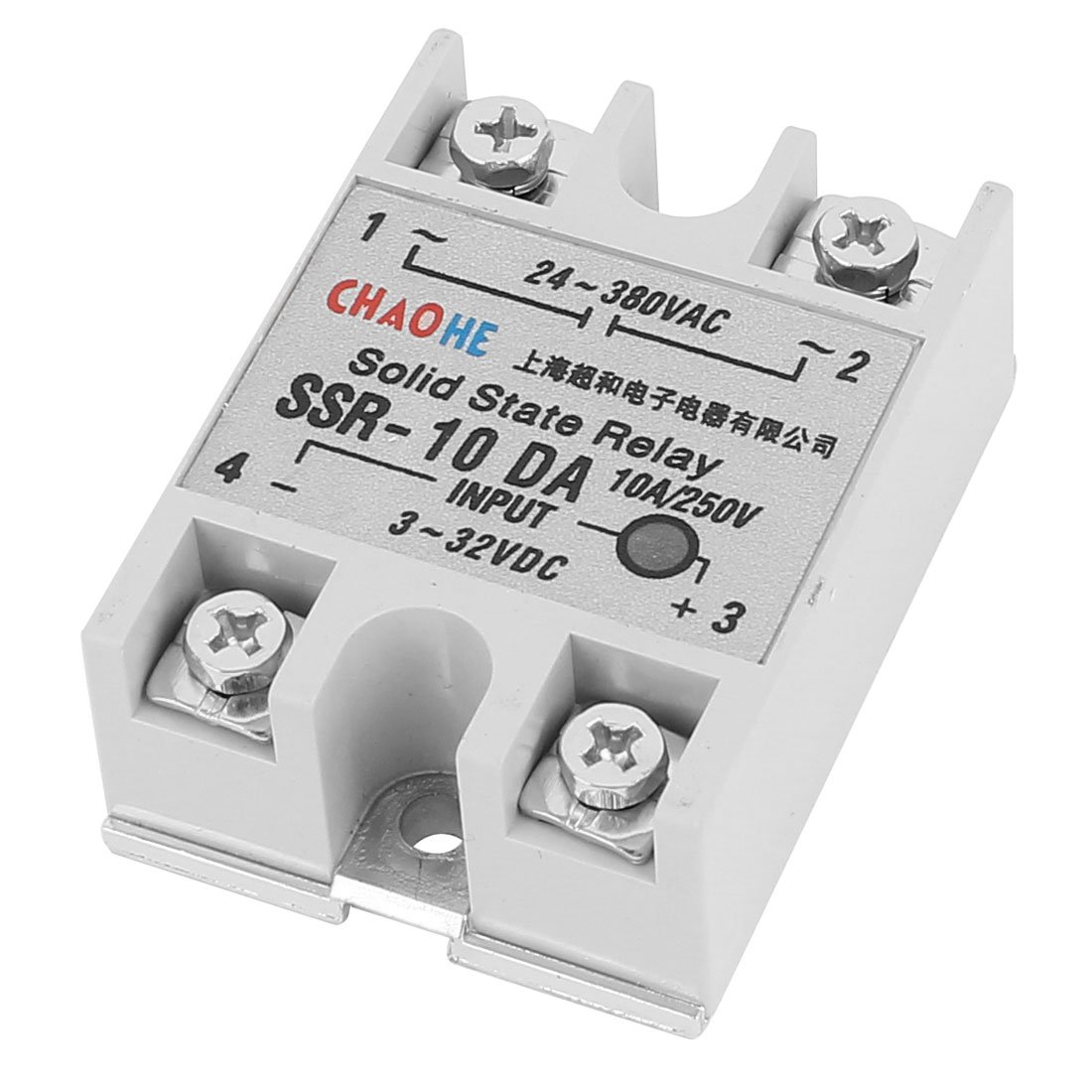
Figure 1: Top view of the Aexit SSR-10 DA Solid State Relay. This image shows the silver-tone metal casing with mounting holes and the overall compact design of the relay module.
2. Setup and Installation
Proper installation is crucial for the safe and optimal performance of the solid state relay. Always ensure power is disconnected before beginning installation.
2.1 Safety Precautions
- Disconnect all power sources before installation or maintenance.
- Ensure the input control voltage and output load voltage/current are within the specified ratings of the SSR-10 DA.
- For loads exceeding 10A, a suitable heat sink is recommended to prevent overheating and ensure longevity.
- Install in a dry, well-ventilated area, away from corrosive gases or excessive vibration.
2.2 Wiring Instructions
- Identify Terminals: The SSR-10 DA has four screw terminals. Two terminals are for DC input control (3-32VDC), and two are for AC output load (24-380VAC). Refer to the markings on the relay for correct identification.
- Connect DC Input: Connect the DC control voltage source (e.g., from a microcontroller or switch) to the input terminals. Ensure correct polarity if specified on the device. The input voltage range is 3-32VDC.
- Connect AC Load: Connect the AC load (e.g., motor, heater, light) to the output terminals. The output voltage range is 24-380VAC, with a maximum current rating of 10A.
- Secure Connections: Ensure all screw terminals are tightened securely to prevent loose connections, which can cause arcing or overheating.
- Mounting: Mount the relay securely using the provided mounting holes. If using a heat sink, ensure proper thermal paste application and secure attachment.

Figure 2: Side view of the Aexit SSR-10 DA Solid State Relay, showing the screw terminals. This image highlights the connection points for both the DC input and AC output, essential for proper wiring.
3. Operating Instructions
The Aexit SSR-10 DA operates as a simple on/off switch controlled by a DC voltage signal.
- Activation: Apply a DC control voltage within the 3-32VDC range to the input terminals. This will cause the relay to switch to its 'ON' state, allowing the AC load to receive power.
- Deactivation: Remove the DC control voltage from the input terminals. The relay will switch to its 'OFF' state, disconnecting power to the AC load.
- Silent Operation: Due to its solid-state design, the relay operates silently without any audible clicking sounds associated with mechanical relays.
- Fast Switching: The solid state design allows for very fast switching speeds, making it suitable for applications requiring rapid on/off cycles.
4. Maintenance
The Aexit SSR-10 DA Solid State Relay is designed for minimal maintenance. However, periodic checks can help ensure its long-term reliability.
- Keep Clean and Dry: Ensure the relay is kept free from dust, dirt, and moisture. Clean the exterior with a dry, soft cloth if necessary.
- Inspect Connections: Periodically check all wiring connections to ensure they remain tight and free from corrosion.
- Verify Cooling: If a heat sink is used, ensure it is free from obstructions and that airflow is adequate to prevent overheating.
- Environmental Conditions: Confirm that the operating environment remains within the specified temperature and humidity ranges.
5. Troubleshooting
If the solid state relay is not functioning as expected, refer to the following troubleshooting guide:
| Problem | Possible Cause | Solution |
|---|---|---|
| Relay does not switch ON | No or incorrect DC input voltage. Faulty wiring. Load circuit open. | Verify DC input voltage (3-32VDC) and polarity. Check all wiring connections for continuity and correctness. Ensure the AC load is properly connected and functional. |
| Relay does not switch OFF | DC input voltage not removed. Internal relay failure. | Ensure DC input voltage is completely removed. Replace the relay if internal failure is suspected. |
| Relay overheats | Load current exceeds rating. Insufficient heat sinking. Poor ventilation. | Reduce load current or use a higher-rated relay. Install or improve heat sink. Ensure adequate airflow around the relay. |
| Intermittent operation | Loose connections. Unstable input voltage. | Tighten all screw terminals. Ensure a stable and consistent DC input voltage. |
6. Specifications
| Feature | Specification |
|---|---|
| Model | SSR-10 DA |
| Type | DC-AC Solid State Relay |
| Input Control Voltage | DC 3-32V |
| Output Load Voltage | AC 24-380V |
| Output Load Current | 10 Amps |
| Contact Type | Normally Open |
| Terminals | 4 Screw Terminals |
| Material | Metal, Plastic, Electric Parts |
| Main Color | Silver Tone, Gray |
| Net Weight | 101g |
| Relay Size (L*W*H) | 62 x 45 x 23mm / 2.44 x 1.8 x 0.9 inches |
7. Warranty and Support
For warranty information or technical support regarding your Aexit SSR-10 DA Solid State Relay, please refer to the retailer or manufacturer's official website. Keep your purchase receipt for warranty claims.