
Introduction
The Linear MCS307010 is a compact, single-button key chain remote designed for convenient operation of compatible garage door openers or gate systems. This transmitter utilizes a 300 MHz frequency and features 10 binary (two-position) switches, offering 1024 unique coding options for secure access. It is compatible with Linear Multi-Code 300 MHz receivers.
Package Contents
- Linear MCS307010 Key Chain Transmitter
- 12V Battery (pre-installed or included)
- Operating Instructions (this manual)
Setup and Programming
To ensure proper function, the MCS307010 transmitter must be programmed to match the code of your compatible Linear Multi-Code 300 MHz receiver.
1. Accessing the Code Switches
Locate the small screws or clips on the back of the transmitter. Carefully open the casing to reveal the 10 binary code switches. These switches are typically numbered 1 through 10.
2. Matching the Code
- Identify the code setting on your existing Linear Multi-Code 300 MHz transmitter or receiver. This will be a series of "ON" or "OFF" positions for each of the 10 switches.
- Using a small screwdriver or pen, set the 10 switches on your new MCS307010 transmitter to exactly match the code of your existing device. Ensure each switch is firmly in either the "ON" or "OFF" position.
- Once the code is set, carefully close the transmitter casing and secure it with the screws or clips.
Note: If you are setting a new code for both the transmitter and receiver, ensure both devices are set to the identical 10-digit code. Refer to your receiver's manual for specific instructions on setting its code.
Operating Instructions
After successful programming, operating the MCS307010 transmitter is straightforward.
- Stand within range of your garage door opener or gate receiver.
- Press and hold the single button on the MCS307010 key chain transmitter.
- The garage door or gate should activate. Release the button once the operation begins.
Tip: The effective range of the transmitter can vary depending on environmental factors and the condition of the battery.
Maintenance
Battery Replacement
The MCS307010 transmitter requires one 12V battery. If the transmitter's range decreases significantly or it stops functioning, the battery may need replacement.
- Carefully open the transmitter casing as described in the "Setup and Programming" section.
- Remove the old 12V battery. Note its orientation (positive and negative terminals).
- Insert a new 12V battery, ensuring correct polarity.
- Close the casing and secure it.
Caution: Dispose of old batteries according to local regulations.
Cleaning
Wipe the exterior of the transmitter with a soft, dry cloth. Avoid using abrasive cleaners or solvents, as these can damage the casing or internal components.
Troubleshooting
- Transmitter not working:
- Check the battery. Replace if necessary.
- Verify that the code switches inside the transmitter match the receiver's code exactly.
- Ensure you are within the operational range of the receiver.
- Reduced operating range:
- Replace the battery.
- Check for sources of interference (e.g., metal objects, other radio frequency devices).
Specifications
| Model | MCS307010 |
| Frequency | 300 MHz |
| Coding | 10 binary (two-position) switches, 1024 codes |
| Battery | 1 x 12V (e.g., A23) |
| Compatibility | Linear Multi-Code 300 MHz receivers |
| Approximate Dimensions (Transmitter) | 2 x 1 x 0.5 inches (estimated from package dimensions) |
| Approximate Weight | 0.01 ounces (excluding packaging) |
| ASIN | B07L926JKL |
| UPC | 302705488450 |
Related Products / Compatible Devices
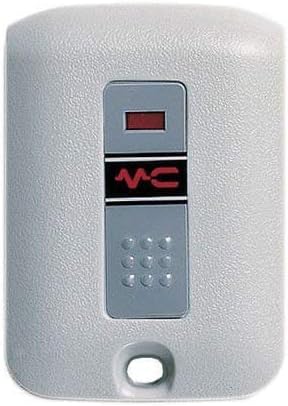
This image displays a Linear Multi-Code 4120 Keypad, which is a compatible device often used with Linear Multi-Code 300 MHz systems. While the primary product of this manual is the MCS307010 key chain transmitter, this keypad represents another method of accessing your garage or gate system using the same underlying technology. It features a numeric keypad for code entry and a status indicator.
Warranty and Support
Specific warranty information for the Linear MCS307010 transmitter is not provided in the product details. For warranty claims or technical support, please refer to the original point of purchase or contact Linear customer service directly. Keep your purchase receipt as proof of purchase.
For additional resources and product information, you may visit the official Linear website or consult with a qualified installer.


