1. Introduction
This manual provides detailed instructions for the safe and efficient use of your Noritz RC-7606S Bathroom Remote Control. This remote is designed for use with dedicated water heaters and does not feature an auto-stop function for bath filling. Please read this manual thoroughly before installation and operation to ensure proper functionality and safety.
2. Important Safety Information
WARNING: Installation and related work must be performed by qualified professionals in accordance with all applicable laws, regulations, and standards.
This includes, but is not limited to, technical standards for electrical equipment, Electrical Appliance and Material Safety Act, Building Standards Act, local ordinances, Fire Service Act, Gas Business Act, Liquefied Petroleum Gas Act, and installation standards for gas appliances. Failure to comply with these regulations may result in property damage, serious injury, or death.
- Any malfunctions or damages resulting from improper installation or conditions outside the specified requirements will incur repair costs, even within the warranty period.
- Ensure all necessary parts not included with the product are prepared by the installer.
- Noritz is not responsible for any damages or delays caused by product delivery delays.
3. Product Overview
3.1 Compatible Models
This remote control is compatible with the following Noritz water heater series:
- GQ-C**38WXS Series
- GQ-C**34WS Series
- GQ-**39WS Series
- GQ-1628WS Series
- GQ-1639WE Series
- GQ-1039W-1
- GQ-1037WD-F-1
3.2 Dimensions
Bathroom Remote Control: W128 x H120 x D21 mm
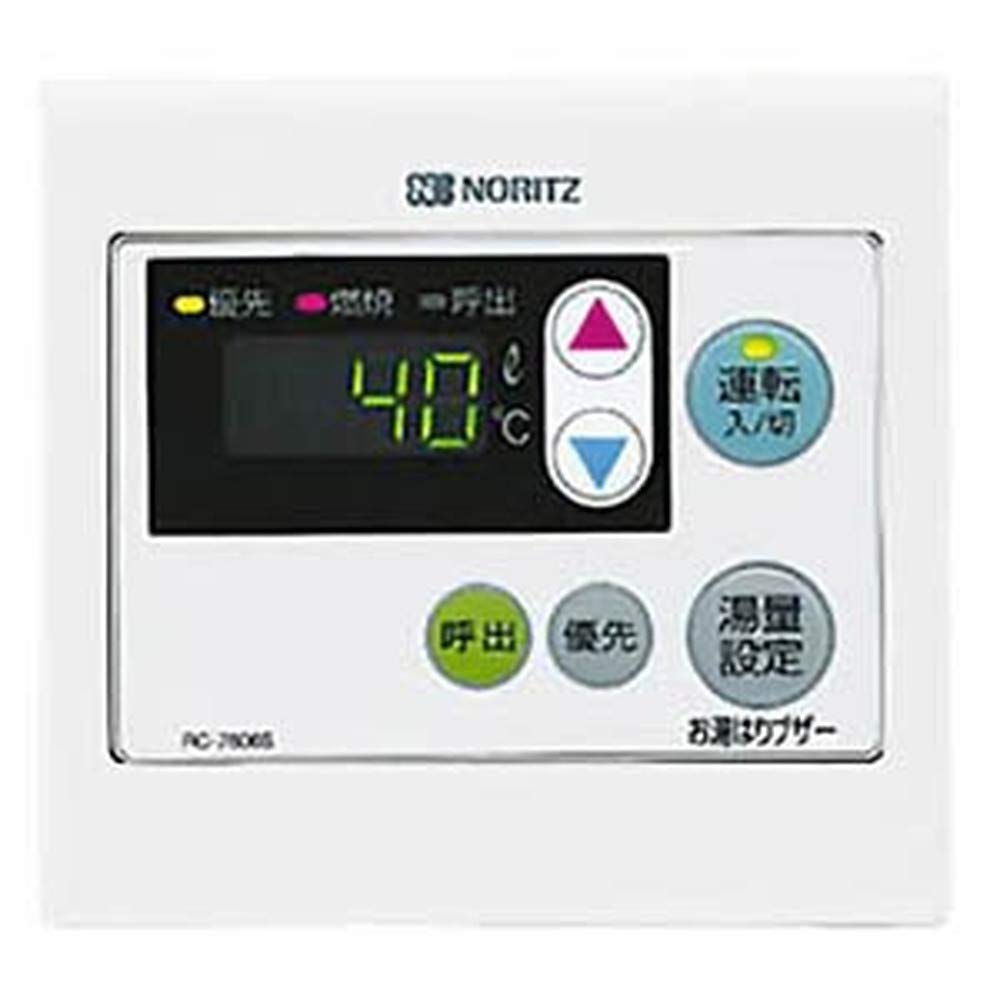
Image: Front view of the Noritz RC-7606S Bathroom Remote Control, showing its compact design and display area.
4. Package Contents
The following items are included with your Noritz RC-7606S Bathroom Remote Control:
- Round head wood screws φ4.1x25 x 2
- All plugs #6x25 x 2
5. Setup and Installation
Note: Installation of this remote control requires specialized knowledge and tools. It must be performed by a certified professional.
5.1 Pre-Installation Checks
- Ensure the main power to the water heater is turned off at the circuit breaker.
- Verify that the water heater model is listed as compatible in the "Product Overview" section.
- Confirm all necessary wiring and mounting hardware are available.
5.2 Mounting the Remote Control
The remote control unit should be mounted in a suitable location within the bathroom, away from direct water spray. Use the provided screws and plugs for secure installation. Refer to the detailed installation manual provided with the water heater for specific wiring diagrams and connection points.
5.3 Electrical Connections
Connect the remote control wiring to the designated terminals on the water heater control board. Ensure correct polarity and secure connections to prevent electrical hazards. Consult the water heater's installation manual for precise wiring instructions.
5.4 Post-Installation
After installation, restore power to the water heater and test the remote control's functionality. Check for proper display, button responsiveness, and communication with the water heater.
6. Operating Instructions
6.1 Power On/Off
Press the Power button to turn the water heater on or off via the remote control. The display will illuminate when the unit is active.
6.2 Temperature Adjustment
Use the Up and Down arrow buttons to adjust the desired water temperature. The current temperature setting will be shown on the display.
6.3 Function Indicators
The display may show various indicators for operational status, error codes, or specific functions. Refer to the water heater's main manual for a complete list of display icons and their meanings.
6.4 Non-Auto-Stop Feature
This model is a non-auto-stop type. It provides control over the water heater's basic functions but does not automatically stop water flow when filling a bath to a preset level. Users must manually monitor and stop the water flow.
7. Maintenance
7.1 Cleaning
Wipe the remote control surface with a soft, damp cloth. Do not use abrasive cleaners, solvents, or chemical sprays, as these can damage the display and casing.
7.2 Inspection
Periodically check the remote control and its wiring for any signs of damage or loose connections. If any issues are found, contact a qualified service technician.
8. Troubleshooting
8.1 No Display/No Power
- Check if the main power to the water heater is on.
- Ensure the remote control's wiring connections are secure.
- If the issue persists, contact a qualified technician.
8.2 Incorrect Temperature
- Verify the temperature setting on the remote control.
- Allow time for the water heater to reach the desired temperature.
- If the problem continues, consult the water heater's main manual or a service professional.
8.3 Buttons Unresponsive
- Ensure the remote control surface is clean and free from obstructions.
- Try turning the water heater off and on again at the main power source.
- If buttons remain unresponsive, professional service may be required.
9. Specifications
| Attribute | Detail |
|---|---|
| Brand | Noritz |
| Model Number | RC-7606S (Product Number: 0702150) |
| Type | Bathroom Remote Control (Non-Auto-Stop Type) |
| Dimensions (W x H x D) | 128 x 120 x 21 mm |
| Weight | 300 g |
| Color | White |
| Included Accessories | Round head wood screws φ4.1x25 x 2, All plugs #6x25 x 2 |
10. Warranty and Support
For warranty information, please refer to the warranty card included with your water heater or contact Noritz customer service. Keep your purchase receipt as proof of purchase.
For technical support or service, please contact your authorized Noritz dealer or a qualified service technician. Do not attempt to repair the unit yourself.


