
1. Introduction
This manual provides essential instructions for the setup, operation, and maintenance of your Fossil Neutra Hybrid Analog Watch, model FTW1177. This hybrid watch combines the classic aesthetics of an analog timepiece with modern smartwatch functionalities, offering activity tracking, social media notifications, and Bluetooth connectivity. Please read this manual thoroughly to ensure proper use and to maximize the features of your device.
2. Product Overview
The Fossil Neutra Hybrid Analog Watch FTW1177 features a traditional analog display with integrated smart technology. Key components include the watch case, analog display, subdial, watch strap, and control buttons.

Figure 2.1: Front view of the watch, showcasing the yellow analog dial and brown leather strap.

Figure 2.2: Side profile of the watch, highlighting the metallic case, crown, and functional pushers.
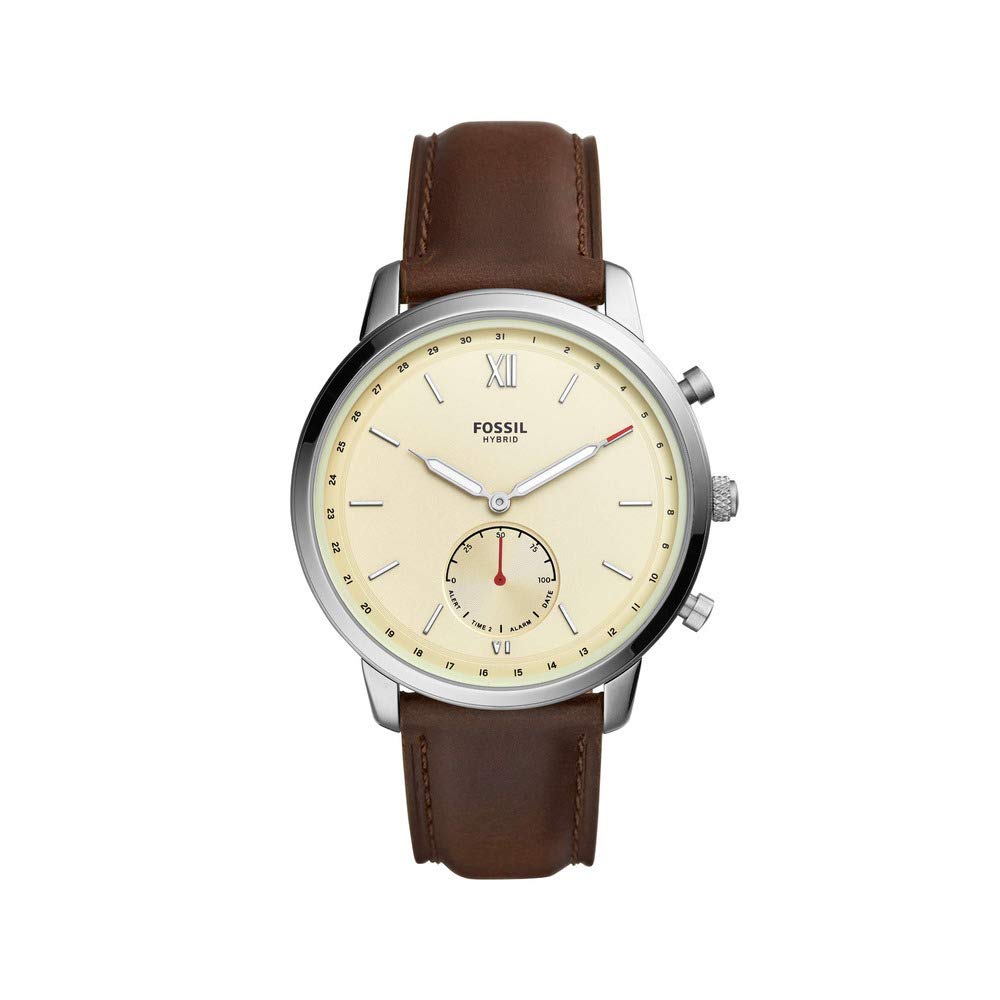
Figure 2.3: Back view of the watch strap and buckle, displaying the Fossil logo on the buckle.
3. Setup
3.1 Initial Power On
Your Fossil Neutra Hybrid Watch comes with a pre-installed Lithium Metal battery. The watch should be ready for initial setup upon unboxing. If the watch does not respond, ensure the battery is properly seated or consider a replacement if it has been stored for an extended period.
3.2 App Installation and Pairing
- Download the Companion App: Search for the official Fossil Smartwatches app on your smartphone's app store (available for iOS and Android devices).
- Enable Bluetooth: Ensure Bluetooth is enabled on your smartphone.
- Open the App: Launch the Fossil Smartwatches app and follow the on-screen instructions to create an account or log in.
- Pair Your Watch: The app will guide you through the pairing process. Typically, this involves selecting your watch model (FTW1177) from a list and confirming the connection on both your watch and phone.
- Complete Setup: Follow any remaining prompts in the app to personalize settings, set your time zone, and configure notifications.
Note: For optimal performance, ensure your smartphone's operating system and the Fossil Smartwatches app are updated to their latest versions.
4. Operating Instructions
4.1 Timekeeping
The watch features an analog display for timekeeping. Once paired with your smartphone, the time will automatically synchronize. Manual time adjustment is typically not required as it is managed through the connected app.
4.2 Activity Tracking
Your watch continuously tracks your daily activity, including steps taken and distance covered. This data is synchronized with the Fossil Smartwatches app on your phone, where you can view your progress, set goals, and analyze trends.
4.3 Notifications
Receive discreet notifications for calls, messages, and social media alerts directly on your watch. You can customize which notifications you receive and how they are displayed (e.g., vibration, hand movement) through the companion app.
4.4 Using the Buttons
The watch features physical buttons (pushers) on the side of the case. These buttons can be customized via the Fossil Smartwatches app to perform various functions, such as controlling music, taking a photo, or checking your activity progress. Refer to the app for detailed customization options.
5. Maintenance
5.1 Cleaning Your Watch
- Watch Case: Wipe the watch case with a soft, damp cloth. Avoid using harsh chemicals or abrasive materials.
- Leather Strap: Leather straps should be cleaned with a specialized leather cleaner or a slightly damp cloth. Allow the strap to air dry completely. Avoid prolonged exposure to water or direct sunlight, which can damage the leather.
5.2 Water Resistance
The Fossil Neutra Hybrid Watch FTW1177 has a water resistance level of "Water Resistant" and an IPX8 rating. This means it is protected against continuous immersion in water under certain conditions. However, it is not suitable for high-impact water sports, diving, or prolonged submersion. Avoid operating the buttons while the watch is wet.
5.3 Battery Replacement
The watch uses a Lithium Metal battery. When the battery level is low, you will receive a notification via the companion app. Battery replacement should ideally be performed by a certified technician or by following specific instructions provided by Fossil to ensure water resistance is maintained. Refer to the Fossil support website for battery replacement guidelines.
6. Troubleshooting
| Problem | Possible Cause | Solution |
|---|---|---|
| Watch not connecting to phone | Bluetooth is off; App is not running; Watch battery is low; Watch is out of range. | Ensure Bluetooth is on. Open the Fossil Smartwatches app. Check watch battery level. Keep watch within Bluetooth range of your phone. Try restarting both devices. |
| Notifications not appearing | Notifications are disabled in app; App permissions are not granted; Watch is not connected. | Check notification settings in the Fossil Smartwatches app. Verify app permissions in your phone's settings. Ensure the watch is properly paired and connected. |
| Inaccurate activity tracking | Watch fit is loose; Software glitch. | Ensure the watch is worn snugly on your wrist. Try restarting the watch and the app. Ensure the app is updated. |
| Short battery life | Frequent notifications; Old battery. | Reduce the number of notifications. Consider replacing the battery if it's old or frequently draining quickly. |
If you encounter issues not listed here, please refer to the Fossil support website or contact customer service.
7. Specifications
| Model Number | FTW1177 |
| Brand | Fossil |
| Display Type | Analog |
| Operating System Compatibility | Android, iOS |
| Wireless Connectivity | Bluetooth |
| Battery Type | Lithium Metal (1 required, included) |
| Water Resistance Rating | Water Resistant (IPX8) |
| Band Material | Leather |
| Band Color | Brown |
| Item Weight | 73.6 g (2.6 Ounces) |
| Package Dimensions | 11.68 x 11.43 x 8.89 cm |
| Manufacturer | FOSSIL INDIA PVT LTD |
| UPC | 796483436626 |
8. Warranty and Support
For warranty information, detailed support, and frequently asked questions, please visit the official Fossil support website or contact Fossil customer service. Keep your proof of purchase for any warranty claims.
Manufacturer: FOSSIL INDIA PVT LTD
For further assistance, refer to the Fossil Store on Amazon.


