
Aexit modle
Aexit Outdoor Terminal Electrical Junction Box User Manual
Brand: Aexit | Model: modle
1. Introduction
This manual provides essential information for the installation, operation, and maintenance of your Aexit Outdoor Terminal Electrical Junction Box. This enclosure is designed to protect electrical connections and house circuit boards in various applications, ensuring their safety from environmental factors.
Key features of this junction box include:
- Specifically designed with internal space for housing circuit boards.
- Offers excellent waterproof performance, suitable for outdoor and damp environments.
- Ideal for a wide range of applications including electronic projects, power supply units, and amplifiers.
- Constructed from durable plastic for longevity and protection.
- Comes with several mounting parts for secure installation.

Figure 1: Overall view of the Aexit Outdoor Terminal Electrical Junction Box.
2. Safety Information
Always observe safety precautions when working with electrical components. This product is an enclosure designed to protect electrical installations. Refer to the warning labels provided with the product for detailed safety instructions and compliance information in multiple languages.
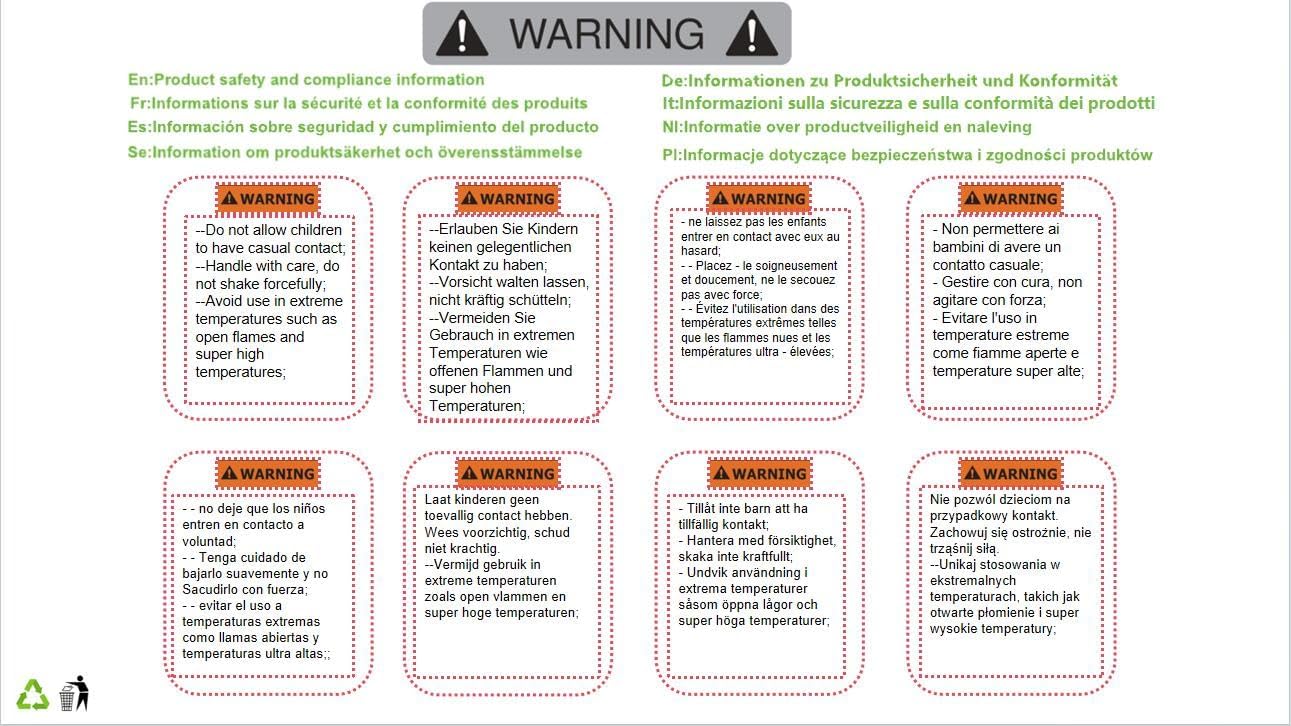
Figure 2: Example of a multi-language warning label included with the product.

Figure 3: Product packaging showing the affixed warning label.
3. Setup & Installation
The junction box is designed for straightforward installation. Follow these steps to ensure proper setup:
- Unpack Contents: Carefully open the packaging and verify that all components are present. The package typically includes one junction box and several mounting parts.
- Select Mounting Location: Choose a suitable, stable surface for installation. Consider environmental factors and accessibility for future maintenance.
- Mounting the Box: Secure the junction box to the chosen surface using the provided mounting parts. The box features pre-drilled mounting holes with a diameter of approximately 7mm (0.28 inches). Ensure the box is level and firmly attached.
- Internal Component Installation: Open the enclosure by removing the lid. The internal dimensions are approximately 193 x 113 x 105mm (7.6 x 4.4 x 4.1 inches). Install your circuit board, power supply unit, or other electrical components as required. Utilize the internal space efficiently.
- Secure the Enclosure: Once all internal components are installed and wired, securely fasten the lid back onto the box. Ensure the seal is properly seated to maintain the excellent waterproof performance of the enclosure.

Figure 4: Junction box with lid removed, illustrating internal space and mounting points.
4. Operation
The Aexit Outdoor Terminal Electrical Junction Box is a passive protective enclosure. It does not require active operation once installed. Its primary function is to safeguard the internal electrical components from environmental elements such as moisture, dust, and physical impact.
Ensure that all internal electrical connections are secure, properly insulated, and comply with relevant electrical codes before closing the enclosure. The box's excellent waterproof performance will then provide continuous protection for your sensitive electronics.
5. Maintenance
To ensure the longevity and continued optimal performance of your junction box, periodic maintenance is recommended:
- Visual Inspection: Regularly inspect the exterior of the box for any signs of physical damage, such as cracks, dents, or discoloration. Check for loose fastenings or mounting points.
- Seal Integrity: Periodically check the seal around the lid. Ensure it is clean, intact, and properly seated to maintain the waterproof capabilities. Debris or damage to the seal can compromise protection.
- Cleaning: Clean the exterior surface of the box with a soft, damp cloth as needed. Avoid using abrasive cleaners or harsh chemicals, as these may damage the plastic material.
- Internal Check (if necessary): If you suspect any issues with the internal components or connections, carefully open the box and inspect. Ensure power is disconnected before opening.
6. Troubleshooting
Most issues related to the junction box are typically associated with installation or external factors rather than the box itself. Consider the following common scenarios:
- Water or Moisture Inside: If you find moisture or water inside the enclosure, the waterproof seal may be compromised. Check the lid's seal for proper seating, damage, or debris. Ensure any cable entries (if you have made them) are properly sealed with appropriate cable glands.
- Loose Mounting: If the junction box feels unstable or loose on its mounting surface, re-tighten the mounting screws. Inspect the mounting surface for integrity.
- Physical Damage: In the event of significant physical damage (e.g., large cracks, severe impact), the protective integrity of the box may be compromised. In such cases, replacement of the enclosure is recommended to ensure continued protection of internal components.
7. Specifications
| Attribute | Value |
|---|---|
| Brand | Aexit |
| Model Number | modle |
| Material | Plastic |
| Main Color | Gray |
| Total Size (L*W*T) | 199 x 119 x 116mm (8" x 5" x 4.5") |
| Internal Size (L*W*T) | 193 x 113 x 105mm (7.6" x 4.4" x 4.1") |
| Net Weight | 439g |
| Mounting Hole Diameter | 7mm (0.28") |
| Country of Manufacture | CHINA |
8. Warranty & Support
For specific warranty information or technical support regarding your Aexit Outdoor Terminal Electrical Junction Box, please contact the manufacturer directly. It is advisable to retain your purchase receipt as proof of purchase for any warranty claims or inquiries.
Related documentsmodle


Ask a question about this manual
Ask about setup, troubleshooting, compatibility, parts, safety, or missing instructions. Manuals+ will review the question and use this page’s manual context to help answer it.