
Introduction
The LAUNCH X431 PRO V 5.0 is a professional-grade bidirectional diagnostic scan tool designed for comprehensive vehicle diagnostics and maintenance. This device offers advanced features such as ECU coding, over 38 special reset functions, full system diagnostics, and guided functions for various vehicle brands. It is equipped with a high-performance tablet and a DBScar VII connector for efficient communication with vehicles.
This manual provides essential information for setting up, operating, maintaining, and troubleshooting your LAUNCH X431 PRO V 5.0 scan tool. Please read it thoroughly to ensure proper use and to maximize the benefits of your device.
1. Setup
1.1 Unpacking and Component Check
Upon receiving your LAUNCH X431 PRO V 5.0, carefully unpack all components and verify against the packing list. The standard package includes:
- LAUNCH X431 PRO V 5.0 Tablet
- DBScar VII Bluetooth Connector
- Power Adapter (USA/VDE specific)
- OBDII Plug
- USB Type-C Plug
- Product Manual
- Instruction Guide
- Various diagnostic adapters (for older or specific vehicle models)
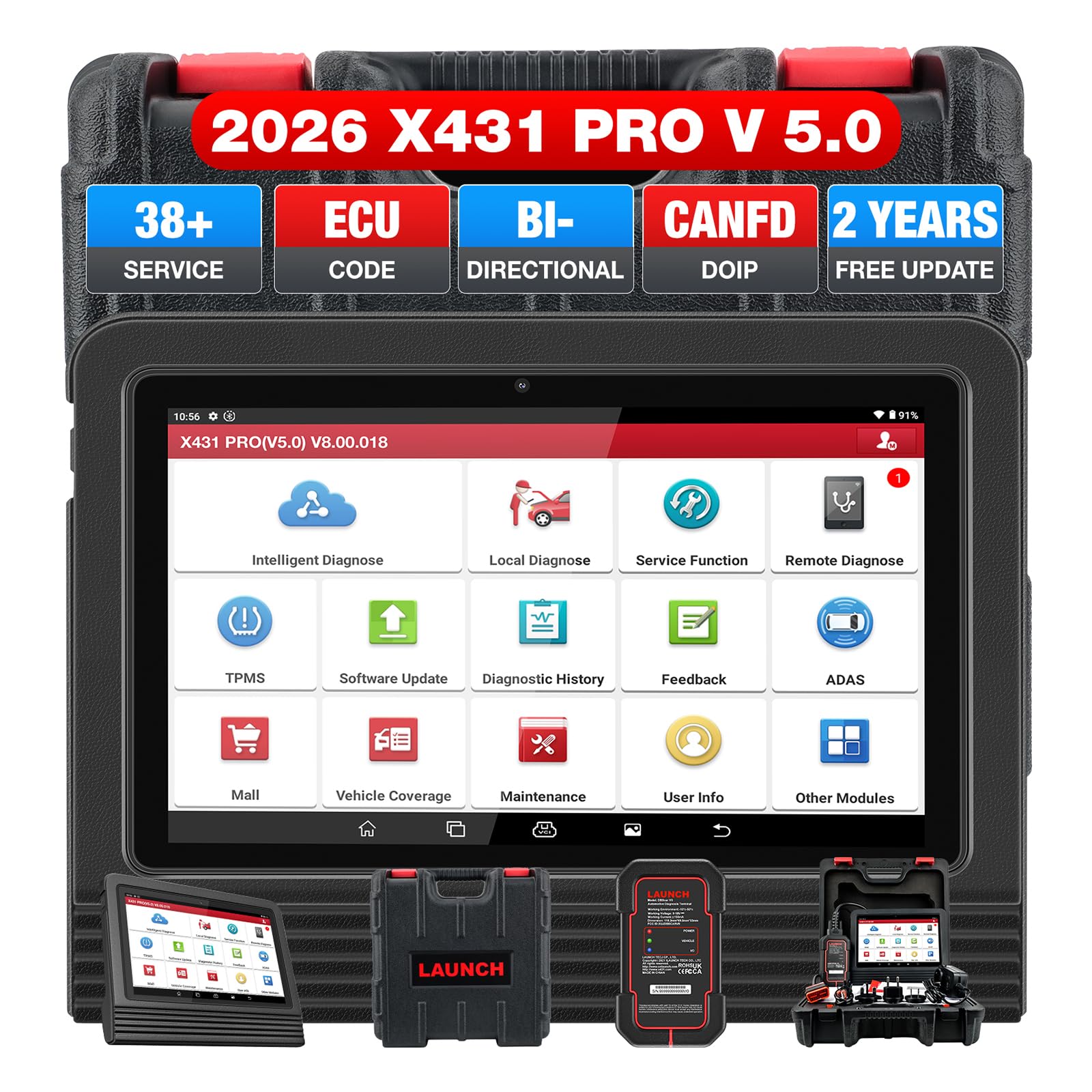
Image: The LAUNCH X431 PRO V 5.0 tablet and DBScar VII connector, along with various accessories, neatly arranged in a protective carrying case.

Image: A visual representation of the contents included in the LAUNCH X431 PRO V 5.0 package, showing the tablet, Bluetooth connector, adapters, and cables.
1.2 Initial Power-On and Registration
- Charge the Device: Connect the power adapter to the tablet and a power outlet. Ensure the device is fully charged before first use.
- Power On: Press and hold the power button until the LAUNCH logo appears.
- Initial Setup: Follow the on-screen prompts to select your language, connect to a Wi-Fi network (2.4GHz or 5GHz), and set up your time zone.
- Register Account: Create a LAUNCH account or log in if you already have one. This is crucial for software updates and accessing online features.
1.3 Software Updates
The LAUNCH X431 PRO V 5.0 comes with 2 years of free software updates. Regular updates ensure compatibility with new vehicle models and provide enhanced features. To update:
- Ensure the device is connected to a stable Wi-Fi network.
- Navigate to the "Update" section within the diagnostic application.
- Select and download available updates for your vehicle brands and system software.
Note: After the initial 2 years, updates are optional but recommended for continued optimal performance and vehicle coverage.
2. Operating the Scan Tool
2.1 Connecting to a Vehicle
- Locate the vehicle's OBDII port (usually under the dashboard).
- Plug the DBScar VII Bluetooth connector into the OBDII port. The connector's LED indicators should light up.
- On the LAUNCH X431 PRO V 5.0 tablet, ensure Bluetooth is enabled and the DBScar VII connector is paired.
- Start the vehicle's ignition (turn key to ON position, or start engine if required by the diagnostic procedure).
- Open the diagnostic application on the tablet and select the desired vehicle brand and model.
2.2 Basic Diagnostics
The tool provides comprehensive OE-level diagnostics for all available vehicle systems (ECM, TCM, ABS, SRS, BCM, BMS, TPMS, SAS, etc.).
- Read/Clear Codes: Access and clear Diagnostic Trouble Codes (DTCs) from various modules.
- Live Data Stream: View real-time sensor data in text, graph, or merged graph formats. This helps in monitoring vehicle performance and identifying intermittent issues.
- Freeze Frame Data: View a snapshot of sensor data at the moment a DTC was set.
- ECU Information: Retrieve detailed information about the vehicle's Electronic Control Units.

Image: The main interface of the LAUNCH X431 PRO V 5.0 diagnostic software, displaying options for various diagnostic functions and vehicle systems.

Image: The LAUNCH X431 PRO V 5.0 tablet screen showing a live data stream, specifically monitoring tire pressure values for multiple tires.
2.3 Advanced Functions
2.3.1 ECU Coding
This function allows you to match, learn, or code newly replaced ECUs, write VINs into PCMs, recode replacement parts, and activate hidden functions. It supports online coding for various brands (BMW, VW, Audi, Skoda, Seat, Benz, GM, Ford, Honda, Toyota, Jaguar, Land Rover, Porsche, etc.).
- Match/learn/code newly replaced ECUs.
- Code VIN into replacement PCM.
- Reflash Hidden Functions (e.g., automatic mirror folding, automatic window unlocking).
- Customize OE Settings and disable annoying features (e.g., seat belt alarm off).

Image: An illustration detailing the various ECU coding capabilities of the LAUNCH X431 PRO V 5.0, including matching ECUs, coding VINs, and reflashing hidden functions.

Image: This image highlights advanced ECU coding features such as online coding, component matching, and options to customize OE settings and disable specific functions.
2.3.2 Bi-Directional Control (Active Test)
The tool can send commands to vehicle systems/components to test their working status directly, without using vehicle controls. This is useful for quickly identifying faulty components.
- Turn on radiator fan.
- Open or close windows.
- Operate mirrors.
- Injector Buzz Test.
- Turn on sound horn.
- Activate transmission oil pump.
- And many more.

Image: Visual representation of various bi-directional control (active test) functions, including activating the radiator fan, lights, mirrors, and transmission oil pump.
2.3.3 38+ Special Functions
Perform various maintenance and service resets, including:
- ABS Bleeding
- Injector Code
- Crankshaft Relearn
- Air Suspension
- Oil Reset
- SAS (Steering Angle Sensor) Reset
- EPB (Electronic Parking Brake) Reset
- BMS (Battery Management System) Reset
- DPF (Diesel Particulate Filter) Regeneration
- TPMS (Tire Pressure Monitoring System) Reset
- Throttle Calibration
- Gear Learning
- Sunroof Initialization
- AFS (Adaptive Front-lighting System) Reset
- EGR (Exhaust Gas Recirculation) Adaption
- And many more.

Image: A grid displaying icons and names for over 38 special service functions, such as ABS Bleeding, Injector Code, Battery Match, and Oil Reset.

Image: Another visual representation of the 38+ service functions, including Oil Reset, Brake Reset, EPB Reset, and TPMS Reset, designed to facilitate various maintenance tasks.
2.3.4 VAG Guided Function & AutoAuth for FCA SGW
- VAG Guided Function: Simplifies complex repair jobs for Volkswagen, Audi, Skoda, and Seat vehicles by providing step-by-step instructions.
- AutoAuth for FCA SGW: Provides immediate authorized secure gateway access for Chrysler, Dodge, Jeep, Alfa Romeo, and Fiat vehicles manufactured after 2017.

Image: This image illustrates the comprehensive diagnostic capabilities, including VAG Guided functions and FCA AutoAuth access, alongside other system diagnostics.
2.4 User-Oriented Features
- Auto VIN & Camera Scan: Quickly identify vehicle information.
- 12-in-1 Live Data Stream: Monitor multiple data parameters simultaneously.
- Remote Diagnostic: Allows for remote assistance from other technicians.
- Diagnostic Report Print & Share: Generate and share professional diagnostic reports.
- DTC Help & Google Search: Integrated tools for quick fault code lookup.
- Multi-Language Support: Supports over 25 languages.

Image: A display of user-friendly features such as Auto VIN, 12-in-1 Live Data Stream, Remote Diagnostic, and Diagnostic Report printing/sharing.

Image: A world map illustrating the wide vehicle coverage (99% of car brands, 200,000+ models) and the 25+ languages supported by the LAUNCH X431 PRO V 5.0.
3. Maintenance
3.1 Device Care
- Keep the device clean and free from dust and moisture. Use a soft, dry cloth for cleaning.
- Avoid exposing the device to extreme temperatures or direct sunlight for prolonged periods.
- Store the device in its protective case when not in use to prevent physical damage.
- Ensure the DBScar VII connector is properly stored and protected from damage.
3.2 Software Maintenance
Regularly check for and install software updates as described in Section 1.3. This ensures your tool has the latest vehicle coverage and diagnostic capabilities.
4. Troubleshooting
4.1 Common Issues and Solutions
| Issue | Possible Cause | Solution |
|---|---|---|
| Device does not power on. | Low battery or power adapter issue. | Ensure the device is fully charged. Check power adapter and cable for damage. |
| Cannot connect to vehicle. | DBScar VII not properly connected, Bluetooth off, or vehicle ignition off. | Verify DBScar VII is securely plugged into OBDII port. Ensure Bluetooth is on and paired. Turn vehicle ignition to ON. Try a different OBDII port if available. |
| Specific function (e.g., ECU Code) not working. | Function not supported for the specific vehicle model/year, or software not updated. | Verify vehicle compatibility for the specific function. Ensure software is up to date. Contact support if the issue persists. |
| Slow performance or freezing. | Too many applications running, low storage, or outdated software. | Close unnecessary applications. Clear cache. Ensure sufficient storage (expandable to 128GB). Update software. Restart the device. |
4.2 Further Assistance
If you encounter issues not covered here, please refer to the support resources listed in Section 6.
5. Specifications
| Feature | Detail |
|---|---|
| Model Number | X-431 V V4.0 |
| Operating System | Android 9.0 (2024 Elite Version) |
| CPU Processor | 2.0 GHz 4-core CPU Processor |
| Screen Size | 8 inches (1280*800 display) |
| RAM | 4GB |
| Internal Storage | 64GB (expandable to 128GB) |
| Battery Capacity | 6300mAh |
| Wi-Fi | 2.4GHz + 5GHz Dual Wi-Fi |
| Cameras | 5.0 MP (front) + 8.0 MP (rear) |
| Connector | DBScar VII |
| Vehicle Coverage | 200+ car brands, 200,000+ car models (1996-2026) |
| Languages Supported | 25+ |
| Item Weight | 11 pounds |
| UPC | 724190790175 |
6. Warranty and Support
6.1 Warranty Information
The LAUNCH X431 PRO V 5.0 comes with a 5-year manufacturer warranty. Please retain your proof of purchase for warranty claims. For detailed warranty terms and conditions, refer to the official LAUNCH website or contact customer service.
6.2 Technical Support
LAUNCH provides various support channels to assist users:
- Online Support: Access 24/7 online support for technical queries.
- Official Documents:
- Online Database: Access a comprehensive database for vehicle information and repair assistance.
- Community Forums: Join official or community-driven forums (e.g., Facebook groups) for peer support and shared knowledge.
- Remote Diagnostic: Utilize the remote diagnostic feature for expert assistance when connected to the internet.


