
1. Introduction
The Yinleader 2000W Pure Sine Wave Power Inverter converts 12V DC battery power into 110V AC household power. This device is designed to provide reliable power for a wide range of electronic devices and appliances, making it suitable for use in vehicles, RVs, boats, and off-grid applications. Its pure sine wave output ensures compatibility with sensitive electronics, preventing damage and ensuring stable operation.
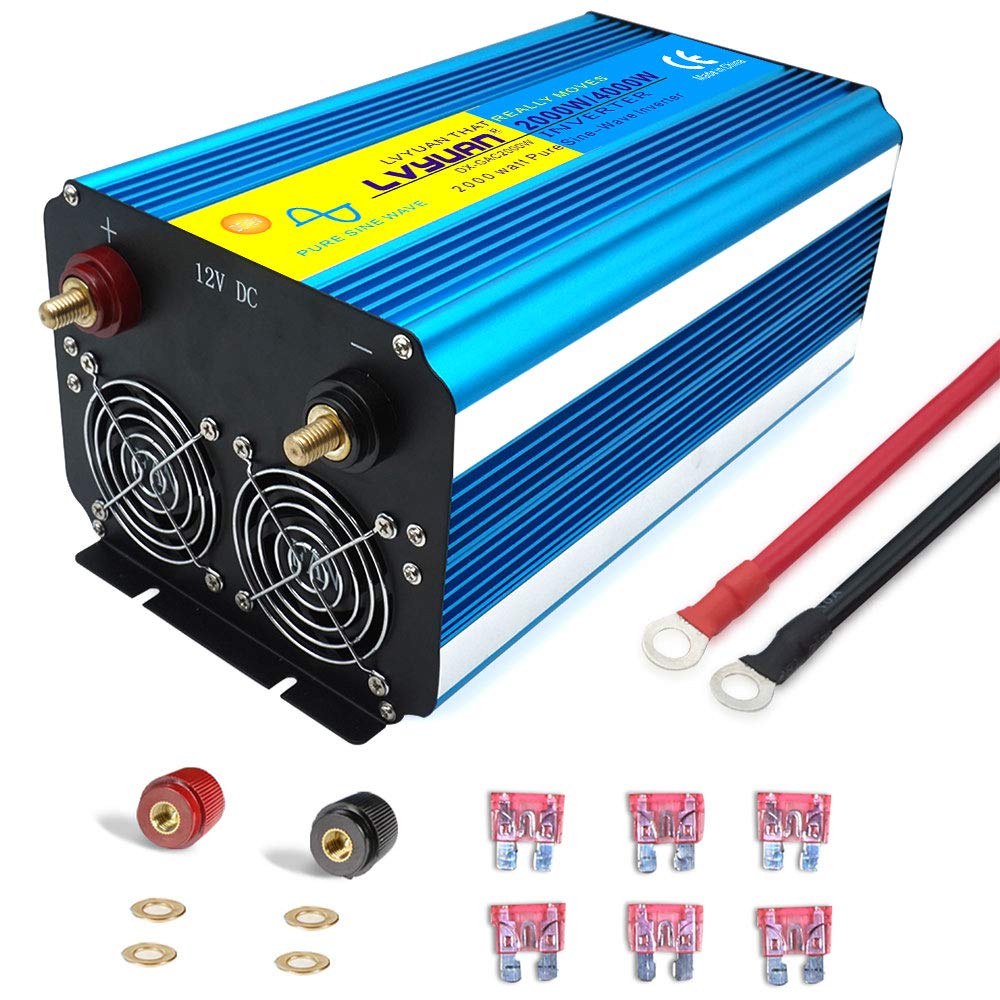
Image 1: Yinleader 2000W Pure Sine Wave Power Inverter, front view.
2. Safety Information
Please read and understand all safety instructions before operating the inverter. Failure to follow these instructions may result in electric shock, fire, or serious injury.
- Ventilation: Ensure adequate ventilation around the inverter. Do not block ventilation openings.
- Dry Location: Operate the inverter in a dry, well-ventilated area. Avoid exposure to water, rain, or moisture.
- Battery Connection: Connect the inverter directly to a 12V DC battery. Ensure correct polarity (positive to positive, negative to negative) to prevent damage.
- Cable Sizing: Use appropriate gauge cables for DC input to handle the current draw and minimize voltage drop.
- Grounding: Properly ground the inverter chassis to a suitable earth ground.
- High Voltage: The inverter produces 110V AC, which can be lethal. Do not open the inverter casing.
- Flammable Materials: Do not operate near flammable liquids or gases.
- Children: Keep out of reach of children.

Image 2: The inverter includes multiple protection features such as short circuit, low voltage, high pressure, reverse polarity, over-temperature, and overload protection.
3. Product Features
- 2000W Continuous Power: Provides 2000 watts of continuous DC 12V to AC 110V power, with a 4000W peak power capability.
- Pure Sine Wave Output: Delivers true pure sine wave AC output, suitable for sensitive electronics like laptops, CPAP machines, and medical devices.
- Dual LED Display: Features two LED displays for monitoring battery voltage and AC output voltage.
- Multiple Outlets: Equipped with 4 AC outlets and 1 USB port for charging and powering multiple devices simultaneously.
- Comprehensive Safety Protections: Includes protection against over voltage, low voltage, overload, short circuit, over heat, and reverse polarity (via fuse).
- Durable Construction: Features a robust aluminum alloy housing for enhanced protection and heat dissipation.
- Intelligent Cooling Fan: An intelligent cooling fan helps regulate internal temperature and prevents overheating.
4. Setup and Installation
Proper installation is crucial for safe and efficient operation of your inverter.
4.1 Unpacking and Placement
- Carefully remove the inverter from its packaging.
- Place the inverter on a flat, stable surface in a well-ventilated area. Ensure there is at least 6 inches (15 cm) of clear space around the inverter for proper airflow.
- Avoid placing the inverter near heat sources, direct sunlight, or areas with excessive dust or moisture.
4.2 Connecting to a 12V DC Battery
Important: Ensure the inverter's power switch is in the "OFF" position before making any connections.
- Connect the red (positive) battery cable to the positive (+) terminal of your 12V DC battery.
- Connect the other end of the red cable to the red (positive) terminal on the inverter.
- Connect the black (negative) battery cable to the negative (-) terminal of your 12V DC battery.
- Connect the other end of the black cable to the black (negative) terminal on the inverter.
- Ensure all connections are tight and secure to prevent arcing and ensure efficient power transfer.

Image 3: Detailed view of the inverter's front panel (AC outlets, USB port, ON/OFF switch, LED indicators, voltage displays) and rear panel (12V DC input terminals, cooling fans).
4.3 Grounding the Inverter
For safety, the inverter chassis should be properly grounded. Connect a grounding wire (not included) from the grounding terminal on the inverter to a suitable earth ground point (e.g., vehicle chassis, ground rod).
4.4 Installation Demonstration Video
Watch this video for a visual guide on connecting and testing a similar pure sine wave inverter. Please note that the inverter model shown in the video may vary slightly from your specific 2000W unit, but the connection principles remain the same.
Video 1: Demonstration of connecting a pure sine wave inverter to a battery and testing its output.
5. Operating Instructions
5.1 Powering On the Inverter
- After ensuring all DC connections are secure, switch the inverter's power button to the "ON" position.
- The LED displays will illuminate, showing the battery voltage (DC input) and AC output voltage.
- The power indicator light should turn green, indicating the inverter is operational.
5.2 Connecting AC Devices
- Plug your AC devices into the 110V AC outlets on the front panel of the inverter.
- Ensure the total continuous wattage of all connected devices does not exceed 2000W. For inductive loads (e.g., motors, refrigerators), consider their surge wattage, which should not exceed 4000W.
- For USB charging, connect your USB-powered devices to the USB port.

Image 4: Examples of devices compatible with the Yinleader 2000W Pure Sine Wave Inverter, including TVs, drills, car cleaners, LED lights, printers, cameras, notebooks, and CPAP machines.
5.3 Monitoring the Displays
- The Battery Voltage display shows the current DC input voltage from your battery. Monitor this to ensure your battery does not discharge too low.
- The Voltage Output display shows the AC output voltage provided by the inverter.
5.4 Powering Off the Inverter
- Disconnect all AC devices from the inverter outlets.
- Switch the inverter's power button to the "OFF" position.
- If storing the inverter, disconnect it from the battery.
6. Maintenance
Regular maintenance ensures the longevity and optimal performance of your inverter.
- Cleaning: Keep the inverter clean and free of dust and debris. Use a dry cloth to wipe the exterior. Do not use liquid cleaners.
- Ventilation: Periodically check that the cooling fan and ventilation openings are clear and unobstructed.
- Connections: Regularly inspect all DC input connections to ensure they remain tight and free of corrosion.
- Storage: When not in use for extended periods, store the inverter in a cool, dry place, disconnected from the battery.
7. Troubleshooting
If you encounter issues with your inverter, refer to the following common problems and solutions:
| Problem | Possible Cause | Solution |
|---|---|---|
| Inverter does not turn on | Loose battery connections, low battery voltage, blown fuse | Check battery cable connections. Charge or replace battery. Check and replace internal fuses if necessary (consult professional). |
| No AC output, fault indicator on | Overload, short circuit, over-temperature, low/high input voltage | Reduce load. Check for short circuits in connected devices. Allow inverter to cool down. Check battery voltage. |
| Low output power | Low battery voltage, excessive cable length/gauge | Charge battery. Use shorter, thicker battery cables. |
| Fan constantly running or noisy | High internal temperature, heavy load | Ensure adequate ventilation. Reduce load. Clean fan vents. |
8. Specifications
| Feature | Specification |
|---|---|
| Brand | Yinleader |
| Model Number | 2000W12V2L-4K-P-US |
| Continuous Output Power | 2000 Watts |
| Peak Output Power | 4000 Watts |
| Input Voltage | DC 12 Volts |
| Output Voltage | AC 110 Volts / 120 Volts |
| Output Waveform | Pure Sine Wave |
| AC Outlets | 4 |
| USB Port | 1 |
| Protections | Over voltage, Low voltage, Overload, Short circuit, Over heat, Polarity reverse |
9. Warranty and Support
The Yinleader 2000W Pure Sine Wave Power Inverter comes with a 36-Months Warranty from the date of purchase.
For technical support, warranty claims, or any questions regarding your product, please contact Yinleader customer service through the retailer's platform or the official brand website. Please have your model number and purchase details ready when contacting support.

