
1. Introduction
Welcome to the user manual for your Easytry123 Replacement Remote Control. This manual provides essential information for the proper setup, operation, and maintenance of your new remote. This remote is designed as a replacement for specific Sunstech LCD HDTV TV models. Please note that as a replacement unit, some advanced or unique functions of your original TV remote may not be fully supported. Ensure your TV model is listed in the title for compatibility.
2. Product Overview
The Easytry123 Replacement Remote Control is an ergonomic, button-controlled device utilizing infrared technology for seamless interaction with compatible Sunstech televisions. Its design focuses on ease of use for common television functions.
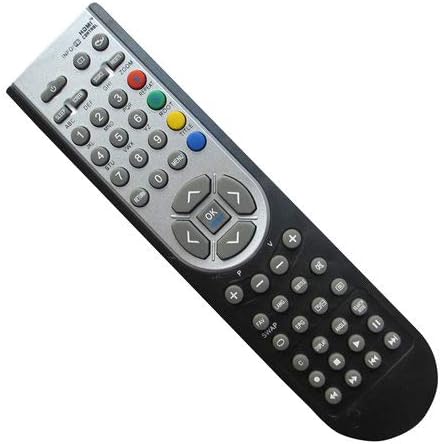
Figure 2.1: Front view of the Easytry123 Replacement Remote Control, showing various function buttons including power, number keys, volume, channel, navigation, and menu controls.
3. Setup
Your Easytry123 Replacement Remote Control requires two AAA batteries (not included) for operation. Follow these steps to install the batteries:
- Locate the battery compartment on the back of the remote control.
- Press down on the latch and slide the battery cover off.
- Insert two AAA batteries, ensuring the positive (+) and negative (-) terminals align correctly with the markings inside the compartment.
- Slide the battery cover back into place until it clicks securely.
The remote is now ready for use. No additional programming is typically required for compatible Sunstech TV models.
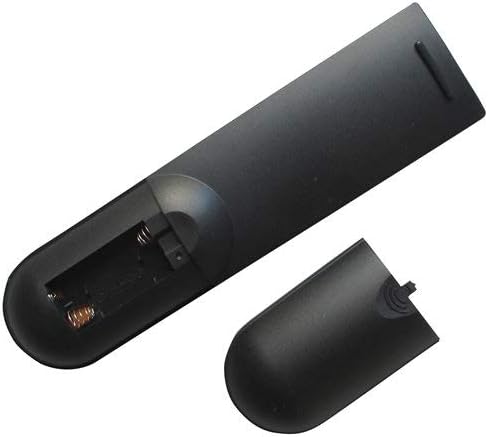
Figure 3.1: Back view of the remote control with the battery compartment open, illustrating where to insert the two AAA batteries.
4. Operating Instructions
This remote control operates using infrared signals. Ensure there is a clear line of sight between the remote and your television's IR receiver. Point the remote directly at the TV for optimal performance.
Basic Functions:
- Power Button: Turns the TV on or off.
- Number Buttons (0-9): Directly select channels.
- Volume Up/Down: Adjusts the sound level.
- Channel Up/Down: Changes the channel sequentially.
- Navigation Buttons (Up, Down, Left, Right): Used to navigate menus and on-screen options.
- OK/Enter Button: Confirms selections in menus.
- Menu Button: Accesses the TV's main menu.
- Input/Source Button: Switches between different video input sources (e.g., HDMI, AV).
For specific functions not listed, refer to your Sunstech TV's original user manual, as replacement remotes may have varying levels of compatibility for advanced features.
5. Maintenance
To ensure the longevity and proper functioning of your remote control, follow these maintenance guidelines:
- Cleaning: Wipe the remote with a soft, dry cloth. Avoid using liquid cleaners or abrasive materials, as they can damage the surface or internal components.
- Battery Replacement: Replace batteries promptly when the remote's responsiveness decreases. Always replace both batteries at the same time with new ones of the same type (AAA). Remove batteries if the remote will not be used for an extended period to prevent leakage.
- Storage: Store the remote in a cool, dry place away from direct sunlight, extreme temperatures, and high humidity.
- Handling: Avoid dropping the remote or exposing it to strong impacts, which can damage internal circuitry.
6. Troubleshooting
- Remote is not responding:
- Check if the batteries are inserted correctly with the correct polarity.
- Replace old batteries with new AAA batteries.
- Ensure there are no obstructions between the remote and the TV's infrared sensor.
- Confirm the remote is pointed directly at the TV.
- Some functions do not work:
- As a replacement remote, certain advanced or unique functions specific to your original TV remote may not be supported. This is normal for universal or replacement remotes.
- Verify that your TV model is explicitly listed as compatible with this remote.
7. Specifications
| Model Number | Easytry4915 |
| Brand | Easytry123 |
| Compatible Devices | Television (Sunstech LCD HDTV TV models: 24LEDTIRSABK, TL-EI19HDMKII, TL-I 32 HD-MKWBK, TLEI19HD-MKIIWBK, TLEI22HDMKII) |
| Connectivity Technology | Infrared |
| Controller Type | Button Control |
| Batteries Required | 2 x AAA (not included) |
| Special Feature | Ergonomic Design |
8. Warranty and Support
Specific warranty details and direct customer support information for the Easytry123 Replacement Remote Control are not provided within the product's general specifications. For any issues or inquiries regarding your remote, please contact the seller or retailer from whom you purchased the product. They will be able to provide assistance or guide you to the appropriate support channels.