
Introduction
The Soundcore Spirit X Bluetooth Sports Headphones are designed for active lifestyles, offering robust sweat protection and powerful audio performance. This manual provides essential information for setting up, operating, and maintaining your headphones.
What's in the Box
- Soundcore Spirit X Headphones
- XS/S/M/L/XL EarTips (various sizes for optimal fit)
- S/M/L EarWings (various sizes for secure fit)
- 2 x Cable Clips
- 1 x Shirt Clip
- Micro USB Cable (for charging)
- Travel Pouch
- Carabiner
- User Manual (this document)
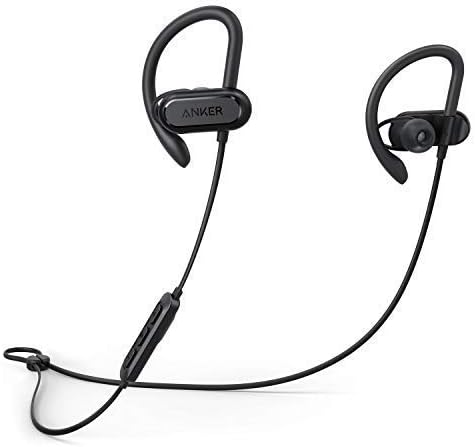
Image: The Soundcore Spirit X headphones, featuring the earbuds connected by a cable with an inline remote control.
Setup
1. Charging Your Headphones
Before first use, fully charge your Soundcore Spirit X headphones. Connect the provided Micro USB cable to the charging port on the inline remote and to a USB power source. The LED indicator will show charging status. A full charge takes approximately 1.5 hours and provides up to 12 hours of playtime.
2. Selecting EarTips and EarWings
For optimal sound quality and a secure fit, choose the EarTips and EarWings that best suit your ears. Experiment with different sizes (XS/S/M/L/XL EarTips and S/M/L EarWings) to find the most comfortable and stable combination. A proper seal is crucial for bass performance and noise isolation.

Image: A close-up view of an earbud, highlighting the flexible earwing design for a secure and comfortable fit during activity.
3. Bluetooth Pairing
- Ensure the headphones are turned off.
- Press and hold the multi-function button on the inline remote until the LED indicator flashes blue, indicating pairing mode.
- On your device (smartphone, tablet, etc.), enable Bluetooth and search for available devices.
- Select "Soundcore Spirit X" from the list of devices.
- Once connected, the LED indicator will turn solid blue.
Operating Your Headphones
Controls
The inline remote provides convenient control over your music and calls:
- Power On/Off: Press and hold the multi-function button.
- Play/Pause: Press the multi-function button once.
- Next Track: Press and hold the Volume + button.
- Previous Track: Press and hold the Volume - button.
- Volume Up: Press the Volume + button.
- Volume Down: Press the Volume - button.
- Answer/End Call: Press the multi-function button once.
- Reject Call: Press and hold the multi-function button.
- Activate Voice Assistant: Double-press the multi-function button.
Audio Performance
The Spirit X headphones feature 10mm dynamic drivers and BassUp technology, delivering powerful bass, lush mids, and clear treble for an immersive audio experience during your workouts.
Sweatproof Technology
Equipped with IPX7 water resistance and Sweat Guard technology, the Spirit X headphones are designed to withstand the corrosive effects of sweat and water splashes, making them ideal for intense workouts.

Image: The Soundcore Spirit X headphones shown with water droplets, illustrating their IPX7 water-resistant design.

Image: A person wearing the Soundcore Spirit X headphones while engaged in a strenuous workout, demonstrating their secure fit and sweat resistance.
Maintenance
- Cleaning: After each use, especially after workouts, gently wipe the earbuds and cable with a soft, dry cloth to remove sweat and dirt.
- EarTips/EarWings: Periodically remove the EarTips and EarWings and clean them with mild soap and water. Ensure they are completely dry before reattaching.
- Storage: When not in use, store your headphones in the provided travel pouch to protect them from dust and damage. Avoid storing them in extreme temperatures.
- Charging Port: Keep the Micro USB charging port free from dust and debris to ensure proper charging.
Troubleshooting
- Cannot power on the headphones:
- Ensure the headphones are fully charged. Connect them to a power source using the Micro USB cable.
- Cannot pair with your device:
-
- Make sure Bluetooth is enabled on your device.
- Ensure the headphones are in pairing mode (flashing blue LED).
- Move the headphones closer to your device.
- Try unpairing and re-pairing the headphones from your device's Bluetooth settings.
- No sound or low volume:
-
- Adjust the volume on both your headphones and your connected device.
- Ensure the headphones are properly connected to your device.
- Check if the correct audio output is selected on your device.
- Poor sound quality:
-
- Ensure there are no obstructions between your device and the headphones.
- Move away from sources of interference (e.g., Wi-Fi routers, other Bluetooth devices).
- Try different EarTips to ensure a proper seal in your ear canal.
Specifications
| Model Number | A3451 |
| Connectivity Technology | Wireless (Bluetooth) |
| Wireless Communication Technology | Bluetooth |
| Ear Placement | Over Ear |
| Form Factor | Over Ear |
| Water Resistance Level | Waterproof (IPX7) |
| Item Weight | 5.4 ounces (0.34 Pounds) |
| Product Dimensions | 27.17 x 1.69 x 1.1 inches |
| Battery Type | 1 Lithium Polymer battery (required) |
| Playtime | Up to 12 hours (from 1.5 hour charge) |
| Control Type | Media Control |
| Material | Silicone |
| Color | Black |
| Manufacturer | Anker |
| UPC | 034722597265 |
Warranty and Support
Your Soundcore Spirit X headphones come with a 3-month worry-free warranty. For technical support, warranty claims, or general inquiries, please contact Soundcore customer service. Contact information can typically be found on the official Soundcore website or through your retailer.
Please note that this product is a renewed item, and warranty terms may differ from new products. Refer to your purchase documentation for specific warranty details.
Additional Information
No official product videos from the seller were available for embedding based on the provided data.


