
Introduction
The DieHard DH137 is a 10A 12V battery charger designed for use with standard, AGM, and Gel batteries. This device is engineered to monitor and maintain the battery's charge level, automatically resuming charging if the battery's voltage drops. Key features include reverse hook-up protection, multi-stage charging for enhanced precision and safety, and extended battery life. It comes equipped with 50 Amp clamps suitable for both top-mount and side-mount battery posts.
Important Safety Information
Always read and understand all safety warnings and instructions before using this product. Failure to follow these instructions may result in electric shock, fire, or serious injury.
- Use only in well-ventilated areas.
- Wear eye protection and protective clothing when working with batteries.
- Keep out of reach of children.
- Do not expose the charger to rain or wet conditions.
- Ensure the charger is disconnected from the power supply before making or breaking connections to the battery.
- Avoid dropping metal tools onto the battery. This could short-circuit the battery or other electrical parts, which may cause an explosion.
- This charger is not intended for use as a power supply.
Product Overview
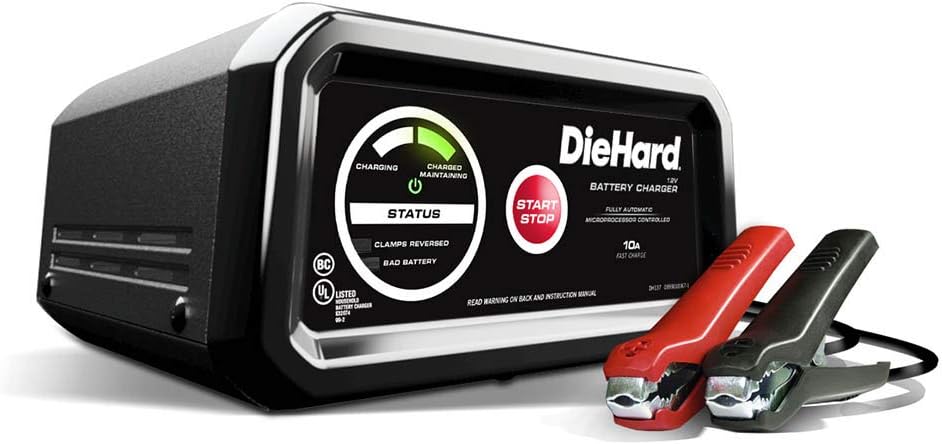
Figure 1: The DieHard DH137 10 Amp Battery Charger, showcasing its main unit and the red and black 50 Amp clamps.

Figure 2: An angled view of the DieHard DH137 charger, highlighting its compact design and integrated handle.
The DieHard DH137 features a robust casing with a clear control panel. The panel includes LED indicators for charging status, battery maintenance, reverse hook-up, and bad battery detection. A prominent START/STOP button controls the charging process. The unit is equipped with heavy-duty 50 Amp clamps for secure connection to battery terminals.
- LED Indicators: Provide visual feedback on the charging status (Charging, Charged/Maintaining, Clamps Reversed, Bad Battery).
- START/STOP Button: Initiates and terminates the charging cycle.
- 50 Amp Clamps: Durable clamps for connecting to battery posts.
- USB Port: For charging small electronic devices (2.1A MAX).
Setup
Before connecting the charger, ensure the battery terminals are clean and free of corrosion. Position the charger on a stable, non-flammable surface away from the battery to allow for proper ventilation.
- Verify the battery type (Standard, AGM, Gel) matches the charger's capabilities.
- Ensure the charger's AC power cord is unplugged from the electrical outlet.
- Connect the red positive (+) clamp to the positive (+) battery terminal.
- Connect the black negative (-) clamp to the negative (-) battery terminal. If connecting to a vehicle, connect the negative clamp to the vehicle chassis or engine block, away from the battery and fuel line.
- Confirm all connections are secure.
Operating Instructions

Figure 3: The DieHard DH137 charger positioned on the engine bay of a vehicle, ready for connection.

Figure 4: A user connecting the red positive clamp of the DieHard DH137 to the positive terminal of a car battery.
The DieHard DH137 features fully automatic, microprocessor-controlled charging. Once connected, it will assess the battery and begin the appropriate charging stage.
- Connect to Power: Plug the charger's AC power cord into a standard 120V AC electrical wall outlet.
- Initiate Charging: Press the START/STOP button. The charger will begin its diagnostic and charging cycle.
- Monitor Status: Observe the LED indicators:
- Solid green LED: Indicates the battery is fully charged and in maintenance mode.
- Solid yellow LED: Indicates charging is in progress.
- Flashing red LED: Indicates reverse hook-up. Disconnect and re-connect clamps correctly.
- Solid red LED: Indicates a bad battery.
- Multi-Stage Charging: The charger automatically progresses through various stages (desulfation, bulk charge, absorption, float) to optimize battery performance and longevity.
- Reverse Hook-up Protection: If clamps are connected incorrectly, the charger will not operate and the red LED will flash, preventing damage to the battery or charger.
- USB Charging: To use the USB port, plug your device into the USB port. The USB ON/OFF and Battery Status LED will illuminate. When finished, press the button to turn off the USB.
- Completion: Once the green LED is solid, the battery is fully charged. You may leave the charger connected for long-term maintenance.
- Disconnecting: First, unplug the AC power cord from the outlet. Then, disconnect the negative (-) clamp, followed by the positive (+) clamp.
Important Notes:
- The charger will automatically monitor and maintain the battery when fully charged, resuming continuous charging if the battery becomes discharged.
- This unit is a battery charger/maintainer, not a jump starter. It is designed for charging over time, not for instant starting of a dead battery.
Maintenance
Proper maintenance ensures the longevity and optimal performance of your DieHard DH137 battery charger.
- Cleaning: Disconnect the charger from all power sources and batteries before cleaning. Wipe the case and clamps with a dry cloth. Do not use solvents or abrasive cleaners.
- Storage: Store the charger in a cool, dry place when not in use. Ensure the clamps are clean and not touching each other.
- Cable Care: Inspect the AC power cord and battery cables for any damage (cuts, fraying, exposed wires) before each use. Do not use the charger if any cables are damaged.
Troubleshooting
| Problem | Possible Cause | Solution |
|---|---|---|
| Charger does not turn on. | No AC power; faulty outlet; internal fault. | Check AC outlet; ensure charger is properly plugged in. If problem persists, contact support. |
| Flashing red LED (Clamps Reversed). | Battery clamps are connected incorrectly. | Disconnect AC power, then disconnect clamps. Re-connect red clamp to positive (+) and black clamp to negative (-). |
| Solid red LED (Bad Battery). | Battery is severely sulfated, short-circuited, or damaged. | The charger cannot charge this battery. Have the battery professionally tested or replaced. |
| Charger not reaching full charge (green LED). | Battery is very large, deeply discharged, or has internal issues. | Allow more time for charging. If it never reaches full charge, the battery may be compromised. |
Specifications
- Brand: DieHard
- Model: DH137
- Output Voltage: 12 Volts
- Charging Amperage: 10 Amp
- Compatible Battery Types: Standard, AGM, Gel
- Item Weight: 1.6 ounces
- Product Dimensions: 8.75 x 4.75 x 9.5 inches
- Manufacturer: Schumacher Electric Corp.
- Features: Multi-stage charging, Reverse hook-up protection, LED indicators, USB charging port.
Warranty and Support
For detailed warranty information, please refer to the warranty card included with your product or visit the official DieHard website. Keep your purchase receipt as proof of purchase for any warranty claims.
For technical support, troubleshooting assistance, or to inquire about replacement parts, please contact Schumacher Electric Corp. customer service. Contact details can typically be found in the product packaging or on the manufacturer's website.
Note: The provided JSON data includes information about optional protection plans (2-Year Protection Plan, 3-Year Protection Plan, Complete Protect) which are separate from the manufacturer's standard product warranty. Please consult the terms and conditions of these plans for details.